Minecraft version
Back to mods 
CurseForge · Minecraft mod
Tubes Reloaded
Tubular item transportation
Choose a version Pick your version below, then grab the matching file.
Quick answer
Which Tubes Reloaded release should I use?
Latest stable file tubesreloaded-1.21.1-5.0.0.3.jar
Game version 1.21.1
Loader NeoForge
Tubes Reloaded tubesreloaded-1.21.1-5.0.0.3.jar targets 1.21.1 with NeoForge. The project page does not say whether this file belongs on the client, dedicated server, or both. No extra mods listed for this file.
Where it goes
Is Tubes Reloaded required on the client, server, or both?
The project page does not say whether this file belongs on the client, dedicated server, or both.
Client Source doesn’t say
Dedicated server Source doesn’t say
Loader for this release NeoForge
Required install it here Optional supported, not mandatory Not supported do not install here Source doesn’t say do not assume
The source does not explicitly classify this release as client-only or server-only.
What else does Tubes Reloaded tubesreloaded-1.21.1-5.0.0.3.jar need?
tubesreloaded-1.21.1-5.0.0.3.jar. Change the file and its required mods may change too.
This file does not list any required mods. Do not add a library just because a different file uses it.
This file does not list any required or optional mods.
Before you install it
Add Tubes Reloaded without breaking your instance.
Built for Tubes Reloaded tubesreloaded-1.21.1-5.0.0.3.jar. Pick another file and the loader, install side or required mods may change.
- 01
Stick to this file
Use tubesreloaded-1.21.1-5.0.0.3.jar. It targets 1.21.1 with NeoForge; another release may have different loader, side or dependency requirements.
- 02
Bring the mods it needs
This file does not list any required mods. Do not add a library just because a different file uses it.
- 03
Put it on the correct side
The project page does not say whether this file belongs on the client, dedicated server, or both.
- 04
Pick the file you checked
Use the “Get this file” button beside tubesreloaded-1.21.1-5.0.0.3.jar. It opens that exact file at the source.
About this project
What does Tubes Reloaded add?
As of 1.21.3, all of Tubes Reloaded's content is now part of MORE RED:
https://www.curseforge.com/minecraft/mc-mods/more-red
Tubes Reloaded will no longer be maintained as a separate mod. Thanks for your years of enjoyment!
Too much stuff in one place? Not enough stuff in other place? Get your stuff from one place to the other with these handy tubes!
This mod description is relevant for minecraft 1.19+. Older versions may not be consistent with the descriptions and images below. You can find a permanent archive of the 1.16.x mod description here.
The 1.19.x versions of Tubes Reloaded requires the Use Item on Block Event mod as a dependency. In 1.20.1 and higher, Tubes Reloaded bundles this mod automatically via jar-in-jar and it is no longer required to be installed separately.
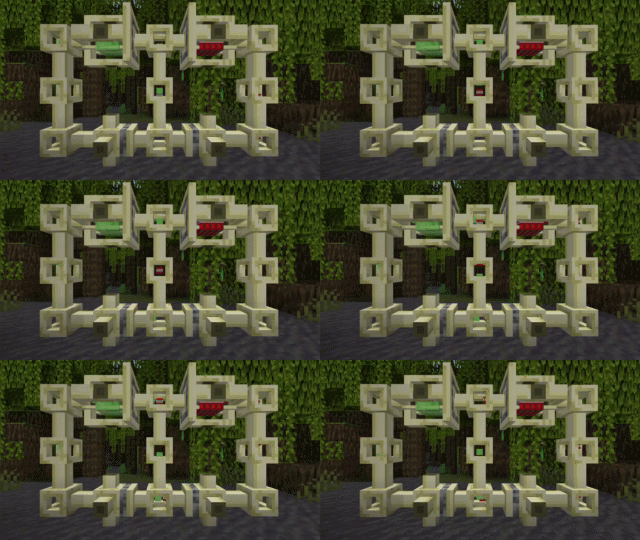
See Images link above for all recipes.
******* Transportation *******
Tubes
Items inserted into tube blocks (via hoppers, osmosis filters, etc) will be transported to the nearest valid inventory. Items cannot be inserted into tube blocks unless there is a valid endpoint connected to the tube network.

Tubing Pliers
The Tubing Pliers can remotely connect two tube blocks by right-clicking a tube block and then right-clicking another tube block. Tubes connected in this way are considered to be one block apart for routing purposes. Tubing pliers can also rotate shunts, loaders, filters, osmosis filters, and distributors.

******* Sorting and Filtering *******
Shunts
The Shunt can accept items on five sides and outputs items on the sixth (ejecting them into the world if there is no inventory block on its output side). The shunt cannot receive items via its output side, making it useful for directing the flow of items. Be wary that the shunt will ALWAYS accept items, even if it doesn't have any room to shunt the items to, and will eject items into the world if it is unable to shunt them.

Filters
The filter acts like a shunt with only one input side, and also has an internal inventory slot that can hold one item. When this item slot is occupied, only items of that type will be accepted through the filter. The four sides other than the output side allow access to the internal inventory slot; items must be deposited into the side opposite from the output side to send the item to the output side.

Distributors
Each face of a distributor acts as either an input face or an output face. Depositing an item into a distributor's face (via a tube, hopper, osmosis filter, etc) will send the item out of another face; which face the item is sent out of changes each time an item enters a distributor's face. Distributors will only distribute items to adjacent item-handling blocks; if there are no connected blocks able to accept an inserted item, a distributor will eject items into the world from the opposite face when an item is received.

Color Tubes
Color Tubes act like regular tubes, but will only connect to tubes of a matching color or to regular tubes.

******* Extraction *******
Loaders
The Loader allows items to be quickly extracted from a player inventory into a tube network, the world, or anything else. Activating the Loader brings up a GUI that the player can move or shift-click items into to instantly eject them from the loader's output side. If there are no item-handling blocks on the loader's output side that can accept the ejected items, the items will be injected into the world.

Osmosis Filters
Osmosis Filters are similar to Filters, but will automatically extract items from their input side at the same rate as a hopper.

Extractors
Extractors will extract a stack of items from an inventory on their input side and eject them from their output side when activated by redstone.

******* Other Utilities *******
Redstone Tubes
Redstone Tubes act like normal tubes, but emit a redstone signal while items are passing through them.

Structures
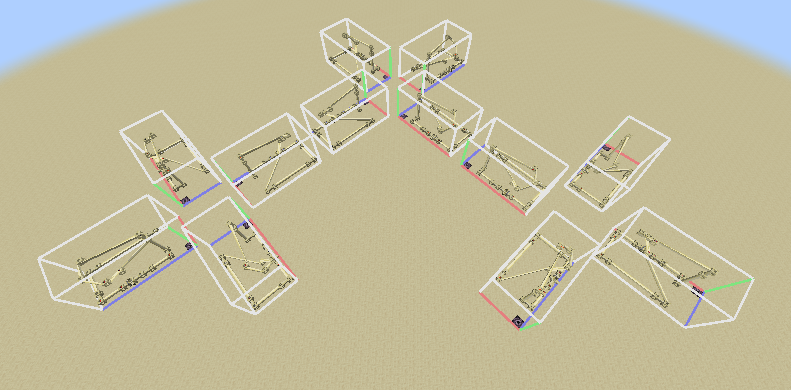
As of tubesreloaded-1.19-2.0.0.0, tubes fully support structure pieces and can be used in rotated and mirrored structure pieces (even when connected to tubes via tubing pliers).
******* Technical Information *******
Block Tags
The tubesreloaded:rotatable_by_pliers tag specifies which blocks the tubing pliers can rotate. Using tubing pliers on these blocks will cycle them through their blockstates.
Server Config
A server config is created in each save folder under <savefolder>/serverconfig/tubesreloaded-server.toml that defines the following configuration values:
soft_tube_cap- Soft cap on how many tubes can exist in a contiguous network of tubes. Items are transported slowlier in networks of greater size than this value, sigifying to the player that they have too many tubes. Defaults to 400
hard_tube_cap- Hard cap on how many tubes can exist in a contiguous network of tubes. If a player attempts to make a network of greater size from this value, not all tubes in the attempted network will become part of that network. Defaults to 500.
ticks_in_tube- Base time in ticks that a moving itemstack spends in each individual tube block. Adjusted by other factors. Defaults to 10.
max_items_in_tube- Max items that can fit in a single tube. A tube block will break if the number of itemstacks contained with them is greater than this value, dropping their items on the ground. Not capped by default.
osmosis_filter_transfer_rate- Osmosis filter automatic item transfer rate in ticks per item. The default value of 8 is the same as vanilla hoppers.
max_remote_tube_connection_range- Maximum range (in blocks) at which tubes can be remotely connected to each other. This also affects how many nearby chunks are checked for longtube intersections when placing a block. Defaults to 16.0 meters.
Project description from CurseForge.
Pick your setup
Tubes Reloaded by Minecraft version and loader
Choose the version and loader you play, then open the matching release.
Minecraft version
1.21
1 loader buildMinecraft version
1.20.4
1 loader buildMinecraft version
1.20.1
2 loader buildsMinecraft version
1.19.2
1 loader buildMinecraft version
1.19.1
1 loader buildMinecraft version
1.19
1 loader buildMinecraft version
1.16.5
2 loader buildsMinecraft version
1.16.4
1 loader buildMinecraft version
1.16.3
1 loader buildMinecraft version
1.16.2
1 loader buildMinecraft version
1.16.1
1 loader buildShowing the newest 12 of 16 game versions. Older files are in the list below.
Check the dependencies, then try the file in a copied instance before changing a world you care about.
Recent files
Tubes Reloaded versions and loaders
tubesreloaded-1.21.1-5.0.0.3.jar
6 Apr 2025
Client Source doesn’t say Server Source doesn’t say Dependencies No extras listed Listed on Release listing
Check the 1.21.1 · NeoForge setup NeoForge1.21.1 release
tubesreloaded-1.21-5.0.0.2.jar
29 Jun 2024
Client Source doesn’t say Server Source doesn’t say Dependencies No extras listed Listed on Release listing
Check the 1.21.1 · NeoForge setup 1.21NeoForge1.21.1 release
tubesreloaded-1.21-5.0.0.1.jar
29 Jun 2024
Client Source doesn’t say Server Source doesn’t say Dependencies No extras listed Listed on Release listing
Check the 1.21 · NeoForge setup 1.21NeoForge release
tubesreloaded-1.21-5.0.0.0.jar
28 Jun 2024
Client Source doesn’t say Server Source doesn’t say Dependencies No extras listed Listed on Release listing
Check the 1.21 · NeoForge setup 1.21NeoForge release
tubesreloaded-1.20.4-4.0.0.0.jar
9 Mar 2024
Client Source doesn’t say Server Source doesn’t say Dependencies No extras listed Listed on Release listing
Check the 1.20.4 · NeoForge setup NeoForge1.20.4 release
tubesreloaded-1.20.1-3.1.0.0.jar
9 Aug 2023
Client Source doesn’t say Server Source doesn’t say Dependencies No extras listed Listed on Release listing
Check the 1.20.1 · NeoForge setup NeoForge1.20.1Forge release
tubesreloaded-1.20.1-3.0.0.0.jar
25 Jun 2023
Client Source doesn’t say Server Source doesn’t say Dependencies No extras listed Listed on Release listing
Check the 1.20.1 · NeoForge setup NeoForge1.20.1Forge release
tubesreloaded-1.19.2-2.0.0.2.jar
1 Sept 2022
Client Source doesn’t say Server Source doesn’t say Dependencies 1 required · 1 unchecked Listed on Release listing
Check the 1.19.2 · Forge setup 1.19.2Forge release
tubesreloaded-1.19.2-2.0.0.1.jar
17 Aug 2022
Client Source doesn’t say Server Source doesn’t say Dependencies 1 required · 1 unchecked Listed on Release listing
Check the 1.19.2 · Forge setup 1.19.2Forge release
tubesreloaded-1.19-2.0.0.0.jar
23 Jul 2022
Client Source doesn’t say Server Source doesn’t say Dependencies 1 required · 1 unchecked Listed on Release listing
Check the 1.19.2 · Forge setup 1.19.2Forge1.19.11.19 release
tubesreloaded-1.16.5-1.5.0.3.jar
3 May 2021
Client Source doesn’t say Server Source doesn’t say Dependencies No extras listed Listed on Release listing
Check the 1.16.5 · Forge setup 1.16.5Forge release
tubesreloaded-1.16.4-1.5.0.2.jar
23 Nov 2020
Client Source doesn’t say Server Source doesn’t say Dependencies No extras listed Listed on Release listing
Check the 1.16.5 setup 1.16.51.16.4 release
Looking for an older file? The official CurseForge project page is in Resources.
 mod
mod CurseForge · Minecraft
Aliens Vs Predator: Resurrection - Predators
A continued project, cloned with permission, of the new alien vs predator mod.
 mod
mod CurseForge + Modrinth · Minecraft
Disc Jockey Plus
(Play Note Block Songs In Minecraft!) NBS SONGS!! Original mod is Disc Jockey. This project just upgraded it and added some features. 原作品为 Disc Jockey,此项目只是对它进行了升级,加装了一些功能。 仅此而已
 mod
mod CurseForge · Minecraft
Aliens Vs Predator: Resurrection - Humans
A continued project, cloned with permission, of the new alien vs predator mod. This module is the human part of the AVP module Suite.