HammerLib Needed by Phantom Ink [1.12.2] Phantom Ink - 1r
requiredMatching file found Matched file: [1.12.2] HammerLib - 12.2.66

CurseForge · Minecraft mod
Make ugly armor invisible!
Quick answer
Phantom Ink [1.12.2] Phantom Ink - 1r targets 1.12.2. The project page does not say whether this file belongs on the client, dedicated server, or both. All 1 required mods have matching files.
Where it goes
The project page does not say whether this file belongs on the client, dedicated server, or both.
The source does not explicitly classify this release as client-only or server-only.
[1.12.2] Phantom Ink - 1r on 1.12.2. Every mod below is checked against that same setup.
Install HammerLib first. We found matching files for this game-version and loader setup.
We only count dependency files that match this setup. A file for another loader does not fill the gap.
Before you install it
Built for Phantom Ink [1.12.2] Phantom Ink - 1r on 1.12.2. Pick another file and the loader, install side or required mods may change.
Use [1.12.2] Phantom Ink - 1r. It targets 1.12.2; another release may have different loader, side or dependency requirements.
Install HammerLib first. We found matching files for this game-version and loader setup.
The project page does not say whether this file belongs on the client, dedicated server, or both.
Use the “Get this file” button beside [1.12.2] Phantom Ink - 1r. It opens that exact file at the source.
About this project
This mod is fairly simple: It adds a single item:  Bottle of Phantom Ink.
They can be applied to any armor. This allows you to be protected and show off your awesome skin!
This is exactly how the mod works: You put any armor with phantom inks and while you wear it, it's invisible. Completely.
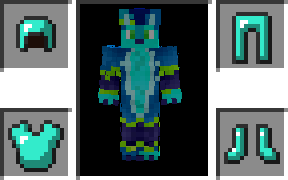
The recipe for the bottle is following:
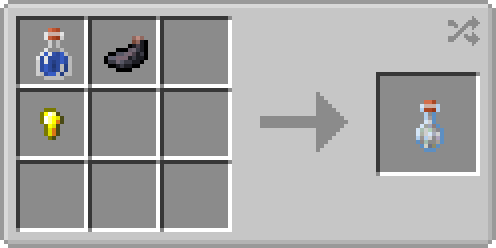
You can also extract the phantom ink off of your armor by combining it with a water bottle. This will get your armor to its previous state and return your inks.
...That's pretty much it! Thanks for taking your time, hope this mod would be useful!

Permissions:
 Zeitheron, or via Discord)
Note:

Want to discuss anything? Need help with APIs?
Join the discord server and follow Zeitheron on 
If you would like to support my work, you can become a patron via  Patreon.

Project description from CurseForge.
Pick your setup
Choose the version and loader you play, then open the matching release.
Check the dependencies, then try the file in a copied instance before changing a world you care about.
Recent files
PhantomInk-1.12.2-1r.jar
8 Aug 2019
Looking for an older file? The official CurseForge project page is in Resources.