Minecraft version
Back to mods 
CurseForge · Minecraft mod
AsphaltMod
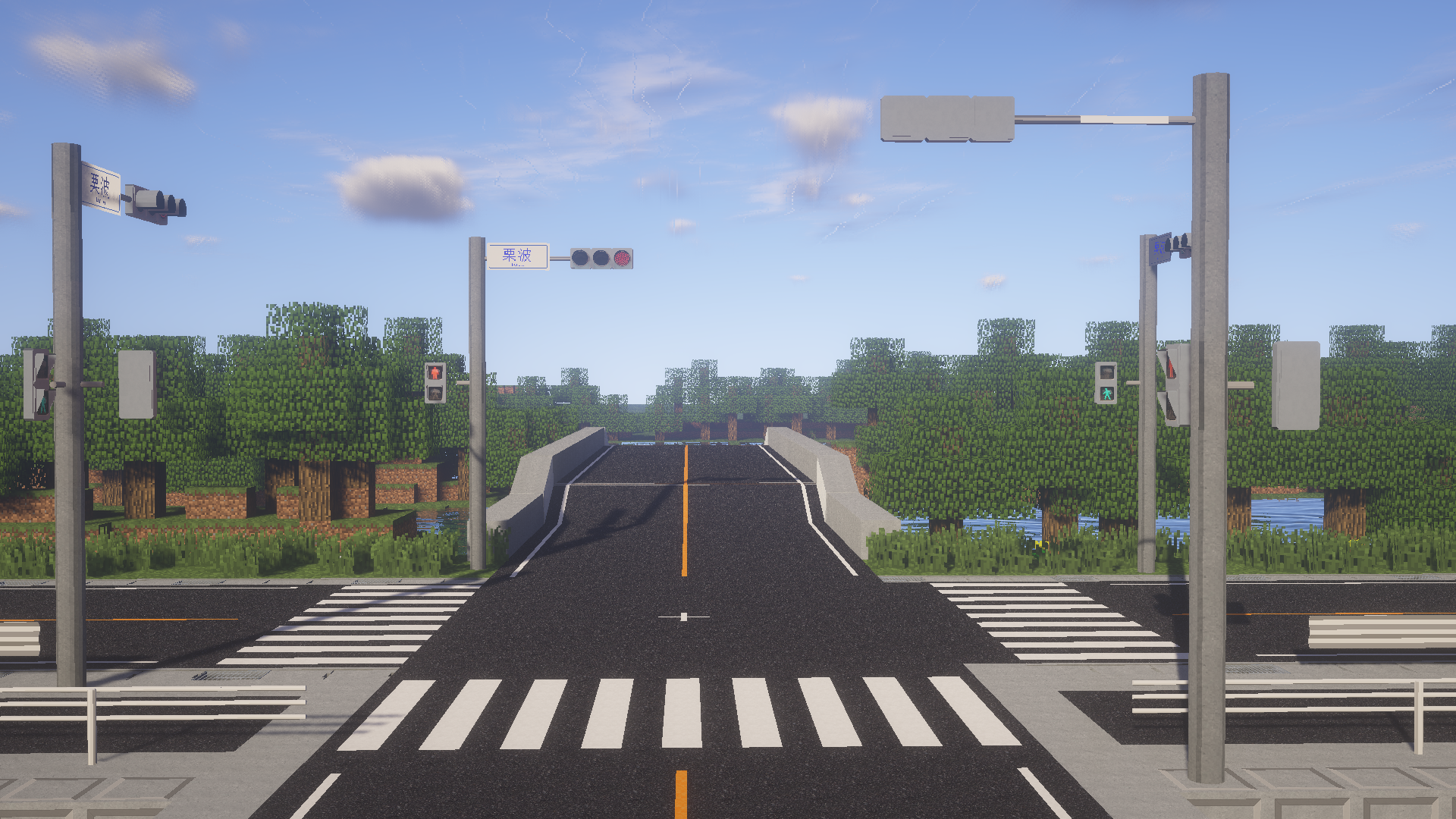
MOD that adds many Japanese roads and related accessories to the Minecraft world.
Choose a version Pick your version below, then grab the matching file.
Quick answer
Which AsphaltMod release matches 1.10.2?
Best match for your filters AsphaltMod_2.3.4_mc1.10.2
Game version 1.10.2
Loader Not required
AsphaltMod_2.3.4_mc1.10.2 targets 1.10.2. The project page does not say whether this file belongs on the client, dedicated server, or both. No extra mods listed for this file.
Where it goes
Is AsphaltMod required on the client, server, or both?
The project page does not say whether this file belongs on the client, dedicated server, or both.
Client Source doesn’t say
Dedicated server Source doesn’t say
Loader for this release No loader listed
Required install it here Optional supported, not mandatory Not supported do not install here Source doesn’t say do not assume
The source does not explicitly classify this release as client-only or server-only.
What else does AsphaltMod_2.3.4_mc1.10.2 need?
AsphaltMod_2.3.4_mc1.10.2 on 1.10.2. Every mod below is checked against that same setup.
This file does not list any required mods. Do not add a library just because a different file uses it.
This file does not list any required or optional mods.
Before you install it
Add AsphaltMod without breaking your instance.
Built for AsphaltMod_2.3.4_mc1.10.2 on 1.10.2. Pick another file and the loader, install side or required mods may change.
- 01
Stick to this file
Use AsphaltMod_2.3.4_mc1.10.2. It targets 1.10.2; another release may have different loader, side or dependency requirements.
- 02
Bring the mods it needs
This file does not list any required mods. Do not add a library just because a different file uses it.
- 03
Put it on the correct side
The project page does not say whether this file belongs on the client, dedicated server, or both.
- 04
Pick the file you checked
Use the “Get this file” button beside AsphaltMod_2.3.4_mc1.10.2. It opens that exact file at the source.
About this project
What does AsphaltMod add?
What is Asphalt Mod?
A mod that adds Japanese road elements to the Minecraft world. Packed with small items suitable for diorama making, such as traffic lights, guardrails, signs that you can make and add, and side grooves where water flows. Let's create a road by making full use of the recorded accessories in both multiplayer and single play.
AsphaltMod continues to update Minecraft version 1.7.10. The permanent residents of 1.7.10 can still enjoy it. We sometimes reflect user ideas, so we don't always adopt them, but please let us know if you have anything.
More Information
To install this mod, first install Minecraft Forge and then place the downloaded file in the mods folder.You can see more information about this mod in my website MukaNote.You can get latest information of mod in my Twitter Account.
Road signs will not be added unless you install the road sign pack. Download the road sign pack at https://mukanote.com/download/asphaltmod/signpack.html#sec6.
Links
- Curse Forge - This page.
- Muka Note - My website. You can download original version of this MOD.
- Japanese Forum - The topic of Asphalt Mod in Minecraft Japan Forum.
- Chinese Forum - The topic of Asphalt Mod in MCBBS.
Videos
* The explanation and upload of Mod are basically done on my website MukaNote.
Project description from CurseForge.
Pick your setup
AsphaltMod by Minecraft version and loader
Choose the version and loader you play, then open the matching release.
Minecraft version
1.12
1 loader buildMinecraft version
1.11.2
1 loader buildMinecraft version
1.10.2
1 loader buildMinecraft version
1.7.10
1 loader buildCheck the dependencies, then try the file in a copied instance before changing a world you care about.
Recent files
AsphaltMod versions and loaders
AsphaltMod_2.3.4_mc1.10.2
AsphaltMod_2.3.4_mc1.10.2.jar
12 Apr 2020
Client Source doesn’t say Server Source doesn’t say Dependencies No extras listed Listed on Release listing
Check the 1.10.2 setup 1.10.2 release
AsphaltMod_2.3.1_mc1.10.2
AsphaltMod_2.3.1_mc1.10.2.jar
7 Mar 2020
Client Source doesn’t say Server Source doesn’t say Dependencies No extras listed Listed on Release listing
Check the 1.10.2 setup 1.10.2 release
AsphaltMod2.3.0_forge-1.10.2-12.18.3.2185
AsphaltMod2.3.0-26_forge-1.10.2-12.18.3.2185.jar
29 Jan 2020
Client Source doesn’t say Server Source doesn’t say Dependencies No extras listed Listed on Release listing
Check the 1.10.2 setup 1.10.2 release
AsphaltMod2.2.0_Forge-1.10.2-12.18.3.2185
AsphaltMod2.2.0-21_forge-1.10.2-12.18.3.2185.jar
2 Nov 2019
Client Source doesn’t say Server Source doesn’t say Dependencies No extras listed Listed on Release listing
Check the 1.10.2 setup 1.10.2 release
Looking for an older file? The official CurseForge project page is in Resources.
 mod
CurseForge · Minecraft
MoreDyes
Adds more than 100 new dyes, blended from existing colors.
 mod
CurseForge · Minecraft
Sky’s Terrain Smoother - Biomes O' Plenty Add-On
Extends Sky’s Terrain Smoother to Biomes O’ Plenty, with matching grass and soil slabs, steps and corners for smoother hillsides and cave floors.
 mod
CurseForge · Minecraft
Sky’s Terrain Smoother
Smooth new terrain and cave floors with slabs, steps and corners, choose from three smoothing levels, with built in Mineralogy support.