Minecraft version
Back to mods 
CurseForge · Minecraft mod
Castia Inventory Tools
This mod will adds some new features for your Castia experience
Choose a version Pick your version below, then grab the matching file.
Quick answer
Which Castia Inventory Tools release should I use?
Latest stable file [Forge][26.2] CIT (v3.4.0)
Game version 26.2
Loader Forge
Castia Inventory Tools [Forge][26.2] CIT (v3.4.0) targets 26.2 with Forge. The project page does not say whether this file belongs on the client, dedicated server, or both. No extra mods listed for this file.
Where it goes
Is Castia Inventory Tools required on the client, server, or both?
The project page does not say whether this file belongs on the client, dedicated server, or both.
Client Source doesn’t say
Dedicated server Source doesn’t say
Loader for this release Forge
Required install it here Optional supported, not mandatory Not supported do not install here Source doesn’t say do not assume
The source does not explicitly classify this release as client-only or server-only.
What else does Castia Inventory Tools [Forge][26.2] CIT (v3.4.0) need?
[Forge][26.2] CIT (v3.4.0). Change the file and its required mods may change too.
This file does not list any required mods. Do not add a library just because a different file uses it.
This file does not list any required or optional mods.
Before you install it
Add Castia Inventory Tools without breaking your instance.
Built for Castia Inventory Tools [Forge][26.2] CIT (v3.4.0). Pick another file and the loader, install side or required mods may change.
- 01
Stick to this file
Use [Forge][26.2] CIT (v3.4.0). It targets 26.2 with Forge; another release may have different loader, side or dependency requirements.
- 02
Bring the mods it needs
This file does not list any required mods. Do not add a library just because a different file uses it.
- 03
Put it on the correct side
The project page does not say whether this file belongs on the client, dedicated server, or both.
- 04
Pick the file you checked
Use the “Get this file” button beside [Forge][26.2] CIT (v3.4.0). It opens that exact file at the source.
About this project
What does Castia Inventory Tools add?
A companion mod for CastiaMC players. Enhances your gameplay with inventory shortcuts, item tier highlighting, job earnings tracking, and more. Works on Forge, Fabric, and NeoForge.
▎ This mod is designed exclusively for the https://castiamc.com server. Features activate automatically when you connect.
Features
Item Tier Highlighting
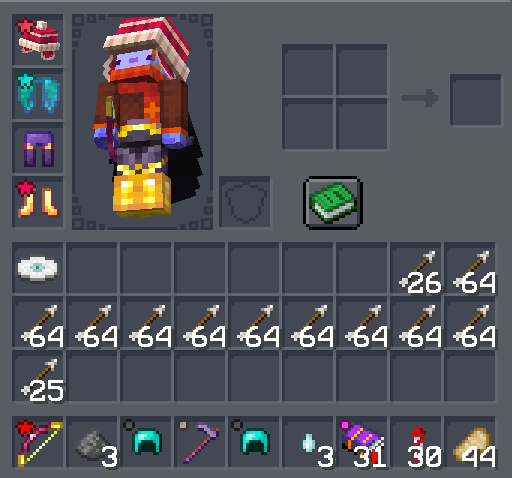
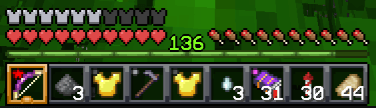
See item rarity at a glance! Colored tier icons appear on items in your hotbar, inventory, and containers — including inside InventoryHUD+ if you have it installed.
Each tier can be individually toggled on or off.
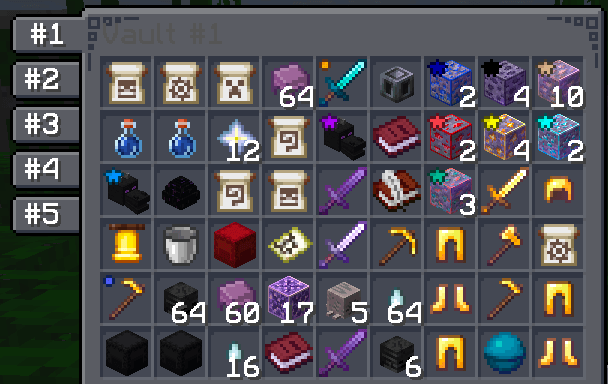
Quick Container Navigation
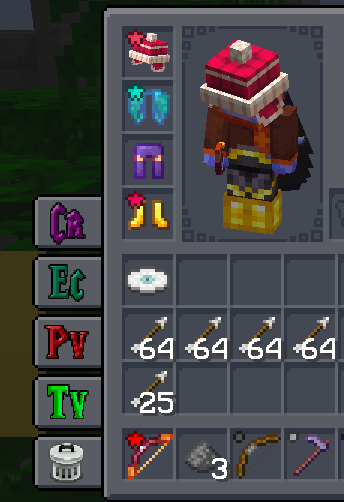
Access your most-used containers with one click. Buttons appear on the side of your inventory and container screens:
- Inventory · Crafting Table · Ender Chest · Trash
- Player Vaults — browse up to 6 vaults with paginated numbered buttons
- Town Vaults — same paginated navigation for town storage
Each button can be toggled individually. Choose whether buttons appear only on your inventory, on all container screens, or hidden entirely.
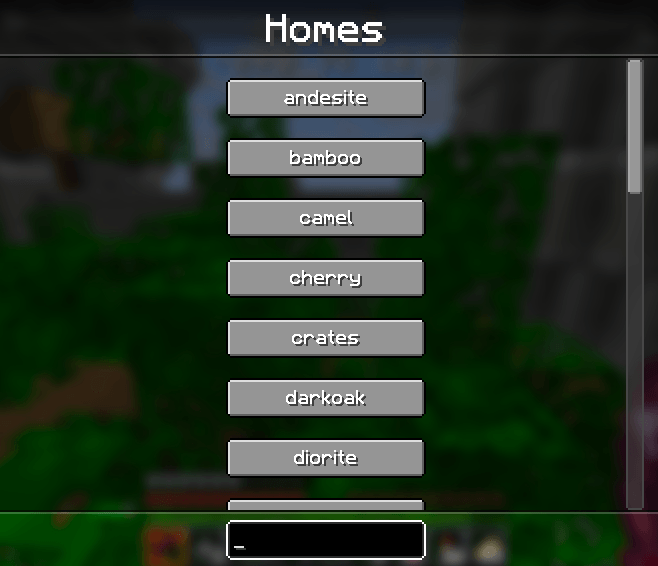
Homes GUI
Press Y to open a searchable list of all your homes. Click any home to teleport instantly. Start typing to filter — press Enter to jump to the first match. Results are cached so reopening is instant.
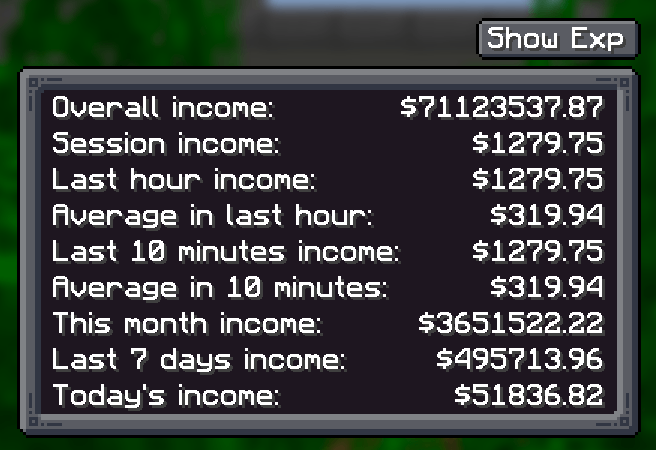
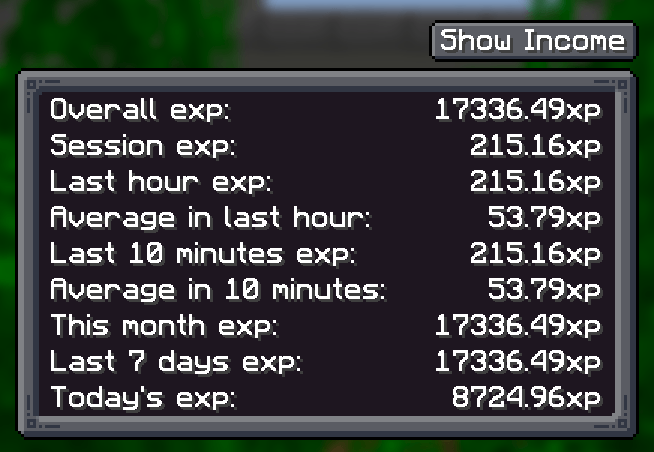
Job Earnings Tracker
Press J to see how much you've earned. Tracks both money and experience across multiple time windows:
- Last hour · Last N minutes (configurable) · Session · Daily · Weekly · Monthly · Overall
Income message display is configurable — show in chat, action bar, or hide completely.
Emoji Buttons
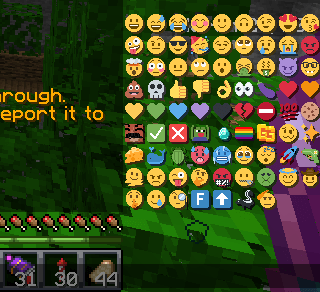
A compact grid of 48+ server emojis appears in the chat screen. Click to insert into your message, Shift+click to send immediately. Toggle on/off in settings.
Sound Controls
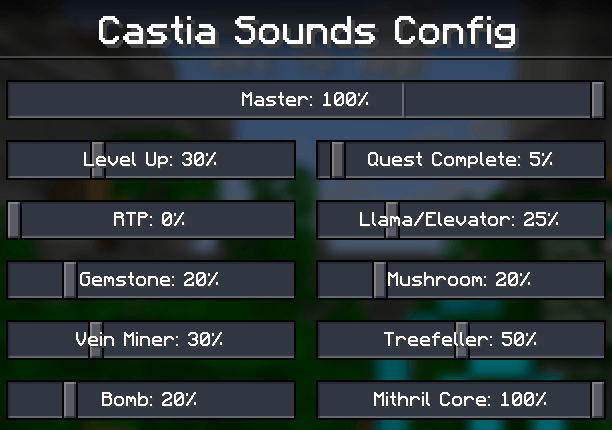
Fine-tune the volume of individual server sounds — Level Up, Quest Complete, RTP, Vein Miner, Treefeller, Gemstone, Bomb, Mithril Core, and more. Each has its own slider, plus a master volume control.
Command Keybindings
Quick keys for common server commands:
C- /craftR- /ec (ender chest)H- /h homeB- /backJ- Job Earnings sreenY- Homes GUIX- Toggle scoreboard sidebar[- Open config screenNumpad 0- Last opened Player VaultNumpad .- Last opened Town Vault(unbound)- /trash, /condense
All keybindings are fully rebindable in Minecraft's controls menu.
InventoryHUD+ Integration
If you use InventoryHUD+ mod, tier icons are rendered directly on its HUD display — supporting vertical, horizontal, and mini layouts.
Configuration
Press [ to open the config screen where you can customize:
- Which container buttons are visible
- Tier icon visibility (per tier)
- Emoji buttons on/off
- Job tracking time window and message routing
- Vault counts
- Server sound volumes
- Button placement mode
Made for the Castia community.
Project description from CurseForge.
Pick your setup
Castia Inventory Tools by Minecraft version and loader
Choose the version and loader you play, then open the matching release.
Minecraft version
1.21.8
3 loader buildsMinecraft version
1.21.4
2 loader buildsMinecraft version
1.21.1
2 loader buildsMinecraft version
1.21
2 loader buildsMinecraft version
1.20.4
2 loader buildsMinecraft version
1.20.2
2 loader buildsMinecraft version
1.20.1
3 loader buildsCheck the dependencies, then try the file in a copied instance before changing a world you care about.
Recent files
Castia Inventory Tools versions and loaders
[Forge][26.2] CIT (v3.4.0)
castiainvtools.forge.26.2-3.4.0.jar
30 Aug 2026
Client Source doesn’t say Server Source doesn’t say Dependencies No extras listed Listed on Release listing
Check the 26.2 · Forge setup Forge26.2 release
[Fabric][26.2] CIT (v3.4.0)
castiainvtools.fabric.26.2-3.4.0.jar
30 Aug 2026
Client Source doesn’t say Server Source doesn’t say Dependencies No extras listed Listed on Release listing
Check the 26.2 · Fabric setup Fabric26.2 release
[NeoForged][26.2] CIT (v3.4.0)
castiainvtools.neoforge.26.2-3.4.0.jar
30 Aug 2026
Client Source doesn’t say Server Source doesn’t say Dependencies No extras listed Listed on Release listing
Check the 26.2 · NeoForge setup NeoForge26.2 release
[Forge][26.2] CIT (v3.3.0)
castiainvtools.forge.26.2-3.3.0.jar
22 Aug 2026
Client Source doesn’t say Server Source doesn’t say Dependencies No extras listed Listed on Release listing
Check the 26.2 · Forge setup Forge26.2 release
[Fabric][26.2] CIT (v3.3.0)
castiainvtools.fabric.26.2-3.3.0.jar
22 Aug 2026
Client Source doesn’t say Server Source doesn’t say Dependencies No extras listed Listed on Release listing
Check the 26.2 · Fabric setup Fabric26.2 release
[NeoForged][26.2] CIT (v3.3.0)
castiainvtools.neoforge.26.2-3.3.0.jar
22 Aug 2026
Client Source doesn’t say Server Source doesn’t say Dependencies No extras listed Listed on Release listing
Check the 26.2 · NeoForge setup NeoForge26.2 release
[Forge][1.21.8] CIT (v3.2.0)
castiainvtools.forge.1.21.8-3.2.0.jar
23 Mar 2026
Client Source doesn’t say Server Source doesn’t say Dependencies No extras listed Listed on Release listing
Check the 1.21.8 · Forge setup 1.21.8Forge release
[Fabric][1.21.8] CIT (v3.2.0)
castiainvtools.fabric.1.21.8-3.2.0.jar
23 Mar 2026
Client Source doesn’t say Server Source doesn’t say Dependencies No extras listed Listed on Release listing
Check the 1.21.8 · Fabric setup Fabric1.21.8 release
[NeoForged][1.21.8] CIT (v3.2.0)
castiainvtools.neoforge.1.21.8-3.2.0.jar
23 Mar 2026
Client Source doesn’t say Server Source doesn’t say Dependencies No extras listed Listed on Release listing
Check the 1.21.8 · NeoForge setup 1.21.8NeoForge release
[Forge][1.21.8] CIT (v3.1.0)
castiainvtools.forge.1.21.8-3.1.0.jar
19 Nov 2025
Client Source doesn’t say Server Source doesn’t say Dependencies No extras listed Listed on Release listing
Check the 1.21.8 · Forge setup 1.21.8Forge release
[Fabric][1.21.8] CIT (v3.1.0)
castiainvtools.fabric.1.21.8-3.1.0.jar
19 Nov 2025
Client Source doesn’t say Server Source doesn’t say Dependencies No extras listed Listed on Release listing
Check the 1.21.8 · Fabric setup Fabric1.21.8 release
[NeoForged][1.21.8] CIT (v3.1.0)
castiainvtools.neo.1.21.8-3.1.0.jar
19 Nov 2025
Client Source doesn’t say Server Source doesn’t say Dependencies No extras listed Listed on Release listing
Check the 1.21.8 · NeoForge setup 1.21.8NeoForge release
Looking for an older file? The official CurseForge project page is in Resources.
 mod
mod CurseForge + Modrinth · Minecraft
Immersive Technology
Energy Technology addon for Immersive Engineering
 mod
mod CurseForge · Minecraft
MrCrayFish's Furniture Mod (Legacy Continued) + Nosiphus Furniture Mod
Port of MrCrayFish's Furniture Mod (Legacy) to newer versions of Minecraft. Formerly an addon that readded missing furniture to CFM.
 mod
mod CurseForge · Minecraft
The Siege Overhaul
Tactical PvE sieges for 1.20.1 Forge. Enemy armies build a war camp, breach your walls, and try to occupy your base. You and your Villager Recruits soldiers hold the line. Zero admin setup, full block restoration, server-friendly. Formerly Faction Raids.