
Minecraft version
Back to mods 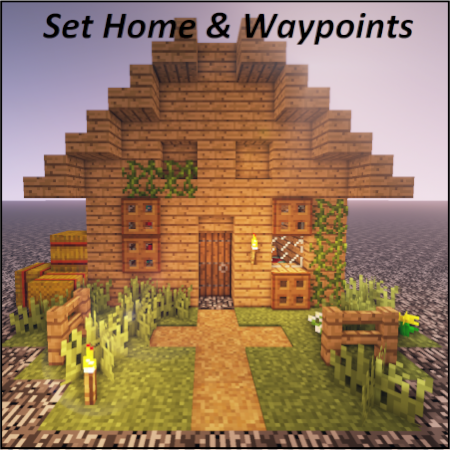
CurseForge · Minecraft mod
Set Home & Waypoints
Want to be abble to come back after your journey ? Adding /home & /wp commands with enhanced UX
Choose a version Pick your version below, then grab the matching file.
Quick answer
Which Set Home & Waypoints release should I use?
Latest stable file SH&W 2.0.0 [FABRIC] 1.21.1.jar
Game version 1.21.1
Loader Fabric
Set Home & Waypoints SH&W 2.0.0 [FABRIC] 1.21.1.jar targets 1.21.1 with Fabric. The project page does not say whether this file belongs on the client, dedicated server, or both. No extra mods listed for this file.
Where it goes
Is Set Home & Waypoints required on the client, server, or both?
The project page does not say whether this file belongs on the client, dedicated server, or both.
Client Source doesn’t say
Dedicated server Source doesn’t say
Loader for this release Fabric
Required install it here Optional supported, not mandatory Not supported do not install here Source doesn’t say do not assume
The source does not explicitly classify this release as client-only or server-only.
What else does Set Home & Waypoints SH&W 2.0.0 [FABRIC] 1.21.1.jar need?
SH&W 2.0.0 [FABRIC] 1.21.1.jar. Change the file and its required mods may change too.
This file does not list any required mods. Do not add a library just because a different file uses it.
This file does not list any required or optional mods.
Before you install it
Add Set Home & Waypoints without breaking your instance.
Built for Set Home & Waypoints SH&W 2.0.0 [FABRIC] 1.21.1.jar. Pick another file and the loader, install side or required mods may change.
- 01
Stick to this file
Use SH&W 2.0.0 [FABRIC] 1.21.1.jar. It targets 1.21.1 with Fabric; another release may have different loader, side or dependency requirements.
- 02
Bring the mods it needs
This file does not list any required mods. Do not add a library just because a different file uses it.
- 03
Put it on the correct side
The project page does not say whether this file belongs on the client, dedicated server, or both.
- 04
Pick the file you checked
Use the “Get this file” button beside SH&W 2.0.0 [FABRIC] 1.21.1.jar. It opens that exact file at the source.
About this project
What does Set Home & Waypoints add?
Set Home & Waypoints
Set Home & Waypoints allows players to set a home and waypoints. The development was focused on user experience (autocomplete, key bind, command feedback, colors…). This mod is configurable on both client and server side.
For 1.12.2 version, check this documentation on GitHub
4 commands to master the mod
- /shw List all available commands,
- /sethome Create or update your home,
- /home Teleport to your home,
- /wp Set, use, update, remove your waypoints.

Supported languages
- 🇬🇧 English
- 🇫🇷 French
- 🇩🇪 German
- 🇹🇼 Republic of China (Taiwan)
If your language is missing, you can contribute to this mod on GitHub by submitting a pull request.
Follow project development
You can follow working issues/features on Trello.
Installation
First of all, download Set Home & Waypoints.
Then add downloaded .jar in mods/ folder on both client and server side.
That's it!
Configuration
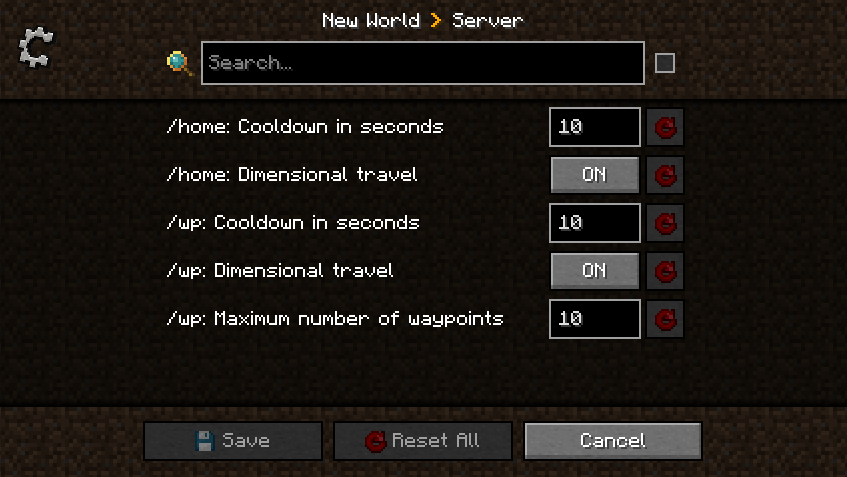
Set Home & Waypoints allows you to configure cooldown, dimensional travel and number of waypoints using commands (solo + multiplayer) or GUI (only solo) for client and config file for server.
All players can display current home and waypoints configuration by executing /home config for home configuration and /wp config for waypoints configuration.

A player with admin permission (3) can configure the server in game using /home config <…> and /wp config <…> commands without restarting the server ✅ Suggestions will guide players with sufficient permissions.
Client side using GUI
This menu was generated using Configured mod. Configured is a simple and lightweight mod that dynamically creates a configuration menu for every mod.
Client side using commands
Example of updating dimensionalTravel for Home using command:

Server side using config file
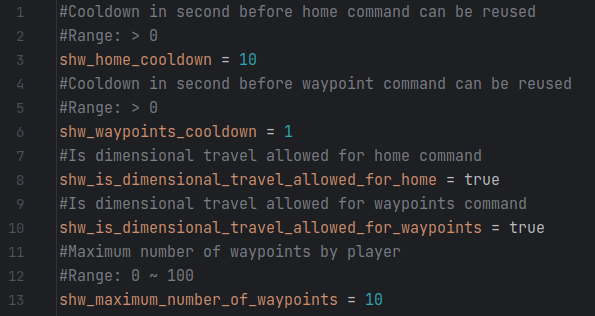
This configuration file is generated at server initialization in world/serverconfig/shw-server.toml.
Setting a new value will take instantly effect. Restarting the server is not necessary.
Updating configuration while the server is running will not notify players.
Commands usage
All commands have suggestions to guide players in game. /shw command will list all available commands.
/sethome and /home commands
Home is unique, set your home in any dimension by executing /sethome. Then, executing /home or pressing H key will teleport you on your home.
Yes, this mod come with a configurable shortcut (H key by default) to fast tp to your home. This will certainly save life.
Note that, re-executing /sethome will update home position with player location.
/wp command
Waypoints are used to save additional locations. By default, 10 waypoints are allowed.
Admins can configure this setting using /wp config maximumWaypointsNumber <count>.
Set, Use, List waypoints
Create waypoints with /wp set <waypoint name> and then teleport to them using /wp use <waypoint name>.

Executing /wp list will show all player waypoints and available space.
Update, Remove, Undo waypoints
Waypoints can be updated by executing /wp update <waypoint name> or removed by executing /wp remove <waypoint name>.
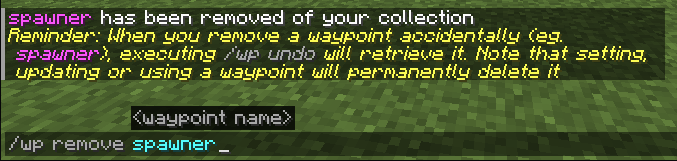
Last removed waypoint can be rollback by executing /wp undo. Note that this action will not be permitted after setting, updating or using another waypoint.

Waypoints can be cleared by executing /wp clear. Be careful, this action will remove all player waypoints and cannot be rollback.
Project description from CurseForge.
Pick your setup
Set Home & Waypoints by Minecraft version and loader
Choose the version and loader you play, then open the matching release.
Minecraft version
1.21.8
2 loader buildsMinecraft version
1.21.1
2 loader buildsMinecraft version
1.20.1
2 loader buildsMinecraft version
1.20
1 loader buildMinecraft version
1.19.4
1 loader buildMinecraft version
1.19.3
1 loader buildMinecraft version
1.19.2
1 loader buildMinecraft version
1.19.1
1 loader buildMinecraft version
1.19
1 loader buildMinecraft version
1.18.2
1 loader buildMinecraft version
1.18.1
1 loader buildShowing the newest 12 of 14 game versions. Older files are in the list below.
Check the dependencies, then try the file in a copied instance before changing a world you care about.
Recent files
Set Home & Waypoints versions and loaders
SH&W 2.0.0 [FABRIC] 1.21.1.jar
set-home-waypoints-fabric-2.0.0.jar
29 Jul 2026
Client Source doesn’t say Server Source doesn’t say Dependencies No extras listed Listed on Release listing
Check the 1.21.1 · Fabric setup Fabric1.21.1 release
SH&W 2.0.0 [NEOFORGE] 1.21.1.jar
set-home-waypoints-neoforge-2.0.0.jar
29 Jul 2026
Client Source doesn’t say Server Source doesn’t say Dependencies No extras listed Listed on Release listing
Check the 1.21.1 · NeoForge setup 1.21.1NeoForge release
SH&W 1.1.0 [FABRIC] 1.20.1.jar
set-home-waypoints-fabric-1.1.0.jar
29 Jul 2026
Client Source doesn’t say Server Source doesn’t say Dependencies No extras listed Listed on Release listing
Check the 1.20.1 · Fabric setup Fabric1.20.1 release
SH&W 1.1.0 [FABRIC] 1.21.8.jar
set-home-waypoints-fabric-2.0.0.jar
27 Jul 2026
Client Source doesn’t say Server Source doesn’t say Dependencies No extras listed Listed on Release listing
Check the 1.21.8 · Fabric setup Fabric1.21.8 release
SH&W 2.0.0 [NEOFORGE] 1.21.8.jar
set-home-waypoints-neoforge-2.0.0.jar
27 Jul 2026
Client Source doesn’t say Server Source doesn’t say Dependencies No extras listed Listed on Release listing
Check the 1.21.8 · NeoForge setup 1.21.8NeoForge release
SH&W 2.1.0 [NEOFORGE] 26.2.jar
set-home-waypoints-neoforge-2.1.0.jar
27 Jul 2026
Client Source doesn’t say Server Source doesn’t say Dependencies No extras listed Listed on Release listing
Check the 26.2 · NeoForge setup NeoForge26.2 release
SH&W 2.1.0 [FABRIC] 26.2.jar
set-home-waypoints-fabric-2.1.0.jar
27 Jul 2026
Client Source doesn’t say Server Source doesn’t say Dependencies No extras listed Listed on Release listing
Check the 26.2 · Fabric setup Fabric26.2 release
SH&W 1.1.0 [FORGE] 1.20.1
SHW 1.1.0 [FORGE] 1.20.1.jar
9 Feb 2025
Client Source doesn’t say Server Source doesn’t say Dependencies No extras listed Listed on Release listing
Check the 1.20.1 · Forge setup 1.20.1Forge release
SH&W 1.0.0 [FORGE] 1.18
shw-forge-1.0.0.jar
6 Aug 2023
Client Source doesn’t say Server Source doesn’t say Dependencies No extras listed Listed on Release listing
Check the 1.18 · Forge setup Forge1.18 release
SH&W 1.0.0 [FORGE] 1.18.1
shw-forge-1.0.0.jar
6 Aug 2023
Client Source doesn’t say Server Source doesn’t say Dependencies No extras listed Listed on Release listing
Check the 1.18.1 · Forge setup 1.18.1Forge release
SH&W 1.0.0 [FORGE] 1.18.2
shw-forge-1.0.0.jar
6 Aug 2023
Client Source doesn’t say Server Source doesn’t say Dependencies No extras listed Listed on Release listing
Check the 1.18.2 · Forge setup 1.18.2Forge release
SH&W 1.0.0 [FORGE] 1.19.4
shw-forge-1.0.0.jar
1 Aug 2023
Client Source doesn’t say Server Source doesn’t say Dependencies No extras listed Listed on Release listing
Check the 1.19.4 · Forge setup 1.19.4Forge release
Looking for an older file? The official CurseForge project page is in Resources.
 mod
mod CurseForge + Modrinth · Minecraft
Polymer
Library for creating better server side content!
 mod
mod CurseForge · Minecraft
Ws Effect Lib
Only added some potion effects and attributes for my mod.
 mod
mod CurseForge · Minecraft
Check Engine
Tells you what's wrong with your modpack in plain English: broken, missing and duplicate mods, plus recipes, loot and quests from mods you don't have.