
Minecraft version
Back to mods 
CurseForge · Minecraft mod
Structure Gel API
An API for simplifying the developer end of creating generated structures.
Choose a version Pick your version below, then grab the matching file.
Quick answer
Which Structure Gel API release should I use?
Latest stable file Structure Gel 26.1.2-v2.22.0
Game version 26.1.2
Loader NeoForge
Structure Gel API Structure Gel 26.1.2-v2.22.0 targets 26.1.2 with NeoForge. The project page does not say whether this file belongs on the client, dedicated server, or both. No extra mods listed for this file.
Where it goes
Is Structure Gel API required on the client, server, or both?
The project page does not say whether this file belongs on the client, dedicated server, or both.
Client Source doesn’t say
Dedicated server Source doesn’t say
Loader for this release NeoForge
Required install it here Optional supported, not mandatory Not supported do not install here Source doesn’t say do not assume
The source does not explicitly classify this release as client-only or server-only.
What else does Structure Gel API Structure Gel 26.1.2-v2.22.0 need?
Structure Gel 26.1.2-v2.22.0. Change the file and its required mods may change too.
This file does not list any required mods. Do not add a library just because a different file uses it.
This file does not list any required or optional mods.
Before you install it
Add Structure Gel API without breaking your instance.
Built for Structure Gel API Structure Gel 26.1.2-v2.22.0. Pick another file and the loader, install side or required mods may change.
- 01
Stick to this file
Use Structure Gel 26.1.2-v2.22.0. It targets 26.1.2 with NeoForge; another release may have different loader, side or dependency requirements.
- 02
Bring the mods it needs
This file does not list any required mods. Do not add a library just because a different file uses it.
- 03
Put it on the correct side
The project page does not say whether this file belongs on the client, dedicated server, or both.
- 04
Pick the file you checked
Use the “Get this file” button beside Structure Gel 26.1.2-v2.22.0. It opens that exact file at the source.
About this project
What does Structure Gel API add?






An API for simplifying the developer end of creating generated structures.
Structure Gel is an API mod designed to make creating structures easier on the developers, specifically ones using the jigsaw system. All code is open source and documented. Some of its features include:
📚 Read the Structure Gel API Documentation Here
For an open source working example of this api, check out Dungeons Plus
You can find detailed information on how to develop and use this API by Minecraft version.
Latest Documentation
🧪 Latest Features
🛠️ Building Tools
The Building Tool is a new creative mode only item used to perform various large scale block alterations.
- It can be found in the Structure Items creative mode tab.
- Right click the Building Tool in the air to open the GUI. Once open, you can select what mode you want to use, undo, redo, select your position, and more.

GUI
The GUI contains various buttons to modify the Building Tool's settings, as well as some convienent tools.
- Pressing,
enter,e,escape, or clicking anywhere on the screen that isn't a button will close the GUI. - Hovering over any item on the GUI will display a tooltip on the right side to explain what it does and how to use it.
- Using the radial menu, you can select which mode you want to use.
- Some modes support positions. If they do, a button will appear on the top left to select a position based on your current location. This is mainly useful when right clicking a block isn't possible or is highly inconvenient.
- The Undo and Redo buttons on the left exist to do exactly what they say. They attempt to undo or redo the last action you performed with the Building Tool. Up to 32 actions are saved and can be undone.
- Some modes have additional settings, these settings will appear below the undo and redo buttons.
- The button in the middle is used to select what block you want to use. When you click it, a text box will open for you to type a block state. This can be done in game as well, but some blocks like water are more than difficult to click on.
Controls
- Middle Click: Selects the current block state you're looking at (also can be done in the GUI).
- Left Click: This is the general key for "do the thing" depending on what mode you're in.
- Right Click Air: Opens the GUI.
- Right Click Block: Some modes use this to set positions, but ones that don't also allow this to "do the thing" as well.
- Shift + Right Click: Clears the currently selected positions.
Modes
Building Tool Modes are different operations that the Building Tool can perform.
Extend: Detects a pattern based on the side of the block you click, and attempts to place blocks in front of that to continue that pattern. If you're familiar with the old Builder's Wands mod, it's essentially the same idea.

Flood: Fills all air blocks within the y level slice that you click, until it hits a border, then continues to fill going downward. This is useful for filling a lake with water for example.
Fill: Very similar to the vanilla fill command. Select two corners and then left click to fill the area between with the currently selected block. Has options for replacing specific blocks and only placing a frame or hollow box.
Line: Places a line of blocks between the selected positions using the currently selected block.
Clone: Copies the selected region and pastes it where you click. Allows for rotating, mirroring, and cutting instead of copying.

Move: Moves the selected region in the direction that you punch.
Clear: Removes all blocks within the selected positions.
Shape: Places a shape where you click. The shape and what blocks will be replaced can be changed though the mode's properties in the GUI.

Mode Properties
Some modes support additional settings to modify their behavior. Some examples include:
- Integrity: Determines how many blocks will actually place.
- Replace: Determines what the mode will replace when placing blocks. All replaces everything, Air replaces only air, and Clicked replaces the block you clicked on.
- Rotation and Mirror: Rotates or mirrors the cloned region. Allows for selecting a random value as well.
🍡 Structure Gel Block
This block is a creative tool to fill the insides of structures easily. The gel is replaced with air when your structure generates while all air is ignored when being placed. This ensures that your structures won't have natural terrain where it shouldn't be. The gel block behaves similarly to structure voids in that you can walk through it, while actually being visible.
When placing gel while sneaking, you can trigger the spreading mechanic. Each gel spreads differently, and you can read how they work by hovering over the item.
🍮 Meet the Gels!
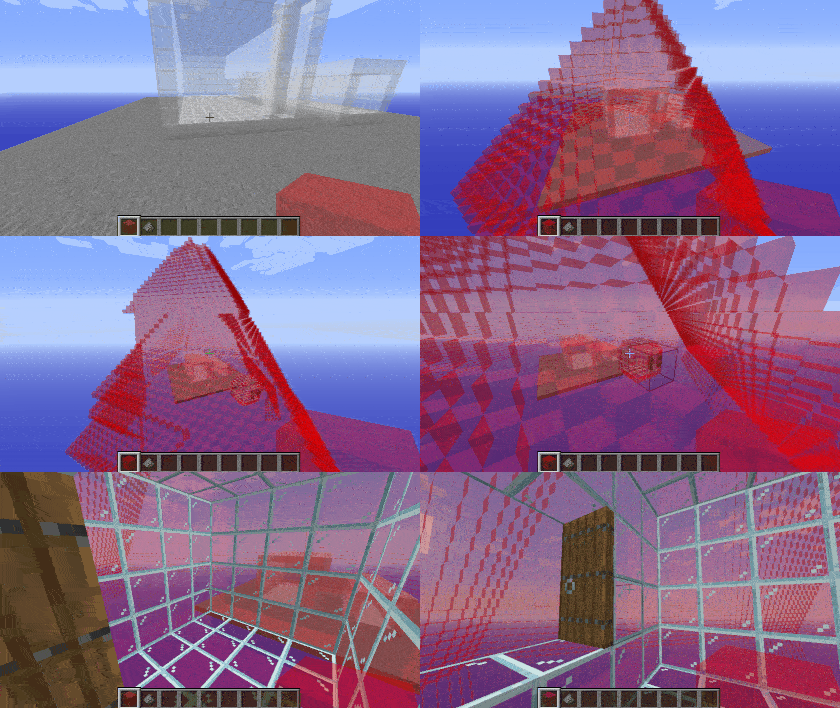
🟥 Red Gel
Red gel uses the default spreading mechanic, spreading along the cardinal directions, only replacing air.
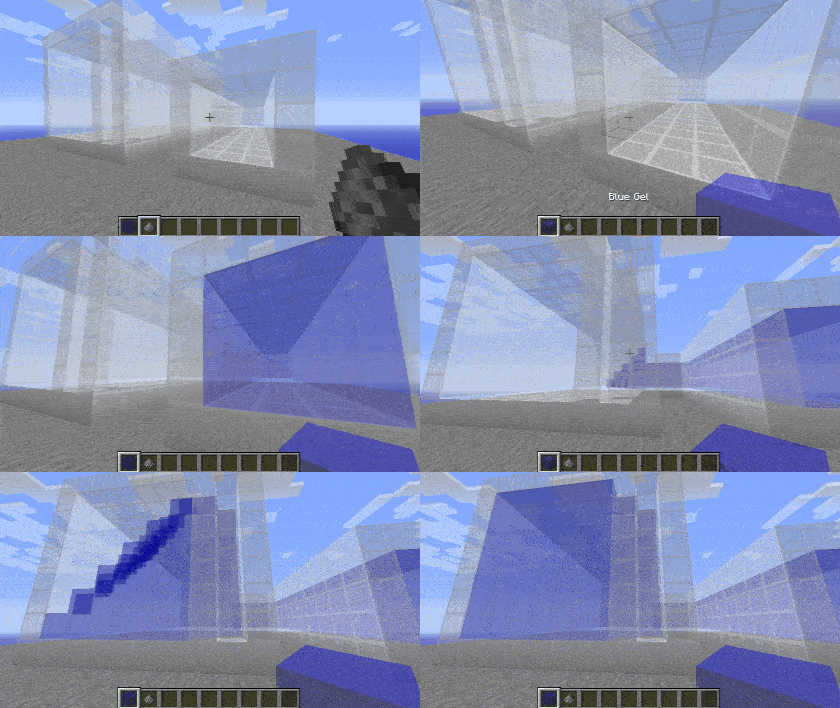
🟦 Blue Gel
Blue gel functions similarly to red, except it won't spread into locations where the sky can be seen.
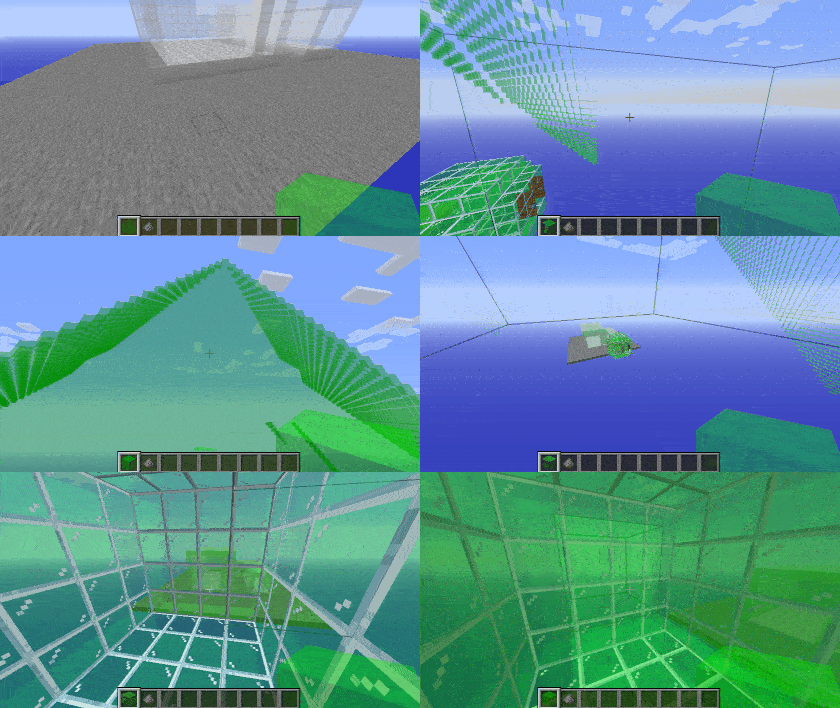
🟩 Green Gel
Green gel spreads the same as red gel, with the addition of also spreading diagonally. This allows it to get through corners created by vines or other complex builds. Be careful not to let it leak outside of your build.
🟦 Cyan Gel
Cyan gel acts as a combination of green and blue gel, by both spreading diagonally and avoiding the sky.
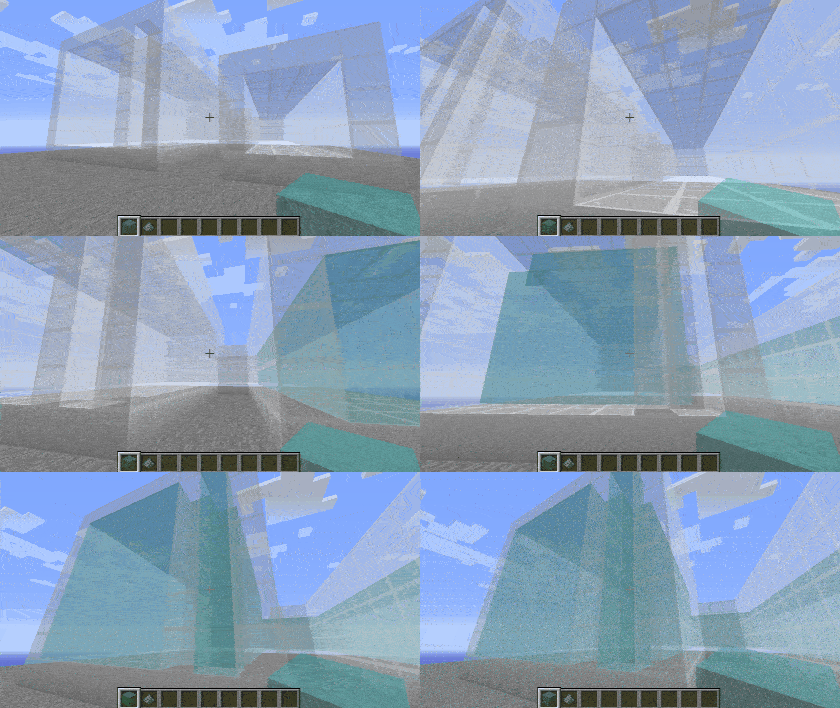
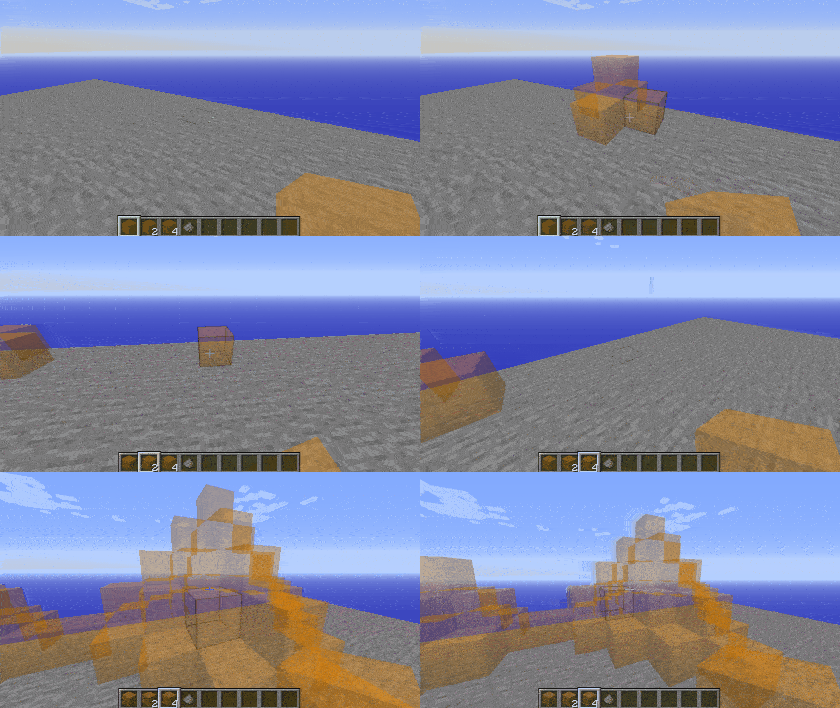
🟧 Orange Gel
Orange gel behaves the same as red gel, but the distance it spreads is determined by how many you're holding when you place it, making it handy for builds in open areas.
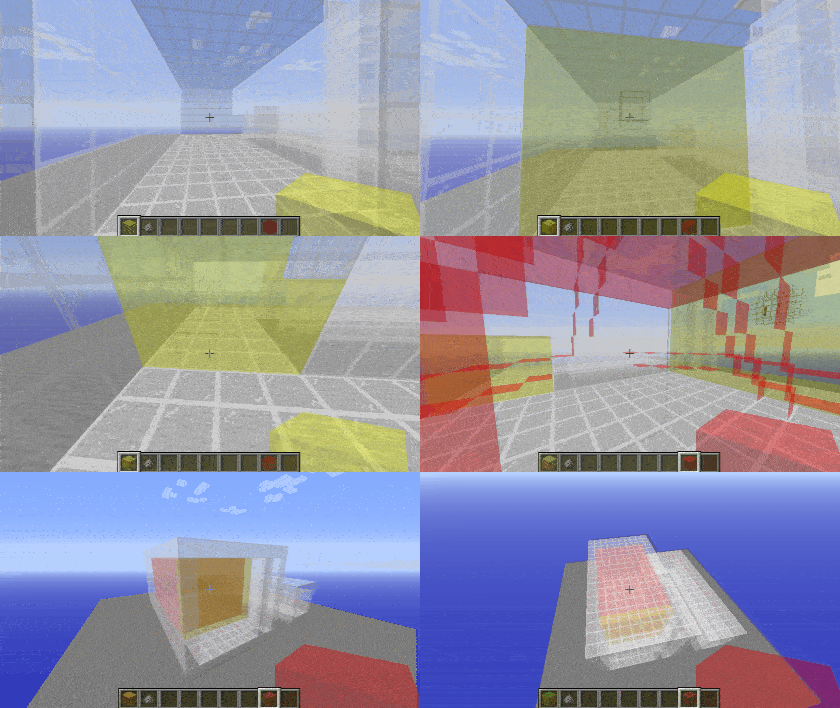
🟨 Yellow Gel
Yellow gel will only spread along the plane that you're facing when you place it, making it great for sealing off walls, windows, or other holes that the gel would otherwise go through.
Removing Gels
Gel can be removed by using gunpowder on it. Doing this will trigger a chain reaction, removing all connected gels of the same type.
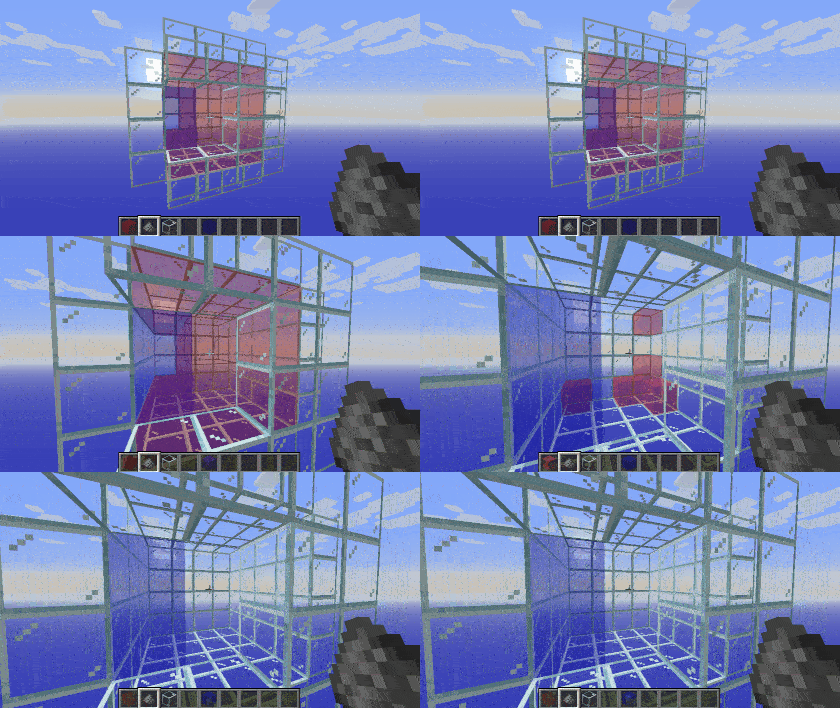
Examples
Here's an example of how it could be used in a build. If this structure were loaded into the game, the gel inside would be replaced with air, while the air outside would not be placed.
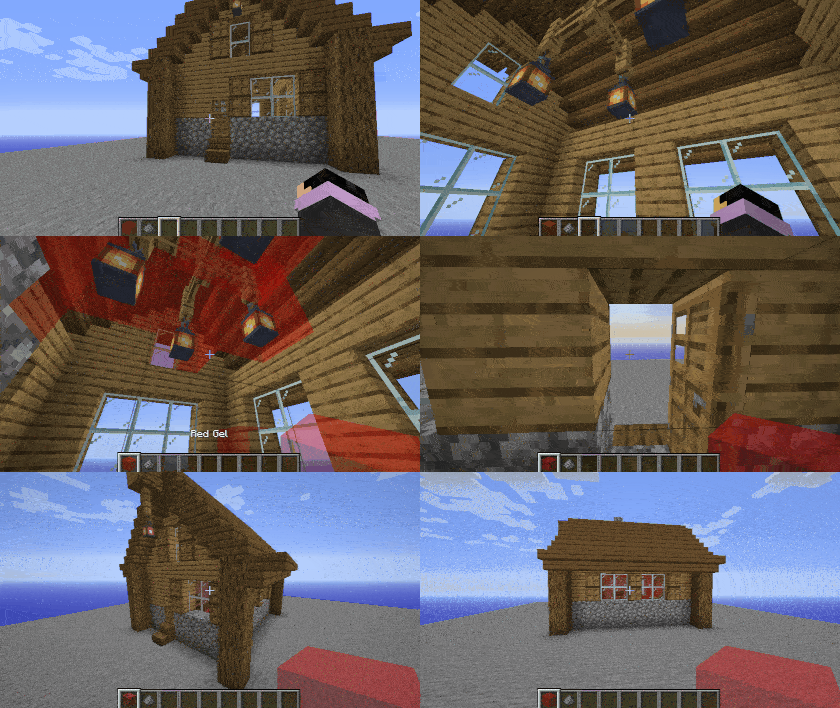
The code for this block is designed in a way such that you can easily extend it and hook into its behavior with methods in blocks.IStructureGel, should you need behavior not already implemented.
This is a core mod that modifies a few internal classes. If you get a crash with this mod that only occurs when mixed with another mod, this may be the cause. Please test before reporting.
🌐 Translate Structure Gel API - Help break the language barrier!
All translators are credited here. Thanks to OneSkyApp, you can translate easily!
undefined
 Deutsch translations by: A1403, Barion
 Português (Brasil) translations by: gabisaoo, simsgameboh
 Nederlands (Nederland) translations by: faas.mr
 Español (España) translations by: Minaderm , guillermojuegostablet, juggernogk
 Українська (Ukrayins'ka) translations by: Queez
 Türkçe (Türkiye) translations by: asimemir58, demirgokler406
 עברית ('Ivriyþ) translations by: pecan1245
 Español (Argentina) translations by: patriciofagetti
 Italiano (Italia) translations by: antonioauciello226
 Lietuvių translations by: WaryRGMCA
🤚 Support: If you have questions or any issues with our mods, read the FAQ! You can also either submit an issue on the issue tracker, or come into our Discord server where we can help you!

Project description from CurseForge.
Pick your setup
Structure Gel API by Minecraft version and loader
Choose the version and loader you play, then open the matching release.
Minecraft version
1.21.4
1 loader buildMinecraft version
1.20.4
1 loader buildMinecraft version
1.20.1
2 loader buildsMinecraft version
1.19.4
1 loader buildMinecraft version
1.19.3
1 loader buildMinecraft version
1.19.2
1 loader buildMinecraft version
1.19.1
1 loader buildMinecraft version
1.19
1 loader buildMinecraft version
1.18.2
1 loader buildMinecraft version
1.16.5
1 loader buildCheck the dependencies, then try the file in a copied instance before changing a world you care about.
Recent files
Structure Gel API versions and loaders
Structure Gel 26.1.2-v2.22.0
structure_gel-26.1.2-2.22.0.jar
10 Sept 2026
Client Source doesn’t say Server Source doesn’t say Dependencies No extras listed Listed on Release listing
Check the 26.1.2 · NeoForge setup NeoForge26.1.2 release
Structure Gel 26.1.2-v2.21.2
structure_gel-26.1.2-2.21.2.jar
30 Aug 2026
Client Source doesn’t say Server Source doesn’t say Dependencies No extras listed Listed on Release listing
Check the 26.1.2 · NeoForge setup NeoForge26.1.2 release
Structure Gel 26.1.2-v2.21.1
structure_gel-26.1.2-2.21.1.jar
4 Aug 2026
Client Source doesn’t say Server Source doesn’t say Dependencies No extras listed Listed on Release listing
Check the 26.1.2 · NeoForge setup NeoForge26.1.2 release
2.21.0
structure_gel-26.1.2-2.21.0.jar
4 Aug 2026
Client Optional Server Optional Dependencies No extras listed Listed on Release listing
Check the 26.1.2 · NeoForge setup 26.1.2NeoForge release
Structure Gel 1.21.4-v2.20.0
structure_gel-1.21.4-2.20.0.jar
26 Jan 2025
Client Source doesn’t say Server Source doesn’t say Dependencies No extras listed Listed on Release listing
Check the 1.21.4 · NeoForge setup 1.21.4NeoForge release
Structure Gel 1.20.4-v2.19.1
structure_gel-1.20.4-2.19.1.jar
21 Jun 2024
Client Source doesn’t say Server Source doesn’t say Dependencies No extras listed Listed on Release listing
Check the 1.20.4 · NeoForge setup NeoForge1.20.4 release
Structure Gel 1.20.4-v2.19.0
structure_gel-1.20.4-2.19.0.jar
2 Jun 2024
Client Source doesn’t say Server Source doesn’t say Dependencies No extras listed Listed on Release listing
Check the 1.20.4 · NeoForge setup NeoForge1.20.4 release
Structure Gel 1.20.4-v2.18.1
structure_gel-1.20.4-2.18.1.jar
21 Apr 2024
Client Source doesn’t say Server Source doesn’t say Dependencies No extras listed Listed on Release listing
Check the 1.20.4 · NeoForge setup NeoForge1.20.4 release
Structure Gel 1.20.1-v2.16.2
structure_gel-1.20.1-2.16.2.jar
21 Apr 2024
Client Source doesn’t say Server Source doesn’t say Dependencies No extras listed Listed on Release listing
Check the 1.20.1 · NeoForge setup NeoForge1.20.1Forge release
Structure Gel 1.20.4-v2.18.0
structure_gel-1.20.4-2.18.0.jar
17 Mar 2024
Client Source doesn’t say Server Source doesn’t say Dependencies No extras listed Listed on Release listing
Check the 1.20.4 · NeoForge setup NeoForge1.20.4 release
Structure Gel 1.20.1-v2.16.1
structure_gel-1.20.1-2.16.1.jar
17 Mar 2024
Client Source doesn’t say Server Source doesn’t say Dependencies No extras listed Listed on Release listing
Check the 1.20.1 · NeoForge setup NeoForge1.20.1Forge release
Structure Gel 1.20.4-v2.17.2
structure_gel-1.20.4-2.17.2.jar
4 Feb 2024
Client Source doesn’t say Server Source doesn’t say Dependencies No extras listed Listed on Release listing
Check the 1.20.4 · NeoForge setup NeoForge1.20.4 release
Looking for an older file? The official CurseForge project page is in Resources.
 mod
mod CurseForge + Modrinth · Minecraft
Forgeweave
Modular tools, armor and a smeltery, craft parts, pick materials, earn traits, level your gear, and melt the world down.
 mod
mod CurseForge + Modrinth · Minecraft
LostBeats
Adds features to the Biome Beats mod including Lost Cities compat
 mod
mod CurseForge + Modrinth · Minecraft
Configurable Extra Mob Drops
✏️ Add any extra item drops to entities via commands and config, drop chance supported.