Minecraft version
Back to mods 
CurseForge · Minecraft mod
Teleport++
Build a fast-travel network. Teleport yourself, mobs and other players using area teleports.
Choose a version Pick your version below, then grab the matching file.
Quick answer
Which Teleport++ release matches 1.16.2?
Best match for your filters teleportmod_1.16.2-1.1.2.jar
Game version 1.16.2
Loader forge
Teleport++ teleportmod_1.16.2-1.1.2.jar targets 1.16.2. The project page does not say whether this file belongs on the client, dedicated server, or both. No extra mods listed for this file.
Where it goes
Is Teleport++ required on the client, server, or both?
The project page does not say whether this file belongs on the client, dedicated server, or both.
Client Source doesn’t say
Dedicated server Source doesn’t say
Loader for this release No loader listed
Required install it here Optional supported, not mandatory Not supported do not install here Source doesn’t say do not assume
The source does not explicitly classify this release as client-only or server-only.
What else does Teleport++ teleportmod_1.16.2-1.1.2.jar need?
teleportmod_1.16.2-1.1.2.jar on 1.16.2. Every mod below is checked against that same setup.
This file does not list any required mods. Do not add a library just because a different file uses it.
This file does not list any required or optional mods.
Before you install it
Add Teleport++ without breaking your instance.
Built for Teleport++ teleportmod_1.16.2-1.1.2.jar on 1.16.2. Pick another file and the loader, install side or required mods may change.
- 01
Stick to this file
Use teleportmod_1.16.2-1.1.2.jar. It targets 1.16.2; another release may have different loader, side or dependency requirements.
- 02
Bring the mods it needs
This file does not list any required mods. Do not add a library just because a different file uses it.
- 03
Put it on the correct side
The project page does not say whether this file belongs on the client, dedicated server, or both.
- 04
Pick the file you checked
Use the “Get this file” button beside teleportmod_1.16.2-1.1.2.jar. It opens that exact file at the source.
About this project
What does Teleport++ add?
Teleport++ is an easy to use and versatile teleportation system.
The mod adds 3 new items:
1. Teleport
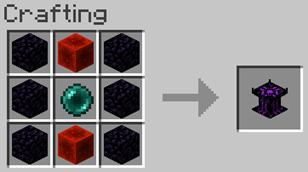
After placing it on the ground you need to give it a unique name.
Right-click a teleport to select a destination. You can browse through all available teleports or start typing to quickly find the one you want.
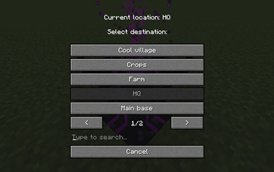
2. Area Teleport
This is an upgraded version of standard Teleport which teleports all living entities within it's range (9x9). You can teleport animals, hostile mobs and other players!
To craft an Area Teleport you need a standard Teleport and 4 redstone torches.
You can use crafting table for that...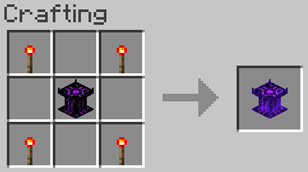
..or upgrade existing Teleport directly in the world by placing 4 redstone torches so they form a 9x9 square with the teleport in the center. Torches are destroyed after successful upgrade.
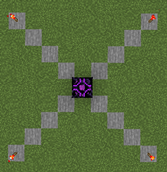
You can distinguish an Area Teleport from a standard one by particle effect within area of effect.
3. Personal Teleporter
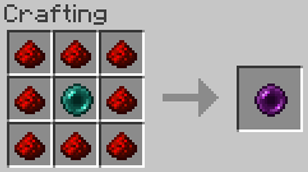
This is a multiple-use item which creates a temporary portal when used on the ground. It'a active for 90 seconds (after that the portal dissapears). During that time you can use the item again to teleport back to previously set destination.
Personal Teleporter can also be used to teleport nearby creatures and players (in 9x9x9 area). To do that you need to charge it while teleporting (hold right mouse button for 2 sec. until it starts glowing). Any living entity in range will get a special particle effect to easly tell if you are close enough to teleport it.
You can do different stuff with Personal Teleporter:
create a "safe point" when scouting dangerous places (caves, underwater structures etc.)
easly transport animals
teleport mobs into a trap
catch fish :)
and many more...
Other notes:
Teleport and Area Teleport can be harvested with a diamond pickaxe
While selecting a Teleport destination you will see only teleports from the current dimension. This way you can have a separate fast travel network in each dimension.
Make sure to leave enough free space around a destination teleport while teleporting together with other players and mobs. Otherwise some of you may end up in different place than expected ;)
Update 1.1.0:
- added possibility to set teleport travel cost (disabled by default)
- teleport can "consume" items, health points, XP levels or XP points
- any item can be used as "currency" (also from other mods - just make sure to provide correct name in config file)
- tip: setting cost type to "ITEM" and cost to "0" will allow to travel only if you have specified item but it won't consume it (so it can work as a multi-use "key")
- if cost type is set to "HEALTH" teleport will not kill the player even if doesn't have enough HP. In such case player health will be set to 1HP (half heart)
- cost can be constant (e.g 1 emerald per use) or based on travel distance (e.g. 1 gold ingot per 10 chunks)
- for distance-based cost you can set a maximum limit (e.g. 10 XP points per chunk but no more than 5000 in total)
- costs are ignored in creative mode
- config can be found in <world_directory>/serverconfig/teleportmod-server.toml (I suggest to reconnect to server after changing something)
- mod now works on Dedicated Servers
Update 1.1.3:
- added option to disable possibility of upgrading Teleport with redstone torches (canUpgradeWithTorches setting in server config file)
Project description from CurseForge.
Pick your setup
Teleport++ by Minecraft version and loader
Choose the version and loader you play, then open the matching release.
Minecraft version
1.16.4
1 loader buildMinecraft version
1.16.3
1 loader buildMinecraft version
1.16.2
1 loader buildMinecraft version
1.16.1
1 loader buildMinecraft version
1.15.2
2 loader buildsCheck the dependencies, then try the file in a copied instance before changing a world you care about.
Recent files
Teleport++ versions and loaders
teleportmod_1.16.2-1.1.2.jar
8 Sept 2020
Client Source doesn’t say Server Source doesn’t say Dependencies No extras listed Listed on Release listing
Check the 1.16.2 setup 1.16.2 release
Looking for an older file? The official CurseForge project page is in Resources.
 mod
CurseForge · Minecraft
SKY ACES
Dogfight in 30+ flyable jets, WWII warbirds and helicopters, then take warships and submarines to sea. F-22, F-35, Spitfire, Apache, a sailing Nimitz carrier, air refuelling and a campaign. (Formerly known as Fighter Jets Overhaul)
 mod
CurseForge · Minecraft
TONI's Magic: Wizardry
Become a wizard: 13 spells from tomes (Arcane Ray, meteor, blizzard...), an Inscription Table and spell hotkeys, good and dark wizards, the Ancient Mage, Dark Towers and the Arcane Bunker dungeon.
 mod
CurseForge · Minecraft
TofuCraftReload
This mod is a remake of Old Mod TofuCraft made by tsuteto. add soybean As a new all-purpose food!