Fabric API Needed by Custom Portals 4.0.0
requiredMatching file found Matched file: 0.155.2+26.1.2

Modrinth · Minecraft mod
Custom Portals is a mod for Minecraft that allows you to construct inter- and intradimensional portals out of any block.
Quick answer
Custom Portals 4.0.0 targets 26.1.2 with Fabric. Installation on the client is optional. Installation on the dedicated server is optional. All 2 required mods have matching files.
Where it goes
Installation on the client is optional. Installation on the dedicated server is optional.
The source marks this as usable on both the client and server.
4.0.0. Change the file and its required mods may change too.
Install Fabric API, YetAnotherConfigLib (YACL) first. We found matching files for this game-version and loader setup. 1 comes through another mod in the chain.
1 extra mod was pulled in by another dependency. Indented rows show who needs each one. We only count dependency files that match this setup. A file for another loader does not fill the gap.
Before you install it
Built for Custom Portals 4.0.0. Pick another file and the loader, install side or required mods may change.
Use 4.0.0. It targets 26.1.2 with Fabric; another release may have different loader, side or dependency requirements.
Install Fabric API, YetAnotherConfigLib (YACL) first. We found matching files for this game-version and loader setup. 1 comes through another mod in the chain.
Installation on the client is optional. Installation on the dedicated server is optional.
Use the “Get this file” button beside 4.0.0. It opens that exact file at the source.
About this project
Now with portals in any shape!
Versions 3.4.0 and above require YetAnotherConfigLib.
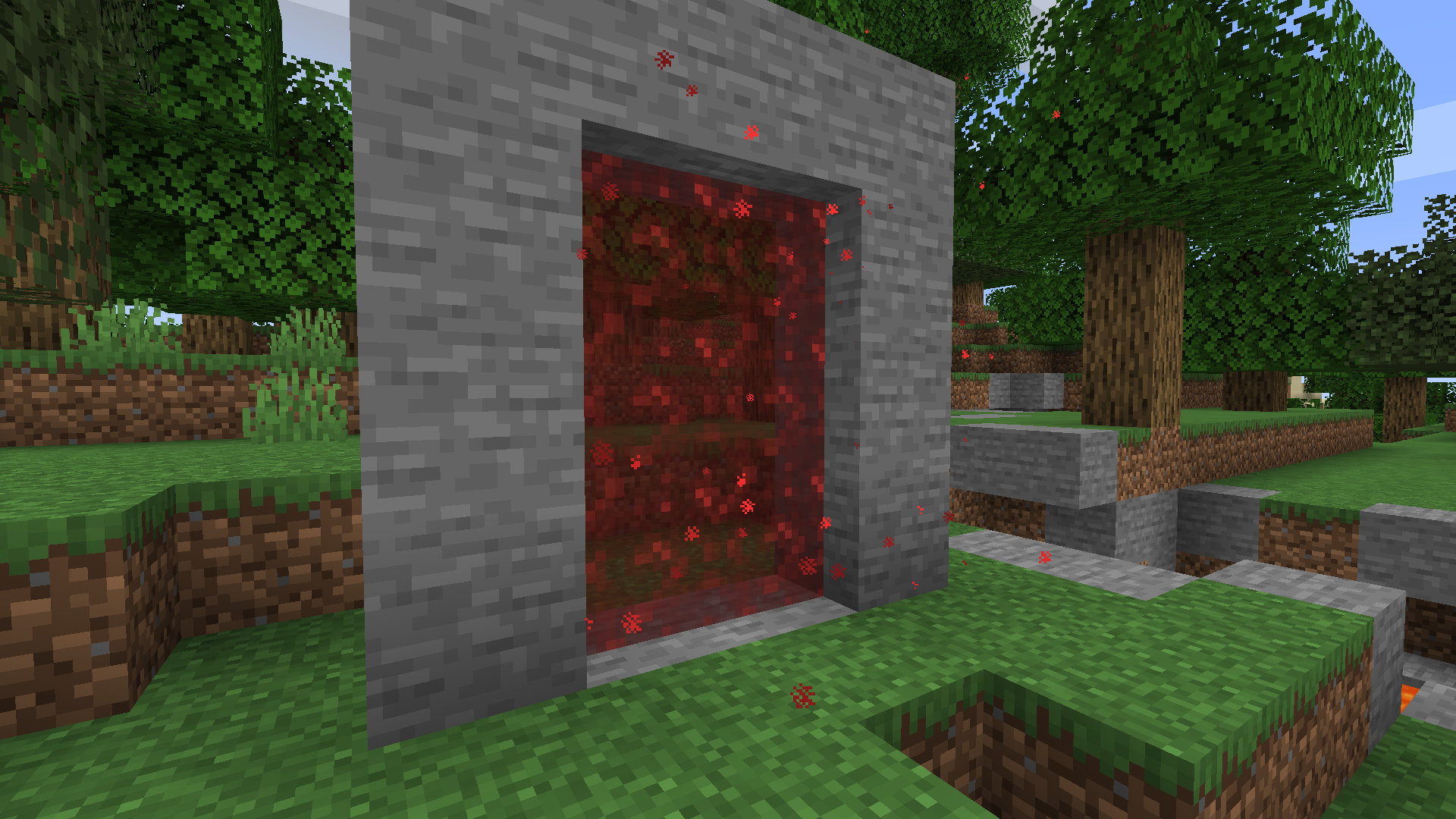
Custom Portals is a mod for Minecraft that allows you to construct inter- and intradimensional portals out of any block.
Please read the FAQ before posting an issue!
Installation
Custom Portals is a Fabric mod. To use this mod, you will first need to install Fabric. You will also need the Fabric API. For versions prior to the release for 1.18.1, you will also need the Cardinal Components API.
Navigate to your .minecraft folder and place the .jar file you downloaded, along with the .jar for the Fabric API & Cardinal Components API, into the "mods" folder. Launch Minecraft, and the mod should be installed.
Getting Started
To construct portals, you will need to craft portal catalysts. These are crafted with four ender pearls, four eyes of ender, and any dye, like so:
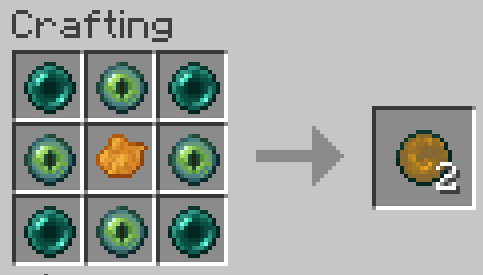
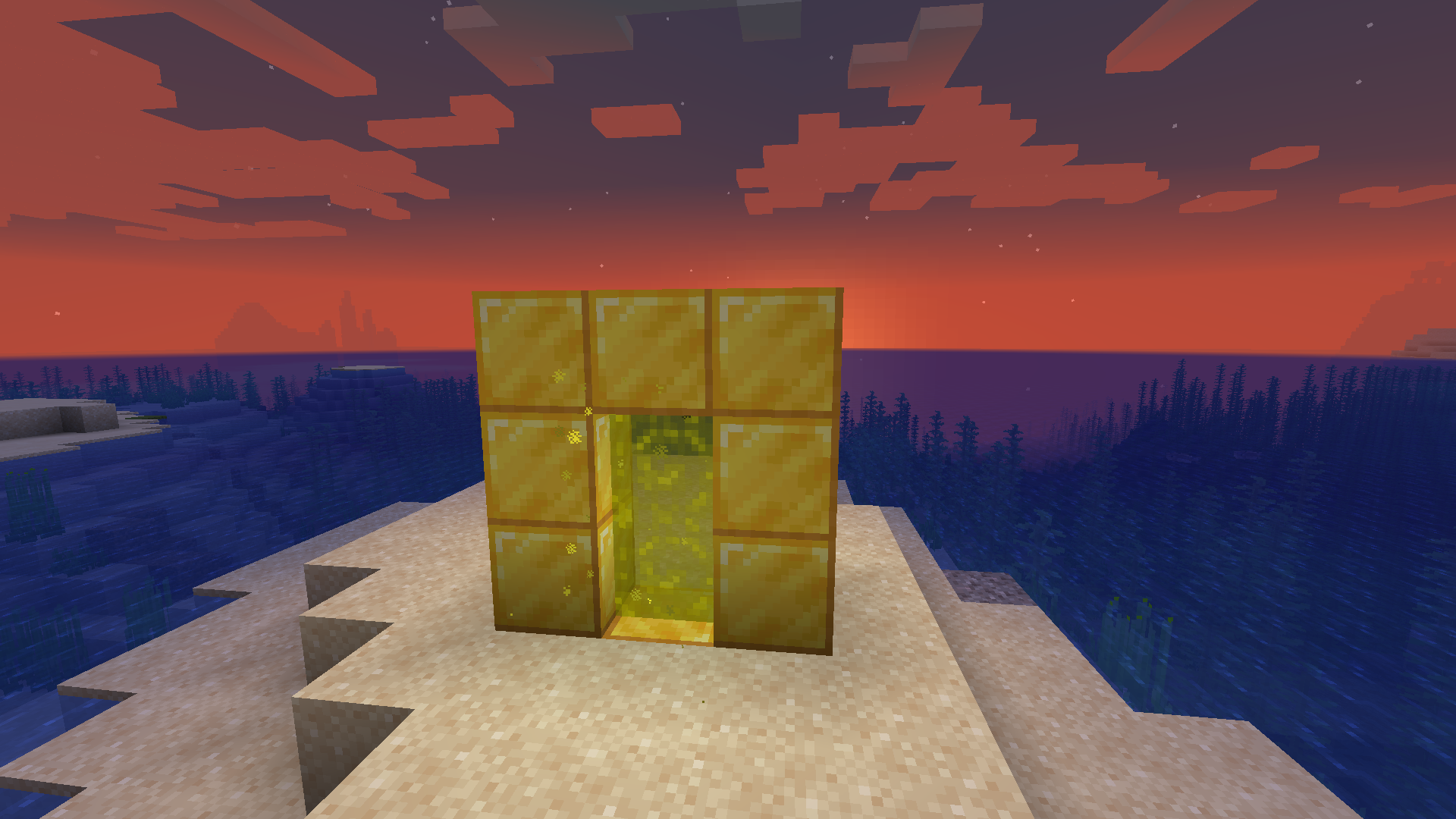
Once you have your portal catalysts, you'll want to build frames for your portals out of the block of your choice. The frames can be any size and shape (for versions before 3.2.0, they must be rectangular).
When you're done, right click on the inside of the frame with your portal catalyst, and the portal will activate. Do the same where you want the other portal to be. If both of your portals are made out of the same materials and are within range, they will automatically link to each other and you will be able to travel between them. Portals that are linked will have an animated, lit-up texture and emit particles. By default, you will spawn in the center of your portal. You can change your portal's spawn position by shift-right-clicking the portal block you want to set it to with an empty hand.
Applying a redstone signal to a portal now turns it off!
Want to make portals that are only one way? Want to turn your portal off when you're not using it so that mobs don't wander in? Versions for Minecraft 1.19 and above allow you to do so with redstone!
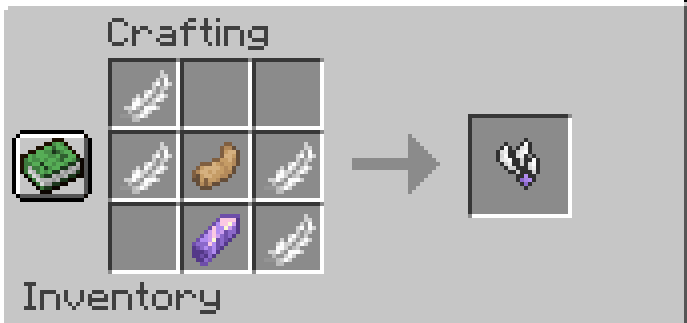
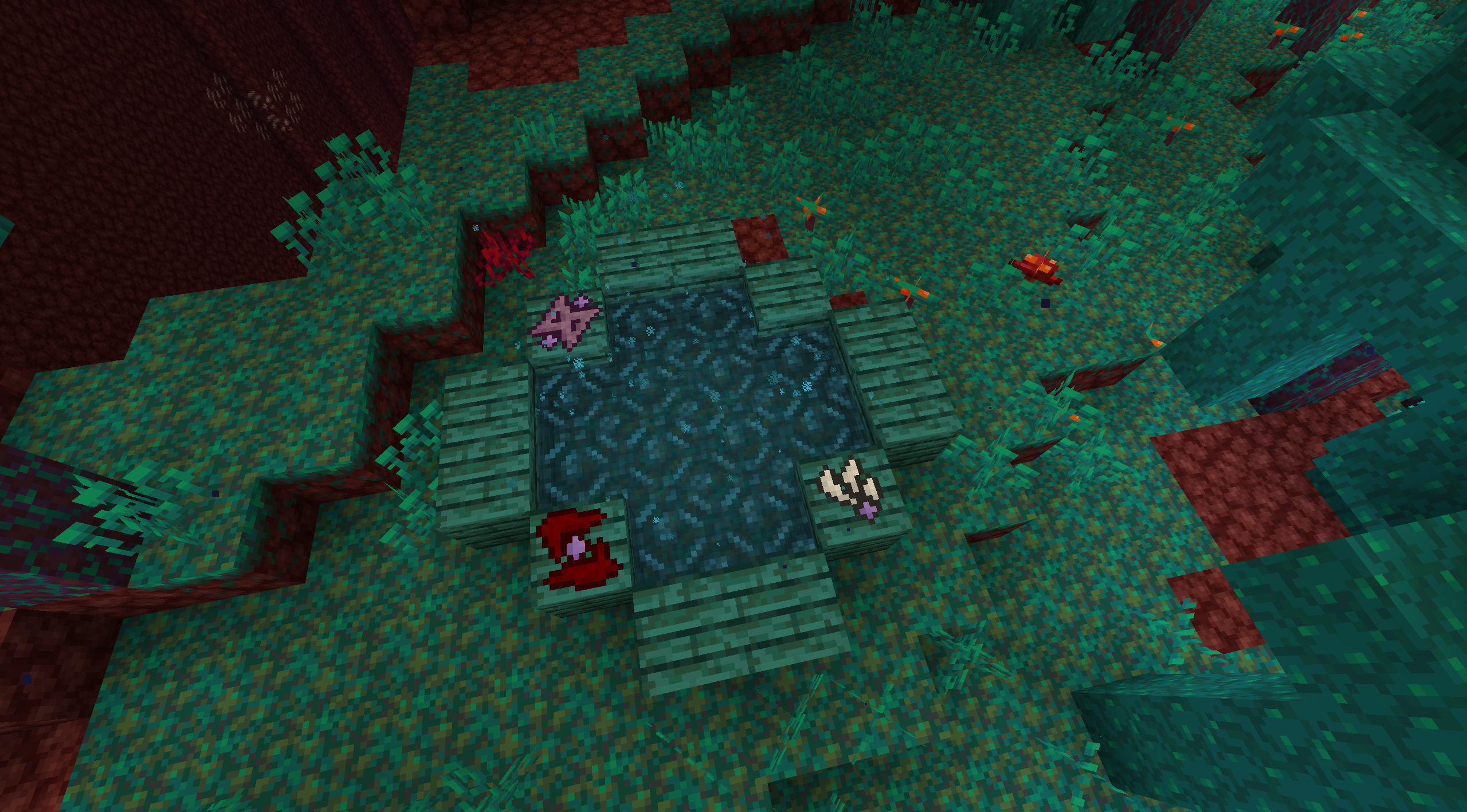
New in Versions 2.0.0 and above: Runes
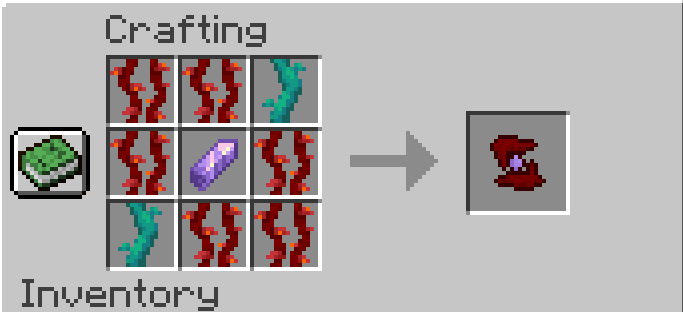
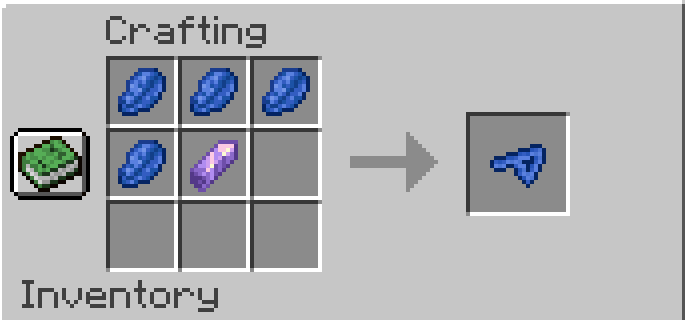
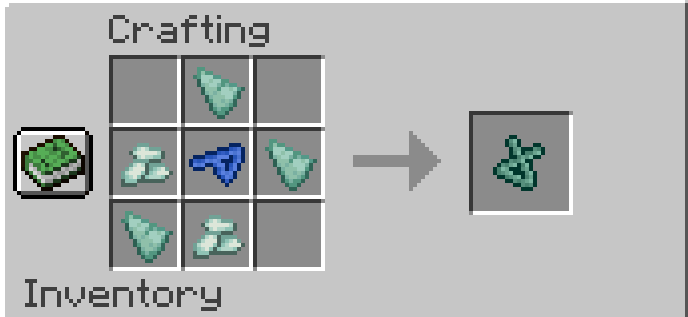
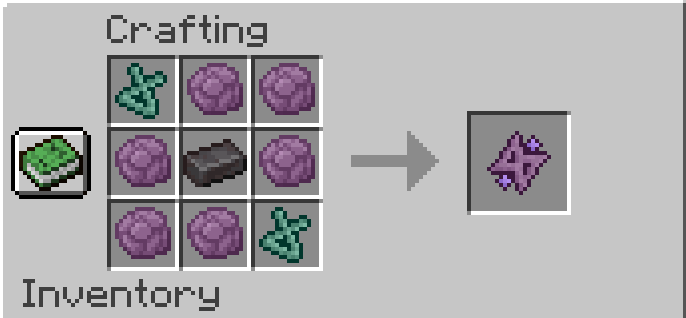
FAQ
I built my portal, but it won't take me to the new dimension!
This is not a dimension mod; it's a transportation mod. The point is to build two portals out of the same materials, which will allow you to travel between them. This mod does not add any new dimensions, and if you build only one portal, that portal will be inactive until a matching portal is built for it to link to.
Will there be a Forge port/backport to an earlier Minecraft version?
Sorry, but no. All future versions will be for Fabric and for the latest version of Minecraft. I made this purely for fun and I simply don't have the time or the energy to learn an entire new modding framework and rewrite the whole thing from the ground up, which is what would be required to port this to Forge. You have my permission to port it yourself if you want to take on the project, though!
Does this work with Immersive Portals?
Currently, using this mod's portals to travel across dimensions tends to break the game on the client side if you have Immersive Portals installed. This has to do with how Immersive Portals changes the way dimensions are rendered.
Can I put this in my modpack/video?
Please do! I would only ask that you link to this page.
Project description from Modrinth.
Pick your setup
Choose the version and loader you play, then open the matching release.
Showing the newest 12 of 36 game versions. Older files are in the list below.
Check the dependencies, then try the file in a copied instance before changing a world you care about.
Recent files
CustomPortals-4.0.0+26.1.2.jar
3 Jun 2026
custom-portals-3.4.3+1.20.1.jar
14 Jan 2026
CustomPortals-3.12.1+1.21.11.jar
14 Jan 2026
CustomPortals-3.12.0+1.21.11.jar
9 Jan 2026
custom-portals-3.11.1+1.21.10.jar
28 Dec 2025
custom-portals-3.4.2+1.20.1.jar
28 Dec 2025
custom-portals-3.11.0+1.21.10.jar
29 Oct 2025
custom-portals-3.10.0+1.21.9.jar
29 Oct 2025
custom-portals-3.9.1+1.21.7.jar
2 Sept 2025
custom-portals-3.9.0+1.21.7.jar
22 Jul 2025
custom-portals-3.8.0-1.21.5.jar
16 Apr 2025
custom-portals-3.4.1 -1.20.1.jar
7 Dec 2024
Looking for an older file? The official Modrinth project page is in Resources.
 mod
modA nether biome mod by the Potion Studios team, truly an adventure like no other awaits you with new biomes, mobs, blocks, items and more!
 mod
modAdds qualities to tools and armor to give them differentiating stats!
 mod
modMagic Coins is a mod focused on economy, introducing a simplified coin system to Minecraft. Ideal for players seeking a more immersive RPG experience and for modpack creators looking to customize villager trades.