Minecraft version
Back to mods 
Modrinth · Minecraft mod
Thirst Bar
Adds a thirst bar to the game.
Choose a version Pick your version below, then grab the matching file.
Quick answer
Which Thirst Bar release should I use?
Latest stable file 1.5
Game version 1.21, 1.21.1, 1.21.2
Loader Fabric, Forge, NeoForge
Thirst Bar 1.5 targets 1.21, 1.21.1, 1.21.2 with Fabric, Forge, NeoForge. Installation on the client is optional. Installation on the dedicated server is optional. No extra mods listed for this file.
Where it goes
Is Thirst Bar required on the client, server, or both?
Installation on the client is optional. Installation on the dedicated server is optional.
Client Optional
Dedicated server Optional
Loader for this release Fabric, Forge, NeoForge
Required install it here Optional supported, not mandatory Not supported do not install here Source doesn’t say do not assume
The source marks this as usable on both the client and server.
What else does Thirst Bar 1.5 need?
1.5. Change the file and its required mods may change too.
This file does not list any required mods. Do not add a library just because a different file uses it.
This file does not list any required or optional mods.
Before you install it
Add Thirst Bar without breaking your instance.
Built for Thirst Bar 1.5. Pick another file and the loader, install side or required mods may change.
- 01
Stick to this file
Use 1.5. It targets 1.21, 1.21.1, 1.21.2 with Fabric, Forge, NeoForge; another release may have different loader, side or dependency requirements.
- 02
Bring the mods it needs
This file does not list any required mods. Do not add a library just because a different file uses it.
- 03
Put it on the correct side
Installation on the client is optional. Installation on the dedicated server is optional.
- 04
Pick the file you checked
Use the “Get this file” button beside 1.5. It opens that exact file at the source.
About this project
What does Thirst Bar add?
💧 Thirst Bar
Thirst Bar is a Minecraft datapack+resourcepack/mod that adds a thirst bar to the game.
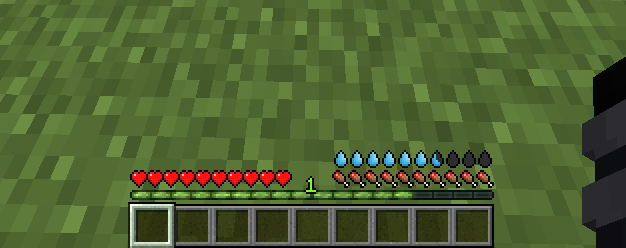
✨ Features
- The thirst bar can be refilled by drinking water bottles.

- Customizable values.
- As soon as you enter the water, it disappears so that the drowning hud is visible.
- Works in singleplayer and multiplayer.
- Supports Smithed Actionbar Libary.
🛠️ Settings
You can easily customize the thirst depletion rate at any time using the following command (1 second = 20 ticks):
- 🛠️ Customize thirst depletion rate:
/data modify storage thirstbar time set value [timeinticks](Default Value:1200)
Example: data modify storage thirstbar time set value 600 (600 = 30 seconds)
You can also easily customize how often damage is dealt when the thirst bar is empty at any time using the following command (1 second = 20 ticks):
- 🛠️ Customize damage rate:
/data modify storage thirstbar damagetime set value [timeinticks](Default Value:20)
Example: data modify storage thirstbar damagetime set value 40 (40 = 2 seconds)
📦 Optional Library Support – Actionbar
This datapack allows the actionbar to be shared across multiple datapacks on a server, preventing conflicts and ensuring compatibility.
🔗 Download: Smithed – Actionbar Library
Enable support with the following command:
scoreboard players set .library thirstbar 1Disable support with the following command:
scoreboard players set .library thirstbar 0
📦 Installation
There are two ways to install:
1️⃣ Mod Version
Download the mod file and add it to your mods folder as you would with any other Minecraft mod. You dont need to install the Resource Pack
2️⃣ Datapack + Resource Pack
First, download the resource pack and place it in your resourcepacks folder.
Then, download the datapack and add it to your world's datapacks folder or your server's datapacks directory.
You can download Resource Pack from the releases page: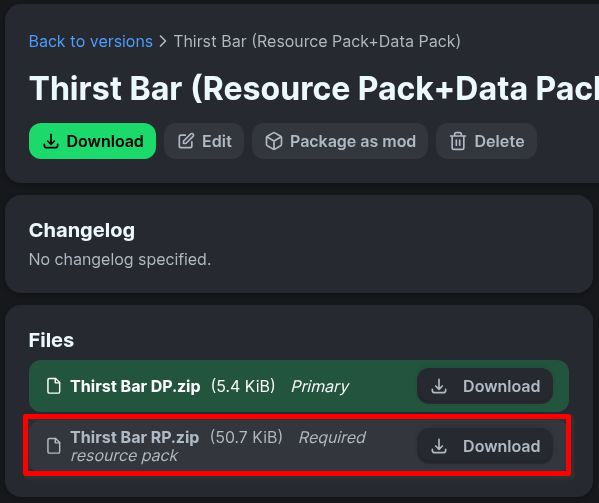
🧱 Compatibility
- Minecraft Java Edition 1.19.3+
- If you choose to use the resource pack, you must also install the datapack
🌐 ITITAN Hosting

💬 Feedback and Request
If you have a request or feedback, please write them in to my discord 3geetr.
Project description from Modrinth.
Pick your setup
Thirst Bar by Minecraft version and loader
Choose the version and loader you play, then open the matching release.
Minecraft version
26.1.2
5 loader buildsMinecraft version
26.1.1
5 loader buildsMinecraft version
26.1
5 loader buildsMinecraft version
1.21.11
5 loader buildsMinecraft version
1.21.10
5 loader buildsMinecraft version
1.21.9
5 loader buildsMinecraft version
1.21.8
5 loader buildsMinecraft version
1.21.7
5 loader buildsMinecraft version
1.21.6
5 loader buildsMinecraft version
1.21.5
5 loader buildsMinecraft version
1.21.4
5 loader buildsShowing the newest 12 of 16 game versions. Older files are in the list below.
Check the dependencies, then try the file in a copied instance before changing a world you care about.
Recent files
Thirst Bar versions and loaders
1.5
thirst-bar-1.5.jar
9 Aug 2026
Client Optional Server Optional Dependencies No extras listed Listed on Release listing
Check the 26.2 · Fabric setup 1.211.21.11.21.21.21.3 release
1.5
Thirst Bar DP.zip
9 Aug 2026
Client Optional Server Optional Dependencies No extras listed Listed on Release listing
Check the 26.2 · datapack setup 1.211.21.11.21.21.21.3 release
1.4
thirst-bar-1.5.jar
20 Aug 2025
Client Optional Server Optional Dependencies No extras listed Listed on Release listing
Check the 26.2 · Fabric setup 1.211.21.11.21.21.21.3 release
1.4
Thirst Bar DP.zip
20 Aug 2025
Client Optional Server Optional Dependencies No extras listed Listed on Release listing
Check the 26.2 · datapack setup 1.211.21.11.21.21.21.3 release
1.3
thirst-bar-1.3.jar
25 Jul 2025
Client Optional Server Optional Dependencies No extras listed Listed on Release listing
Check the 1.21.8 · Fabric setup 1.211.21.11.21.21.21.3 release
1.3
Thirst Bar DP.zip
25 Jul 2025
Client Optional Server Optional Dependencies No extras listed Listed on Release listing
Check the 1.21.8 · datapack setup 1.211.21.11.21.21.21.3 release
1.2
thirst-bar-1.2.jar
24 Jul 2025
Client Optional Server Optional Dependencies No extras listed Listed on Release listing
Check the 1.21.8 · Fabric setup 1.211.21.11.21.21.21.3 release
1.2
Thirst Bar DP.zip
24 Jul 2025
Client Optional Server Optional Dependencies No extras listed Listed on Release listing
Check the 1.21.8 · datapack setup 1.211.21.11.21.21.21.3 release
1.1
thirst-bar-1.1.jar
24 Jul 2025
Client Optional Server Optional Dependencies No extras listed Listed on Release listing
Check the 1.21.5 · Fabric setup 1.211.21.11.21.21.21.3 release
1.1
Thirst Bar DP.zip
24 Jul 2025
Client Optional Server Optional Dependencies No extras listed Listed on Release listing
Check the 1.21.5 · datapack setup 1.211.21.11.21.21.21.3 release
1.0
thirst-bar-1.0.jar
26 Jun 2025
Client Optional Server Optional Dependencies No extras listed Listed on Release listing
Check the 1.21.5 · Fabric setup 1.211.21.11.21.21.21.3 release
1.0
Thirst Bar DP.zip
26 Jun 2025
Client Optional Server Optional Dependencies No extras listed Listed on Release listing
Check the 1.21.5 · datapack setup 1.211.21.11.21.21.21.3 release
Looking for an older file? The official Modrinth project page is in Resources.
 mod
mod CurseForge + Modrinth · Minecraft
Create Aeronautics: Transmission & Linkage
An Aeronautics expansion mod that adds items useful for designing vehicles, as well as practical utility items such as universal joints and kinetic converters.
 mod
mod CurseForge + Modrinth · Minecraft
Crop Critters
Tired of uneventful vanilla farming? Crop Critters adds all-new levels of challenge, from basic weed management to constructing a friendly team of soul-possesed crops to work on your farm!
 mod
mod CurseForge + Modrinth · Minecraft
Spatial Tools Compatible
A standalone structure tools mod for copying, cutting, previewing, transforming, and pasting complex builds, with built-in support for AE2, GTCEu, Mekanism, and FramedBlocks.