Minecraft version
Back to mods 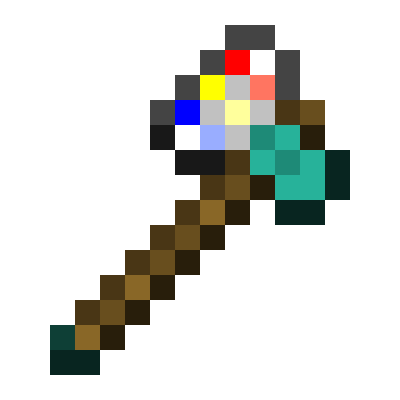
CurseForge · Minecraft mod
Images
Adds blocks to display images from the intenet
Choose a version Pick your version below, then grab the matching file.
Quick answer
Which Images release matches 1.16.2?
Best match for your filters images-0.3.1+1.16.3.jar
Game version 1.16.3, 1.16.2
Loader Fabric
images-0.3.1+1.16.3.jar targets 1.16.3, 1.16.2 with Fabric. The project page does not say whether this file belongs on the client, dedicated server, or both. No extra mods listed for this file.
Where it goes
Is Images required on the client, server, or both?
The project page does not say whether this file belongs on the client, dedicated server, or both.
Client Source doesn’t say
Dedicated server Source doesn’t say
Loader for this release Fabric
Required install it here Optional supported, not mandatory Not supported do not install here Source doesn’t say do not assume
The source does not explicitly classify this release as client-only or server-only.
What else does images-0.3.1+1.16.3.jar need?
images-0.3.1+1.16.3.jar on 1.16.2. Every mod below is checked against that same setup.
This file does not list any required mods. Do not add a library just because a different file uses it.
This file does not list any required or optional mods.
Before you install it
Add Images without breaking your instance.
Built for images-0.3.1+1.16.3.jar on 1.16.2. Pick another file and the loader, install side or required mods may change.
- 01
Stick to this file
Use images-0.3.1+1.16.3.jar. It targets 1.16.3, 1.16.2 with Fabric; another release may have different loader, side or dependency requirements.
- 02
Bring the mods it needs
This file does not list any required mods. Do not add a library just because a different file uses it.
- 03
Put it on the correct side
The project page does not say whether this file belongs on the client, dedicated server, or both.
- 04
Pick the file you checked
Use the “Get this file” button beside images-0.3.1+1.16.3.jar. It opens that exact file at the source.
About this project
What does Images add?
For the time being this mod is no longer being maintained so I can focus on other projects

Added Item: The Printaxe
The ultimate AXE+PRINTER combo
Used to chop down trees, slay monsters and print images onto picture frames
Added Block: Picture Frames
When placed in a rectangular shape and used with a Printaxe, it can be used to display an image
Picture Frame Usage
Shift + Right Click while holding the Printaxe to enter an image
Right Click on a picture frame with the Printaxe to start a selection
Right Click on a different or the same picture frame to finish the selection and print the image
optionally use a dye on the printed image to change the color of the background
Banner and Bed Usage
Shift + Right Click while holding the Printaxe to enter an image
Right Click on a placed banner with the Printaxe to print the image
banners can then be broken and used to decorate a shield or be worn as a cape
Inspecting and Copying Images
The easiest way to see the details of an block with a print on it is by using Hwyla
To copy an image, shift + right click which looking at one with the Printaxe. This will also tell you who printed it
F3+V Will refresh all loaded images
Project description from CurseForge.
Pick your setup
Images by Minecraft version and loader
Choose the version and loader you play, then open the matching release.
Minecraft version
1.16.3
1 loader buildMinecraft version
1.16.2
1 loader buildMinecraft version
1.16.1
1 loader buildCheck the dependencies, then try the file in a copied instance before changing a world you care about.
Recent files
Images versions and loaders
images-0.3.1+1.16.3.jar
17 Oct 2020
Client Source doesn’t say Server Source doesn’t say Dependencies No extras listed Listed on Release listing
Check the 1.16.2 · Fabric setup 1.16.3Fabric1.16.2 release
images-0.3.1+1.16.2.jar
1 Sept 2020
Client Source doesn’t say Server Source doesn’t say Dependencies No extras listed Listed on Release listing
Check the 1.16.2 · Fabric setup Fabric1.16.2 beta
Looking for an older file? The official CurseForge project page is in Resources.
 mod
CurseForge · Minecraft
TofuCraftReload
This mod is a remake of Old Mod TofuCraft made by tsuteto. add soybean As a new all-purpose food!
 mod
CurseForge · Minecraft
Fantasy Mounts
Fantasy mod bringing you Unicorns, Two Seater Riding, Horse Whistle and more!
 mod
CurseForge · Minecraft
BackSlot
Keep your weapon always ready