Minecraft version
Back to mods 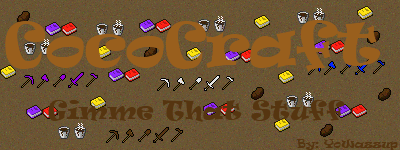
CurseForge · Minecraft mod
CocoCraft
CocoCraft Version 1.8.2
Choose a version Pick your version below, then grab the matching file.
Quick answer
Which CocoCraft release matches 1.2.5?
Best match for your filters CocoCRaftSpV1.8.2.zip
Game version 1.2.5
Loader Not required
CocoCRaftSpV1.8.2.zip targets 1.2.5. The project page does not say whether this file belongs on the client, dedicated server, or both. No extra mods listed for this file.
Where it goes
Is CocoCraft required on the client, server, or both?
The project page does not say whether this file belongs on the client, dedicated server, or both.
Client Source doesn’t say
Dedicated server Source doesn’t say
Loader for this release No loader listed
Required install it here Optional supported, not mandatory Not supported do not install here Source doesn’t say do not assume
The source does not explicitly classify this release as client-only or server-only.
What else does CocoCRaftSpV1.8.2.zip need?
CocoCRaftSpV1.8.2.zip on 1.2.5. Every mod below is checked against that same setup.
This file does not list any required mods. Do not add a library just because a different file uses it.
This file does not list any required or optional mods.
Before you install it
Add CocoCraft without breaking your instance.
Built for CocoCRaftSpV1.8.2.zip on 1.2.5. Pick another file and the loader, install side or required mods may change.
- 01
Stick to this file
Use CocoCRaftSpV1.8.2.zip. It targets 1.2.5; another release may have different loader, side or dependency requirements.
- 02
Bring the mods it needs
This file does not list any required mods. Do not add a library just because a different file uses it.
- 03
Put it on the correct side
The project page does not say whether this file belongs on the client, dedicated server, or both.
- 04
Pick the file you checked
Use the “Get this file” button beside CocoCRaftSpV1.8.2.zip. It opens that exact file at the source.
About this project
What does CocoCraft add?
Hello! And welcome to CocoCraft! This is a mod that adds new ores, world gen, and mobs! CocoCraft is still WIP, but is coming out nicely, without alot of bugs :)
READ
There is a more up-to-date version available on this forum : http://www.minecraftforum.net/topic/1186743-125cococraftv193/ , Please go download it there, and comment =D Thanks
Information
Ores
CocoCraft adds a few new ores, CocoStone, Mithril, Silver and Amethyst. You can smelt all of them, except Amethyst, into ingots to craft tools and armor with them.
Crusher & Compressor
These are two blocks that are quite expensive, bur really useful. With these machines you can get yourself double the ores you would normally get, by crushing ores in the Crusher, everything that returns in a block form, except CocoStone. And with the Compressor you can get yourself Alloy Armor, that is armor that is REALLY expensvie, but really strong. It is totally worth it.
Magic Books
Magic books are exactly what they are called, books that do something 'magical'. At the moment there are three sorts of Magic Books. The Book of Healing, The Book Of Time and The Book Of Exp. These all do something, that is odly similar to the name, on right click.
Steel
Steel is a new Alloy, that is made with Coal dust, Coal in a Crusher, and Iron Dust, Iron Ore in a Crusher, Combine them to get Mixed Iron Dust, smelt that to get Unworked Steel Ingots. Slam your Unworked Steel Ingots with a Hammer to get Steel Ingots. With Steel Ingots you can create all the basic tools, but no armor! Steel's to heavy for Steve to wear.
Obsidian Ingot
These ingots aren't the ingots that are in other Obsidian Tools mods, this is more complex. You make them by Crushing Obsidian in the Crusher to get Obsidian Dust, combine three of them, shapeless, to get one ingot. With the ingots you can create the Obsidian Multi Tool, this tool has 2012 uses, and works on, almost, everything! NOTE: The Tool is bugged and only works correctly on: Wood, Planks, Stone, Sand and Dirt! This is a bug! Will be fixed, so you can use it on everything!
Misc.
There is alot more that you will have to find out yourself. I don't want to spoil everything.....
Changelog
Latest Version
- Added Obsidian Multi Tool - Added Silver Furnave, doesn't doe anything yet..... - New textures for Crusher and Compressor.
Known Bugs
- GUIs don't display their name. - Breaking a Crusher/Compressor with items in it will delete them, and crash your game. - Silver Furnace ain't working - Obsidian Multi Tool is bugged.
How To Install
- Locate your .minecraft
- Install ModLoader and Forge in your minecraft.jar, instructions on their pages.
- Run Minecraft, see if everything starts up.
- Copy CocoCraftVersionnumberhereSp.zip in the mods folder that is now in the .minecraft
- Profit!
Copyrights.
This mod (plugin, a patch to Minecraft source, henceforth "Mod" or "The Mod"), by the terms ofhttp://www.minecraft.net/copyright.jsp is sole property of the Mod author (, henceforth "Owner" or "The Owner"). By default it may only be distributed on minecraftforums.net, dev.bukkit.org. It may only be mirrored or reposted with advance written permission of the Owner. Electronic Mail is fine if you wait for a response. URL shorteners or other attempts to make money off The Owner's Mod are strictly forbidden without advance written permission
Project description from CurseForge.
Pick your setup
CocoCraft by Minecraft version and loader
Choose the version and loader you play, then open the matching release.
Check the dependencies, then try the file in a copied instance before changing a world you care about.
Recent files
CocoCraft versions and loaders
CocoCRaftSpV1.8.2.zip
9 Jun 2012
Client Source doesn’t say Server Source doesn’t say Dependencies No extras listed Listed on Release listing
Check the 1.2.5 setup 1.2.5 release
Looking for an older file? The official CurseForge project page is in Resources.
 mod
CurseForge · Minecraft
The Twilight Forest
A realm basked in mystery and eerie twilight, you will overpower terrifying creatures and secure the adventure of a lifetime; in the Twilight Forest.
 mod
Modrinth · Minecraft
Pets Mod
Adds completely client-sided pets to your game. Supports every vanilla mob, some custom ones, and will work on any server, including in singleplayer!
 mod
CurseForge · Minecraft
Jeff's Pets
Adds completely client-sided pets to your game. Supports every vanilla mob, some custom ones, and will work on any server, including in singleplayer!