
Minecraft version
Back to mods 
CurseForge · Minecraft mod
Minimal Menu
Minimal Menu is a small client side mod that allows the user independently toggle main buttons on the title screen and options screens.
Choose a version Pick your version below, then grab the matching file.
Quick answer
Which Minimal Menu release matches 1.17?
Best match for your filters minimalmenu-1.17-0.0.8
Game version 1.17
Loader fabric
Minimal Menu minimalmenu-1.17-0.0.8 targets 1.17. The project page does not say whether this file belongs on the client, dedicated server, or both. No extra mods listed for this file.
Where it goes
Is Minimal Menu required on the client, server, or both?
The project page does not say whether this file belongs on the client, dedicated server, or both.
Client Source doesn’t say
Dedicated server Source doesn’t say
Loader for this release No loader listed
Required install it here Optional supported, not mandatory Not supported do not install here Source doesn’t say do not assume
The source does not explicitly classify this release as client-only or server-only.
What else does Minimal Menu minimalmenu-1.17-0.0.8 need?
minimalmenu-1.17-0.0.8 on 1.17. Every mod below is checked against that same setup.
This file does not list any required mods. Do not add a library just because a different file uses it.
This file does not list any required or optional mods.
Before you install it
Add Minimal Menu without breaking your instance.
Built for Minimal Menu minimalmenu-1.17-0.0.8 on 1.17. Pick another file and the loader, install side or required mods may change.
- 01
Stick to this file
Use minimalmenu-1.17-0.0.8. It targets 1.17; another release may have different loader, side or dependency requirements.
- 02
Bring the mods it needs
This file does not list any required mods. Do not add a library just because a different file uses it.
- 03
Put it on the correct side
The project page does not say whether this file belongs on the client, dedicated server, or both.
- 04
Pick the file you checked
Use the “Get this file” button beside minimalmenu-1.17-0.0.8. It opens that exact file at the source.
About this project
What does Minimal Menu add?
Minimal Menu


Minimal Menu is a small client side mod that allows the user independently toggle many buttons on the title screen and options screens. It also adds features like a button to reload saves, and view saves folder. Designed to work with mod menu and mod menu only.
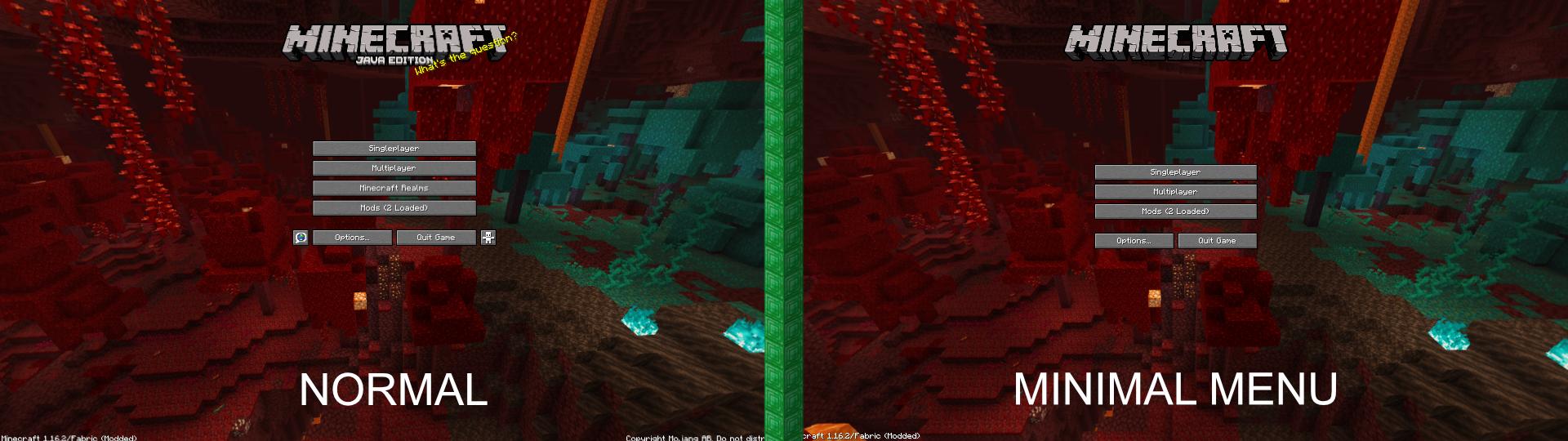
*Requires cloth config and mod menu
Features
- Pause the rendering of the background panorama
- Dirt menu background for title screen
- Add saves folder button
- Add reload saves button
- Add button to directly open the .minecraft folder or list all .minecraft directories
Removals
- Remove splash text
- Remove "Java Edition" subtitle
- Remove singleplayer button
- Remove multiplayer button
- Remove the Realms Button
- Remove the accessibility Button
- Remove the language button
- Remove the copyright text
- Remove the Realms notification button from the options screen
- Remove the feedback button from the pause screen
- Remove the bug report button from the pause screen
- Remove the open to lan button in singleplayer
- Remove the open to lan button in multiplayer
Installation
- Download and install Fabric from here
- Download Fabric API mod from here and place in your mods folder.
- Download Modmenu from CurseForge (Required to be able to configure mod, all settings are off by default.)
- Download Cloth config from CurseForge
- Download Minimal Menu from the github page or from CurseForge and place in your mods folder.
Project description from CurseForge.
Pick your setup
Minimal Menu by Minecraft version and loader
Choose the version and loader you play, then open the matching release.
Minecraft version
1.18.2
1 loader buildMinecraft version
1.18.1
1 loader buildMinecraft version
1.17
2 loader buildsMinecraft version
1.16.5
1 loader buildMinecraft version
1.16.4
1 loader buildMinecraft version
1.16.3
1 loader buildMinecraft version
1.16.2
1 loader buildMinecraft version
1.16.1
1 loader buildMinecraft version
1.16
1 loader buildCheck the dependencies, then try the file in a copied instance before changing a world you care about.
Recent files
Minimal Menu versions and loaders
minimalmenu-1.17-0.0.8
minimalmenu-1.17-0.0.8.jar
23 Jun 2021
Client Source doesn’t say Server Source doesn’t say Dependencies No extras listed Listed on Release listing
Check the 1.17 setup 1.17 release
minimalmenu-1.17-0.0.7
minimalmenu-1.17-0.0.7.jar
13 Jun 2021
Client Source doesn’t say Server Source doesn’t say Dependencies No extras listed Listed on Release listing
Check the 1.17 · Fabric setup 1.17Fabric release
Looking for an older file? The official CurseForge project page is in Resources.