Cloth Config API (Fabric/Forge/NeoForge) Optional for Wireless Redstone [Forge 1.20.4] 1.2.2 Wireless Redstone
optionalMatching file found Matched file: [MinecraftForge 1.20.4] v13.0.138

CurseForge · Minecraft mod
Wireless Redstone adds blocks and items to use redstone remotely
Quick answer
Wireless Redstone [Forge 1.20.4] 1.2.2 Wireless Redstone targets 1.20.4 with Forge. The project page does not say whether this file belongs on the client, dedicated server, or both. No extra mods listed for this file.
Where it goes
The project page does not say whether this file belongs on the client, dedicated server, or both.
The source does not explicitly classify this release as client-only or server-only.
[Forge 1.20.4] 1.2.2 Wireless Redstone. Change the file and its required mods may change too.
This file does not list any required mods. Do not add a library just because a different file uses it.
We only count dependency files that match this setup. A file for another loader does not fill the gap.
Before you install it
Built for Wireless Redstone [Forge 1.20.4] 1.2.2 Wireless Redstone. Pick another file and the loader, install side or required mods may change.
Use [Forge 1.20.4] 1.2.2 Wireless Redstone. It targets 1.20.4 with Forge; another release may have different loader, side or dependency requirements.
This file does not list any required mods. Do not add a library just because a different file uses it.
The project page does not say whether this file belongs on the client, dedicated server, or both.
Use the “Get this file” button beside [Forge 1.20.4] 1.2.2 Wireless Redstone. It opens that exact file at the source.
About this project

Wireless Redstone adds Redstone components to Minecraft, allowing Redstone components to be controlled remotely. The concept works like any transceiver functionality.
Transmitter and receiver blocks behave in a lazy-loaded manner with respect to redstone updates in unloaded chunks. This means that unloaded chunks will not be actively loaded to make the redstone update, but as soon as the receiver is loaded, its redstone state will be updated to match that of its corresponding transmitter.
New:
Currently wireless redstone is dimensional but this might change in the future.


The Redstone Transmitter transmits a signal to the Redstone Network when it is turned on by a Redstone signal and sets all receivers on the same frequency to high as well. If there is more than one transmitter transmitting on the same frequency, all receivers on that frequency will be high as long as at least one transmitter on that frequency is on. This block can be right-clicked to set the frequency.
The Redstone Receiver will output a Redstone signal of 15 as long as there is at least one active transmitter on the same frequency. This block can be right-clicked to set the frequency.


In addition to the classic frequency based transmitter and receiver pair, there are now P2P transmitters and receivers. Instead of "connecting" them via a frequency, they are directly connected with the help of the Linker, thus the name P2P (point to point). This means that there cannot be any frequency clashes with other players. But you can only connect one transmitter to one receiver and vice versa.
These components have two block states:
powered: Indicating whether the block is being powered (transmitter) or powers something (receiver)linked: Indicating if the block is linked with its counterpart. This property can be tested for by using a comparator. It will output redstone power of 15 if linked, and 0 otherwise.Once the link between a transmitter and receiver pair is established, the linked property changes accordingly and redstone changes on the transmitter are reflected by the connected receiver. In case one of the two blocks gets destroyed or relinked to another block, the link of its counterpart is terminated.
There is however a unique catch to the linked property. Once a linked p2p block gets unloaded it will visually be unlinked from its counterpart. The redstone state stays the same and the actual link between them is still stored and re-established once they are both loaded again. In case the other block gets destroyed or re-linked in the meantime the block will unlink completely as soon as it tries to connect to the other block again (meaning both must be loaded). This behavior can for example be used detect if certain chunks are loaded or unloaded. I'd like to see what you can come up with using this feature.

The Remote is the item form of the Transmitter, while holding right-click the remote signal goes high. But it comes with the addition of being able to copy the frequency of a Transmitter or a Receiver by sneaking and right-clicking it. By sneaking and right-clicking the remote (not on a transmitter/receiver), you can set the frequency through the GUI.
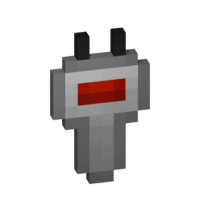
The Frequency Tool is a handy tool that makes it easy for you to take a frequency and set multiple transmitters and/or receivers to the same frequency. When holding it in your hand you can copy a frequency into the Frequency Tool by sneaking and right-clicking on a transmitter or receivers. To copy the now-stored frequency, simply right-click either a transmitter or receiver. By sneaking and right-clicking the frequency tool (not on a transmitter/receiver), you can set the frequency through the GUI.
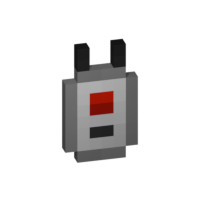
The Frequency Sniffer can be used as a tool to find active transmitters on a given frequency. As with other frequency tools too you can set the frequency either manually over the gui or copying it from a transmitter/receiver. When you right-click the sniffer tool all active transmitters on the set frequency within range are highlighted with a wireframe around the transmitter block. There is also a chat message that tells you where all the active transmitters are located at by showing the block position. If you are an admin/op, you can also click on the block position to teleport there. See example in the screenshot section. You can also change the highlight color in the configs!
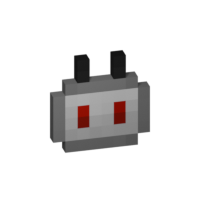
You use the Linker to link a P2P Transmitter and a P2P Receiver together. By sneaking and right-clicking on a block you select this block for linkage. The selected block is highlighted and can be seen through other blocks, the position of it can also be seen in the tooltip of the Linker item. The color of this highlight can be adjusted in the configs. To complete the link, simply right-click the blocks counterpart and you are done.

The Circuit is for crafting purposes only.
Note: If you press Shift in the Frequency GUI, all values to change the frequency will be multiplied by 100 (so you can add/subtract 100 and 1000) or you can just type in your desired frequency manually. You can also change the color of the frequency display on a receiver/transmitter in the Configs. The same goes for highlighting with the Frequency Sniffer!
In general Wireless Redstone should always be compatible between mod loaders. Meaning you can enter a world you began with Forge and later switch to Fabric and everything should still work with Wireless Redstone. The same is true for Minecraft versions. Newer versions of Minecraft and the mod should always be backwards compatible with older ones. That being said, always make a backup of your world before switching loaders or versions and open an issue if something of Wireless Redstone isn't working anymore.
For recipes you can use the vanilla recipe book, but I suggest JEI (in the screenshots tab you can also see the recipes).
Issues, bugs or similar things can be reported on this project page's issue tab. You can also write me a PM.

Please tell me if you consider making textures for the mod. I will link them on this project page if you want to.
Project description from CurseForge.
Pick your setup
Choose the version and loader you play, then open the matching release.
Check the dependencies, then try the file in a copied instance before changing a world you care about.
Recent files
wirelessredstone-forge-1.2.2+1.20.4.jar
30 Sept 2025
wirelessredstone-neoforge-1.2.2+1.20.4.jar
30 Sept 2025
wirelessredstone-fabric-1.2.2+1.20.4.jar
30 Sept 2025
wirelessredstone-fabric-1.2.2+1.20.1.jar
30 Sept 2025
wirelessredstone-forge-1.2.2+1.20.1.jar
30 Sept 2025
wirelessredstone-forge-1.2.1+1.20.1.jar
24 Sept 2025
wirelessredstone-fabric-1.2.1+1.20.1.jar
19 Sept 2025
wirelessredstone-fabric-1.2.1+1.20.4.jar
19 Sept 2025
wirelessredstone-neoforge-1.2.1+1.20.4.jar
19 Sept 2025
wirelessredstone-forge-1.2.1+1.20.4.jar
19 Sept 2025
wirelessredstone-neoforge-1.2.0+1.20.4.jar
11 Sept 2025
wirelessredstone-forge-1.2.0+1.20.4.jar
11 Sept 2025
Looking for an older file? The official CurseForge project page is in Resources.
 mod
modGetting tired of the constant chest monsters and overflowing storage systems? Ultimate Compression is a mod created to reduce storage requirements by compressing almost all vanilla Minecraft blocks & items! The mod also includes custom tools and armor created with the compressed variants of ingots and their respective
 mod
modAdds the ability to create filter tabs in your AE2/RS terminals
 mod
modHighlight nearby inventories containing an item, and restock items from or deposit items to them directly from your inventory.