Minecraft version
Back to mods 
CurseForge · Minecraft mod
Smithee
Combine all the tools
Choose a version Pick your version below, then grab the matching file.
Quick answer
Which Smithee release should I use?
beta file Wraith Smithee 0.2.3
Game version 1.16.5
Loader Fabric
Smithee Wraith Smithee 0.2.3 targets 1.16.5 with Fabric. The project page does not say whether this file belongs on the client, dedicated server, or both. No extra mods listed for this file.
Where it goes
Is Smithee required on the client, server, or both?
The project page does not say whether this file belongs on the client, dedicated server, or both.
Client Source doesn’t say
Dedicated server Source doesn’t say
Loader for this release Fabric
Required install it here Optional supported, not mandatory Not supported do not install here Source doesn’t say do not assume
The source does not explicitly classify this release as client-only or server-only.
What else does Smithee Wraith Smithee 0.2.3 need?
Wraith Smithee 0.2.3. Change the file and its required mods may change too.
This file does not list any required mods. Do not add a library just because a different file uses it.
This file does not list any required or optional mods.
Before you install it
Add Smithee without breaking your instance.
Built for Smithee Wraith Smithee 0.2.3. Pick another file and the loader, install side or required mods may change.
- 01
Stick to this file
Use Wraith Smithee 0.2.3. It targets 1.16.5 with Fabric; another release may have different loader, side or dependency requirements.
- 02
Bring the mods it needs
This file does not list any required mods. Do not add a library just because a different file uses it.
- 03
Put it on the correct side
The project page does not say whether this file belongs on the client, dedicated server, or both.
- 04
Pick the file you checked
Use the “Get this file” button beside Wraith Smithee 0.2.3. It opens that exact file at the source.
About this project
What does Smithee add?
Smithee
This mod is discontinued for the time being, and I am unsure when/if I'll be coming back to it.
Smithee is a mod all about different tool-part combinations. Its goal is not to be a clone of Tinker's Construct, but rather a "spiritual successor" with high customizability.
You can add new custom tool materials and change their stats all via configs.
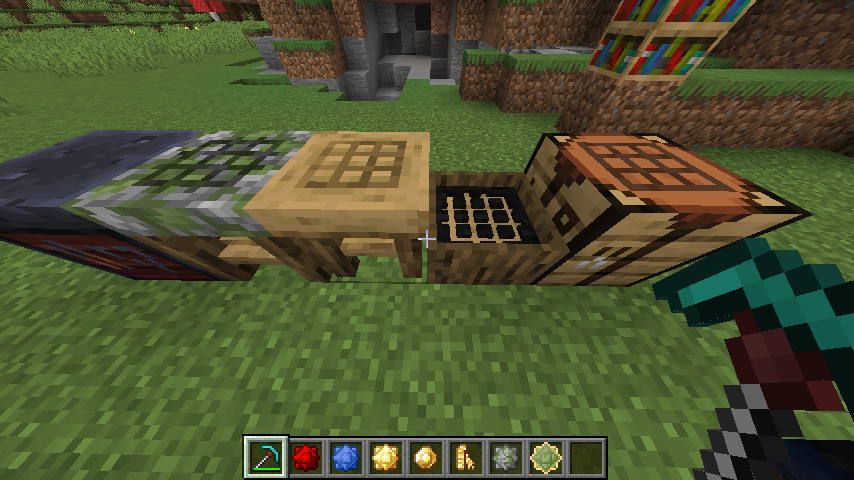
The 3 different tool stations:
Disassembly Table - Breaks apart the tools back to their original components
Assembly Table - Combines tool parts into tools. Also used for embossing
Chiseling Table - Chisel materials into tool parts (requires a chisel)
The items in the inventory are embossments used for giving additional stats to tools. You can only add 1 embossment per tool level, which is acquired by shift-right-clicking with the tool, which exchanges your XP for tool XP.
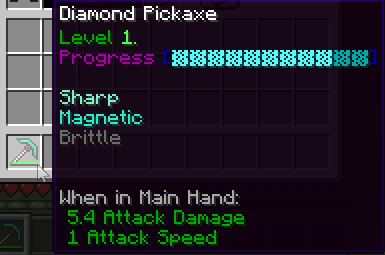
Currently supports materials from the following mods:
Join the Development Discord if you want to help out or follow progress.
Any help is appreciated (be it code, stat-balancing, ideas/suggestions, etc.)
Project description from CurseForge.
Pick your setup
Smithee by Minecraft version and loader
Choose the version and loader you play, then open the matching release.
Minecraft version
1.16.4
1 loader buildCheck the dependencies, then try the file in a copied instance before changing a world you care about.
Recent files
Smithee versions and loaders
Wraith Smithee 0.2.3
wraith-smithee-0.2.3.jar
20 Jan 2021
Client Source doesn’t say Server Source doesn’t say Dependencies No extras listed Listed on Release listing
Check the 1.16.5 · Fabric setup Fabric1.16.5 beta
Smithee 0.2.2 ALPHA
wraith-smithee-0.2.2a.jar
15 Jan 2021
Client Source doesn’t say Server Source doesn’t say Dependencies No extras listed Listed on Release listing
Check the 1.16.4 · Fabric setup Fabric1.16.4 alpha
Smithee 0.2.1 ALPHA
wraith-smithee-0.2.1a.jar
13 Jan 2021
Client Source doesn’t say Server Source doesn’t say Dependencies No extras listed Listed on Release listing
Check the 1.16.4 · Fabric setup Fabric1.16.4 alpha
Smithee 0.2 ALPHA
wraith-smithee-0.2a.jar
12 Jan 2021
Client Source doesn’t say Server Source doesn’t say Dependencies No extras listed Listed on Release listing
Check the 1.16.4 · Fabric setup Fabric1.16.4 alpha
Smithee 0.1.5
wraith-smithee-0.1.5.jar
5 Jan 2021
Client Source doesn’t say Server Source doesn’t say Dependencies No extras listed Listed on Release listing
Check the 1.16.4 · Fabric setup Fabric1.16.4 beta
Smithee v0.1.4
wraith-smithee-0.1.4.jar
30 Dec 2020
Client Source doesn’t say Server Source doesn’t say Dependencies No extras listed Listed on Release listing
Check the 1.16.4 · Fabric setup Fabric1.16.4 beta
Smithee v0.1.3
wraith-smithee-0.1.3.jar
29 Dec 2020
Client Source doesn’t say Server Source doesn’t say Dependencies No extras listed Listed on Release listing
Check the 1.16.4 · Fabric setup Fabric1.16.4 beta
Smithee v0.1.2
wraith-smithee-0.1.2.jar
28 Dec 2020
Client Source doesn’t say Server Source doesn’t say Dependencies No extras listed Listed on Release listing
Check the 1.16.4 · Fabric setup Fabric1.16.4 beta
Smithee Alpha 1
wraith-smithee-0.1.0.jar
23 Dec 2020
Client Source doesn’t say Server Source doesn’t say Dependencies No extras listed Listed on Release listing
Check the 1.16.4 · Fabric setup Fabric1.16.4 alpha
Looking for an older file? The official CurseForge project page is in Resources.