
Minecraft version
Back to mods 
CurseForge · Minecraft mod
PXL-God Apples
Adds More apples and enchanted varients.
Choose a version Pick your version below, then grab the matching file.
Quick answer
Which PXL-God Apples release should I use?
Latest stable file PXL_God_Apples-NeoForge-1.21.1 V0.01
Game version 1.21.1
Loader NeoForge
PXL-God Apples PXL_God_Apples-NeoForge-1.21.1 V0.01 targets 1.21.1 with NeoForge. The project page does not say whether this file belongs on the client, dedicated server, or both. No extra mods listed for this file.
Where it goes
Is PXL-God Apples required on the client, server, or both?
The project page does not say whether this file belongs on the client, dedicated server, or both.
Client Source doesn’t say
Dedicated server Source doesn’t say
Loader for this release NeoForge
Required install it here Optional supported, not mandatory Not supported do not install here Source doesn’t say do not assume
The source does not explicitly classify this release as client-only or server-only.
What else does PXL-God Apples PXL_God_Apples-NeoForge-1.21.1 V0.01 need?
PXL_God_Apples-NeoForge-1.21.1 V0.01. Change the file and its required mods may change too.
This file does not list any required mods. Do not add a library just because a different file uses it.
This file does not list any required or optional mods.
Before you install it
Add PXL-God Apples without breaking your instance.
Built for PXL-God Apples PXL_God_Apples-NeoForge-1.21.1 V0.01. Pick another file and the loader, install side or required mods may change.
- 01
Stick to this file
Use PXL_God_Apples-NeoForge-1.21.1 V0.01. It targets 1.21.1 with NeoForge; another release may have different loader, side or dependency requirements.
- 02
Bring the mods it needs
This file does not list any required mods. Do not add a library just because a different file uses it.
- 03
Put it on the correct side
The project page does not say whether this file belongs on the client, dedicated server, or both.
- 04
Pick the file you checked
Use the “Get this file” button beside PXL_God_Apples-NeoForge-1.21.1 V0.01. It opens that exact file at the source.
About this project
What does PXL-God Apples add?
WELCOME ALL TO TE REVAMPED GOD APPLES MOD. This mod aims to add verious OP apples into the game. This mod is aimed to improve the vanilla game play. ATM this mod only adds a few items and recipes but more are to come soon.
Recipes-
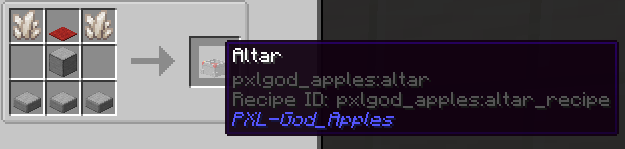
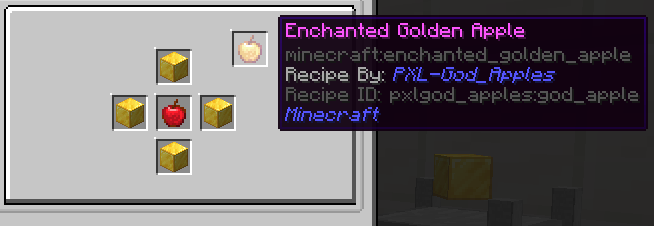
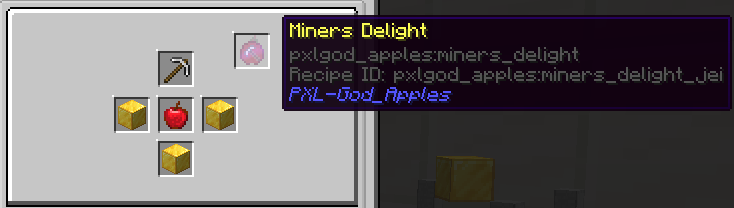
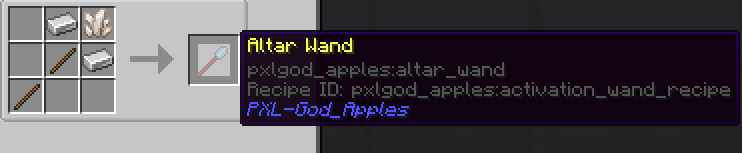
All god apple recipes are made with the new infusion altar. To create a god apple just put a regular apple in the altar and required items onto the pedestals and then right click the altar with the altar want and BOOM god apple. JEI integration is included so just check the recipe in jei if you froget what ingredents are needed.
Altar setup-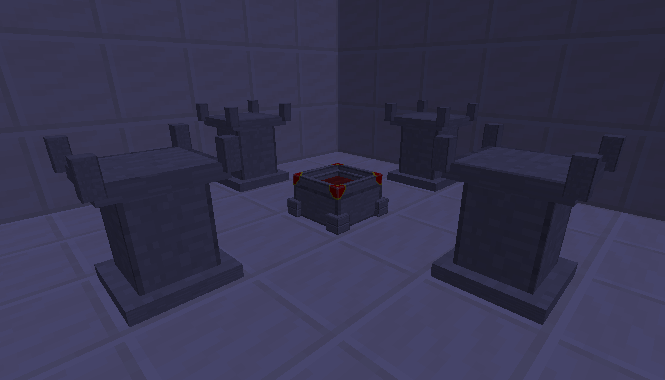
Altar set up is Altar in center with 1 pedestal on n.s.w.e with one block spacing(WARNING.... Altar setup may change in the future and may include more complex altar setups.) To Verify Altar setup just shift right click with a empty hand and it will tell you if its correct.
Earlier version of mod only included God apple recipe and no altar. All stated above is only included in V0.01 and later.
Allowed-To use in modpacks and personal use
Not-Allowed- Distribute thru 3ds party or modify files
ATTENTION--- UPDATE IN PROGRESS. MASSIVE CONTENT UPDATE COMING IN THE NEXT FEW WEEKS.
Get the best hosting experience with BisectHosting and save 25% off for new customers using PXL.
Project description from CurseForge.
Pick your setup
PXL-God Apples by Minecraft version and loader
Choose the version and loader you play, then open the matching release.
Minecraft version
1.20.1
1 loader buildMinecraft version
1.15.2
1 loader buildMinecraft version
1.14.4
1 loader buildMinecraft version
1.12.2
1 loader buildCheck the dependencies, then try the file in a copied instance before changing a world you care about.
Recent files
PXL-God Apples versions and loaders
PXL_God_Apples-NeoForge-1.21.1 V0.01
pxl-god_apples-V0.01-neoforge-1.21.1.jar
8 Feb 2026
Client Source doesn’t say Server Source doesn’t say Dependencies No extras listed Listed on Release listing
Check the 1.21.1 · NeoForge setup 1.21.1NeoForge release
PXL-God_Apples V0.01 (1.20.1-Forge)
pxl-god_apples-V0.01-forge-1.20.1.jar
8 Feb 2026
Client Source doesn’t say Server Source doesn’t say Dependencies No extras listed Listed on Release listing
Check the 1.20.1 · Forge setup 1.20.1Forge release
God Apples + 1.20.1 V0.0.2.jar
4 Feb 2024
Client Source doesn’t say Server Source doesn’t say Dependencies No extras listed Listed on Release listing
Check the 1.20.1 · Forge setup 1.20.1Forge release
God Apples + 1.20.1 V0.0.1
God Apples + 1.20.1 V0.0.1.jar
19 Dec 2023
Client Source doesn’t say Server Source doesn’t say Dependencies No extras listed Listed on Release listing
Check the 1.20.1 · Forge setup 1.20.1Forge beta
God Apple V1.0.0 (1.15.2)
God_Apple V1.0.0 (1.15.2).jar
4 Mar 2021
Client Source doesn’t say Server Source doesn’t say Dependencies No extras listed Listed on Release listing
Check the 1.15.2 setup 1.15.2 beta
God Apple V1.0.0 (1.14.4)
God_Apple V1.0.0 (1.14.4).jar
4 Mar 2021
Client Source doesn’t say Server Source doesn’t say Dependencies No extras listed Listed on Release listing
Check the 1.14.4 setup 1.14.4 beta
God Apple V1.0.0 (1.12.2)
God_Apple V1.0.0 (1.12.2).jar
4 Mar 2021
Client Source doesn’t say Server Source doesn’t say Dependencies No extras listed Listed on Release listing
Check the 1.12.2 setup 1.12.2 beta
Looking for an older file? The official CurseForge project page is in Resources.
 mod
CurseForge + Modrinth · Minecraft
Agritech (AT2)
Farming automation mod. Planters and raised beds grow your crops and trees for you.
 mod
CurseForge · Minecraft
The Flood: Rising Waters
An apocalyptic survival mod where the world gradually drowns in rising floodwaters from deepest caves up to mountain peaks.
 mod
CurseForge · Minecraft
Combat Styles Content
Content made for Combat Styles with many accessories and weapons