Minecraft version
Back to mods 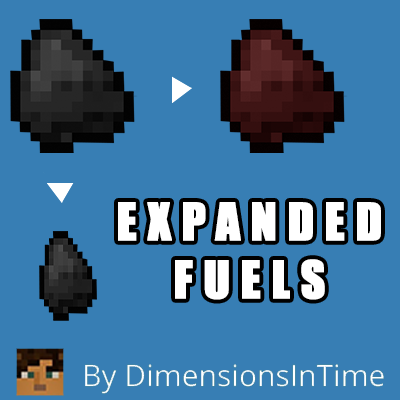
CurseForge · Minecraft mod
Expanded Fuels
This is a mod adding some solid fuel sources for machines and furnaces.
Choose a version Pick your version below, then grab the matching file.
Quick answer
Which Expanded Fuels release should I use?
Latest stable file Expanded-Fuels-Neoforge-1.0.0.jar
Game version 1.21.4
Loader NeoForge
Expanded Fuels Expanded-Fuels-Neoforge-1.0.0.jar targets 1.21.4 with NeoForge. The project page does not say whether this file belongs on the client, dedicated server, or both. No extra mods listed for this file.
Where it goes
Is Expanded Fuels required on the client, server, or both?
The project page does not say whether this file belongs on the client, dedicated server, or both.
Client Source doesn’t say
Dedicated server Source doesn’t say
Loader for this release NeoForge
Required install it here Optional supported, not mandatory Not supported do not install here Source doesn’t say do not assume
The source does not explicitly classify this release as client-only or server-only.
What else does Expanded Fuels Expanded-Fuels-Neoforge-1.0.0.jar need?
Expanded-Fuels-Neoforge-1.0.0.jar. Change the file and its required mods may change too.
This file does not list any required mods. Do not add a library just because a different file uses it.
This file does not list any required or optional mods.
Before you install it
Add Expanded Fuels without breaking your instance.
Built for Expanded Fuels Expanded-Fuels-Neoforge-1.0.0.jar. Pick another file and the loader, install side or required mods may change.
- 01
Stick to this file
Use Expanded-Fuels-Neoforge-1.0.0.jar. It targets 1.21.4 with NeoForge; another release may have different loader, side or dependency requirements.
- 02
Bring the mods it needs
This file does not list any required mods. Do not add a library just because a different file uses it.
- 03
Put it on the correct side
The project page does not say whether this file belongs on the client, dedicated server, or both.
- 04
Pick the file you checked
Use the “Get this file” button beside Expanded-Fuels-Neoforge-1.0.0.jar. It opens that exact file at the source.
About this project
What does Expanded Fuels add?
Simple mod that adds some new fuels that are more versatile for your furnace.
All future versions of this mod will be for Neoforge.
Regular coal has a carbon value of 1600.
Splintered Coal / Splintered Charcoal : Carbon value of 200, just enough to smelt one item. One coal or charcoal gets you 8 splintered.
Kindling : Carbon value of 400. Three sticks gets you a bundle of kindling, enough to smelt two items.
Green Coal: Carbon value of 2200. Combine one emerald and one coal to get enough to smelt 12 items.
Red Coal: Carbon value of 2200. Combine one redstone and one coal to get enough to smelt 12 items.
Compacted Coal : Carbon value 4400. Place two coal in a crafting table to compact them into one Compacted Coal. Smelts 24 items.
Green Compacted Coal : Carbon value 6,800. Place a compacted coal and an emerald in a crafting table to get a Green Compacted. Smelts 34 items.
Red Compacted Coal : Carbon value 9,800. Place a compacted coal and a piece of redstone in a crafting table to get a Red Compacted. Smelts 49 items.
Double Compacted Coal : Carbon value 12,800. Two compacted coal = one Double Compacted. Smelts a stack of items (64).
All coal recipes now work with charcoal as well. Added Green compacted coal in 1.19. Added Reverse recipes for compacted fuels in 1.20.1. Added version for Neoforge 1.21.4.
Project description from CurseForge.
Pick your setup
Expanded Fuels by Minecraft version and loader
Choose the version and loader you play, then open the matching release.
Minecraft version
1.20.1
1 loader buildMinecraft version
1.19.3
1 loader buildMinecraft version
1.19
2 loader buildsMinecraft version
1.16.4
1 loader buildMinecraft version
1.16.3
1 loader buildCheck the dependencies, then try the file in a copied instance before changing a world you care about.
Recent files
Expanded Fuels versions and loaders
Expanded-Fuels-Neoforge-1.0.0.jar
expandedfuels-1.0.0.jar
7 Apr 2025
Client Source doesn’t say Server Source doesn’t say Dependencies No extras listed Listed on Release listing
Check the 1.21.4 · NeoForge setup 1.21.4NeoForge release
Expanded-Fuels-Neoforge-1.21.4-0.0.1
expandedfuels-0.0.1.jar
3 Apr 2025
Client Source doesn’t say Server Source doesn’t say Dependencies No extras listed Listed on Release listing
Check the 1.21.4 · NeoForge setup 1.21.4NeoForge alpha
Expanded Fuels 1.20.1-0.1
expandedfuels-0.1-1.20.1.jar
26 Oct 2023
Client Source doesn’t say Server Source doesn’t say Dependencies No extras listed Listed on Release listing
Check the 1.20.1 · Forge setup 1.20.1Forge beta
Expanded Fuels 1.19.3-0.3
expandedfuels-1.19.3-0.3.jar
12 Feb 2023
Client Source doesn’t say Server Source doesn’t say Dependencies No extras listed Listed on Release listing
Check the 1.19.3 · Forge setup 1.19.3Forge alpha
Expanded Fuels 1.19-0.2
expandedfuels-0.2.jar
7 Feb 2023
Client Source doesn’t say Server Source doesn’t say Dependencies No extras listed Listed on Release listing
Check the 1.19 setup Expanded Fuels 0.1 Alpha
expandedfuels-0.1.jar
6 Feb 2023
Client Source doesn’t say Server Source doesn’t say Dependencies No extras listed Listed on Release listing
Check the 1.19 · Forge setup Forge1.19 alpha
Expanded Fuels 1.16.3-03
expandedfuels-1.16.3-0.3.jar
28 May 2021
Client Source doesn’t say Server Source doesn’t say Dependencies No extras listed Listed on Release listing
Check the 1.16.4 · Forge setup 1.16.3Forge1.16.4 beta
Expanded Fuels 1.16.3-0.2
expandedfuels-1.16.3-0.2.jar
16 Mar 2021
Client Source doesn’t say Server Source doesn’t say Dependencies No extras listed Listed on Release listing
Check the 1.16.4 · Forge setup 1.16.3Forge1.16.4 alpha
Expanded Fuels 1.16-0.1
expandedfuels-1.16.3-0.1.jar
13 Mar 2021
Client Source doesn’t say Server Source doesn’t say Dependencies No extras listed Listed on Release listing
Check the 1.16.3 · Forge setup 1.16.3Forge alpha
Looking for an older file? The official CurseForge project page is in Resources.
 mod
CurseForge + Modrinth · Minecraft
Pin Tooltips 📌
Adds the ability to pin tooltips to the screen and view more information from them such as enchantment and mob effect descriptions.
 mod
CurseForge · Minecraft
Living Wind
A complete wind system featuring realistic wind behavior, atmospheric effects, interactive blocks, and integration with other mods.
 mod
CurseForge · Minecraft
KingKanman's Blood N' Guts
Disguise yourself from zombies by covering yourself in their flesh!