Minecraft version
Back to mods 
CurseForge · Minecraft mod
Convenient Storage
A mod that can store almost everything in just a single item.
Choose a version Pick your version below, then grab the matching file.
Quick answer
Which Convenient Storage release should I use?
Latest stable file Convenient Storage-1.20.1-1.3.1.jar
Game version 1.20.1
Loader Forge
Convenient Storage-1.20.1-1.3.1.jar targets 1.20.1 with Forge. The project page does not say whether this file belongs on the client, dedicated server, or both. No extra mods listed for this file.
Where it goes
Is Convenient Storage required on the client, server, or both?
The project page does not say whether this file belongs on the client, dedicated server, or both.
Client Source doesn’t say
Dedicated server Source doesn’t say
Loader for this release Forge
Required install it here Optional supported, not mandatory Not supported do not install here Source doesn’t say do not assume
The source does not explicitly classify this release as client-only or server-only.
What else does Convenient Storage-1.20.1-1.3.1.jar need?
Convenient Storage-1.20.1-1.3.1.jar. Change the file and its required mods may change too.
This file does not list any required mods. Do not add a library just because a different file uses it.
This file does not list any required or optional mods.
Before you install it
Add Convenient Storage without breaking your instance.
Built for Convenient Storage-1.20.1-1.3.1.jar. Pick another file and the loader, install side or required mods may change.
- 01
Stick to this file
Use Convenient Storage-1.20.1-1.3.1.jar. It targets 1.20.1 with Forge; another release may have different loader, side or dependency requirements.
- 02
Bring the mods it needs
This file does not list any required mods. Do not add a library just because a different file uses it.
- 03
Put it on the correct side
The project page does not say whether this file belongs on the client, dedicated server, or both.
- 04
Pick the file you checked
Use the “Get this file” button beside Convenient Storage-1.20.1-1.3.1.jar. It opens that exact file at the source.
About this project
What does Convenient Storage add?
Convenient Storage is a lightweight mod that only added an item: Storage Tablet.
NOTICE
- Don't use Inventory Profiles Next and Inventory Essentials, they conflicts with this mod.
- It is recommended to use Inventory Sorter and Mouse Tweaks.
- Use this mod to allow your storage to interact with blocks, which also enables energy storage.
UTILITIES
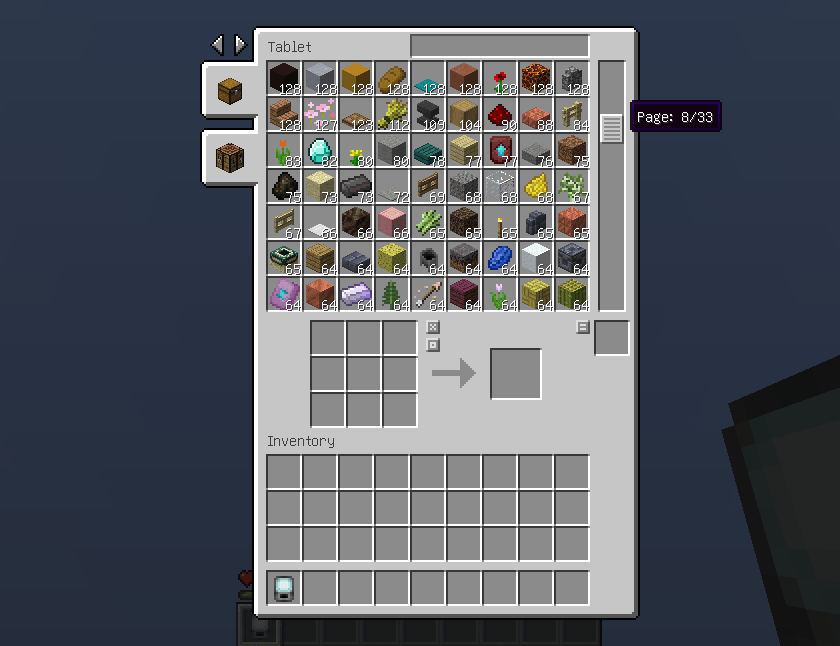
- Basic Usage: Storing almost infinity items, fluids, experience.(Capped at 9223372036854775807)
- Enchantment: Stores enchantments, use /gamerule limitedEnchantmentLevels false to disable the limit of enchantment withdrawed.
- Waypoint: Stores waypoints anywhere you come and use casually anytime.
- Entity: Stores when rightclick on an entity, you can attack or resummon them or make them to spawn eggs in storage.
- Interact: Collecting fluid from level like a bucket, pouring fluid into level like a filled bucket while "Selected Fluid" is not empty.
- Auto Pick: Configure items automatically store into storage when picked up inside tablet, use key 'Q' to remove items.
- Fluid Auto Pick: Pick up fluid blocks within your reach automatically while enabled and holding tablet.
- Quick Loot: Right click on loot chests to pick up loots directly.
- Craft: Built in a crafting table in Storage Tablet's menu, supporting complex operations.
- Smelt: Smelt items with "heat_source" instead of fuel in Storage Tablet's menu.
- Forge: Inner anvil that never causes "Too Expensive"!
- Smith: Inner smithing table!
- Cut: Inner composite cutter which means you can also cut woods and stones inside tablet, wood-cutting recipes can be configured with datapack.
- Brew: Inner brewing stand which can brew continuously.
- Enchant: Built in Enchanting Table.
- Search: Start with c to search s. '@':Mod name; '#':Tag; ':':Item ID.
- Team Storage: Use /storage to store items with other players.
- Energy: Storing infinity energy if energy storage is enabled.
SPECIAL
We use torches, campfires and magma blocks as heat source for smelting.
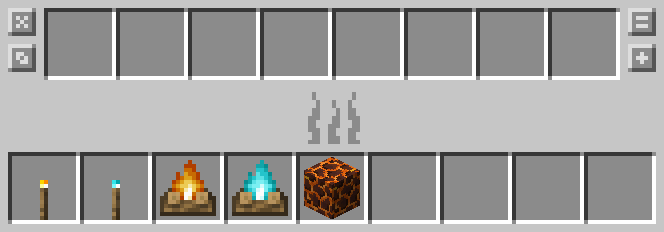
This is configurable by datapack.
ADDITIONAL
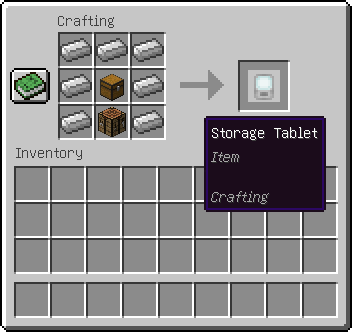
Once you crafted a Storage Tablet, you can only use Item Storage and Crafting Utility initially.
Use according recipes to upgrade your tablet with more Storages and Utilities.
If you disliked upgrading tablet frequently, use command "/gamerule restrictedTabletTabs false" to disable this.
Then you can use all Storages and Utilities regardless of whether it was upgraded.
CRAFT YOUR TABLET
STORE YOUR ITEMS
UPGRADE YOUR TABLET
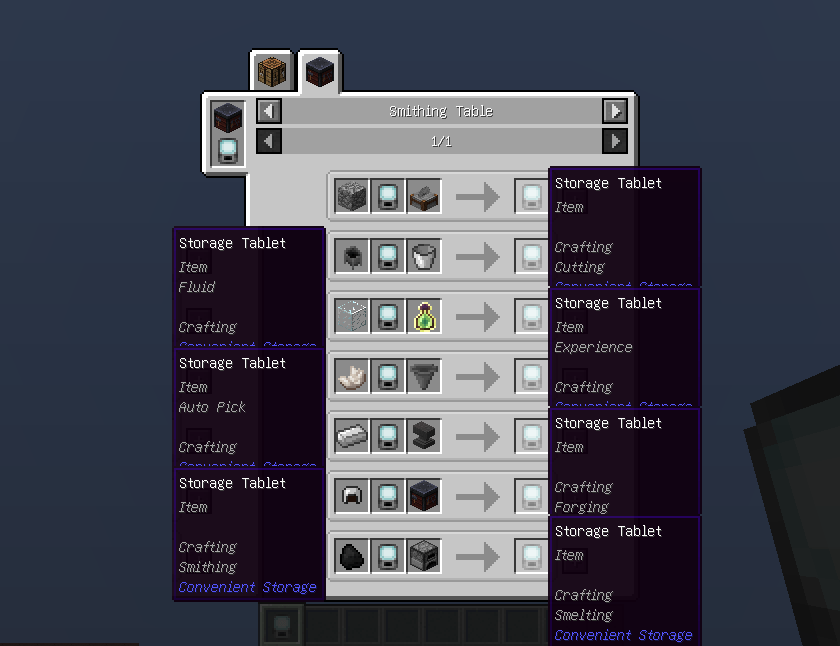
MAXED TABLET
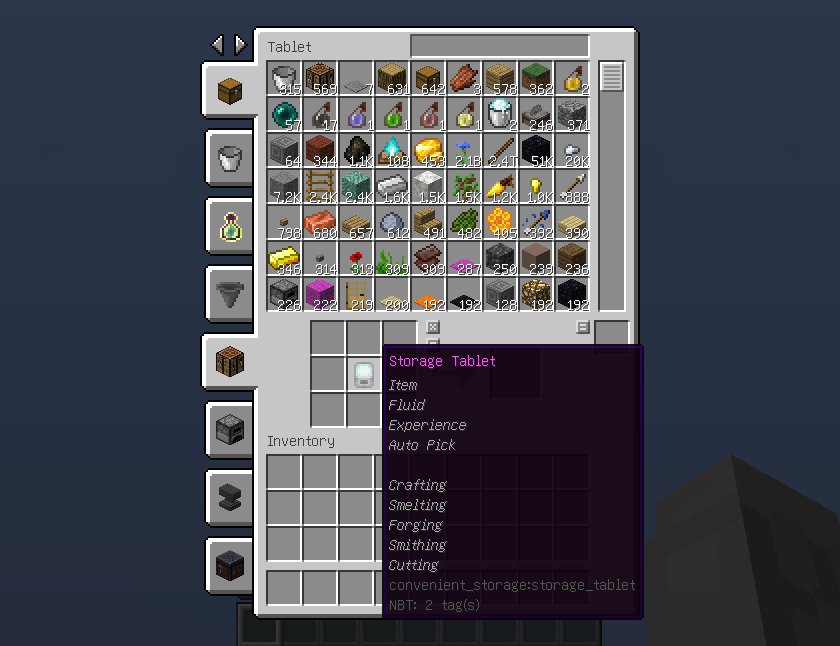
Project description from CurseForge.
Pick your setup
Convenient Storage by Minecraft version and loader
Choose the version and loader you play, then open the matching release.
Minecraft version
1.20.1
1 loader buildCheck the dependencies, then try the file in a copied instance before changing a world you care about.
Recent files
Convenient Storage versions and loaders
Convenient Storage-1.20.1-1.3.1.jar
3 Aug 2026
Client Source doesn’t say Server Source doesn’t say Dependencies No extras listed Listed on Release listing
Check the 1.20.1 · Forge setup 1.20.1Forge release
Convenient Storage-1.20.1-1.3.0.jar
25 Jul 2026
Client Source doesn’t say Server Source doesn’t say Dependencies No extras listed Listed on Release listing
Check the 1.20.1 · Forge setup 1.20.1Forge release
1.2.0
Convenient Storage-1.20.1-1.2.0.jar
15 Jul 2026
Client Optional Server Optional Dependencies No extras listed Listed on Release listing
Check the 1.20.1 · Forge setup 1.20.1Forge release
Convenient Storage-1.20.1-1.2.0.jar
13 Jul 2026
Client Source doesn’t say Server Source doesn’t say Dependencies No extras listed Listed on Release listing
Check the 1.20.1 · Forge setup 1.20.1Forge release
Convenient Storage-1.20.1-1.1.3.jar
6 Jul 2026
Client Source doesn’t say Server Source doesn’t say Dependencies No extras listed Listed on Release listing
Check the 1.20.1 · Forge setup 1.20.1Forge release
Convenient Storage-1.20.1-1.1.2.jar
5 Jul 2026
Client Source doesn’t say Server Source doesn’t say Dependencies No extras listed Listed on Release listing
Check the 1.20.1 · Forge setup 1.20.1Forge release
Convenient Storage-1.20.1-1.1.1.jar
3 Jul 2026
Client Source doesn’t say Server Source doesn’t say Dependencies No extras listed Listed on Release listing
Check the 1.20.1 · Forge setup 1.20.1Forge release
Convenient Storage-1.20.1-1.1.0.jar
27 Jun 2026
Client Source doesn’t say Server Source doesn’t say Dependencies No extras listed Listed on Release listing
Check the 1.20.1 · Forge setup 1.20.1Forge release
Convenient Storage-1.20.1-1.0.5.jar
1 Jun 2026
Client Source doesn’t say Server Source doesn’t say Dependencies No extras listed Listed on Release listing
Check the 1.20.1 · Forge setup 1.20.1Forge release
Convenient Storage-1.20.1-1.0.4.jar
28 May 2026
Client Source doesn’t say Server Source doesn’t say Dependencies No extras listed Listed on Release listing
Check the 1.20.1 · Forge setup 1.20.1Forge release
Convenient Storage-1.20.1-1.0.3.jar
17 May 2026
Client Source doesn’t say Server Source doesn’t say Dependencies No extras listed Listed on Release listing
Check the 1.20.1 · Forge setup 1.20.1Forge release
Convenient Storage-1.20.1-1.0.2.jar
12 May 2026
Client Source doesn’t say Server Source doesn’t say Dependencies No extras listed Listed on Release listing
Check the 1.20.1 · Forge setup 1.20.1Forge release
Looking for an older file? The official CurseForge project page is in Resources.
 mod
mod CurseForge + Modrinth · Minecraft
Dungeon Train: A Lore-Rich Roguelite RPG Adventure
Adventure time inspired dungeon crawler on a train. Procedurally generated carriages on a infinite sable physics train. Rich narrative, with custom made mods for a completely unique experience.
 mod
mod CurseForge + Modrinth · Minecraft
Friends&Foes (Forge/NeoForge)
Adds outvoted and forgotten mobs from the mob vote, expanding on their original concepts and adding new vanilla-like features. The mod includes: Copper Golem, Crab, Glare, Moobloom, Iceologer, Rascal, Tuff Golem, Wildfire, Illusioner, Zombie Horse
 mod
mod Modrinth · Minecraft
HorizonUI
Bring a modern, clean, and customizable user interface to Minecraft. HorizonUI focuses on visual clarity, animated backgrounds, and layout refinement to deliver a fresh and immersive UI experience.