Minecraft version
Back to mods 
CurseForge · Minecraft mod
Autopalette
A clientside resource utility mod for minecraft forge that generates palette swaps of existing textures at load time
Choose a version Pick your version below, then grab the matching file.
Quick answer
Which Autopalette release should I use?
Latest stable file autopalette-1.19.2-2.1.0.1.jar
Game version 1.19.2
Loader Forge
autopalette-1.19.2-2.1.0.1.jar targets 1.19.2 with Forge. The project page does not say whether this file belongs on the client, dedicated server, or both. No extra mods listed for this file.
Where it goes
Is Autopalette required on the client, server, or both?
The project page does not say whether this file belongs on the client, dedicated server, or both.
Client Source doesn’t say
Dedicated server Source doesn’t say
Loader for this release Forge
Required install it here Optional supported, not mandatory Not supported do not install here Source doesn’t say do not assume
The source does not explicitly classify this release as client-only or server-only.
What else does autopalette-1.19.2-2.1.0.1.jar need?
autopalette-1.19.2-2.1.0.1.jar. Change the file and its required mods may change too.
This file does not list any required mods. Do not add a library just because a different file uses it.
This file does not list any required or optional mods.
Before you install it
Add Autopalette without breaking your instance.
Built for autopalette-1.19.2-2.1.0.1.jar. Pick another file and the loader, install side or required mods may change.
- 01
Stick to this file
Use autopalette-1.19.2-2.1.0.1.jar. It targets 1.19.2 with Forge; another release may have different loader, side or dependency requirements.
- 02
Bring the mods it needs
This file does not list any required mods. Do not add a library just because a different file uses it.
- 03
Put it on the correct side
The project page does not say whether this file belongs on the client, dedicated server, or both.
- 04
Pick the file you checked
Use the “Get this file” button beside autopalette-1.19.2-2.1.0.1.jar. It opens that exact file at the source.
About this project
What does Autopalette add?
Autopalette is a clientside forge mod for minecraft that uses an asset loader to generate palette swaps of existing textures at runtime, when resources are loaded. Autopalette does not need to be installed on servers and does nothing when installed on servers.
When installed on a client, Autopalette enables the loading of autotexture jsons to generate palette-swapped textures when resource packs are loaded or reloaded. These textures do not replace the originals, and can be used alongside them.
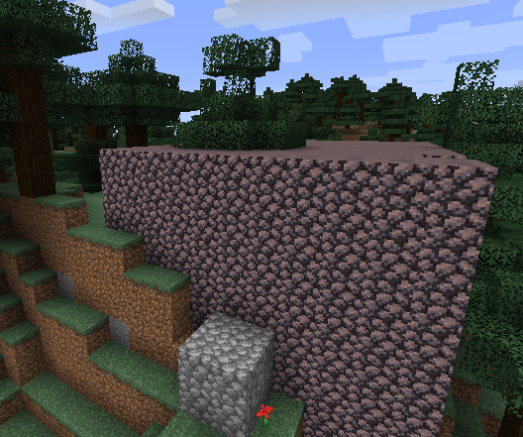
Information on creating autotexture jsons can be found on the github readme at this link
Project description from CurseForge.
Pick your setup
Autopalette by Minecraft version and loader
Choose the version and loader you play, then open the matching release.
Minecraft version
1.18.2
1 loader buildMinecraft version
1.18.1
1 loader buildMinecraft version
1.17.1
1 loader buildMinecraft version
1.16.5
1 loader buildCheck the dependencies, then try the file in a copied instance before changing a world you care about.
Recent files
Autopalette versions and loaders
autopalette-1.19.2-2.1.0.1.jar
14 Aug 2022
Client Source doesn’t say Server Source doesn’t say Dependencies No extras listed Listed on Release listing
Check the 1.19.2 · Forge setup 1.19.2Forge release
autopalette-1.18.1-2.1.0.0.jar
7 Jan 2022
Client Source doesn’t say Server Source doesn’t say Dependencies No extras listed Listed on Release listing
Check the 1.18.2 · Forge setup 1.18.11.18.2Forge release
autopalette-1.17.1-2.0.0.0.jar
23 Jul 2021
Client Source doesn’t say Server Source doesn’t say Dependencies No extras listed Listed on Release listing
Check the 1.17.1 · Forge setup 1.17.1Forge release
autopalette-1.16.5-1.0.0.0.jar
9 May 2021
Client Source doesn’t say Server Source doesn’t say Dependencies No extras listed Listed on Release listing
Check the 1.16.5 · Forge setup 1.16.5Forge release
Looking for an older file? The official CurseForge project page is in Resources.
 mod
CurseForge · Minecraft
TrailWright
This mod adds gradual, ragged footpaths. Walk a route often and grass wears to dirt, and coarse dirt, turning to mud near water.
 mod
CurseForge · Minecraft
Cobblemon: Dreamweaving Prism Ball
Extraordinary beautiful poke ball to turn the captured pokemon shiny.
 mod
CurseForge · Minecraft
JUJUTSU: REBORN
an action-packed Jujutsu Kaisen Minecraft mod featuring enhanced combat, cinematic cursed techniques and Domain Expansions, powerful cursed spirits and bosses, immersive quests, and an RPG progression system with dungeons, XP, leveling, and loot.