Sophisticated Core Optional for Etched 5.1.0 NeoForge
optionalMatching file found Matched file: sophisticatedcore-1.21.1-1.5.7.2381.jar
CurseForge · Minecraft mod
A new form of entertainment
Quick answer
Etched 5.1.0 NeoForge targets 1.21.1 with NeoForge. The project page does not say whether this file belongs on the client, dedicated server, or both. No extra mods listed for this file.
Where it goes
The project page does not say whether this file belongs on the client, dedicated server, or both.
The source does not explicitly classify this release as client-only or server-only.
Etched 5.1.0 NeoForge. Change the file and its required mods may change too.
This file does not list any required mods. Do not add a library just because a different file uses it.
We only count dependency files that match this setup. A file for another loader does not fill the gap.
Before you install it
Built for Etched 5.1.0 NeoForge. Pick another file and the loader, install side or required mods may change.
Use Etched 5.1.0 NeoForge. It targets 1.21.1 with NeoForge; another release may have different loader, side or dependency requirements.
This file does not list any required mods. Do not add a library just because a different file uses it.
The project page does not say whether this file belongs on the client, dedicated server, or both.
Use the “Get this file” button beside Etched 5.1.0 NeoForge. It opens that exact file at the source.
About this project

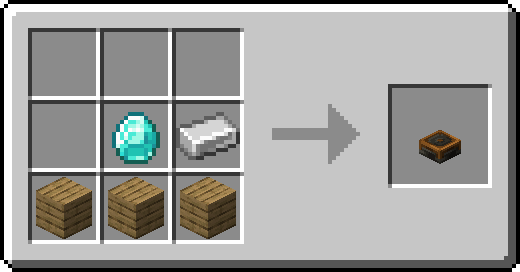
Etched provides new ways to play your own music right in Minecraft! Not only can you create custom records with full customization with the new Etching Table, Etched also provides new ways to play all discs. The new Album Jukebox lets you store up to 9 records which will play in order and on repeat unless powered by redstone, which then it'll pause and reset to the first disc. The Jukebox Minecart lets you play music on the rails with the ability to insert records into it with hoppers or, if the song is ended, restart the song with an activator rail!
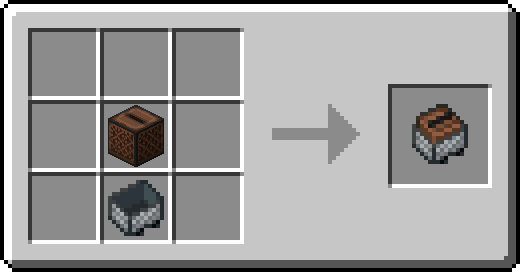
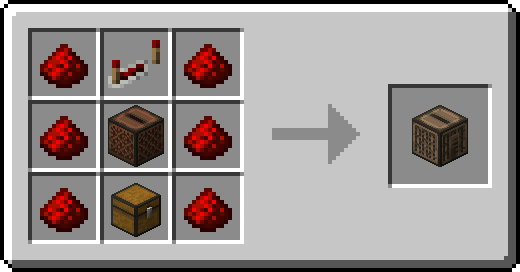
It's quite easy to do, simply insert a Blank Music Disc along with a Music Label (right click it to customize the song's info, color with dyes in a crafting table, and craft two dyed music labels together to create a Complex Music Label) and you'll be ready to create your first disc. Once you've got the necessary components, you can select the pattern of the label under the component slots to make your disc look pretty and the URL to your song goes in the bar above! Etched currently supports URLs that lead to an MP3 File, WAV File, OGG File, SoundCloud Song (GO+ songs are not supported, regardless of subscription status), Bandcamp Song, or a Minecraft Sound Event.
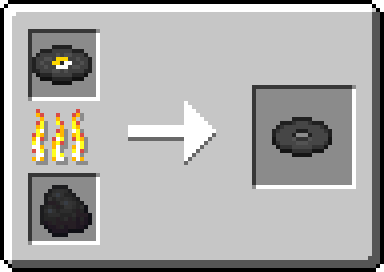
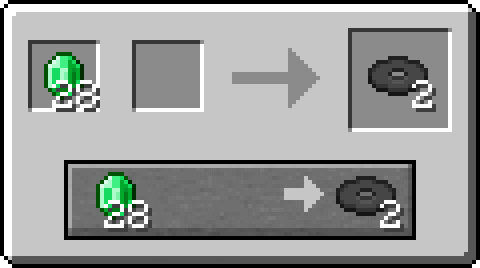
These wouldn't be records without some sort of challenge. To get a Blank Music Disc, you can either smelt a vanilla Music Disc or trade with the new Bard at merchant level 2.
Project description from CurseForge.
Pick your setup
Choose the version and loader you play, then open the matching release.
Check the dependencies, then try the file in a copied instance before changing a world you care about.
Recent files
etched-5.1.0.jar
6 Jun 2026
etched-5.0.0.jar
9 Oct 2025
etched-3.0.4.jar
17 Dec 2024
etched-4.0.0.jar
17 Dec 2024
etched-3.0.2.jar
14 May 2024
etched-3.0.1.jar
28 Jan 2024
etched-3.0.0.jar
26 Jan 2024
etched-fabric-2.3.2.jar
26 Jan 2024
etched-forge-2.3.2.jar
26 Jan 2024
etched-fabric-2.3.1.jar
26 Jul 2023
etched-forge-2.3.1.jar
26 Jul 2023
etched-fabric-2.3.0.jar
21 Jul 2023
Looking for an older file? The official CurseForge project page is in Resources.