Minecraft version
Back to mods 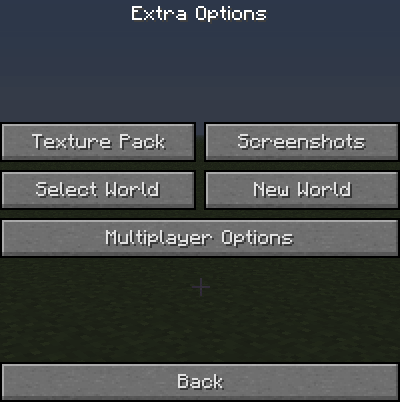
CurseForge · Minecraft mod
Extra Options
With this mod you have a few extra options up your sleeve!
Choose a version Pick your version below, then grab the matching file.
Quick answer
Which Extra Options release should I use?
Latest stable file Extra_Options_1.4.7_V1.4.zip
Game version 1.4.7
Loader Not required
Extra Options Extra_Options_1.4.7_V1.4.zip targets 1.4.7. The project page does not say whether this file belongs on the client, dedicated server, or both. No extra mods listed for this file.
Where it goes
Is Extra Options required on the client, server, or both?
The project page does not say whether this file belongs on the client, dedicated server, or both.
Client Source doesn’t say
Dedicated server Source doesn’t say
Loader for this release No loader listed
Required install it here Optional supported, not mandatory Not supported do not install here Source doesn’t say do not assume
The source does not explicitly classify this release as client-only or server-only.
What else does Extra Options Extra_Options_1.4.7_V1.4.zip need?
Extra_Options_1.4.7_V1.4.zip. Change the file and its required mods may change too.
This file does not list any required mods. Do not add a library just because a different file uses it.
This file does not list any required or optional mods.
Before you install it
Add Extra Options without breaking your instance.
Built for Extra Options Extra_Options_1.4.7_V1.4.zip. Pick another file and the loader, install side or required mods may change.
- 01
Stick to this file
Use Extra_Options_1.4.7_V1.4.zip. It targets 1.4.7; another release may have different loader, side or dependency requirements.
- 02
Bring the mods it needs
This file does not list any required mods. Do not add a library just because a different file uses it.
- 03
Put it on the correct side
The project page does not say whether this file belongs on the client, dedicated server, or both.
- 04
Pick the file you checked
Use the “Get this file” button beside Extra_Options_1.4.7_V1.4.zip. It opens that exact file at the source.
About this project
What does Extra Options add?
Extra Options v1.3 1.4.6
This mod gives you a few extra options on the menu screen ingame. The options include changing the texture pack and clearing multiplayer chat (also works on spc chat).
The join server button works on single player and multiplayer. When using it on single player you click the server you want to join then it will save your world chunks then start joining the server. It works when wanting to change server too. Instead of saving chunks it just disconnects from the previous server.

Main Menu
Extra Options
Multiplayer Options
Project description from CurseForge.
Pick your setup
Extra Options by Minecraft version and loader
Choose the version and loader you play, then open the matching release.
Minecraft version
1.4.6
1 loader buildCheck the dependencies, then try the file in a copied instance before changing a world you care about.
Recent files
Extra Options versions and loaders
Extra_Options_1.4.7_V1.4.zip
15 Jan 2013
Client Source doesn’t say Server Source doesn’t say Dependencies No extras listed Listed on Release listing
Check the 1.4.7 setup 1.4.7 release
Extra_Options_1.4.6_V13.0.zip
9 Jan 2013
Client Source doesn’t say Server Source doesn’t say Dependencies No extras listed Listed on Release listing
Check the 1.4.6 setup 1.4.6 release
Looking for an older file? The official CurseForge project page is in Resources.
 mod
mod CurseForge · Minecraft
Dynamic View and Simulation Distances
Dynamically changes chunk view(and simulation) distance based on server load to avoidlag
 mod
mod CurseForge · Minecraft
Effect Control
Highly customizable potion effect applier & remover.
 mod
mod CurseForge · Minecraft
Spawn Conditions
Customizable player spawn conditions.