Minecraft version
Back to mods 
Modrinth · Minecraft mod
Super Gamemode Switcher
A Server Tool to allow switching gamemodes without Operator. Customizable selections & Spectator Glowing
Choose a version Pick your version below, then grab the matching file.
Quick answer
Which Super Gamemode Switcher release matches 26.2?
Best match for your filters V1+mod
Game version 1.21, 1.21.1, 1.21.10
Loader Fabric, Forge, NeoForge
Super Gamemode Switcher V1+mod targets 1.21, 1.21.1, 1.21.10 with Fabric, Forge, NeoForge. Installation on the client is optional. Installation on the dedicated server is optional. No extra mods listed for this file.
Where it goes
Is Super Gamemode Switcher required on the client, server, or both?
Installation on the client is optional. Installation on the dedicated server is optional.
Client Optional
Dedicated server Optional
Loader for this release Fabric, Forge, NeoForge
Required install it here Optional supported, not mandatory Not supported do not install here Source doesn’t say do not assume
The source marks this as usable on both the client and server.
What else does Super Gamemode Switcher V1+mod need?
V1+mod on 26.2. Every mod below is checked against that same setup.
This file does not list any required mods. Do not add a library just because a different file uses it.
This file does not list any required or optional mods.
Before you install it
Add Super Gamemode Switcher without breaking your instance.
Built for Super Gamemode Switcher V1+mod on 26.2. Pick another file and the loader, install side or required mods may change.
- 01
Stick to this file
Use V1+mod. It targets 1.21, 1.21.1, 1.21.10 with Fabric, Forge, NeoForge; another release may have different loader, side or dependency requirements.
- 02
Bring the mods it needs
This file does not list any required mods. Do not add a library just because a different file uses it.
- 03
Put it on the correct side
Installation on the client is optional. Installation on the dedicated server is optional.
- 04
Pick the file you checked
Use the “Get this file” button beside V1+mod. It opens that exact file at the source.
About this project
What does Super Gamemode Switcher add?
Super Gamemode Switcher
Super Gamemode Switcher is a Datapack/Mod that allows you to have Players change gamemodes without Operator Privileges. This is uses /trigger commands to change gamemodes allowing you to let players be any gamemode with toggles to turn them on and off! In addition you can enable glowing for spectators.
Usecases?
Using a vanilla or lightly modded server can become a problem with permissions and allowing players to play a certain way. For example if you have a Creative server, normally players will have to play in only creative. This is especially useful if you run a Snapshot surver!
Commands
Commands used in this Datapack/mod
/trigger GMSettings| While can be ran by any player, Settings allows for Operators to toggle on/off any Gamemode, or Spectator Glowing. More Information Below/trigger Creative| Alias of/trigger GMC/trigger Spectator| Alias of/trigger GMSP/trigger Survival| Alias of/trigger GMS/trigger Adventure| Alias of/trigger GMA
Super Gamemode Switcher Settings
Settings are divided up into 5 sections.
Spectator Glow: Spectators invisible head glows for other Spectators. Does not affect players in other gamemodes. | OFF By DefaultCreative Mode: Sets the player who ran it into Creative Mode. | ON By DefaultSpectator Mode: Sets the player who ran it into Spectator Mode. | ON By DefaultSurvival Mode: Sets the player who ran it into Survival Mode. | ON By DefaultAdventure Mode: Sets the player who ran it into Adventure Mode Mode. | ON By Default
In-Game View of the settings menu
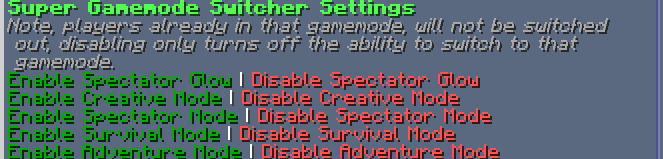
Project description from Modrinth.
Pick your setup
Super Gamemode Switcher by Minecraft version and loader
Choose the version and loader you play, then open the matching release.
Minecraft version
26.1.2
5 loader buildsMinecraft version
26.1.1
5 loader buildsMinecraft version
26.1
5 loader buildsMinecraft version
1.21.11
5 loader buildsMinecraft version
1.21.10
5 loader buildsMinecraft version
1.21.9
5 loader buildsMinecraft version
1.21.8
5 loader buildsMinecraft version
1.21.7
5 loader buildsMinecraft version
1.21.6
5 loader buildsMinecraft version
1.21.5
5 loader buildsMinecraft version
1.21.4
5 loader buildsShowing the newest 12 of 16 game versions. Older files are in the list below.
Check the dependencies, then try the file in a copied instance before changing a world you care about.
Recent files
Super Gamemode Switcher versions and loaders
V1+mod
super-gamemode-switcher-V1.jar
3 Oct 2024
Client Optional Server Optional Dependencies No extras listed Listed on Release listing
Check the 26.2 · Fabric setup 1.211.21.11.21.101.21.11 release
V1
SuperGamemodeSwitcherV1.zip
3 Oct 2024
Client Optional Server Optional Dependencies No extras listed Listed on Release listing
Check the 26.2 · datapack setup 1.211.21.11.21.101.21.11 release
Looking for an older file? The official Modrinth project page is in Resources.
 mod
CurseForge + Modrinth · Minecraft
Structure Vault Fixer
Fixed an issue where Vaults for certain structures might not activate in mods that add structures.
 mod
Modrinth · Minecraft
OPanel
A Minecraft server management panel for Paper / Folia / Fabric / Forge / Neoforge servers
 mod
Modrinth · Minecraft
Area Hints
A mod that displays the domain name which could be written by players when you enters an area