Quick answer
Which QuickAdditions StationAPI release should I use?
Latest stable file 2.11.1
Game version b1.7.3
Loader babric, Fabric
QuickAdditions StationAPI 2.11.1 targets b1.7.3 with babric, Fabric. Installation on the client is optional. Installation on the dedicated server is optional. All 2 required mods have matching files.
Where it goes
Is QuickAdditions StationAPI required on the client, server, or both?
Installation on the client is optional. Installation on the dedicated server is optional.
Client Optional
Dedicated server Optional
Loader for this release babric, Fabric
Required install it here Optional supported, not mandatory Not supported do not install here Source doesn’t say do not assume
The source marks this as usable on both the client and server.
What else does QuickAdditions StationAPI 2.11.1 need?
2.11.1. Change the file and its required mods may change too.
Install ZastavkaAPI, StationAPI first. We found matching files for this game-version and loader setup.
Mod Menu Optional for QuickAdditions StationAPI 2.11.1 optionalNo matching file
Matching file found Matched file: 1.1.2
StationAPI Needed by QuickAdditions StationAPI 2.11.1 requiredMatching file found Matched file: 2.0.0-alpha.6.2
We only count dependency files that match this setup. A file for another loader does not fill the gap.
Before you install it
Add QuickAdditions StationAPI without breaking your instance.
Built for QuickAdditions StationAPI 2.11.1. Pick another file and the loader, install side or required mods may change.
- 01
Stick to this file
Use 2.11.1. It targets b1.7.3 with babric, Fabric; another release may have different loader, side or dependency requirements.
- 02
Bring the mods it needs
Install ZastavkaAPI, StationAPI first. We found matching files for this game-version and loader setup.
- 03
Put it on the correct side
Installation on the client is optional. Installation on the dedicated server is optional.
- 04
Pick the file you checked
Use the “Get this file” button beside 2.11.1. It opens that exact file at the source.
About this project
What does QuickAdditions StationAPI add?
QuickAdditions StationAPI for Minecraft Beta 1.7.3
A StationAPI mod for Minecraft Beta 1.7.3 that adds in features that were requested, but didn't have enough time to make more real solutions.
- Requires Zastavka API (used to make music biome/dimension specific and to get current BGM)
Quick Additions
Mod now works on Multiplayer with GlassConfigAPI version 3.0+ used to sync configs!
Entity Spawning Mechanics
- Adds ability to control which vanilla entities can spawn from biome spawn mechanics.
- Adds ability to disable living entity despawning.
- Adds ability to disable saddled pig despawning.
- Also adds the ability to skip saddled pigs in the passive spawn count.
- Allowing passive spawn capacity to be filled with normal despawning passive mobs and not just the new saddled pigs.
- Adds ability to change max mob spawn capacity for different creature types.
- Monster, passive (animals), and squid max spawn capacity can be changed.
- Adds ability to change mob spawn group size.
- Disabled when PumpkinMoon is installed, as PumpkinMoon will take over setting spawn group size.
- Adds ability to change max light level at which monsters can spawn.
Weather
- Adds ability to set a Y level above which it will always snow.
- Adds ability to disable rain in savanna biomes.
- Adds ability to cancel weather reset when sleeping and the weather is clear.
- This makes rain and snow more common.
- Adds ability to configure rain/thunder time until and duration.
- Also adds the ability to disable rain/thunder entirely.
Music
- Adds ability to lower ambient nether portal, rain, ghast, and cave sounds.
- Adds ability to change background music countdown timer min and max interval values.
- Also adds the ability to disable random background music entirely.
- Adds ability to add custom background music to the game.
- On first run of the mod a folder named
custom-music will be created.
- Add
.ogg, .mus, or .wav files to this folder, and they will have a random chance to play in-game.
- No other file types are supported by default in Minecraft or by this mod.
- You can make the added songs only play in certain dimensions or biomes by adding specific tags to the song name.
- Firstly the song must end with
-specific.XXX where XXX is one of the three acceptable file types ogg, mus, or wav.
- Then simply specify which dimension using
-overworld-, -nether-, or -levelX- in the song name.
- Where
X in -levelX- is the numerical value of the level ID.
- (nether =
-1, overworld = 0, skylands = 1, modded-dimension = some number greater than 1 probably)
- You can also make songs biome specific by specifying the biome with a biome tag such as
-tundra- or -savanna-.
- See full list of vanilla b1.7.3 biomes below
- All tag names MUST be lowercase to work and have the
- symbol on either side of the tag.
- Example song name:
HappyDisco-nether-rainforest-specific.ogg
- This song would play in the nether or in the rainforest biome.
- Adds ability to disable default Minecraft background music.
- Adds ability to view currently playing music in the debug overlay (F3).
- Compatible with Better F3 using their module system.
- Adds ability to add main menu songs.
- On first run of the mod a folder named
main-menu-theme will be created.
- Add
.ogg, .mus, or .wav files to this folder, these songs will play on the title screen.
- A single song is chosen randomly upon entering the title screen and plays.
- Song names cannot be the same as vanilla b1.7.3 streaming resource files, if they are the song will not play when chosen.
- No other file types are supported by default in Minecraft or by this mod.
- Adds ability to have main menu song override background music.
- (Vanilla b1.7.3 has Minecraft background music continue to play on main menu if started in-game)
Misc.
- Adds ability to give the player missing achievements that they may have already achieved.
- Load into a world and access mod config from pause menu using ModMenu.
- Adding back missing achievements will not work from the main menu or when game is not running.
- Adds ability to force display active even when tabbing away from the screen.
- Adds ability to speed up night rather than skip it.
- (Takes about 30 seconds to sleep the entire night away using this method)
- Adds ability to exit beds by clicking or swinging the hand.
- Adds ability to configure percentage of sleeping players needed to skip nighttime.
- 0% will be treated as one player fully asleep required to skip the night.
- Adds ability to configure server spawn protection radius.
- Overridden by UniTweaks.
- Set the value for spawn protection radius in the server.properties file instead when UniTweaks is loaded.
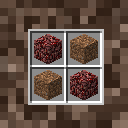
- Adds ability to add a crafting recipe for soul sand.
- See gallery images for recipe.
List of b1.7.3 Biomes
- Rainforest -> biome tag =
-rainforest-
- Swampland -> biome tag =
-swampland-
- Seasonal Forest -> biome tag =
-seasonal forest-
- Forest -> biome tag =
-forest-
- Savanna -> biome tag =
-savanna-
- Shrubland -> biome tag =
-shrubland-
- Taiga -> biome tag =
-taiga-
- Desert -> biome tag =
-desert-
- Plains -> biome tag =
-plains-
- Ice Desert -> biome tag =
-ice desert-
- Tundra -> biome tag =
-tundra-
- Hell -> biome tag =
-hell- this is the biome that the nether uses
- Sky -> biome tag =
-sky- this is the biome that the skylands uses
- ModdedBiome -> biome tag =
-moddedbiome- modded biomes are supported just make the biome name lowercase as a tag!
Installation using Prism Launcher
- Download an instance of Babric for Prism Launcher: https://github.com/Glass-Series/babric-prism-instance
- Install Java 17 and set the instance to use it: https://adoptium.net/temurin/releases/
- Add GlassConfigAPI 3.0.2+ to the mod folder for the instance: https://modrinth.com/mod/glass-config-api
- Add Glass Networking to the mod folder for the instance: https://modrinth.com/mod/glass-networking
- Add StationAPI to the mod folder for the instance: https://modrinth.com/mod/stationapi
- Add ZastavkaAPI to the mod folder for the instance: https://modrinth.com/mod/zastavkaapi
- (Optional) Add Mod Menu to the mod folder for the instance: https://modrinth.com/mod/modmenu-beta
- Add this mod to the mod folder for the instance: https://github.com/telvarost/QuickAdditions-StationAPI/releases
- Run and enjoy! 👍
Feedback
Got any suggestions on what should be added next? Feel free to share it by creating an issue. Know how to code and want to do it yourself? Then look below on how to get started.
Contributing
Thanks for considering contributing! To get started fork this repository, make your changes, and create a PR.
If you are new to StationAPI consider watching the following videos on Babric/StationAPI Minecraft modding: https://www.youtube.com/watch?v=9-sVGjnGJ5s&list=PLa2JWzyvH63wGcj5-i0P12VkJG7PDyo9T
Project description from Modrinth.
Pick your setup
QuickAdditions StationAPI by Minecraft version and loader
Choose the version and loader you play, then open the matching release.
Minecraft version
b1.7.3
1
loader build Check the dependencies, then try the file in a copied instance before changing a world you care about.
Recent files
QuickAdditions StationAPI versions and loaders
b1.7.3babricFabric release
QuickAdditions-2.11.0.jar
17 Apr 2026
Client Optional Server Optional Dependencies 2 required · 2 unchecked Listed on Release listing
Check the b1.7.3 · babric setup → b1.7.3babricFabric release
QuickAdditions-2.10.0.jar
17 Apr 2026
Client Optional Server Optional Dependencies 2 required · 2 unchecked Listed on Release listing
Check the b1.7.3 · babric setup → b1.7.3babricFabric release
QuickAdditions-2.9.3.jar
8 Mar 2026
Client Optional Server Optional Dependencies 2 required · 2 unchecked Listed on Release listing
Check the b1.7.3 · babric setup → b1.7.3babricFabric release
QuickAdditions-2.9.2.jar
22 Nov 2025
Client Optional Server Optional Dependencies 2 required · 2 unchecked Listed on Release listing
Check the b1.7.3 · babric setup → b1.7.3babricFabric release
QuickAdditions-2.9.1.jar
20 Nov 2025
Client Optional Server Optional Dependencies 2 required · 2 unchecked Listed on Release listing
Check the b1.7.3 · babric setup → b1.7.3babricFabric release
QuickAdditions-2.9.0.jar
19 Nov 2025
Client Optional Server Optional Dependencies 2 required · 2 unchecked Listed on Release listing
Check the b1.7.3 · babric setup → b1.7.3babricFabric release
QuickAdditions-2.8.2.jar
28 Jul 2025
Client Optional Server Optional Dependencies 2 required · 2 unchecked Listed on Release listing
Check the b1.7.3 · babric setup → b1.7.3babricFabric release
QuickAdditions-2.8.1.jar
4 Jul 2025
Client Optional Server Optional Dependencies 2 required · 2 unchecked Listed on Release listing
Check the b1.7.3 · babric setup → b1.7.3babricFabric release
QuickAdditions-2.8.0.jar
29 Jun 2025
Client Optional Server Optional Dependencies 2 required · 2 unchecked Listed on Release listing
Check the b1.7.3 · babric setup → b1.7.3babricFabric release
QuickAdditions-2.7.0.jar
8 Jun 2025
Client Optional Server Optional Dependencies 1 required · 1 unchecked Listed on Release listing
Check the b1.7.3 · babric setup → b1.7.3babricFabric release
QuickAdditions-2.6.1.jar
3 May 2025
Client Optional Server Optional Dependencies 1 required · 1 unchecked Listed on Release listing
Check the b1.7.3 · babric setup → b1.7.3babricFabric release
 mod
mod mod
mod mod
mod