Assorted Core Optional for Assorted Tech assortedtech-1.17.1-1.0.4.jar
optionalMatching file found Matched file: assortedcore-1.17.1-2.0.2.jar
CurseForge · Minecraft mod
Contains an assorted group of additions based around technology, machines, and logic.
Quick answer
Assorted Tech assortedtech-1.17.1-1.0.4.jar targets 1.17.1 with Forge. The project page does not say whether this file belongs on the client, dedicated server, or both. No extra mods listed for this file.
Where it goes
The project page does not say whether this file belongs on the client, dedicated server, or both.
The source does not explicitly classify this release as client-only or server-only.
assortedtech-1.17.1-1.0.4.jar on 1.17.1 Forge. Every mod below is checked against that same setup.
This file does not list any required mods. Do not add a library just because a different file uses it.
1 extra mod was pulled in by another dependency. Indented rows show who needs each one. We only count dependency files that match this setup. A file for another loader does not fill the gap.
Before you install it
Built for Assorted Tech assortedtech-1.17.1-1.0.4.jar on 1.17.1 Forge. Pick another file and the loader, install side or required mods may change.
Use assortedtech-1.17.1-1.0.4.jar. It targets 1.17.1 with Forge; another release may have different loader, side or dependency requirements.
This file does not list any required mods. Do not add a library just because a different file uses it.
The project page does not say whether this file belongs on the client, dedicated server, or both.
Use the “Get this file” button beside assortedtech-1.17.1-1.0.4.jar. It opens that exact file at the source.
About this project
Versions 6.0.0 and newer now require Assorted Lib!!
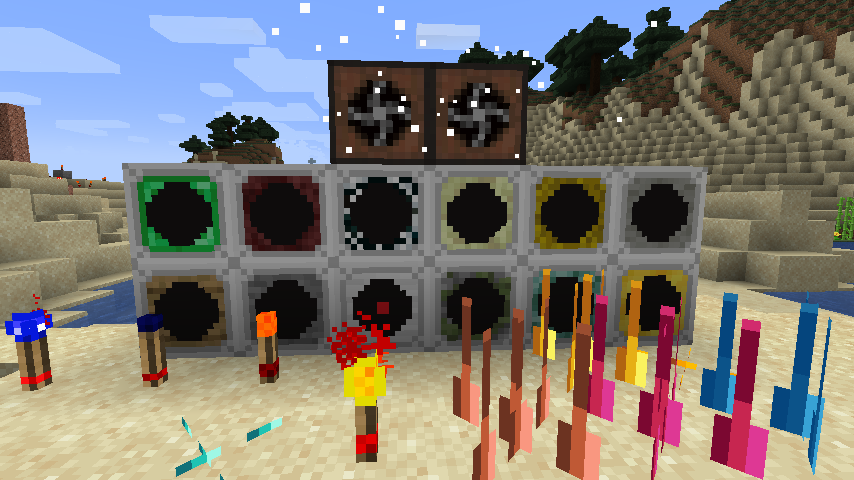
Assorted Tech adds a bunch of blocks/items all around tech.
Like the other Assorted Mods most of these come straight from my old mod GrimPack but most have been either changed or rewritten to be better and have more options.
Currently Assorted Tech adds the following:
Glowstone Torch:
Flip Flop Torch:
Sensors:
Sensors are block types that scan the area they are facing and will become powered if they see an entity of their type in view of their range.
You are able to adjust the range of the sensor by right-clicking and shift-right clicking on them with an empty hand.
You can also view the range by right clicking on them with a redstone torch. The area will be green if there are no blocks blocking the range and red if so.
These are the sensor types available
Wood - Any entity
Stone - Living entities
Iron - Player entities
Mossy Cobblestone - Monster entities
Prismarine - Water Animals and any entities in the entity_type tag (assortedtech:sensors/water)
Gold - Item entities
Emerald - Villager entities
Netherrack - Any entities in the entity_type tag (assortedtech:sensors/nether)
Cobweb - Any entities in the entity_type tag (assortedtech:sensors/arthropods)
End Stone - Any entities in the entity_type tag (assortedtech:sensors/end)
Hay Bale - Any entities in the entity_type tag (assortedtech:sensors/pets)
Feather - Any entities in the entity_type tag (assortedtech:sensors/flying)
Spikes:
These are a block that when powered will start damaging any entity within the hitbox. They can be placed on any side of the block.
These support all vanilla materials as well as those that Assorted Core supports.
Fans:
These are blocks that can push/pull entities or blow/suck. They have a GUI that you can open to adjust the range and the mode that they currently are set to.
When powered with redstone they will turn off. The air particles they emit can be disabled in the config as well as the speed and max range of the fans.
Bridges:
Laser Bridges in Minecraft. These have 5 varieties that each do different things and some are able to move the player automatically.
Gravity:
Multiple blocks that allow you manipulate gravity and push/pull/gravitate entities in a range. With directional variants as well as being able to wear armor so that you are not affected.
Alarm:
An Alarm Box that when powered can play one of 14 different sounds.
Project description from CurseForge.
Pick your setup
Choose the version and loader you play, then open the matching release.
Check the dependencies, then try the file in a copied instance before changing a world you care about.
Recent files
13 Sept 2021
5 Sept 2021
19 Aug 2021
11 Aug 2021
11 Aug 2021
Looking for an older file? The official CurseForge project page is in Resources.
 mod
modAn assortment of various things than can generate in your world.
 mod
modA random assortment of tools to add to your Minecraft world.
 mod
modAdds an assortment of new storage to Minecraft