Assorted Lib Needed by Assorted Core 10.0.0 (NeoForge)
requiredMatching file found Matched file: Assorted Lib 4.0.0 (NeoForge)
CurseForge · Minecraft mod
Adds an assortment of items and blocks to be used by the other Assorted Mods.
Quick answer
Assorted Core 10.0.0 (NeoForge) targets 26.2 with NeoForge. The project page does not say whether this file belongs on the client, dedicated server, or both. All 1 required mods have matching files.
Where it goes
The project page does not say whether this file belongs on the client, dedicated server, or both.
The source does not explicitly classify this release as client-only or server-only.
Assorted Core 10.0.0 (NeoForge). Change the file and its required mods may change too.
Install Assorted Lib first. We found matching files for this game-version and loader setup.
We only count dependency files that match this setup. A file for another loader does not fill the gap.
Before you install it
Built for Assorted Core 10.0.0 (NeoForge). Pick another file and the loader, install side or required mods may change.
Use Assorted Core 10.0.0 (NeoForge). It targets 26.2 with NeoForge; another release may have different loader, side or dependency requirements.
Install Assorted Lib first. We found matching files for this game-version and loader setup.
The project page does not say whether this file belongs on the client, dedicated server, or both.
Use the “Get this file” button beside Assorted Core 10.0.0 (NeoForge). It opens that exact file at the source.
About this project
Versions 7.0.0 and newer now require Assorted Lib!!
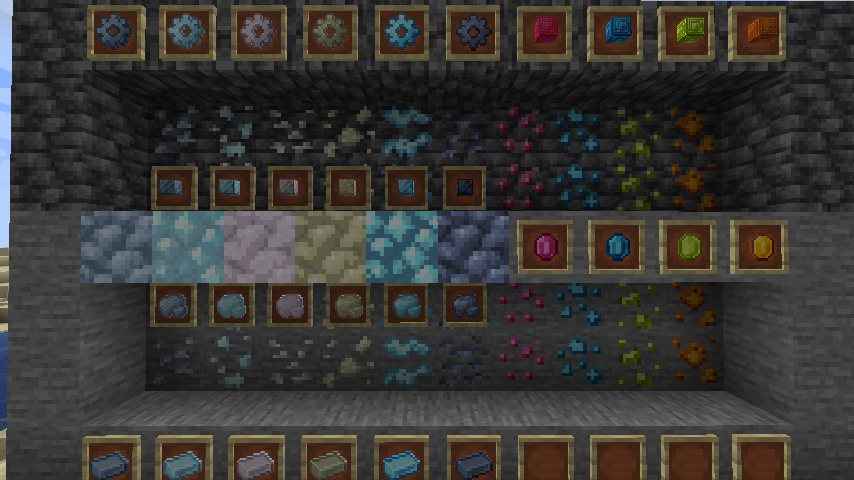
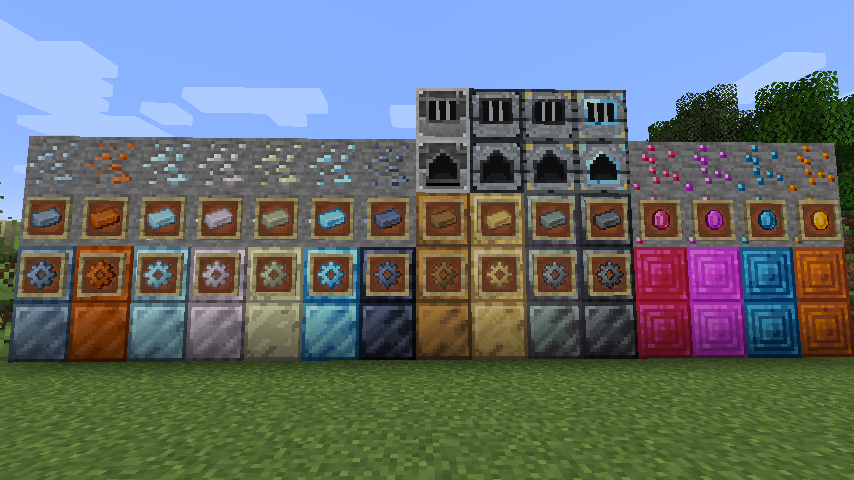
Currently adds many new ores and materials to be used by other Assorted mods.
Adds the following ores:
Tin
Copper
Silver
Aluminum
Nickel
Platinum
Lead
Ruby
Amethyst
Sapphire
Topaz
Add the following alloys:
Bronze
Electrum
Invar
Steel
Adds two machines, 4 tiers each for processing:
Basic Alloy Forge, Intermediate Alloy Forge, Advanced Alloy Forge, Expert Alloy Forge
Basic Grinding Mill, Intermediate Grinding Mill, Advanced Grinding Mill, Expert Grinding Mill
Adds dusts, nuggets, gears, and storage blocks for each new metal. The gems each have a storage block as well.
All items and blocks are tagged so they can be used interchangeably with other mods that add the same mods.
World Generation:
All ore world generation can be controlled via the config file.
Project description from CurseForge.
Pick your setup
Choose the version and loader you play, then open the matching release.
Check the dependencies, then try the file in a copied instance before changing a world you care about.
Recent files
assortedcore-neoforge-26.2-10.0.0.jar
13 Sept 2026
assortedcore-fabric-26.2-10.0.0.jar
13 Sept 2026
28 Oct 2023
6 Jul 2023
6 Jul 2023
18 Apr 2023
18 Apr 2023
18 Apr 2023
18 Apr 2023
17 Jan 2023
15 Jan 2023
30 Aug 2022
Looking for an older file? The official CurseForge project page is in Resources.
 mod
modTrueUUID lets premium and offline-mode Minecraft players play together on the same server. Premium players keep their real Minecraft UUID and skin, while offline players can still join normally.
 mod
modA smooth spectator-style freecam. Fly the camera freely while your player stays frozen, then glide back into gameplay with a smooth transition.
 mod
modMadoku Craft: Hud simplifies Minecraft's UI and adds new UI on the top left to display new information.