Fabric API Needed by Map Distance Fix mapdistancefix-neoforge-1.1.2+mc26.jar
requiredNo matching file
CurseForge · Minecraft mod
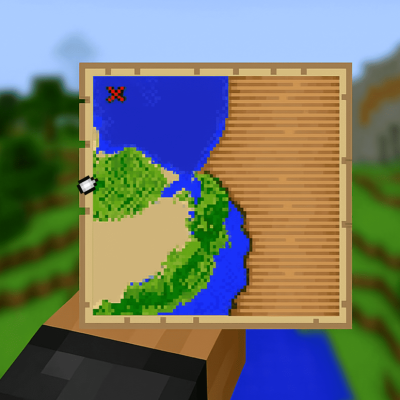
A simple mod that shows a player indicator instead of a white dot when outside map boundaries.
Quick answer
Map Distance Fix mapdistancefix-neoforge-1.1.2+mc26.jar targets 26.1, 26.1.1, 26.1.2 with NeoForge. The project page does not say whether this file belongs on the client, dedicated server, or both. 1 required mod needs a matching file.
Where it goes
The project page does not say whether this file belongs on the client, dedicated server, or both.
The source does not explicitly classify this release as client-only or server-only.
mapdistancefix-neoforge-1.1.2+mc26.jar. Change the file and its required mods may change too.
Install Fabric API first, but 1 required mod has no matching file for this setup. Do not mix loader builds to force a match.
We only count dependency files that match this setup. A file for another loader does not fill the gap.
Before you install it
Built for Map Distance Fix mapdistancefix-neoforge-1.1.2+mc26.jar. Pick another file and the loader, install side or required mods may change.
Use mapdistancefix-neoforge-1.1.2+mc26.jar. It targets 26.1, 26.1.1, 26.1.2 with NeoForge; another release may have different loader, side or dependency requirements.
Install Fabric API first, but 1 required mod has no matching file for this setup. Do not mix loader builds to force a match.
The project page does not say whether this file belongs on the client, dedicated server, or both.
Use the “Get this file” button beside mapdistancefix-neoforge-1.1.2+mc26.jar. It opens that exact file at the source.
About this project
A very simple Minecraft mod that fixes map player indicators to always show the player's position and direction, even when outside map boundaries, making it much easier to navigate treasure maps and other map items.
In vanilla Minecraft, when you're far from a map's boundaries, the player indicator either disappears entirely or shows as a generic "player_off_map" and "player_off_limits" decorations without directional information. This mod fixes that by:
Both mods are optional. Without them, you can still configure the mod by editing the JSON config file directly or via in-game commands
The mod creates a configuration file at config/mapdistancefix.json with the following options:
| Option | Default | Description |
|---|---|---|
showDistance |
true |
Enable or disable distance display |
showDistanceWhenOffMap |
true |
Show distance when the player is outside the map boundaries |
showDistanceInsideBoundaries |
false |
Show distance even when the player is inside the map boundaries |
showStructureDistances |
true |
Show the distance to the nearest structure in the map |
distanceFormat |
%dm |
Format string for distance (use %d for the distance value) |
useShortUnits |
true |
Use short format like "1.2k" for large distances |
shortUnitThreshold |
1000 |
Distance threshold (in blocks) for switching to short units |
If you have Cloth Config and Mod Menu installed, you can access the configuration screen by:
or if you don't have these mods, you can use commands:
/mapdistancefix config <config> set/reset/get or /mdf config <config> set/reset/get - Change configs in-game/mapdistancefix status or /mdf status - Display current configuration settings/mapdistancefix reload or /mdf reload - Reload the configuration file if modified (no need to run if using /mdf config command)Config screen not appearing
Distance text looks weird with shaders
showDistance to false in the config file or through the in-game config screen (if Cloth Config is installed).If you encounter issues:
Contributions are welcome! Here's how you can help:
This project is licensed under the MIT License. Feel free to use this mod in your modpacks without asking for permission. But please do not redistribute the jar files anywhere else!
Made with ❤️ by MrErenK for the Minecraft community
For questions, suggestions, or support, feel free to open an issue on GitHub or post a comment in the curseforge page!
Project description from CurseForge.
Pick your setup
Choose the version and loader you play, then open the matching release.
Showing the newest 12 of 33 game versions. Older files are in the list below.
Check the dependencies, then try the file in a copied instance before changing a world you care about.
Recent files
25 Jul 2026
25 Jul 2026
19 Jun 2026
19 Jun 2026
17 Apr 2026
26 Mar 2026
26 Mar 2026
26 Mar 2026
26 Mar 2026
26 Mar 2026
26 Mar 2026
21 Mar 2026
Looking for an older file? The official CurseForge project page is in Resources.
 mod
modOverhaul survival with many changes to existing mechanics. Weapon rebalance, enchanting rework, and much more
 mod
modA lightweight RPG-style system that scales player attributes based on level.
 mod
modDon’t mess with the server Play Minecraft with your friends in 2 clicks