Minecraft version
Back to mods 
CurseForge · Minecraft mod
EyeMine Classic
Adds eye control via the EyeMine Classic interface
Choose a version Pick your version below, then grab the matching file.
Quick answer
Which EyeMine Classic release should I use?
Latest stable file eyegaze-1.11.2-forge-1.1.1.jar
Game version 1.11.2
Loader Forge
EyeMine Classic eyegaze-1.11.2-forge-1.1.1.jar targets 1.11.2 with Forge. The project page does not say whether this file belongs on the client, dedicated server, or both. No extra mods listed for this file.
Where it goes
Is EyeMine Classic required on the client, server, or both?
The project page does not say whether this file belongs on the client, dedicated server, or both.
Client Source doesn’t say
Dedicated server Source doesn’t say
Loader for this release Forge
Required install it here Optional supported, not mandatory Not supported do not install here Source doesn’t say do not assume
The source does not explicitly classify this release as client-only or server-only.
What else does EyeMine Classic eyegaze-1.11.2-forge-1.1.1.jar need?
eyegaze-1.11.2-forge-1.1.1.jar. Change the file and its required mods may change too.
This file does not list any required mods. Do not add a library just because a different file uses it.
This file does not list any required or optional mods.
Before you install it
Add EyeMine Classic without breaking your instance.
Built for EyeMine Classic eyegaze-1.11.2-forge-1.1.1.jar. Pick another file and the loader, install side or required mods may change.
- 01
Stick to this file
Use eyegaze-1.11.2-forge-1.1.1.jar. It targets 1.11.2 with Forge; another release may have different loader, side or dependency requirements.
- 02
Bring the mods it needs
This file does not list any required mods. Do not add a library just because a different file uses it.
- 03
Put it on the correct side
The project page does not say whether this file belongs on the client, dedicated server, or both.
- 04
Pick the file you checked
Use the “Get this file” button beside eyegaze-1.11.2-forge-1.1.1.jar. It opens that exact file at the source.
About this project
What does EyeMine Classic add?
EyeMine - play Minecraft with your eyes! (classic version)
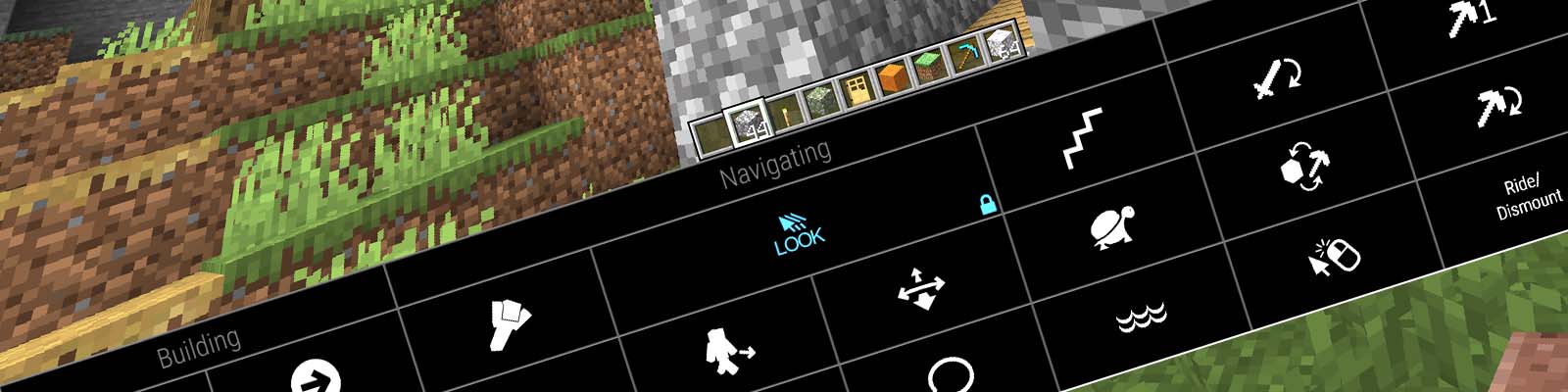
** This is the Classic version of EyeMine which requires the older EyeMine Classic keyboard. For more recent versions see EyeMine **
This mod adds various functionality to support eye control for users unable to operate conventional controls.
To play with eye control, please install the EyeMine Classic interface from the EyeMine wiki which provides the necessary on-screen keyboard to access the controls. You will also require an eye tracker, head mouse or another method of controlling the cursor.
Authors: EyeMine was originally developed by kmcnaught for SpecialEffect and upgraded by mrbysco for more versions of Minecraft
Code + issue tracker: https://github.com/SpecialEffect/EyeMineMods/issues
Documentation: https://github.com/SpecialEffect/EyeMine/wiki
Project description from CurseForge.
Pick your setup
EyeMine Classic by Minecraft version and loader
Choose the version and loader you play, then open the matching release.
Minecraft version
1.11.2
1 loader buildCheck the dependencies, then try the file in a copied instance before changing a world you care about.
Recent files
EyeMine Classic versions and loaders
eyegaze-1.12.2-forge-1.2.0.jar
eyegaze-1.12.2-1.2.0.jar
23 Apr 2024
Client Source doesn’t say Server Source doesn’t say Dependencies No extras listed Listed on Release listing
Check the 1.12.2 · Forge setup Forge1.12.2 beta
eyegaze-1.11.2-forge-1.1.1.jar
eyegaze-1.1.1.jar
29 Dec 2021
Client Source doesn’t say Server Source doesn’t say Dependencies No extras listed Listed on Release listing
Check the 1.11.2 · Forge setup Forge1.11.2 release
Looking for an older file? The official CurseForge project page is in Resources.
 mod
CurseForge + Modrinth · Minecraft
Unconfusion
A mod to make intuitive in-game tutorials for modpacks and mod players.
 mod
CurseForge + Modrinth · Minecraft
VO: Better Dogs
Enhances vanilla wolves with unique personalities (Aggressive, Pacifist, Normal), smarter AI, safety behaviors, and combat improvements.
 mod
CurseForge · Minecraft
Imperial Adventures
Epic Imperial Modifications