Minecraft version
Back to mods 
CurseForge · Minecraft mod
Chat Colors
Allows the use of colours/formatting in chat, item names, and everywhere else that allows you to type.
Choose a version Pick your version below, then grab the matching file.
Quick answer
Which Chat Colors release should I use?
Latest stable file ChatColours-1.21.1-2026.04.19.jar
Game version 1.21.1
Loader NeoForge
Chat Colors ChatColours-1.21.1-2026.04.19.jar targets 1.21.1 with NeoForge. The project page does not say whether this file belongs on the client, dedicated server, or both. No extra mods listed for this file.
Where it goes
Is Chat Colors required on the client, server, or both?
The project page does not say whether this file belongs on the client, dedicated server, or both.
Client Source doesn’t say
Dedicated server Source doesn’t say
Loader for this release NeoForge
Required install it here Optional supported, not mandatory Not supported do not install here Source doesn’t say do not assume
The source does not explicitly classify this release as client-only or server-only.
What else does Chat Colors ChatColours-1.21.1-2026.04.19.jar need?
ChatColours-1.21.1-2026.04.19.jar. Change the file and its required mods may change too.
This file does not list any required mods. Do not add a library just because a different file uses it.
This file does not list any required or optional mods.
Before you install it
Add Chat Colors without breaking your instance.
Built for Chat Colors ChatColours-1.21.1-2026.04.19.jar. Pick another file and the loader, install side or required mods may change.
- 01
Stick to this file
Use ChatColours-1.21.1-2026.04.19.jar. It targets 1.21.1 with NeoForge; another release may have different loader, side or dependency requirements.
- 02
Bring the mods it needs
This file does not list any required mods. Do not add a library just because a different file uses it.
- 03
Put it on the correct side
The project page does not say whether this file belongs on the client, dedicated server, or both.
- 04
Pick the file you checked
Use the “Get this file” button beside ChatColours-1.21.1-2026.04.19.jar. It opens that exact file at the source.
About this project
What does Chat Colors add?
Chat Colours
Overhauls the game's 13 year old text formatting syntax.
Markdown-like syntax
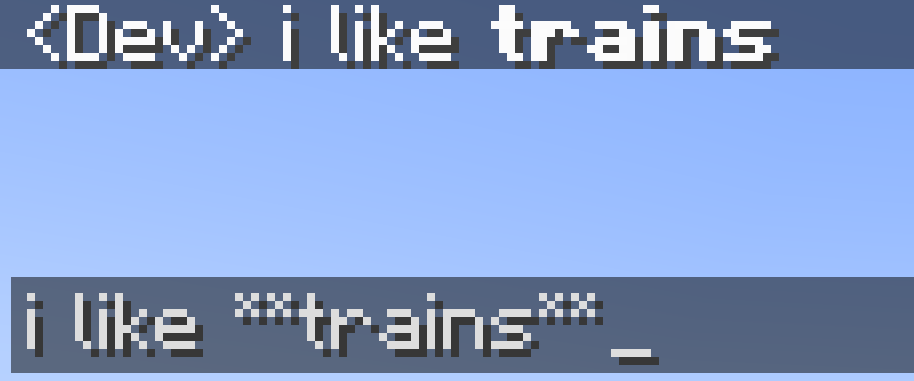
This mod allows you to use markdown-like syntax to format your text in minecraft:
*italic text* -> italic text**bold text** -> bold text***bold + italic*** -> bold + italic__underline__ -> underline~~strikethrough~~ -> strikethroughthis **is** bold -> this is boldthis __*is* multiple things__ -> this is multiple things
The terminating set of symbols is optional, e.g. **hello will still be bold.
If you put a star at the start of the name of an item in an anvil, it will cancel out the italic
Hex codes/custom colours
This mod allows you to colour your text with custom colours:
[#ff0000]red text
The codes are case-insensitive.
Extended format syntax
This feature has been replaced by new syntax, but still works.
The mod allows you to use named colours instead of the normal single letters.
The names are white, black, blue, green, aqua (or cyan), red, purple, gray and yellow.
The names are case-insensitive.
To use the dark version of the colour (except white and black), put "d", "dark" or "deep" before or after the name. You can optionaly use a space or underscore between the name and the prefix/suffix. For example, §[dark_blue], §[deepblue], §[blue d], §[dblue] all make dark blue text
§[gold], the name MCWiki gives the colour, can also be used for dark yellow.
Bold, underline, italics, etc
You can also use:
§[s]for strikeout text,§[b]for bold text,§[o]for obfuscated text,§[u]for underlined text,- and
§[r]for §r (reset)
Multiple style options
Format options can be chained without needing multiple §s. For example, §[red][u][i]text will show red, bold, underlined text. You need to put the colour before the bold and underline. This is because the colour code resets the style to be coloured, but not italic, bold, etc. This is a minecraft thing, and also applies to vanilla formatting codes.
Use on servers
If you want to use this mod on a server, this mod will have to be installed on it, or the server must otherwise allow you to send '§' in chat, or the server will automatically kick you when you use formatting.
Project description from CurseForge.
Pick your setup
Chat Colors by Minecraft version and loader
Choose the version and loader you play, then open the matching release.
Minecraft version
1.20.4
1 loader buildMinecraft version
1.20.3
1 loader buildMinecraft version
1.20.2
1 loader buildMinecraft version
1.20.1
1 loader buildMinecraft version
1.20
1 loader buildMinecraft version
1.19.4
1 loader buildMinecraft version
1.19.3
1 loader buildMinecraft version
1.19.2
1 loader buildMinecraft version
1.18.2
1 loader buildMinecraft version
1.18.1
1 loader buildMinecraft version
1.17.1
1 loader buildShowing the newest 12 of 13 game versions. Older files are in the list below.
Check the dependencies, then try the file in a copied instance before changing a world you care about.
Recent files
Chat Colors versions and loaders
ChatColours-1.21.1-2026.04.19.jar
18 Apr 2026
Client Source doesn’t say Server Source doesn’t say Dependencies No extras listed Listed on Release listing
Check the 1.21.1 · NeoForge setup 1.21.1NeoForge release
ChatColors-1.21.1-4.0.jar
18 Apr 2026
Client Source doesn’t say Server Source doesn’t say Dependencies No extras listed Listed on Release listing
Check the 1.21.1 · NeoForge setup 1.21.1NeoForge release
chatcolours-1.19.4-3.1.jar
5 Jan 2024
Client Source doesn’t say Server Source doesn’t say Dependencies No extras listed Listed on Release listing
Check the 1.19.4 · Forge setup 1.19.4Forge release
chatcolours-1.18.2-3.1.jar
5 Jan 2024
Client Source doesn’t say Server Source doesn’t say Dependencies No extras listed Listed on Release listing
Check the 1.18.2 · Forge setup 1.18.2Forge release
chatcolours-1.16.5-3.1.jar
5 Jan 2024
Client Source doesn’t say Server Source doesn’t say Dependencies No extras listed Listed on Release listing
Check the 1.16.5 · Forge setup 1.16.5Forge release
chatcolours-1.17.1-3.1.jar
5 Jan 2024
Client Source doesn’t say Server Source doesn’t say Dependencies No extras listed Listed on Release listing
Check the 1.17.1 · Forge setup 1.17.1Forge release
chatcolours-1.20.2-3.1.jar
5 Jan 2024
Client Source doesn’t say Server Source doesn’t say Dependencies No extras listed Listed on Release listing
Check the 1.20.2 · Forge setup 1.20.2Forge release
chatcolours-1.20.1-3.1.jar
5 Jan 2024
Client Source doesn’t say Server Source doesn’t say Dependencies No extras listed Listed on Release listing
Check the 1.20.1 · Forge setup 1.20.1Forge release
chatcolours-1.19.3-3.1.jar
5 Jan 2024
Client Source doesn’t say Server Source doesn’t say Dependencies No extras listed Listed on Release listing
Check the 1.19.3 · Forge setup 1.19.3Forge release
chatcolours-1.19.2-3.1.jar
5 Jan 2024
Client Source doesn’t say Server Source doesn’t say Dependencies No extras listed Listed on Release listing
Check the 1.19.2 · Forge setup 1.19.2Forge release
chatcolours-1.20.3-3.1.jar
5 Jan 2024
Client Source doesn’t say Server Source doesn’t say Dependencies No extras listed Listed on Release listing
Check the 1.20.3 · Forge setup 1.20.3Forge release
chatcolours-1.20.4-3.1.jar
5 Jan 2024
Client Source doesn’t say Server Source doesn’t say Dependencies No extras listed Listed on Release listing
Check the 1.20.4 · Forge setup Forge1.20.4 release
Looking for an older file? The official CurseForge project page is in Resources.
 mod
mod CurseForge · Minecraft
Broadcast Craft
Functional broadcast cameras, PTZ control, tally lights and video switching for Minecraft.
 mod
mod CurseForge · Minecraft
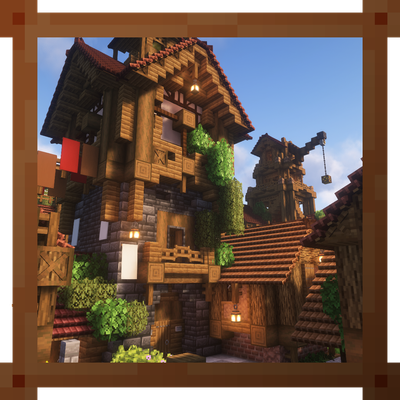
Rustic Style for MCol
Adds a cozy and early-industrial stylepack to Minecolonies.
 mod
mod CurseForge · Minecraft
PrimeClient
PrimeClient is the custom Client-side Mod made specifically for Pixelmon Prime. It enables the ability to communicate with the server using the PrimeAPI.