Minecraft version
Back to mods 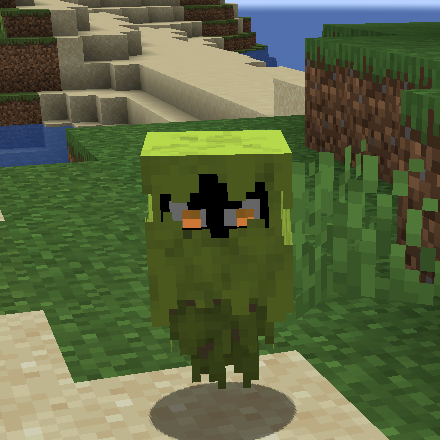
CurseForge · Minecraft mod
YDM's Glare
This mod adds the glare mob from the 2021 mobvote
Choose a version Pick your version below, then grab the matching file.
Quick answer
Which YDM's Glare release should I use?
Latest stable file Forge 1.20.1 - 1.0.1
Game version 1.20.1
Loader Forge
YDM's Glare Forge 1.20.1 - 1.0.1 targets 1.20.1 with Forge. The project page does not say whether this file belongs on the client, dedicated server, or both. No extra mods listed for this file.
Where it goes
Is YDM's Glare required on the client, server, or both?
The project page does not say whether this file belongs on the client, dedicated server, or both.
Client Source doesn’t say
Dedicated server Source doesn’t say
Loader for this release Forge
Required install it here Optional supported, not mandatory Not supported do not install here Source doesn’t say do not assume
The source does not explicitly classify this release as client-only or server-only.
What else does YDM's Glare Forge 1.20.1 - 1.0.1 need?
Forge 1.20.1 - 1.0.1. Change the file and its required mods may change too.
This file does not list any required mods. Do not add a library just because a different file uses it.
This file does not list any required or optional mods.
Before you install it
Add YDM's Glare without breaking your instance.
Built for YDM's Glare Forge 1.20.1 - 1.0.1. Pick another file and the loader, install side or required mods may change.
- 01
Stick to this file
Use Forge 1.20.1 - 1.0.1. It targets 1.20.1 with Forge; another release may have different loader, side or dependency requirements.
- 02
Bring the mods it needs
This file does not list any required mods. Do not add a library just because a different file uses it.
- 03
Put it on the correct side
The project page does not say whether this file belongs on the client, dedicated server, or both.
- 04
Pick the file you checked
Use the “Get this file” button beside Forge 1.20.1 - 1.0.1. It opens that exact file at the source.
About this project
What does YDM's Glare add?
YDM's Glare for FORGE/FABRIC
Get the Glare to your game!
It will show you areas that are dark enough for monsters to spawn.
It does so by flying to dangerously dark areas and then throwing a hissy fit.
With the glare by your side, you’ll know that each tantrum might lead to monsters too!
-can be tamed and breed with glow berries.
-it glares at you
-if you want a mob to spawn in another mods biome:
You have to change the biome_name line to:
biome_name = "modid:name_of_the_biome"
For example with Biomes O' Plenty:
biome_name = "biomesoplenty:cherry_blossom_grove"
To let it spawn in more biomes you have to put a comma (,) between the biome names like this:
biome_name = "modid:name_of_the_biome,minecraft:desert,minecraft:forest"
In the fabric version you dont have to write the modid.
(You have to restart the game to let the config changes happen)
In 1.19 the config for spawn settings was replaced with biome tag and biome modifier json files.
These can be found under the data folder in the jar.
If you find any errors please let me know.
Thanks for downloading my mod!


Project description from CurseForge.
Pick your setup
YDM's Glare by Minecraft version and loader
Choose the version and loader you play, then open the matching release.
Minecraft version
1.19.3
2 loader buildsMinecraft version
1.19.2
2 loader buildsMinecraft version
1.19.1
2 loader buildsMinecraft version
1.19
2 loader buildsMinecraft version
1.18.2
2 loader buildsMinecraft version
1.18.1
2 loader buildsMinecraft version
1.18
1 loader buildMinecraft version
1.17.1
2 loader buildsCheck the dependencies, then try the file in a copied instance before changing a world you care about.
Recent files
YDM's Glare versions and loaders
Forge 1.20.1 - 1.0.1
glare-forge-1.20.1-1.0.1.jar
1 Jul 2023
Client Source doesn’t say Server Source doesn’t say Dependencies No extras listed Listed on Release listing
Check the 1.20.1 · Forge setup 1.20.1Forge release
Glare - Fabric 1.19.3 - 1.0.1
glare-fabric-1.19.3-1.0.1.jar
24 Dec 2022
Client Source doesn’t say Server Source doesn’t say Dependencies No extras listed Listed on Release listing
Check the 1.19.3 · Fabric setup 1.19.3Fabric release
Glare - Forge 1.19.3 - 1.0.1
glare-forge-1.19.3-1.0.1.jar
24 Dec 2022
Client Source doesn’t say Server Source doesn’t say Dependencies No extras listed Listed on Release listing
Check the 1.19.3 · Forge setup 1.19.3Forge release
Glare - Fabric 1.19.2 - 1.0.1
glare-fabric-1.19.2-1.0.1.jar
2 Oct 2022
Client Source doesn’t say Server Source doesn’t say Dependencies No extras listed Listed on Release listing
Check the 1.19.2 · Fabric setup Fabric1.19.2 release
Glare - Forge 1.19.x - 1.0.1
glare-forge-1.19-1.0.1.jar
18 Jul 2022
Client Source doesn’t say Server Source doesn’t say Dependencies No extras listed Listed on Release listing
Check the 1.19.2 · Forge setup 1.19.2Forge1.19.11.19 release
Glare - Fabric 1.19.x - 1.0.0
glare-fabric-1.19-1.0.0.jar
25 Jun 2022
Client Source doesn’t say Server Source doesn’t say Dependencies No extras listed Listed on Release listing
Check the 1.19.1 · Fabric setup Fabric1.19.11.19 release
Glare - Fabric 1.18.x - 1.0.0
glare-fabric-1.18.x-1.0.0.jar
25 Jun 2022
Client Source doesn’t say Server Source doesn’t say Dependencies No extras listed Listed on Release listing
Check the 1.18.2 · Fabric setup 1.18.1Fabric1.18.21.18 release
Glare - Fabric 1.17.1 - 1.0.0
glare-fabric-1.17.1-1.0.0.jar
25 Jun 2022
Client Source doesn’t say Server Source doesn’t say Dependencies No extras listed Listed on Release listing
Check the 1.17.1 · Fabric setup 1.17.1Fabric release
Glare - Forge 1.19 - 1.0.1
glare-forge-1.19-1.0.0.jar
14 Jun 2022
Client Source doesn’t say Server Source doesn’t say Dependencies No extras listed Listed on Release listing
Check the 1.19 · Forge setup Forge1.19 release
YDM's Glare for forge 1.18.1/1.18.2
glare-1-18-1.jar
5 Mar 2022
Client Source doesn’t say Server Source doesn’t say Dependencies No extras listed Listed on Release listing
Check the 1.18.2 · Forge setup 1.18.11.18.2Forge release
YDM's Glare for forge 1.17.1
glare-1-17-1.jar
5 Mar 2022
Client Source doesn’t say Server Source doesn’t say Dependencies No extras listed Listed on Release listing
Check the 1.17.1 · Forge setup 1.17.1Forge release
Looking for an older file? The official CurseForge project page is in Resources.
 mod
CurseForge · Minecraft
Forgotten Island: Wild Companions
Befriend 13 magical companions, explore a lantern-lit island, battle two bosses, forge crystal gear, and raise a flying Bakunawa.
 mod
CurseForge · Minecraft
Creature Feature (Unnoficial Forge Port)
Unofficial Forge 1.20.1 port of Creature Feature: 22 strange and dangerous creatures, with their items, effects and blocks.
 mod
CurseForge · Minecraft
SnoobKid's Zombie Hordes - Only Zombies
This mod makes zombies the only hostile mobs that spawn. It is useful for vanilla-friendly zombie apocalypse modpacks.