Minecraft version
Back to mods 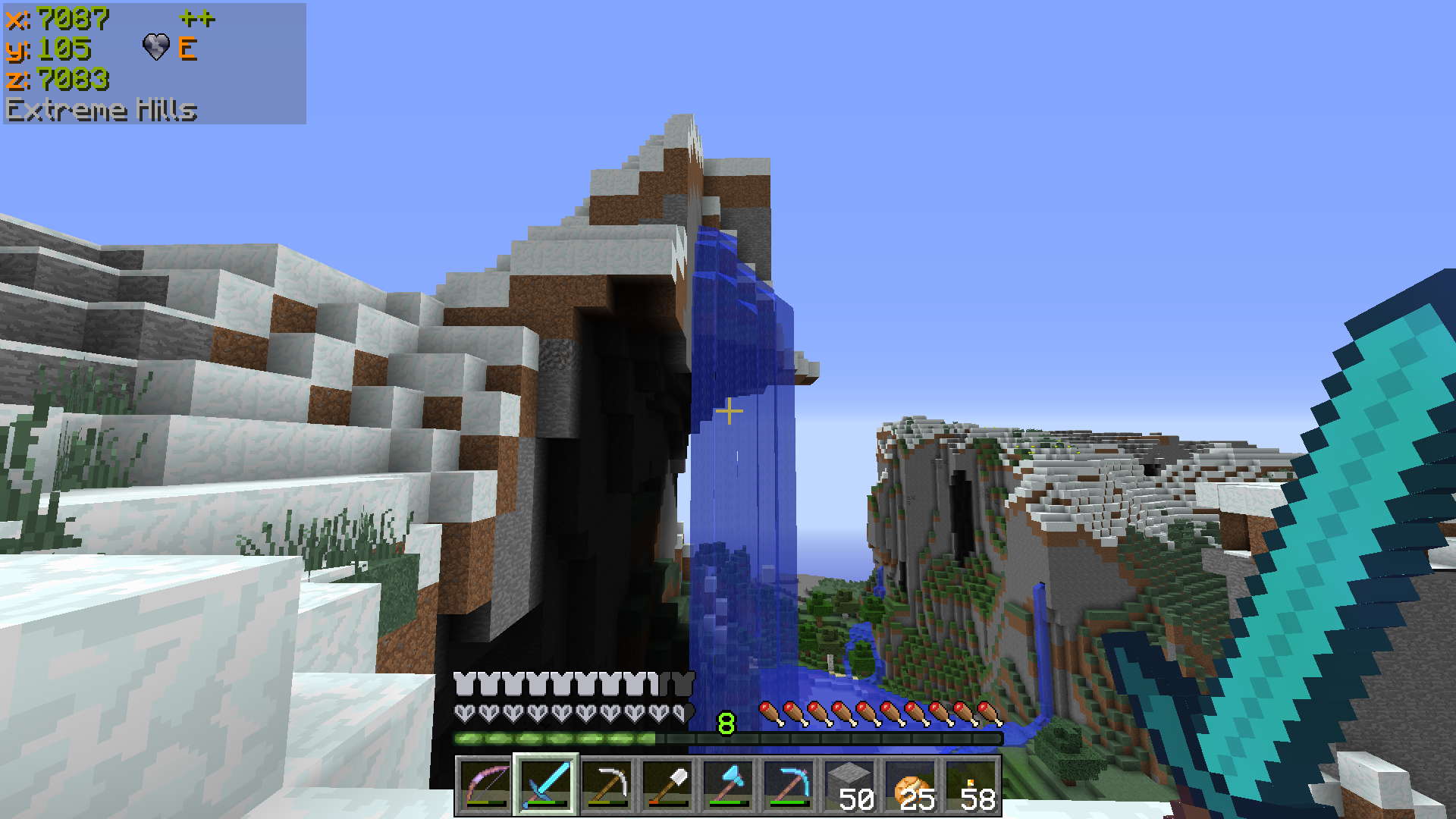
CurseForge · Minecraft mod
Batty's Coordinates PLUS! Mod for Forge
Batty's Coordinates PLUS! Mod for Forge
Choose a version Pick your version below, then grab the matching file.
Quick answer
Which Batty's Coordinates PLUS! Mod for Forge release should I use?
Latest stable file Batty's Coordinates PLUS Mod for Forge (1.18.2-0.1.0)
Game version 1.18.2
Loader Forge
Batty's Coordinates PLUS! Mod for Forge Batty's Coordinates PLUS Mod for Forge (1.18.2-0.1.0) targets 1.18.2 with Forge. The project page does not say whether this file belongs on the client, dedicated server, or both. No extra mods listed for this file.
Where it goes
Is Batty's Coordinates PLUS! Mod for Forge required on the client, server, or both?
The project page does not say whether this file belongs on the client, dedicated server, or both.
Client Source doesn’t say
Dedicated server Source doesn’t say
Loader for this release Forge
Required install it here Optional supported, not mandatory Not supported do not install here Source doesn’t say do not assume
The source does not explicitly classify this release as client-only or server-only.
What else does Batty's Coordinates PLUS! Mod for Forge Batty's Coordinates PLUS Mod for Forge (1.18.2-0.1.0) need?
Batty's Coordinates PLUS Mod for Forge (1.18.2-0.1.0). Change the file and its required mods may change too.
This file does not list any required mods. Do not add a library just because a different file uses it.
This file does not list any required or optional mods.
Before you install it
Add Batty's Coordinates PLUS! Mod for Forge without breaking your instance.
Built for Batty's Coordinates PLUS! Mod for Forge Batty's Coordinates PLUS Mod for Forge (1.18.2-0.1.0). Pick another file and the loader, install side or required mods may change.
- 01
Stick to this file
Use Batty's Coordinates PLUS Mod for Forge (1.18.2-0.1.0). It targets 1.18.2 with Forge; another release may have different loader, side or dependency requirements.
- 02
Bring the mods it needs
This file does not list any required mods. Do not add a library just because a different file uses it.
- 03
Put it on the correct side
The project page does not say whether this file belongs on the client, dedicated server, or both.
- 04
Pick the file you checked
Use the “Get this file” button beside Batty's Coordinates PLUS Mod for Forge (1.18.2-0.1.0). It opens that exact file at the source.
About this project
What does Batty's Coordinates PLUS! Mod for Forge add?
Batty's Coordinates PLUS! Mod for Forge
Announcement
I have had many technical problems trying to upgrade to 1.17.x. I almost decided to let the mod die at this point, which would be a shame since it has been running for so long.
In the end I decided to release a cut-down version for 1.17.1.
It has these features removed:
a) The entire Info Panel (that showed FPS, Light Levels and Moon Phases)
b) The Copy Coords to Clipboard option
c) The BatHeart logo (normally shown within the Coords Panel)
They are also missing for 1.18.x and this will be the case until I announce that I have fixed it.
NOTE: This mod runs with Minecraft Forge.
If you want a version that runs without Forge, see this page.
Combines Batty's Coordinates & Stopwatch Timer
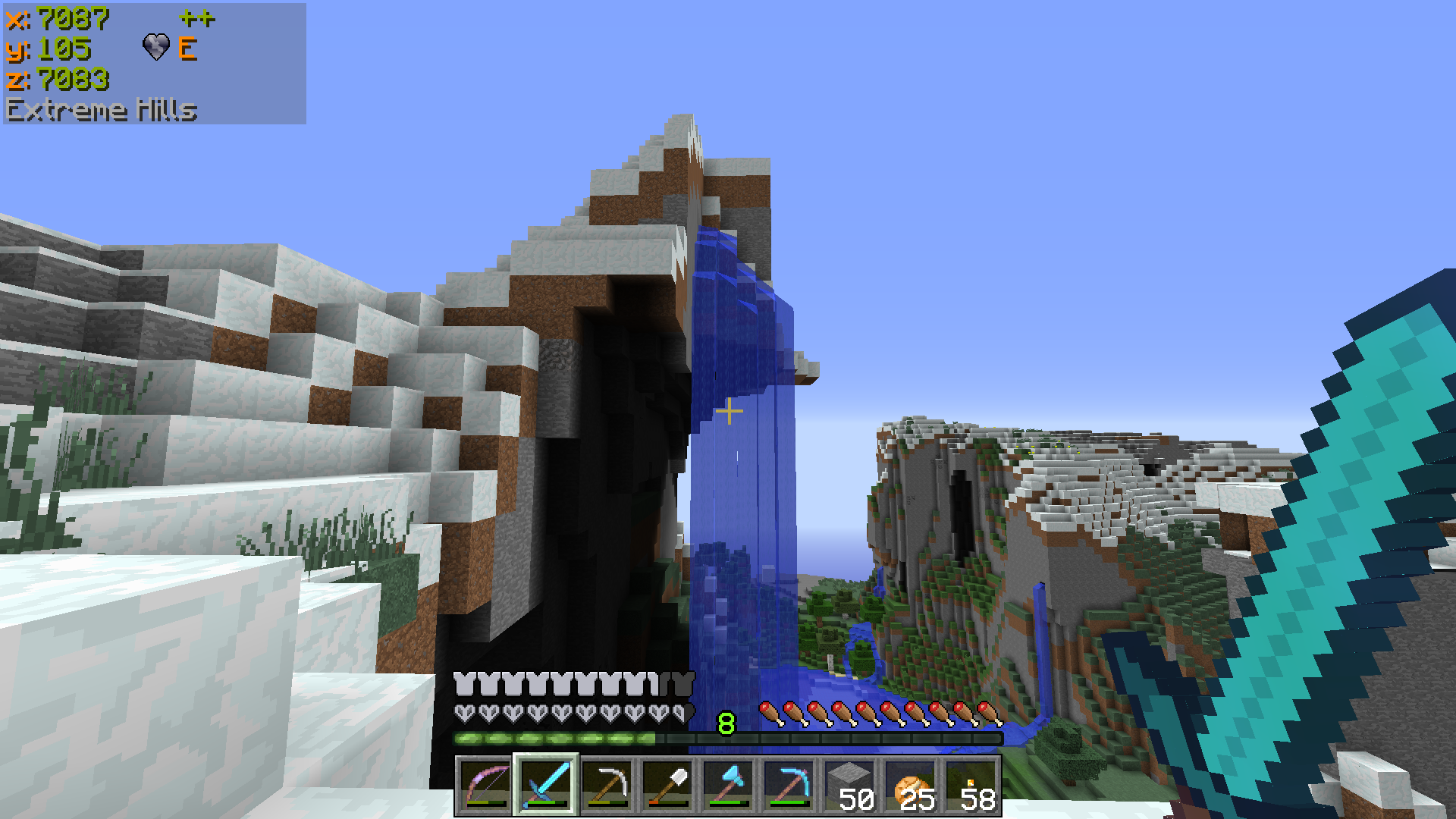
Batty's Coordinates
The X, Y and Z coordinates that locate the player's position in the world are normally displayed on the F3 Debug screen.
This mod has a number of display modes that present this information, and more, discreetly in a corner of the main game screen, so you don't have to leave F3 open to see them.
In Mode 0 the Coordinates are hidden.
Mode 1 shows the X, Y and Z coordinates, and it also indicates the direction that you are facing, in compass-direction terms.
Mode 2 adds an indication whether your X and Z coordinates will Increase or Decrease if you move in the direction you are facing.
Mode 3 also shows the Biome that you are currently in, displayed below the coordinates.
Mode 4 adds the Minecraft Day counter, shown as 'dy'.
Mode 5 replaces the normal X, Y and Z coordinates with Chunk information:
This shows which Chunk you are in, and which Block within that Chunk
The display appears with the Chunk being denoted by a 'c' and the Block by a 'b', for example:
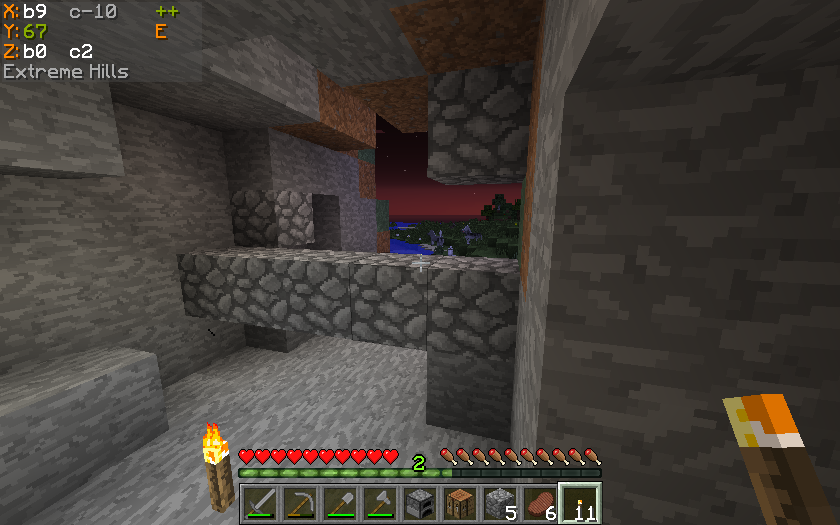
means:
X = Block 9 within Chunk -10
Z = Block 0 within Chunk 2
Batty's Stopwatch Timer
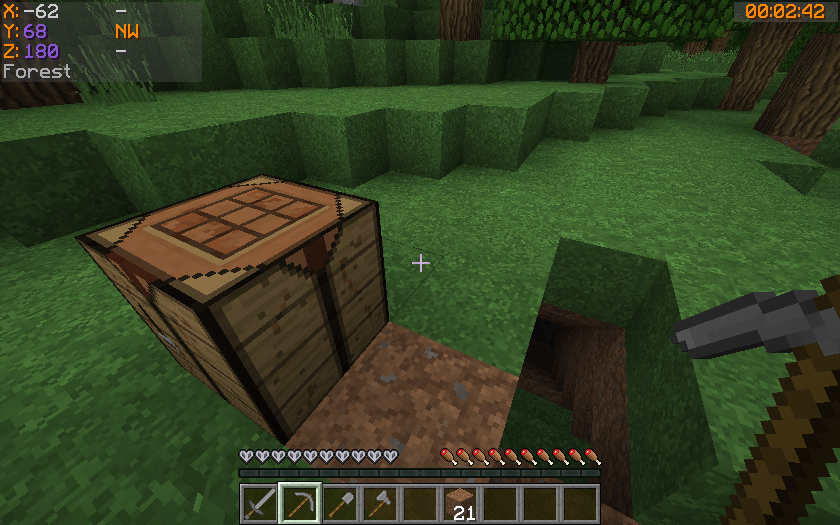
A discreet timer tucked away in a corner of the screen, that you can hide, reappear, stop, start and zero using key presses.
Can be used to time activities in-game. Useful for speed challenges.
Shows the time passed in hours, minutes and seconds.
Colour-coded so you know at a glance if it is stopped or running.
Info Panel
This display will show either the FPS, the Block Light-level or the Moon phase. You can switch between these at the press of a button.
FPS Display
The Frames per Second that the game is running at is displayed in a corner of the screen.
Block Light-level
The block light (i.e. artificial light reaching this block) of the block the player is standing on is displayed
Moon phase
An icon, showing the current phase of the moon, is displayed.
Video Spotlight
A Mod Spotlight (covering all variations of my mods) by EddCase and OddyC of TheMobCave.
Controls
From version 1.7.2_1.4.0 the Controls have been completely revamped
All controls use keys from the NumPad (Be sure to have NumLock set on!)
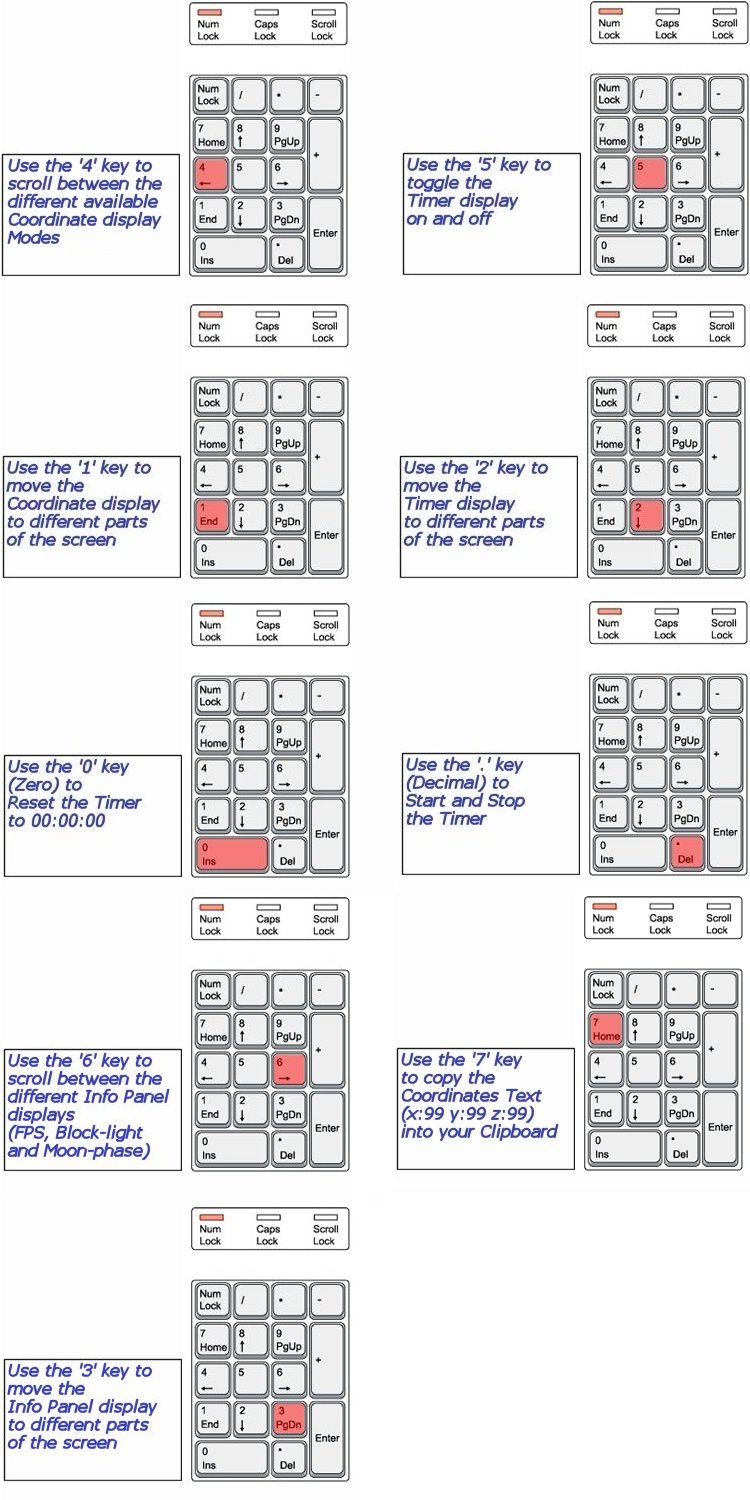
NOTE 1 Coordinates can appear:
- Top Left
- Top Right
- Bottom Right
NOTE 2 Timer can appear:
- Top Left
- Top Centre
- Top Right
- Bottom Right
- Bottom Left
NOTE 3 The Info Panel can appear:
- Top Left
- Top Centre
- Top Right
- Bottom Right
NOTE 4 All of the Control Keys are fully reconfigurable via the Options Menu in-game
NOTE 5 Screen locations and display modes are remembered when you quit Minecraft
Custom Colours
Important
From versions 1.11.2_003 through to 1.15.2-0.1.0, Batty's Coordinates PLUS Mod for Forge used the Forge configuration system, allowing the colours to be customised by going to the Mod Options screen in-game. For these versions the BatMod.properties - described below - was not used.
The Mod Options settings are stored in a Forge configurations file in the /config folder. This file is called coordinatesplusmod.cfg.
[N.B. in 1.14 this filename has changed again. It is now coordinatesplusmod-client.toml]
From version 1.16.1_0.2.0 configuration has reverted to the BatMod.properties as described below.
You can customise the colours in which Batty's Coordinates and Timer appear on the screen.
This done by creating a small file called BatMod.properties in your .minecraft folder.
If this file is not present, the displays all appear in the default colours.
The following lines are permitted in the file:
- Coords.shade = <true or false>
- Coords.chars.Increase = <any character>
- Coords.chars.Decrease = <any character>
- Coords.colours.TitleText = <colour from the list>
- Coords.colours.PosCoordText = <colour from the list>
- Coords.colours.NegCoordText = <colour from the list>
- Coords.colours.PosChunkText = <colour from the list>
- Coords.colours.NegChunkText = <colour from the list>
- Coords.colours.CoordText = <colour from the list>
- Coords.colours.CompassText = <colour from the list>
- Coords.colours.ChevronText = <colour from the list>
- Coords.colours.BiomeText = <colour from the list>
- Coords.copy.tpFormat = <true or false>
- Timer.shade = <true or false>
- Timer.colours.Stopped = <colour from the list>
- Timer.colours.Running = <colour from the list>
- Info.shade = <true or false>
- Info.colours.FPS = <colour from the list>
- Info.colours.Bright = <colour from the list>
- Info.colours.Dim = <colour from the list>
- Info.colours.Moon = <colour from the list>
NOTE 1: PosCoordText and NegCoordText can be used to distinguish positive and negative coordinates from each other by giving them different colours
NOTE 2: You can still use CoordText, and this will override anything you put in PosCoordText and NegCoordText
NOTE 3: You can choose the character that indicates whether your coordinates are increasing or decreasing in the X or Z directions. By default these are '+' and '-', but by use of Coords.chars.Increase or .Decrease you can substitute another character.
NOTE 4: You can choose the colours that the Chunk Coordinates display, positive and negative
NOTE 5: You can decide to copy the Coordinates to your clipboard in standard format "x=999, y=99, z=999" or in /tp command format "999 99 999" by the Coords.copy.tpFormat parameter. Setting this to true will make it use the /tp command format.
NOTE 6: Info.colours.Dim chooses the colour that light-levels of 7 and below will display, while Info.colours.Bright chooses the colour that light-level of 8 and above will display.
The full list of recognised colours:

(*Note* that you must type all of the entries exactly as they appear here - capitals and lowercase - or they will be ignored and the default colours will be used by the game)
Compatibility
Batty's Coordinates PLUS! for Forge is designed to run under Minecraft Forge. It will therefore be compatible with other Forge mods that you load, within the rules structure of Forge.
Installing
Make sure you have Forge installed: download and run the latest recommended Forge installer.
Download Batty's Coordinates PLUS! for Forge .jar file and place it in your /.minecraft/mods folder. (%appdata%/.minecraft/mods)
Create the /mods folder if it does not already exist.
Select the latest Forge profile in the Minecraft Launcher, or MagicLauncher.
Check that Batty's Coordinates PLUS! for Forge has been recognised as an External Mod.
Run Minecraft from the Launcher.
Project description from CurseForge.
Pick your setup
Batty's Coordinates PLUS! Mod for Forge by Minecraft version and loader
Choose the version and loader you play, then open the matching release.
Minecraft version
1.18.1
1 loader buildMinecraft version
1.18
1 loader buildMinecraft version
1.17.1
1 loader buildMinecraft version
1.16.5
1 loader buildMinecraft version
1.16.4
1 loader buildMinecraft version
1.16.3
1 loader buildMinecraft version
1.16.2
1 loader buildMinecraft version
1.16.1
1 loader buildMinecraft version
1.15.2
1 loader buildMinecraft version
1.15.1
1 loader buildMinecraft version
1.14.4
1 loader buildShowing the newest 12 of 30 game versions. Older files are in the list below.
Check the dependencies, then try the file in a copied instance before changing a world you care about.
Recent files
Batty's Coordinates PLUS! Mod for Forge versions and loaders
Batty's Coordinates PLUS Mod for Forge (1.18.2-0.1.0)
Batty's Coordinates PLUS Mod for Forge-1.18.2-0.1.0.jar
10 Mar 2022
Client Source doesn’t say Server Source doesn’t say Dependencies No extras listed Listed on Release listing
Check the 1.18.2 · Forge setup 1.18.2Forge release
Batty's Coordinates PLUS Mod for Forge (1.18.1-0.1.0)
Batty's Coordinates PLUS Mod for Forge-1.18.1-0.1.0.jar
11 Dec 2021
Client Source doesn’t say Server Source doesn’t say Dependencies No extras listed Listed on Release listing
Check the 1.18.1 · Forge setup 1.18.1Forge release
Batty's Coordinates PLUS Mod for Forge (1.18-0.1.0)
coordinatesplusmod-1.18-0.1.0.jar
1 Dec 2021
Client Source doesn’t say Server Source doesn’t say Dependencies No extras listed Listed on Release listing
Check the 1.18.1 · Forge setup 1.18.1Forge1.18 release
Batty's Coordinates PLUS Mod for Forge (1.17.1-0.1.0)
Batty's Coordinates PLUS Mod (1.17.1-0.1.0).jar
6 Oct 2021
Client Source doesn’t say Server Source doesn’t say Dependencies No extras listed Listed on Release listing
Check the 1.17.1 setup 1.17.1 release
Batty's Coordinates PLUS Mod for Forge (1.16.4 0.1.0)
Batty's Coordinates PLUS Mod for Forge-1.16.4-0.1.0.jar
3 Nov 2020
Client Source doesn’t say Server Source doesn’t say Dependencies No extras listed Listed on Release listing
Check the 1.16.5 setup 1.16.51.16.4 beta
Batty's Coordinates PLUS Mod for Forge (1.16.3-0.1.0)
Batty's Coordinates PLUS Mod for Forge-1.16.3-0.1.0.jar
13 Sept 2020
Client Source doesn’t say Server Source doesn’t say Dependencies No extras listed Listed on Release listing
Check the 1.16.3 setup 1.16.3 beta
Batty's Coordinates PLUS Mod for Forge (1.16.2-0.3.0)
Batty's Coordinates PLUS Mod for Forge-1.16.2-0.3.0.jar
1 Sept 2020
Client Source doesn’t say Server Source doesn’t say Dependencies No extras listed Listed on Release listing
Check the 1.16.2 setup 1.16.2 beta
Batty's Coordinates PLUS Mod for Forge (1.16.2-0.1.0)
Batty's Coordinates PLUS Mod for Forge-1.16.2-0.1.0.jar
13 Aug 2020
Client Source doesn’t say Server Source doesn’t say Dependencies No extras listed Listed on Release listing
Check the 1.16.2 setup 1.16.2 beta
Batty's Coordinates PLUS Mod for Forge (1.16.1-0.3.0)
Batty's Coordinates PLUS Mod for Forge-1.16.1-0.3.0.jar
8 Aug 2020
Client Source doesn’t say Server Source doesn’t say Dependencies No extras listed Listed on Release listing
Check the 1.16.1 setup 1.16.1 beta
Batty's Coordinates PLUS Mod for Forge (1.16.1-0.2.0)
Batty's Coordinates PLUS Mod for Forge-1.16.1-0.2.0.jar
9 Jul 2020
Client Source doesn’t say Server Source doesn’t say Dependencies No extras listed Listed on Release listing
Check the 1.16.1 setup 1.16.1 beta
Batty's Coordinates PLUS Mod for Forge (1.16.1-0.1.0)
Batty's Coordinates PLUS Mod for Forge-1.16.1-0.1.0.jar
6 Jul 2020
Client Source doesn’t say Server Source doesn’t say Dependencies No extras listed Listed on Release listing
Check the 1.16.1 setup 1.16.1 beta
Batty's Coordinates PLUS Mod for Forge (1.15.2 0.1.0)
Batty's Coordinates PLUS Mod for Forge-1.15.2-0.1.0.jar
26 Jan 2020
Client Source doesn’t say Server Source doesn’t say Dependencies No extras listed Listed on Release listing
Check the 1.15.2 setup 1.15.2 release
Looking for an older file? The official CurseForge project page is in Resources.
 mod
mod CurseForge · Minecraft
E33Chat
Rebuilds the vanilla chat HUD in chat-app style
 mod
mod CurseForge · Minecraft
Cobblemon Catch Rate Display
Real-time catch rate calculator for Cobblemon. Shows live percentages, ball comparisons, and status effects. 100% client-side — works on any server.
 mod
mod CurseForge + Modrinth · Minecraft
Holyhell
Vanilla friendly content mod that adds Biblically Accurate Angels