Minecraft version
Back to mods 
CurseForge · Minecraft mod
Better Eyes
Eyes of Ender with better mechanics
Choose a version Pick your version below, then grab the matching file.
Quick answer
Which Better Eyes release should I use?
Latest stable file bettereyes-1.16.5-1.0.jar
Game version 1.16.5
Loader Forge
Better Eyes bettereyes-1.16.5-1.0.jar targets 1.16.5 with Forge. The project page does not say whether this file belongs on the client, dedicated server, or both. No extra mods listed for this file.
Where it goes
Is Better Eyes required on the client, server, or both?
The project page does not say whether this file belongs on the client, dedicated server, or both.
Client Source doesn’t say
Dedicated server Source doesn’t say
Loader for this release Forge
Required install it here Optional supported, not mandatory Not supported do not install here Source doesn’t say do not assume
The source does not explicitly classify this release as client-only or server-only.
What else does Better Eyes bettereyes-1.16.5-1.0.jar need?
bettereyes-1.16.5-1.0.jar. Change the file and its required mods may change too.
This file does not list any required mods. Do not add a library just because a different file uses it.
This file does not list any required or optional mods.
Before you install it
Add Better Eyes without breaking your instance.
Built for Better Eyes bettereyes-1.16.5-1.0.jar. Pick another file and the loader, install side or required mods may change.
- 01
Stick to this file
Use bettereyes-1.16.5-1.0.jar. It targets 1.16.5 with Forge; another release may have different loader, side or dependency requirements.
- 02
Bring the mods it needs
This file does not list any required mods. Do not add a library just because a different file uses it.
- 03
Put it on the correct side
The project page does not say whether this file belongs on the client, dedicated server, or both.
- 04
Pick the file you checked
Use the “Get this file” button beside bettereyes-1.16.5-1.0.jar. It opens that exact file at the source.
About this project
What does Better Eyes add?
Better Eyes
THIS IS A FORGE MOD
Better Eyes changes Eyes of Ender functionality to be more user-friendly.
Are you SICK and TIRED of right-clicking an Eye of Ender only to have it fly off randomly in the distance while you desperately spin around trying to see where it went, only for it to explode in the sky or drop down on top of a tree? Stuck in a forest and can't find a clearing? Or how about when you get just close enough to one that it just goes straight into the ground?
Think of all the WASTED ender pearls you've lost over the years trying to find a stronghold! Forget about all that NONSENSE!
Well, waste no more.. Better Eyes no longer launches Eyes of Ender from the player as an entity, instead, simply a message is generated that gently, but clearly, directs the player in the same direction the eye would have traveled yet they stay comfortably in your inventory. If in the unfortunate event that the Eye of Ender shatters, the player is informed of this information.
Particles will even spawn in an area around the player when the Eye of Ender is right-clicked. It's a very subtle effect, but the more spread out the particles are then the farther you are from the nearest stronghold.
This amazing mod was inspired by how rune talismans work in Runescape and brings the convenience and simplicity of that system to modded Minecraft!
Configuration options available:
- printToActionBar: true - if set to false, the mod will print the message to chat instead
- shatterChance: 0.2 - probability that the eye will shatter when used, 20% chance is the vanilla default
When the player right-clicks an eye, various messages may be displayed in chat:
- Direction: "You rub the Eye of Ender and it pulls north-west."
- Nearby: "You rub the Eye of Ender and it shakes violently in your hand."
- Nothing Found: "You rub the Eye of Ender and it does not move."

The directions indicated are accurate to the 16th division. Such as:
- North
- East by South-East
- South-West
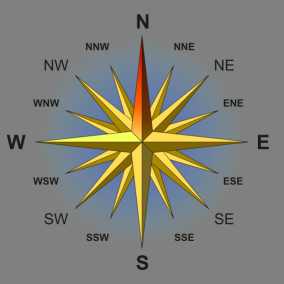
Project description from CurseForge.
Pick your setup
Better Eyes by Minecraft version and loader
Choose the version and loader you play, then open the matching release.
Minecraft version
1.16.5
1 loader buildCheck the dependencies, then try the file in a copied instance before changing a world you care about.
Recent files
Better Eyes versions and loaders
bettereyes-1.16.5-1.0.jar
29 May 2022
Client Source doesn’t say Server Source doesn’t say Dependencies No extras listed Listed on Release listing
Check the 1.16.5 · Forge setup 1.16.5Forge release
bettereyes-1.18.2-1.0.jar
29 May 2022
Client Source doesn’t say Server Source doesn’t say Dependencies No extras listed Listed on Release listing
Check the 1.18.2 · Forge setup 1.18.2Forge release
Looking for an older file? The official CurseForge project page is in Resources.
 mod
CurseForge + Modrinth · Minecraft
Velorise Simple Map
An exploration-focused world map and minimap with cave mapping, waypoints and extensive customization.
 mod
CurseForge + Modrinth · Minecraft
PlayerRevive
Revive your friends.
 mod
CurseForge · Minecraft
Smart_Crafter_MCdestined
Smart Crafter is a lightweight, vanilla-friendly automation mod that upgrades the vanilla Crafter into a true set-and-forget auto-crafter—no redstone clocks required, and no more accidentally emptying your crafting template!