Minecraft version
Back to mods 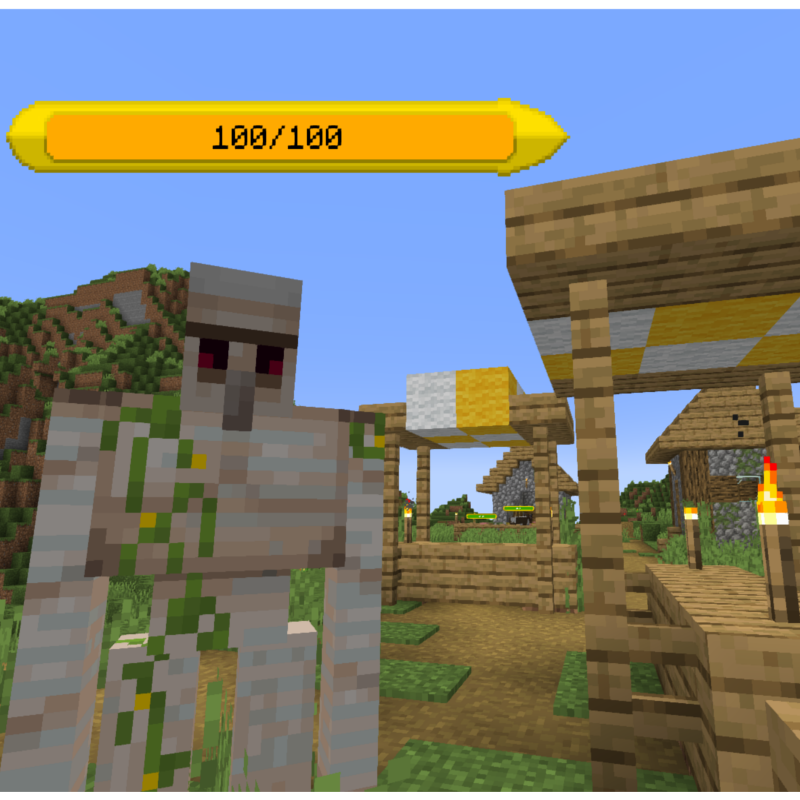
CurseForge · Minecraft mod
Health Bar Plus
Enhance your game with visible bars above entities
Choose a version Pick your version below, then grab the matching file.
Quick answer
Which Health Bar Plus release should I use?
Latest stable file Forge 1.20.1 - 1.1.0
Game version 1.20.1
Loader Forge
Health Bar Plus Forge 1.20.1 - 1.1.0 targets 1.20.1 with Forge. The project page does not say whether this file belongs on the client, dedicated server, or both. No extra mods listed for this file.
Where it goes
Is Health Bar Plus required on the client, server, or both?
The project page does not say whether this file belongs on the client, dedicated server, or both.
Client Source doesn’t say
Dedicated server Source doesn’t say
Loader for this release Forge
Required install it here Optional supported, not mandatory Not supported do not install here Source doesn’t say do not assume
The source does not explicitly classify this release as client-only or server-only.
What else does Health Bar Plus Forge 1.20.1 - 1.1.0 need?
Forge 1.20.1 - 1.1.0. Change the file and its required mods may change too.
This file does not list any required mods. Do not add a library just because a different file uses it.
This file does not list any required or optional mods.
Before you install it
Add Health Bar Plus without breaking your instance.
Built for Health Bar Plus Forge 1.20.1 - 1.1.0. Pick another file and the loader, install side or required mods may change.
- 01
Stick to this file
Use Forge 1.20.1 - 1.1.0. It targets 1.20.1 with Forge; another release may have different loader, side or dependency requirements.
- 02
Bring the mods it needs
This file does not list any required mods. Do not add a library just because a different file uses it.
- 03
Put it on the correct side
The project page does not say whether this file belongs on the client, dedicated server, or both.
- 04
Pick the file you checked
Use the “Get this file” button beside Forge 1.20.1 - 1.1.0. It opens that exact file at the source.
About this project
What does Health Bar Plus add?
This is a HUD and hp bar editor and is currently available for FORGE/FABRIC
As you can see it in the pictures, you can create some new things for your HUD like:
- adding the player head to the screen
- creating a circle or square frame, second frame and background as a "head holder"
- creating a health bar (frame, hp, bg, second frame)
- changing the size, position, color, opacity for most of these elements
Health bars can be made for mobs too.
You can create the hp bars for passive, neutral and hostile mobs separately.
You can choose from:
- 33 health bar frame type (You can use 2 frame type at the same time)
- 11 health bar background
- 11 health indicator bar
- 30 head holder frame type (You can use 2 frame type at the same time)
- 24 head holder background
These are all colorable, positionable, scalable and can be turned on or off.
Opacity can not be changed for mob hp bars, but you can turn every single element on or off if you want.
You can open the settings window for these with the "B" keyboard key by default.
Project description from CurseForge.
Pick your setup
Health Bar Plus by Minecraft version and loader
Choose the version and loader you play, then open the matching release.
Minecraft version
1.19.3
2 loader buildsMinecraft version
1.19.2
2 loader buildsMinecraft version
1.19
2 loader buildsMinecraft version
1.18.2
2 loader buildsMinecraft version
1.18.1
2 loader buildsMinecraft version
1.18
2 loader buildsMinecraft version
1.16.5
2 loader buildsCheck the dependencies, then try the file in a copied instance before changing a world you care about.
Recent files
Health Bar Plus versions and loaders
Forge 1.20.1 - 1.1.0
healthbarplus-forge-1.20.1-1.1.0.jar
2 Jul 2023
Client Source doesn’t say Server Source doesn’t say Dependencies No extras listed Listed on Release listing
Check the 1.20.1 · Forge setup 1.20.1Forge release
HBP - Fabric 1.19.3 - 1.0.1
healthbarplus-fabric-1.19.3-1.0.1.jar
19 Dec 2022
Client Source doesn’t say Server Source doesn’t say Dependencies No extras listed Listed on Release listing
Check the 1.19.3 · Fabric setup 1.19.3Fabric release
HBP - Forge 1.19.3 - 1.0.1
healthbarplus-forge-1.19.3-1.0.1.jar
19 Dec 2022
Client Source doesn’t say Server Source doesn’t say Dependencies No extras listed Listed on Release listing
Check the 1.19.3 · Forge setup 1.19.3Forge release
HBP - Fabric 1.19.2 - 1.0.1
healthbarplus-fabric-1.19.2-1.0.1.jar
11 Nov 2022
Client Source doesn’t say Server Source doesn’t say Dependencies No extras listed Listed on Release listing
Check the 1.19.2 · Fabric setup Fabric1.19.2 release
HBP - Forge 1.19 - 1.0.1
healthbarplus-forge-1.19.2-1.0.1.jar
9 Nov 2022
Client Source doesn’t say Server Source doesn’t say Dependencies No extras listed Listed on Release listing
Check the 1.19.2 · Forge setup 1.19.2Forge release
HBP - Forge 1.19 - 1.0.0
healthbarplus-forge-1.19-1.0.0.jar
24 Jun 2022
Client Source doesn’t say Server Source doesn’t say Dependencies No extras listed Listed on Release listing
Check the 1.19 · Forge setup Forge1.19 release
HBP - Forge 1.18.x - 1.0.0
healthbarplus-forge-1.18.x-1.0.0.jar
24 Jun 2022
Client Source doesn’t say Server Source doesn’t say Dependencies No extras listed Listed on Release listing
Check the 1.18.2 · Forge setup 1.18.11.18.2Forge1.18 release
HBP - Forge 1.16.5 - 1.0.0
healthbarplus-forge-1.16.5-1.0.0.jar
24 Jun 2022
Client Source doesn’t say Server Source doesn’t say Dependencies No extras listed Listed on Release listing
Check the 1.16.5 · Forge setup 1.16.5Forge release
HBP - Fabric 1.19 - 1.0.0
healthbarplus-fabric-1.19-1.0.0.jar
24 Jun 2022
Client Source doesn’t say Server Source doesn’t say Dependencies No extras listed Listed on Release listing
Check the 1.19 · Fabric setup Fabric1.19 release
HBP - Fabric 1.18.x - 1.0.0
healthbarplus-fabric-1.18.x-1.0.0.jar
24 Jun 2022
Client Source doesn’t say Server Source doesn’t say Dependencies No extras listed Listed on Release listing
Check the 1.18.2 · Fabric setup 1.18.1Fabric1.18.21.18 release
HBP - Fabric 1.16.5 - 1.0.0
healthbarplus-fabric-1.16.5-1.0.0.jar
24 Jun 2022
Client Source doesn’t say Server Source doesn’t say Dependencies No extras listed Listed on Release listing
Check the 1.16.5 · Fabric setup Fabric1.16.5 release
Looking for an older file? The official CurseForge project page is in Resources.
 mod
CurseForge + Modrinth · Minecraft
Howling Werewolf
Become a werewolf, master multiple forms and skills, survive Hunters armed with Silver, and conquer the Alpha Trial.
 mod
CurseForge · Minecraft
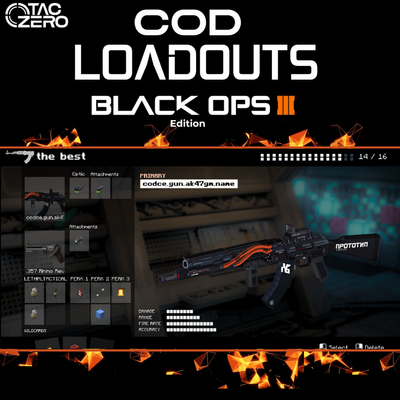
COD Loadouts [TACZ- LRtactical]- BO3 Edition
Call of Duty BO3 Loadouts! Recreate the class setup menu and weapon lists from Black Ops 3 using Tacz and LRTactical. Customize your weapon, choose your lethal and tactical equipment, select wildcards and select functional perks—compatible with gun packs.
 mod
CurseForge + Modrinth · Minecraft
Sanity: Renewed
Brings the sanity mechanic from Don't Starve into Minecraft