Minecraft version
Back to mods 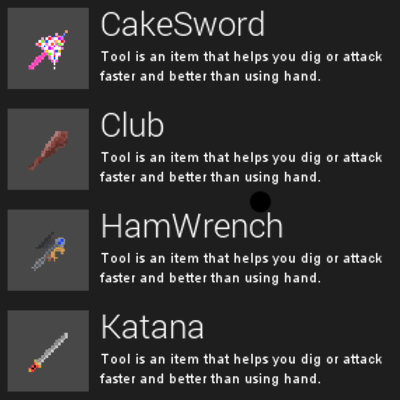
CurseForge · Minecraft mod
Fantasy Swords
Adds several swords for Andromeda Automation
Choose a version Pick your version below, then grab the matching file.
Quick answer
Which Fantasy Swords release should I use?
Latest stable file fantasyswords[1.3].jar
Game version 1.18.1, 1.18.2, 1.19.1
Loader forge
Fantasy Swords fantasyswords[1.3].jar targets 1.18.1, 1.18.2, 1.19.1. The project page does not say whether this file belongs on the client, dedicated server, or both. No extra mods listed for this file.
Where it goes
Is Fantasy Swords required on the client, server, or both?
The project page does not say whether this file belongs on the client, dedicated server, or both.
Client Source doesn’t say
Dedicated server Source doesn’t say
Loader for this release No loader listed
Required install it here Optional supported, not mandatory Not supported do not install here Source doesn’t say do not assume
The source does not explicitly classify this release as client-only or server-only.
What else does Fantasy Swords fantasyswords[1.3].jar need?
fantasyswords[1.3].jar. Change the file and its required mods may change too.
This file does not list any required mods. Do not add a library just because a different file uses it.
This file does not list any required or optional mods.
Before you install it
Add Fantasy Swords without breaking your instance.
Built for Fantasy Swords fantasyswords[1.3].jar. Pick another file and the loader, install side or required mods may change.
- 01
Stick to this file
Use fantasyswords[1.3].jar. It targets 1.18.1, 1.18.2, 1.19.1; another release may have different loader, side or dependency requirements.
- 02
Bring the mods it needs
This file does not list any required mods. Do not add a library just because a different file uses it.
- 03
Put it on the correct side
The project page does not say whether this file belongs on the client, dedicated server, or both.
- 04
Pick the file you checked
Use the “Get this file” button beside fantasyswords[1.3].jar. It opens that exact file at the source.
About this project
What does Fantasy Swords add?
Adds several swords into minecraft!
**They don't have recipes so feel free to add them with datapacks or CC tweaker!**
Intended for mod dev!
-Cake sword
-Club
-DoomSword
-Excalibur
-HamWrench
-Spectral Greatsword
-Katana
-MasterSword
-Broken Sword
-Purple Ounk Sword
-Sky Sword
-The Fork
+more!
**Sponsored By Apex Hosting Use The Link Imbedded In The File To Show Your support!**
Project description from CurseForge.
Pick your setup
Fantasy Swords by Minecraft version and loader
Choose the version and loader you play, then open the matching release.
Minecraft version
1.19
1 loader buildMinecraft version
1.18.2
2 loader buildsMinecraft version
1.18.1
2 loader buildsCheck the dependencies, then try the file in a copied instance before changing a world you care about.
Recent files
Fantasy Swords versions and loaders
fantasyswords[1.3].jar
14 Aug 2022
Client Source doesn’t say Server Source doesn’t say Dependencies No extras listed Listed on Release listing
Check the 1.19.1 setup 1.18.11.18.21.19.1 release
fantasyswords[1.2].jar
14 Jul 2022
Client Source doesn’t say Server Source doesn’t say Dependencies No extras listed Listed on Release listing
Check the 1.19.1 · Forge setup 1.18.11.18.2Forge1.19.1 release
fantasyswords[1.0]
FantasySwords.jar
12 Jul 2022
Client Source doesn’t say Server Source doesn’t say Dependencies No extras listed Listed on Release listing
Check the 1.19 setup 1.18.11.18.21.19 release
Looking for an older file? The official CurseForge project page is in Resources.
 mod
mod CurseForge · Minecraft
Instantly Destroy Tree :Clear Path for Horse Riding
fastor than Treecapitator or Lumberjack , efficient terraforming. Like VeinMiner, our Demolish Axe instantly removes trees. It offers fast logging with zero wait. Leaving zero items,Clear Obstacles,Instant Break,Fast Logging
 mod
mod CurseForge + Modrinth · Minecraft
Rocket Squids
Blundering, balletic megamolluscs for your amusement.
 mod
mod CurseForge + Modrinth · Minecraft
Reliable Recipes
A lightweight utility for recipe and tag manipulation via simple JSON configuration!