Minecraft version
Back to mods 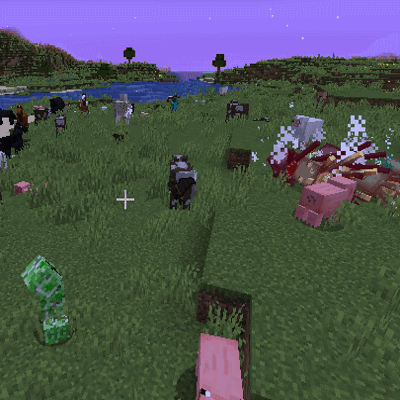
CurseForge · Minecraft mod
Spawncap Control Utility (Forge & Fabric)
Allows control of basic spawncap values
Choose a version Pick your version below, then grab the matching file.
Quick answer
Which Spawncap Control Utility (Forge & Fabric) release should I use?
Latest stable file forgeSpawncapControlUtility-1.21.11-61.1.4.jar
Game version 1.21.11
Loader Forge
Spawncap Control Utility (Forge & Fabric) forgeSpawncapControlUtility-1.21.11-61.1.4.jar targets 1.21.11 with Forge. The project page does not say whether this file belongs on the client, dedicated server, or both. No extra mods listed for this file.
Where it goes
Is Spawncap Control Utility (Forge & Fabric) required on the client, server, or both?
The project page does not say whether this file belongs on the client, dedicated server, or both.
Client Source doesn’t say
Dedicated server Source doesn’t say
Loader for this release Forge
Required install it here Optional supported, not mandatory Not supported do not install here Source doesn’t say do not assume
The source does not explicitly classify this release as client-only or server-only.
What else does Spawncap Control Utility (Forge & Fabric) forgeSpawncapControlUtility-1.21.11-61.1.4.jar need?
forgeSpawncapControlUtility-1.21.11-61.1.4.jar. Change the file and its required mods may change too.
This file does not list any required mods. Do not add a library just because a different file uses it.
This file does not list any required or optional mods.
Before you install it
Add Spawncap Control Utility (Forge & Fabric) without breaking your instance.
Built for Spawncap Control Utility (Forge & Fabric) forgeSpawncapControlUtility-1.21.11-61.1.4.jar. Pick another file and the loader, install side or required mods may change.
- 01
Stick to this file
Use forgeSpawncapControlUtility-1.21.11-61.1.4.jar. It targets 1.21.11 with Forge; another release may have different loader, side or dependency requirements.
- 02
Bring the mods it needs
This file does not list any required mods. Do not add a library just because a different file uses it.
- 03
Put it on the correct side
The project page does not say whether this file belongs on the client, dedicated server, or both.
- 04
Pick the file you checked
Use the “Get this file” button beside forgeSpawncapControlUtility-1.21.11-61.1.4.jar. It opens that exact file at the source.
About this project
What does Spawncap Control Utility (Forge & Fabric) add?
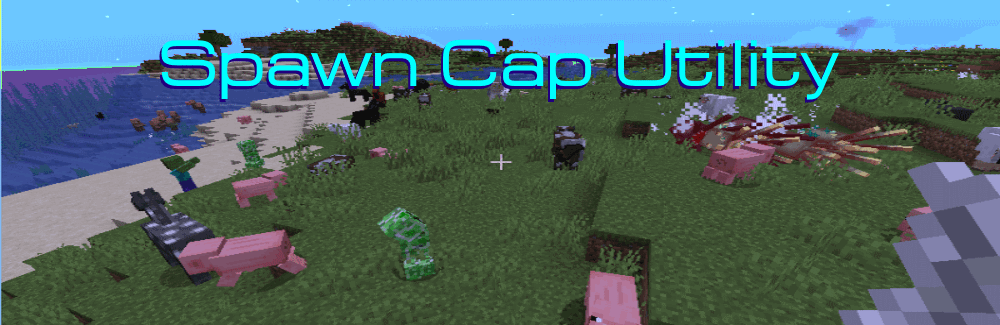
Spawncap Utility Control is a simple to use mod that gives you control over Spawncap values.
Uses
Want to play "Slightly easier than easy mode"? Set easy mode and then lower the spawncap values for Monsters to 20.
Want to play with more monsters?" Boost the spawncap values for Monsters from 70 to 140, or even 210!
Want to make food animals harder to find in a post apocalyptic pack? Lower the Creature and WaterAmbient values.
Want to free up a bit of processing power for monsters? Lower the UndergroundWaterCreature(Glow Squid) and Ambient (Bats) values.
Warnings and Caveats
None really. I've tested this on my standalone machines with the maximum values and it ran fine. I think these values were chosen when computers were weaker and to make night have a certain level of risk.
At the maximum values for monsters, it is dangerous to run at night- you are constantly running into groups of mobs.
If you set them too high for your Potato and performance is terrible, then you can set them to lower values but the default parameters are safe for very weak machines.
We used to use 178 mobs on Spigot and it was fun. I wanted to have that feeling again so... here you go! Monsters at 140 is a much better rate.
Oh-- and this *will* speed up inefficient mob farms. It should not speed up efficient mob farms tho.
Forge & Fabric
On this mod page, Older Fabric mods are stored as a Beta version and Forge is stored as a Release version so both will be visible. With the newer client, this isn't needed any more and both can be Release version.
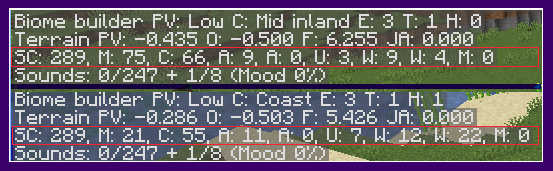
ExampleThe top is from settings with 5 extra monsters.
The bottom is from settings with only 20 monsters.
Command ( Forge 1.21.11 only for now )/spawncapinfo
[ SpawncapControlInfo ]
[MONSTER] EnumMax=40 Count=40 ComputedCap=40
[CREATURE] EnumMax=10 Count=227 ComputedCap=10
[AMBIENT] EnumMax=11 Count=11 ComputedCap=11
[AXOLOTLS] EnumMax=12 Count=0 ComputedCap=12
[CHAT] [UNDERGROUND_WATER_CREATURE] EnumMax=11 Count=7 ComputedCap=11
[WATER_CREATURE] EnumMax=10 Count=0 ComputedCap=10
[WATER_AMBIENT] EnumMax=24 Count=0 ComputedCap=24
Configuration file
The configuration file name is SpawncapControlUtility.common
In the earlier versions there are five hardcoded categories with a number you can change.
In the current version (1.19.X only for now), there is a list of categories you can change. You can also add new categories from Mods to it. You can use the latest.log file to find the names of those categories.
Log File Entries (For Mod Pack Designers) (Forge and Fabric 1.19.X only at this time)
If you are using a mod that has it's own mob categories you can customize the values. Look for the correct names and default in this section of the log file.
[18:46:45] [Server thread/INFO]: SpawncapControlUtiity Startup
[18:46:45] [Server thread/INFO]: Configured new Spawn Category Values
[18:46:45] [Server thread/INFO]: SpawncapControlUtility: Category MONSTER has a default maximum of 70. Checking configuration for override maximum values.
[18:46:45] [Server thread/INFO]: SpawncapControlUtility: Raised Category MONSTER Maximum Value from 70 to 73
[18:46:45] [Server thread/INFO]: SpawncapControlUtility: Category CREATURE has a default maximum of 10. Checking configuration for override maximum values.
[18:46:45] [Server thread/INFO]: SpawncapControlUtility: Category CREATURE configured maximum same as default value. No change made.
[18:46:45] [Server thread/INFO]: SpawncapControlUtility: Category AMBIENT has a default maximum of 15. Checking configuration for override maximum values.
[18:46:45] [Server thread/INFO]: SpawncapControlUtility: Lowered Category AMBIENT Maximum Value from 15 to 14
[18:46:45] [Server thread/INFO]: SpawncapControlUtility: Category AXOLOTLS has a default maximum of 5. Checking configuration for override maximum values.
[18:46:45] [Server thread/INFO]: SpawncapControlUtility: Category AXOLOTLS configured maximum same as default value. No change made.
[18:46:45] [Server thread/INFO]: SpawncapControlUtility: Category UNDERGROUND_WATER_CREATURE has a default maximum of 5. Checking configuration for override maximum values.
[18:46:45] [Server thread/INFO]: SpawncapControlUtility: Category UNDERGROUND_WATER_CREATURE configured maximum same as default value. No change made.
[18:46:45] [Server thread/INFO]: SpawncapControlUtility: Category WATER_CREATURE has a default maximum of 5. Checking configuration for override maximum values.
[18:46:45] [Server thread/INFO]: SpawncapControlUtility: Category WATER_CREATURE configured maximum same as default value. No change made.
[18:46:45] [Server thread/INFO]: SpawncapControlUtility: Category WATER_AMBIENT has a default maximum of 20. Checking configuration for override maximum values.
[18:46:45] [Server thread/INFO]: SpawncapControlUtility: Category WATER_AMBIENT configured maximum same as default value. No change made.
[18:46:45] [Server thread/INFO]: SpawncapControlUtility: Category MISC should not be changed.
[18:46:45] [Server thread/INFO]: SpawncapControlUtility: Category HUNTERS has a default maximum of 10. Checking configuration for override maximum values.
[18:46:45] [Server thread/INFO]: SpawncapControlUtility: Category HUNTERS had no configured overrides. Keeping maximum of 10
[18:46:45] [Server thread/INFO]: SpawncapControlUtility: Category BEASTS has a default maximum of 91. Checking configuration for override maximum values.
[18:46:45] [Server thread/INFO]: SpawncapControlUtility: BEASTS had no configured overrides. Keeping maximum of 91.
Then add them like this to the configuration file.
#spawn Categories(MONSTER, CREATURE, ... defaults..., custom pools from other mods
spawnCategories = ["MONSTER,80", "CREATURE,19", "AMBIENT,23", "AXOLOTLS,12",
"UNDERGROUND_WATER_CREATURE,11", "WATER_CREATURE,10", "WATER_AMBIENT,24"]
Afterwards the log will look like this..
[18:46:45] [Server thread/INFO]: SpawncapControlUtility: Category HUNTER has a default maximum of 10 Checking configuration for override maximum values.
[18:46:45] [Server thread/INFO]: SpawncapControlUtility: Raised Category HUNTER Maximum Value from 10 to 17
[18:46:45] [Server thread/INFO]: SpawncapControlUtility: Category BEASTS has a default maximum of 91. Checking configuration for override maximum values.
[18:46:45] [Server thread/INFO]: SpawncapControlUtility: Lowered Category BEASTS Maximum Value from 91 to 42
Discord
You can join us on Discord at
Patron Support
You can support our work with Patreon. This will help since alternative modloaders do not share a portion of their advertising income with us like Curseforge.

Project description from CurseForge.
Pick your setup
Spawncap Control Utility (Forge & Fabric) by Minecraft version and loader
Choose the version and loader you play, then open the matching release.
Minecraft version
1.21.9
1 loader buildMinecraft version
1.21.8
2 loader buildsMinecraft version
1.21.7
2 loader buildsMinecraft version
1.21.6
2 loader buildsMinecraft version
1.21.5-Snapshot
1 loader buildMinecraft version
1.21.5
2 loader buildsMinecraft version
1.21.4
2 loader buildsMinecraft version
1.21.3
2 loader buildsMinecraft version
1.21.2
2 loader buildsMinecraft version
1.21.1-Snapshot
1 loader buildMinecraft version
1.21.1
2 loader buildsShowing the newest 12 of 30 game versions. Older files are in the list below.
Check the dependencies, then try the file in a copied instance before changing a world you care about.
Recent files
Spawncap Control Utility (Forge & Fabric) versions and loaders
forgeSpawncapControlUtility-1.21.11-61.1.4.jar
5 Jan 2026
Client Source doesn’t say Server Source doesn’t say Dependencies No extras listed Listed on Release listing
Check the 1.21.11 · Forge setup Forge1.21.11 release
spawncapcontrolutility-1.21.1-52.1.4.jar
3 Sept 2025
Client Source doesn’t say Server Source doesn’t say Dependencies No extras listed Listed on Release listing
Check the 1.21.5-Snapshot · Forge setup 1.21.41.21.5-SnapshotForge1.21.3 release
fabric-spawncapcontrolutility-1.21.1-115.1.4.jar
3 Sept 2025
Client Source doesn’t say Server Source doesn’t say Dependencies No extras listed Listed on Release listing
Check the 1.21.11 · Fabric setup Fabric1.21.81.21.51.21.4 release
spawncapcontrolutility-1.21.6-56.1.4.jar
3 Sept 2025
Client Source doesn’t say Server Source doesn’t say Dependencies No extras listed Listed on Release listing
Check the 1.21.8 · Forge setup 1.21.8Forge1.21.71.21.6 release
spawncapcontrolutility-1.21.1-52.1.4.jar
1 Sept 2025
Client Source doesn’t say Server Source doesn’t say Dependencies No extras listed Listed on Release listing
Check the 1.21.5 · Forge setup 1.211.21.51.21.1-Snapshot1.21.4 release
fabric-spawncapcontrolutility-1.21.1-115.2.0.jar
13 Feb 2025
Client Source doesn’t say Server Source doesn’t say Dependencies No extras listed Listed on Release listing
Check the 1.21.1 · Fabric setup Fabric1.21.1 release
spawncapcontrolutility-1.21.1-52.1.2.jar
28 Aug 2024
Client Source doesn’t say Server Source doesn’t say Dependencies No extras listed Listed on Release listing
Check the 1.21.5 · Forge setup 1.211.21.51.21.4Forge release
fabric-spawncapcontrolutility-1.20-3.jar
19 Jul 2023
Client Source doesn’t say Server Source doesn’t say Dependencies No extras listed Listed on Release listing
Check the 1.20.4 · Fabric setup 1.20.2Fabric1.20.31.20.1 beta
spawncapcontrolutility-1.20-46.1.2.jar
18 Jun 2023
Client Source doesn’t say Server Source doesn’t say Dependencies No extras listed Listed on Release listing
Check the 1.20.4 · Forge setup 1.20.21.20.31.20.1Forge release
fabric-spawncapcontrolutility-1.20-2.jar
1 Jun 2023
Client Source doesn’t say Server Source doesn’t say Dependencies No extras listed Listed on Release listing
Check the 1.20-Snapshot · Fabric setup Fabric1.20-Snapshot beta
fabric-spawncapcontrolutility-1.19-2.jar
24 May 2023
Client Source doesn’t say Server Source doesn’t say Dependencies No extras listed Listed on Release listing
Check the 1.19.4-Snapshot · Fabric setup 1.19.31.19.4-Snapshot1.19.4Fabric beta
SpawncapControlUtility-1.19-41.1.2.0.jar
17 May 2023
Client Source doesn’t say Server Source doesn’t say Dependencies No extras listed Listed on Release listing
Check the 1.19.4 · Forge setup 1.19.31.19.41.19.2Forge release
Looking for an older file? The official CurseForge project page is in Resources.
 mod
CurseForge + Modrinth · Minecraft
ArmorPlus
ArmorPlus adds new armor sets, tools, weapons, building blocks, and progression content to enhance your Minecraft adventures.
 mod
CurseForge + Modrinth · Minecraft
Sword Displays
A mod that allows you to display your weapons
 mod
CurseForge + Modrinth · Minecraft
Tiered More
Fork of Globox_Z's TieredZ that adds some QoL things & Accessories Modifiers!