Baubles Optional for BattleCorrection 1.3.0 (1.12.2)
optionalNo matching file
CurseForge · Minecraft mod
15 combat attributes, global combat tuning and an in-game item and NBT editor for RPG maps, modpacks and servers.
Quick answer
BattleCorrection 1.3.0 (1.12.2) targets 1.12.2 with Forge. The project page does not say whether this file belongs on the client, dedicated server, or both. No extra mods listed for this file.
Where it goes
The project page does not say whether this file belongs on the client, dedicated server, or both.
The source does not explicitly classify this release as client-only or server-only.
BattleCorrection 1.3.0 (1.12.2). Change the file and its required mods may change too.
This file does not list any required mods. Do not add a library just because a different file uses it.
We only count dependency files that match this setup. A file for another loader does not fill the gap.
Before you install it
Built for BattleCorrection 1.3.0 (1.12.2). Pick another file and the loader, install side or required mods may change.
Use BattleCorrection 1.3.0 (1.12.2). It targets 1.12.2 with Forge; another release may have different loader, side or dependency requirements.
This file does not list any required mods. Do not add a library just because a different file uses it.
The project page does not say whether this file belongs on the client, dedicated server, or both.
Use the “Get this file” button beside BattleCorrection 1.3.0 (1.12.2). It opens that exact file at the source.
About this project
BattleCorrection (BC) is for people who build RPG maps, modpacks and servers and want to set the combat numbers themselves. It adds 15 attributes such as critical chance, lifesteal and dodge that work on players and mobs, global multipliers for PVP, mob health, invulnerability frames and environmental damage, and an in-game editor for item names, lore, enchantments, attributes and raw NBT.
Forge 1.20.1 and 1.12.2 · install on both client and server · no other mods needed
Operators (permission level 2) in creative mode press I or run /battlecorrection edit. The editor opens on the held item, on the item under the mouse in any open inventory or chest, or, with an empty hand, on the entity or block entity you are looking at. O opens the SNBT page directly and P the NBT tree. The server checks permission, creative mode, the target and the NBT size again on every save, and itemEditorEnabled = false turns the editor off completely.
The editor is drawn by the mod itself: page tabs on the left, the current page in the middle, a live tooltip preview on the right, and Copy command, Import, the NBT size, Cancel and Save along the bottom. The screenshots are from 1.20.1; what differs on 1.12.2 is listed at the end of this section.
Type & colour codes and &#RRGGBB hex colours, or click the swatches and format buttons to insert them at the cursor. Clear strips colour and format codes from the selection, and pasted § signs become &. Insert writes one colour; Gradient blends two colours letter by letter across the selected text, or the whole line when nothing is selected.
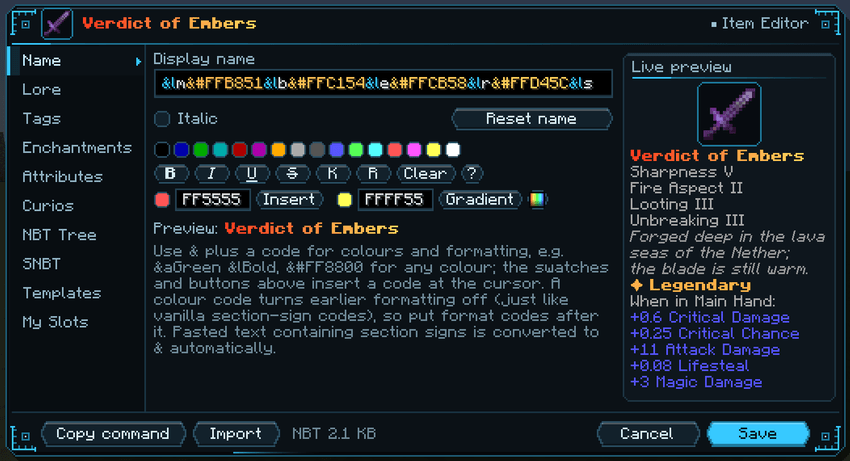
Name page: a gradient name, with the finished tooltip previewed on the right.
The Lore page has one row per line, with move up / down, delete and add. Enter splits a line at the cursor, Backspace at the start of a line joins it to the one above, and a multi-line paste fills several rows. Vanilla style switches between plain white text and vanilla's purple italic. Only the lines you change are rebuilt: lines holding things a text box cannot show (click events, hover text, custom fonts) are marked, and stay intact as long as you leave them alone.
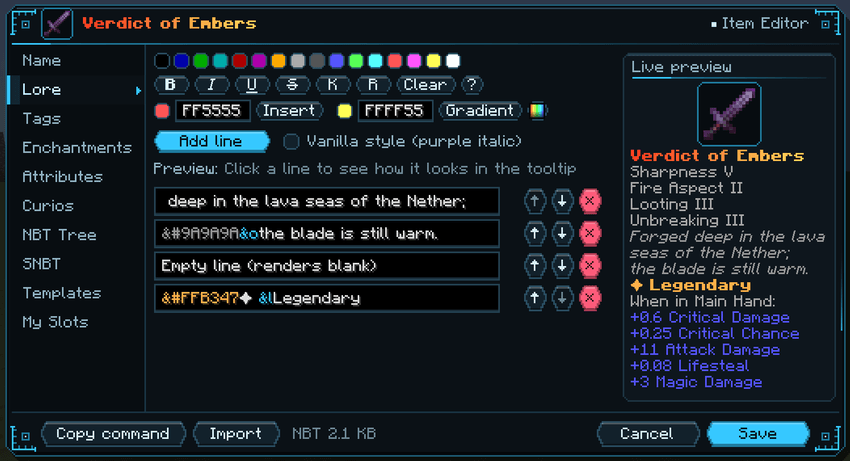
Lore page: one row per line, each with move, delete and a live preview.
The palette button opens a colour picker with a saturation / brightness square, hue bar, RGB sliders, hex input and your 16 most recent colours. Gradients take 2 to 8 colour stops, with ten presets such as rainbow, fire and ocean, and a preview of the whole line.
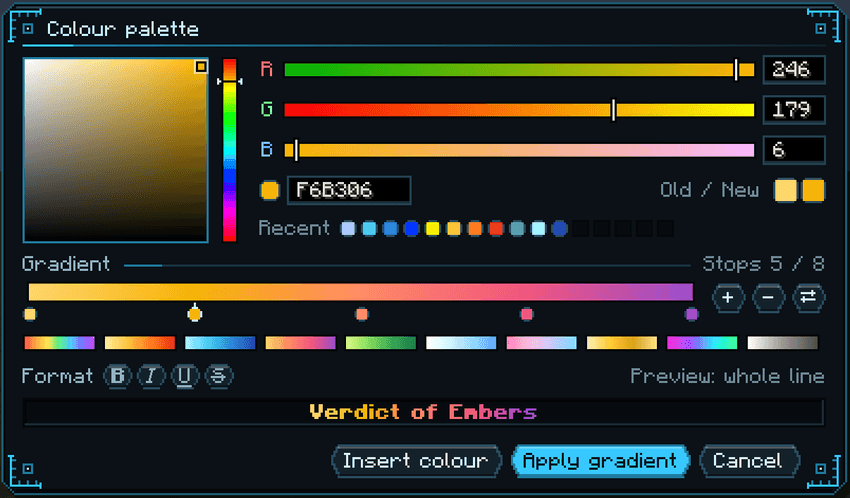
Colour palette: a five-stop gradient with a preview of the whole line.
The item's enchantments are on the left, each next to its vanilla maximum level: left-click changes the level, right-click removes it. On the right, search every enchantment in the game, other mods' included, and click one to add it. Curses are shown in red, and hovering shows what an enchantment does. Levels go up to 255 (32767 on 1.12.2); levels above the vanilla maximum and enchantments vanilla would not allow on the item still apply.
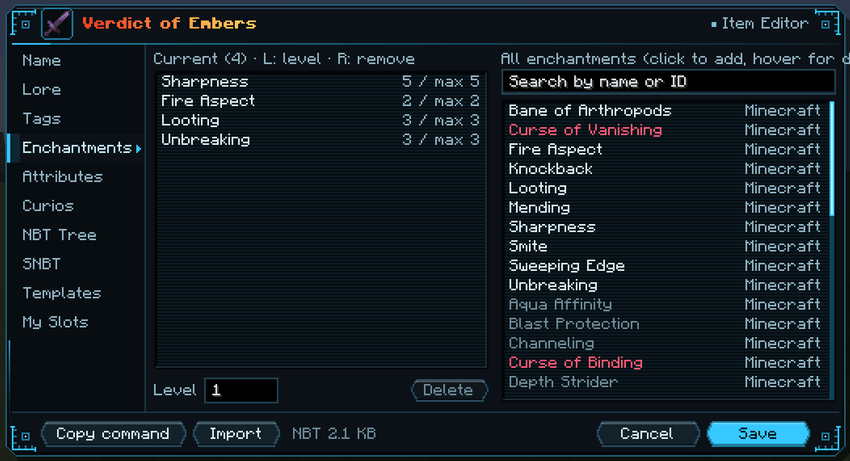
Enchantments page: the item's enchantments on the left, every enchantment on the right.
Attributes work the same way: every registered attribute, vanilla or from any mod, in one searchable list, with a description on hover. Set the amount, operation and slot; typing 20% switches to a percentage. Choosing a Curios slot as the slot also lets the item be worn there.
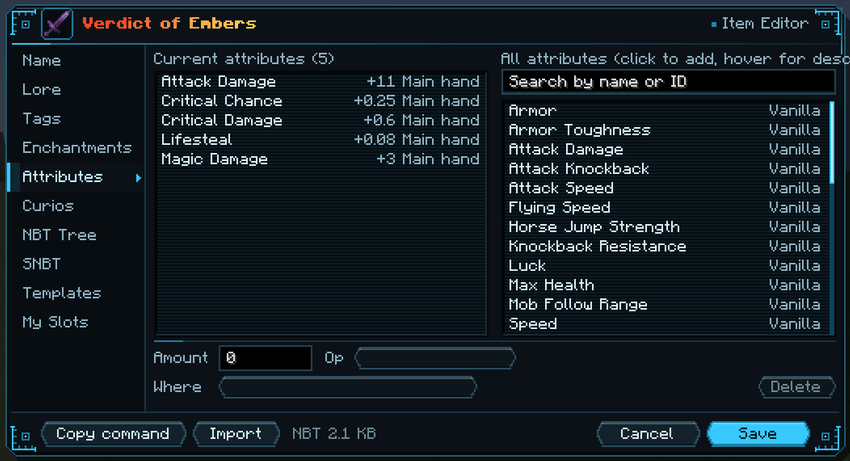
Attributes page: critical chance, critical damage, lifesteal and magic damage on a sword.
The Tags page sets Unbreakable, enchantment glint, hide flags, damage, anvil repair cost, count (1 to 127) and, on 1.20.1, CustomModelData. The Curios page is covered under Accessory marks below.
My Slots (1.20.1) is for testing accessories and changes your own Curios slots. It lists every slot type you have with its count: change a count (0 removes that type), or type an id to add a slot, even one no mod has registered (it just has no icon). Curios only gives slots to players who already have at least one slot type, so with none this page cannot change anything. For testing, devCurioSlots = true gives every player one of each of Curios' ten built-in slots; keep it off in normal play.
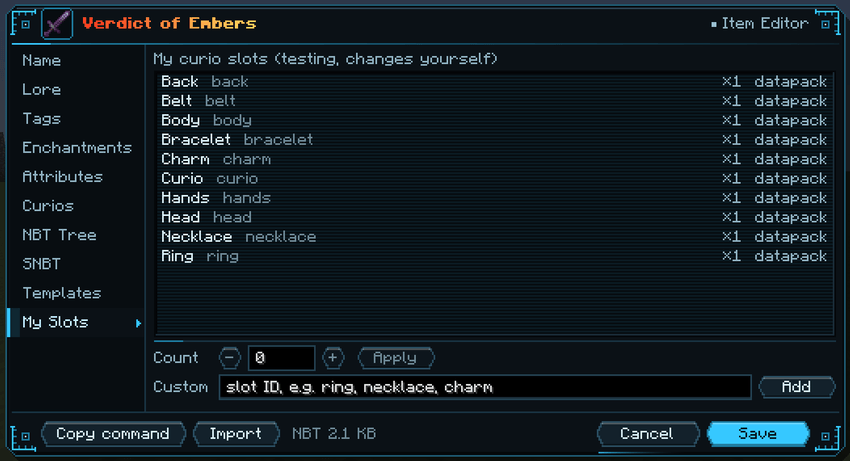
My Slots: your own Curios slots and their counts.
The tree shows every tag with its type. Search keys and values (Ctrl+F), jump to a path such as tag.display.Lore[0], copy a node's path, edit keys and values in place, and add, delete, copy, paste, duplicate or move nodes.
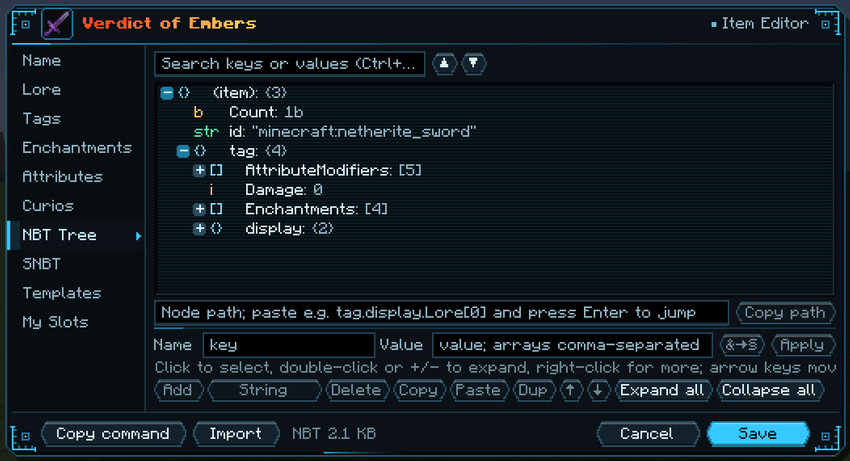
NBT tree: typed nodes, a path box with jump, and the node buttons along the bottom.
The SNBT page edits the whole item as text, with line numbers, highlighting and live error marking; text that does not parse is never applied. It has find (Ctrl+F), go to line (Ctrl+G), indent, duplicate and move line, Format, Compact and & / § conversion.
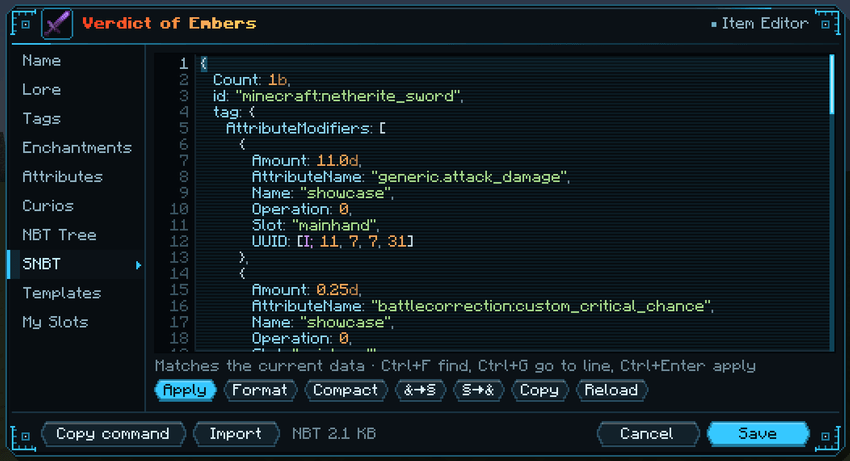
SNBT page: Ctrl+Enter applies the text to the item.
A template stores an item's full NBT and count under a name, on your own computer. Apply it whole, or tick only the parts you want (name, lore, enchantments, attributes, curio marks and so on) and keep the rest, for example to give several weapons the same enchantments and attributes.
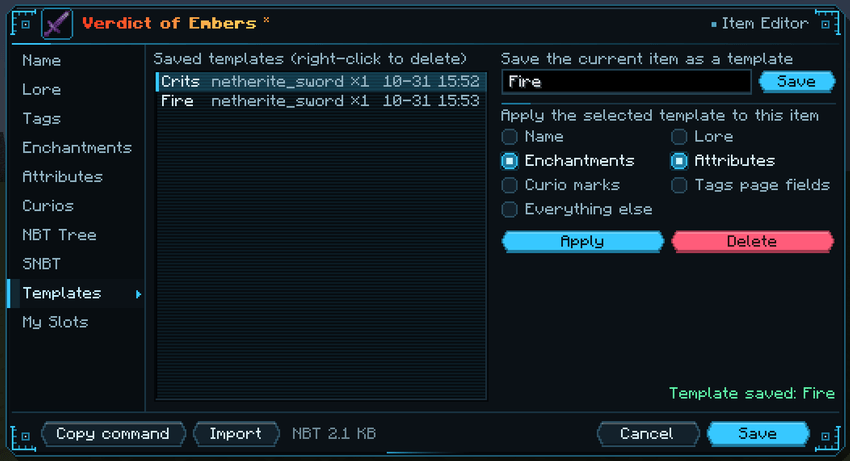
Templates page: applying only the enchantments and attributes of a saved template.
Import reads a /give command, an item id with NBT, or item SNBT from the clipboard and replaces the current item. Copy command exports the item as a /give command; commands longer than 256 characters cannot be sent from chat, so run those from a command block or function. F4 or a click on the item icon in the title bar changes the item type and keeps its NBT and count. Search by name or id, or type @ and a mod id (such as @battlecorrection) to list one mod's items.
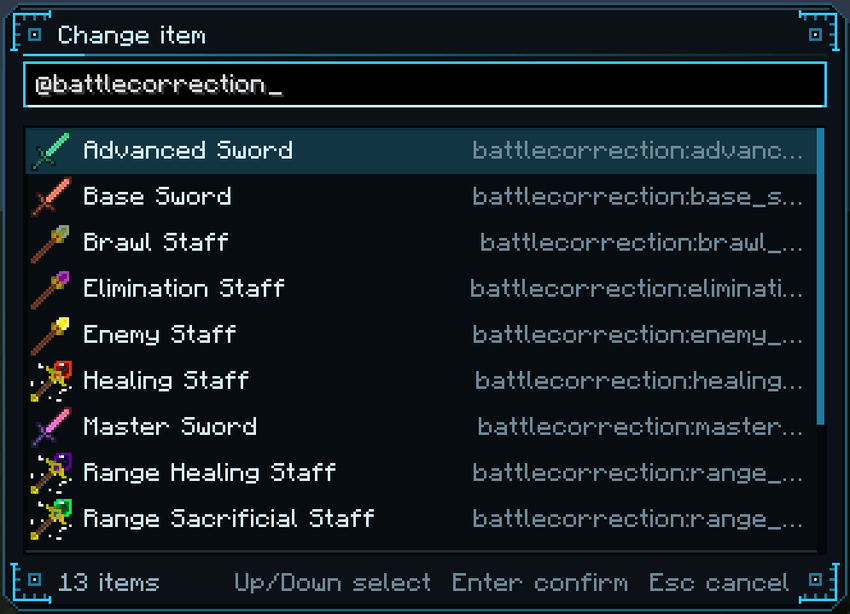
Change item (F4): @battlecorrection lists only this mod's items.
With an empty hand, I edits the entity under the crosshair (players excluded) or a block with a block entity, such as a chest, furnace or spawner. The entity and block entity editors have the NBT tree and SNBT pages and work just like they do for items.
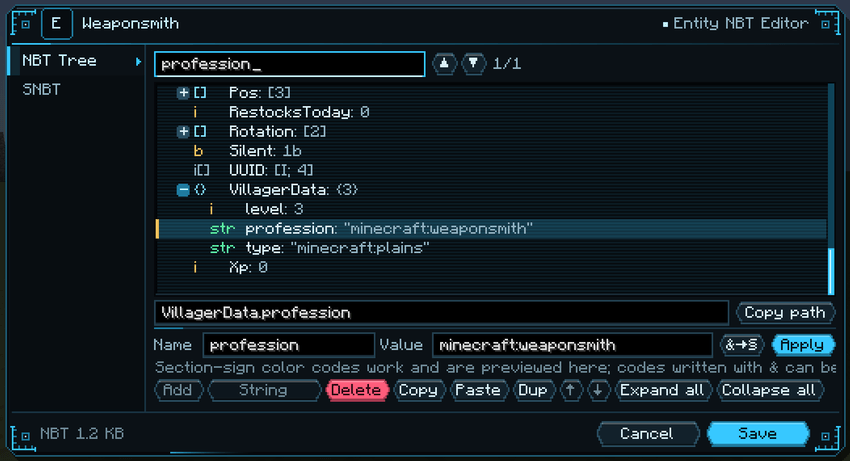
Entity NBT editor: searching a villager's NBT for its profession.
Ctrl+Z / Ctrl+Y undo and redo, and typing within one second counts as one step. Ctrl+Tab moves to the next page and Ctrl+1 to Ctrl+9 jump straight to one. Closing with unsaved changes lists what changed and asks first.
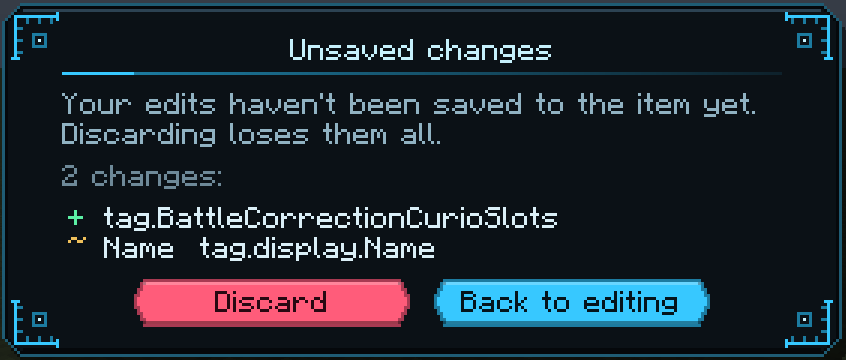
Closing with unsaved changes lists them before anything is discarded.
Ctrl+S or Save sends the item to the server. The NBT size of one item is capped by itemEditorMaxNbtKb (1 MB on 1.20.1 and 256 KB on 1.12.2 by default), and larger items are not saved. Past about 2 MB the vanilla client cannot read an item at all, and players holding one get disconnected. F1 lists every shortcut.
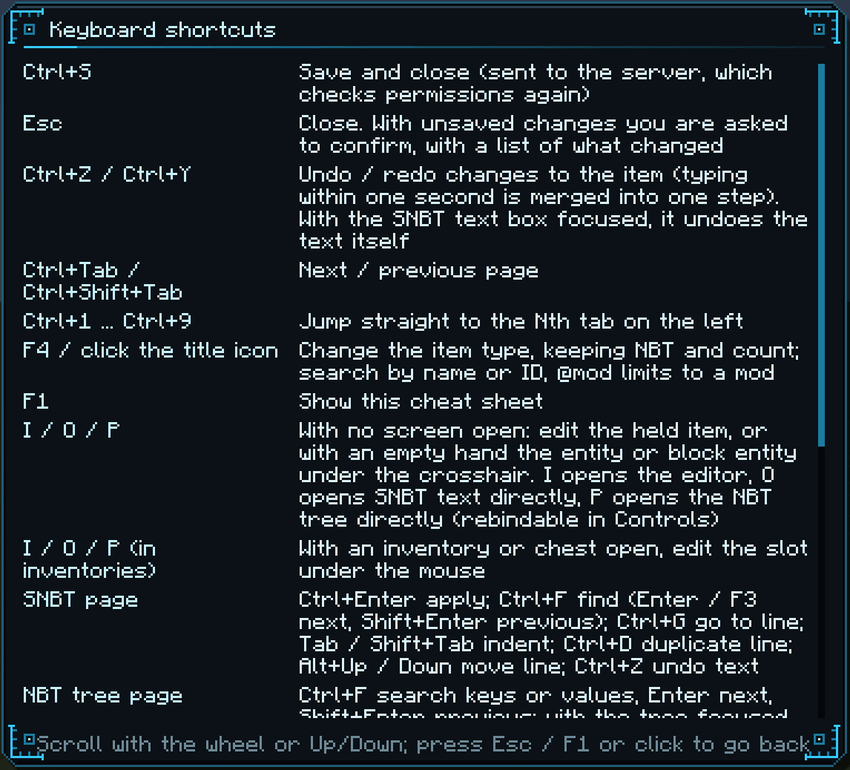
Keyboard shortcuts (F1).
The editor is the same apart from what that game version allows. 1.12.2 has no hex colours, so the palette offers the 16 vanilla colours (no colour square or RGB sliders), gradients snap to the nearest of them and it remembers 8 recent colours. The attribute list holds vanilla, Forge and this mod's attributes plus any your player has, and other names can be typed in. The Tags page has no CustomModelData, the Curios page is a Baubles page, and there is no My Slots page.
All 15 attributes exist on every living entity. Put them on gear with the editor, /give, a data pack or any tool that writes attribute modifiers; on 1.20.1 the /attribute command works on them too. Each attribute also has a global value in the config that applies to every entity, mobs included.
Ids below are for 1.20.1, as battlecorrection:<id>. On 1.12.2 the same names are written in camelCase after a dot: battlecorrection.magicDamage, battlecorrection.vanillaCriticalHitDamage and so on. The examples use Operation 0 (addition), which suits all 15.
| Attribute | Id | Effect (Operation 0) |
|---|---|---|
| Magic Damage | magic_damage |
Extra damage on magic hits that have an attacker |
| Arrow Damage | arrow_damage |
Extra damage on arrow hits (tridents count on 1.20.1) |
| Projectile Damage | projectile_damage |
Extra damage on other projectiles, such as fireballs and spell projectiles |
| Damage Immunity | immune_damage |
Chance to ignore a hit completely: +0.25 = 25% |
| Ignore Damage | ignore_damage |
Subtracts a flat amount from every hit; hits at or below it are cancelled |
| Reduced Fall Damage | reduced_fall_damage |
The same, for fall damage only |
| Healing Restoration | restore_heal |
Healing multiplier: +0.5 = 150% healing |
| Lifesteal | bloodthirsty |
Heals a share of melee damage dealt (players need a full charge): +0.1 = 10% |
| Almighty Lifesteal | almighty_bloodthirsty |
The same for every damage type |
| Bow Speed | bow_speed |
Bow draw speed (crossbows too on 1.20.1): +1.0 = twice as fast |
| Use Speed | preparation_speed |
Use speed of food, potions and other held items: +1.0 = twice as fast |
| Jump Boost | jump_lift |
Extra jump height: 1.0 is about one block |
| Vanilla Critical Damage | vanilla_critical_hit_damage |
Adds to the vanilla jump-attack critical: +0.5 turns 150% into 200% |
| Critical Chance | custom_critical_chance |
Chance of this mod's own critical hit on melee and projectile hits: 0.3 = 30% |
| Critical Damage | custom_critical_damage |
Added to the critical multiplier, which is 2.0 by default: +1.0 = 3× damage |
Critical chance above 100% is not wasted: the excess is added to the multiplier. With the default settings a chance of 1.5 makes every hit critical for 2.5× damage. Melee hits and projectiles roll once each, and a piercing arrow keeps one roll for all its targets.
Operations and /give examples:
Attributes that start at 0 (the three damage bonuses, Ignore Damage, Reduced Fall Damage, Jump Boost, Critical Chance and Critical Damage) only react to Operation 0 on 1.20.1. Attributes that start at 1.0 count what is above 1.0, so an amount of 0.25 on its own gives the same bonus with Operation 0 or 1. On 1.12.2, Operation 1 and 2 on Magic, Arrow and Projectile Damage scale the hit instead (0.5 = +50%).
A bow with +5 Arrow Damage on 1.20.1 (the editor's Copy command button writes commands like this for you):
/give @p bow{AttributeModifiers:[{AttributeName:"battlecorrection:arrow_damage",Name:"bonus",Amount:5.0d,Operation:0,UUID:[I;1,2,3,4],Slot:"mainhand"}]}
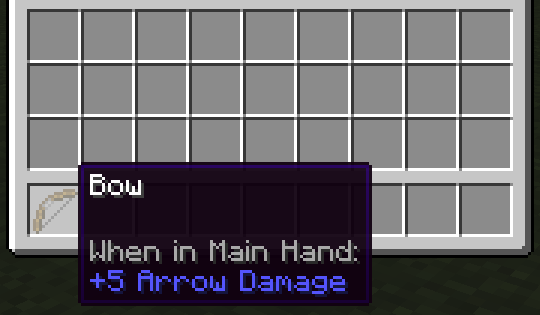
The same on 1.12.2:
/give @p minecraft:bow 1 0 {AttributeModifiers:[{AttributeName:"battlecorrection.arrowDamage",Name:"bonus",Amount:5.0d,Operation:0,UUIDMost:1L,UUIDLeast:1L,Slot:"mainhand"}]}
Global settings, applied through Forge's damage and healing events, so weapons and damage from other mods are covered too. At their defaults they leave vanilla combat unchanged.
/kill are never changed. 1.12.2 has no freezing category.forge:is_magic damage type tag, a whitelist and a blacklist. On 1.12.2 you list damage type prefixes. Melee hits by summons and pets never count as magic.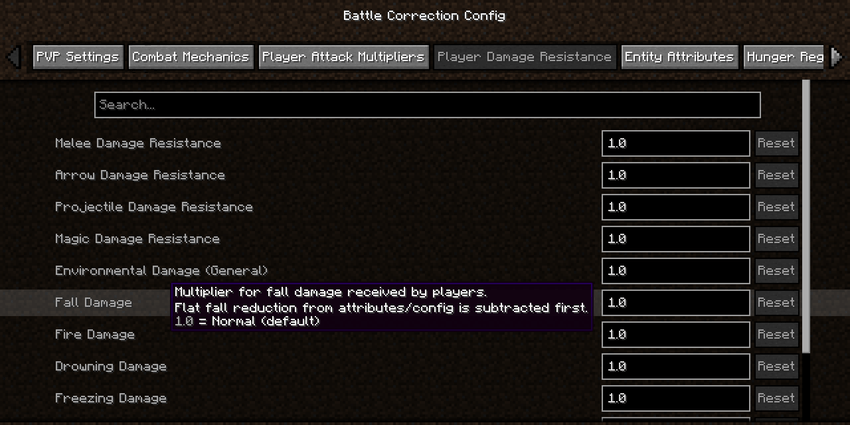
The in-game config screen on 1.20.1 (Mods → BattleCorrection → Config).
With Curios (1.20.1) or Baubles (1.12.2) installed, an operator can mark one single item so it fits chosen accessory slots: a sword worn as a charm, a helmet worn as a ring. The mark is stored in the item's NBT, so copies and trades keep it.
AttributeModifiers, bonuses from other mods) apply only in the accessory slot, and marked armor can no longer be worn in armor slots.ALL (default), MOD_ONLY or OFF.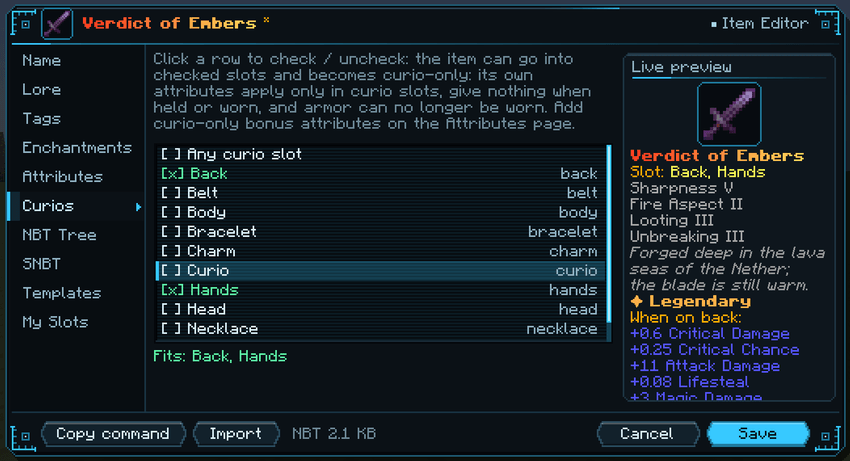
Curios page on 1.20.1: this sword can now be worn in the Back and Hands slots, and its attributes are listed per slot in the preview.
Ten staffs for map makers and testing. They have no recipes and come only from the Battle Correction creative tab or /give, but anyone holding one can use it, in survival too. The area staffs work within 64 blocks, and every staff has a one-second cooldown.
All staffs and swords:
| Item | Use |
|---|---|
| Enemy Staff | Click two mobs: they attack each other |
| Rebel Staff | Click a mob: every mob within 64 blocks attacks it |
| Riot Staff | Click a mob: it attacks random mobs nearby for 10 minutes |
| Brawl Staff | Use in the air: all mobs within 64 blocks fight each other for 10 minutes |
| Elimination Staff | Use in the air: mobs attack mobs of other species for 10 minutes |
| Healing Staff | Click any living entity: full health |
| Range Healing Staff | Full health for every living entity within 64 blocks of the target, players included |
| Sacrificial Staff | Kills the clicked entity, players included |
| Range Sacrificial Staff | Kills every non-player entity within 64 blocks of the target |
| Restoration Staff | Removes all effects from the clicked entity |
| Base / Advanced / Master Sword | 10 / 100 / 1,000 attack damage, 1,000 / 10,000 / 100,000 durability |
Commands, keys and config files:
| Command or key | What it does |
|---|---|
/battlecorrection edit |
Opens the editor on the held item; add snbt or nbt to open that page |
/battlecorrection curio add <slot> |
Lets the held item go into a Curios slot type (any = every slot); remove <slot>, clear and list manage the marks |
/battlecorrection curio attr add <attribute> <amount> [add, multiply_base or multiply_total] [slot] |
Attaches an attribute that counts only while worn; attr remove <attribute> [slot] and attr clear remove them |
/battlecorrection bauble ... |
1.12.2: the same subcommands for Baubles slots (amulet, ring, belt, head, body, charm, any); curio works as an alias |
I / O / P |
Open the editor / SNBT page / NBT tree; with a container open they act on the slot under the mouse |
K |
1.12.2 only: opens the mod list |
All commands need permission level 2; edit also needs creative mode. The keys can be changed under Options → Controls → Key Binds → Battle Correction (Options → Controls on 1.12.2). On 1.20.1, P is also vanilla's default Social Interactions Screen key, and on a server that screen opens first, so rebind one of the two.
On 1.20.1 there are two files. config/battlecorrection-battle.toml holds the combat tuning above, and config/battlecorrection-attribute.toml holds the global attribute values, the lifesteal option, accessory marks and the item editor. Most options are also in the in-game screen (Mods → BattleCorrection → Config); curioNbtAttributes, itemEditorEnabled and itemEditorMaxNbtKb are only in the file. Bow Draw Speed and Item Use Speed are read on both sides, so keep those two values the same in the client and server files.
On 1.12.2 everything is in config/battlecorrection.cfg, with Battle Configuration, Attribute Configuration, Bauble Mark and Item Editor categories, all editable in game (Mods → Battle Correction → Config; K opens the mod list).
The editor's NBT size limit for one item, entity or block entity defaults to 1024 KB on 1.20.1 and 256 KB on 1.12.2 and can be changed with itemEditorMaxNbtKb.
| Minecraft | Loader | Optional |
|---|---|---|
| 1.20.1 | Forge 47.x, Java 17 | Curios API 5.14.1 or newer |
| 1.12.2 | Forge 14.23.5.2855 or newer, Java 8 | Baubles |
Install the same version on the client and the server. The 1.20.1 jar already contains Cloth Config API (Jar-in-Jar) for the config screen, so there is nothing else to download. Without Curios or Baubles the accessory features stay off. On 1.20.1, Curios must be 5.14.1 or newer, otherwise the game will not start.
Can ordinary players use the item editor? No. It needs permission level 2 and creative mode, and the server checks both again on every save. Set itemEditorEnabled to false to turn it off completely.
Why does P open the social screen on a server? On 1.20.1 vanilla also uses P for its Social Interactions Screen, and on a server that screen opens before the NBT tree. Rebind one of the two under Options → Controls → Key Binds.
Do config changes need a restart? Most options apply as soon as they are saved, even though the 1.12.2 config screen marks them as needing a restart. Attack cooldown and mob max health apply when an entity joins the world again, and the accessory attribute option when the item is put on again.
Where do I get the staffs and swords? From the Battle Correction creative tab or with /give. There are no crafting recipes.
Anything to know before updating? Back up your config folder first. Each file's changelog on the Files tab lists what that version changed and anything you may want to adjust.
中文简介:
战斗修正(BattleCorrection,简称 BC)为 Forge 加入 15 种战斗属性(暴击、吸血、闪避、魔法和弹射物伤害等,玩家和怪物都能带)、全局战斗数值调整(PVP、按伤害类型的倍率、环境伤害、无敌时间、攻击冷却、生物生命值、饥饿),以及给管理员用的游戏内物品和 NBT 编辑器(按 I 打开,需要 2 级权限和创造模式)。
1.20.1 版需要 Forge 47.x 和 Java 17(可选 Curios API 5.14.1 及以上(版本更低时游戏无法启动),已内置 Cloth Config API),1.12.2 版需要 Forge 14.23.5.2855 及以上和 Java 8(可选 Baubles)。客户端和服务端要装同一个版本。
完整中文介绍、属性表和配置说明见页面底部的 MC百科 链接。
Source code · Issues · Modrinth · MC百科 (中文)
Licensed under CC BY-NC-SA 4.0. The 1.20.1 jar includes Cloth Config API (LGPL-3.0), unmodified.
Project description from CurseForge.
Pick your setup
Choose the version and loader you play, then open the matching release.
Check the dependencies, then try the file in a copied instance before changing a world you care about.
Recent files
BattleCorrection-1.12.2-1.3.0.jar
31 Oct 2026
BattleCorrection-forge-1.20.1-3.0.0.jar
31 Oct 2026
16 Jan 2026
11 Jan 2026
11 Jan 2026
7 Jan 2026
16 Dec 2025
14 Dec 2025
22 Mar 2025
BattleCorrection-1.12.2-1.0.6.jar
19 Oct 2023
BattleCorrection-1.12.2-1.0.6.jar
19 Oct 2023
BattleCorrection-1.12.2-1.0.5.jar
17 Oct 2023
Looking for an older file? The official CurseForge project page is in Resources.
 mod
modBring Dragon Ball to life with dynamic story encounters, unique racial origins, evolving fighters, new transformations and powerful ki techniques.
 mod
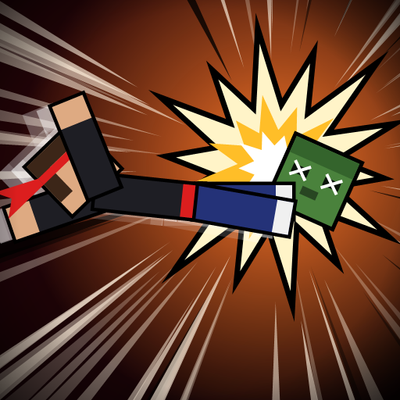
modKick, dropkick through doors, parry with a WASD combo, and unlock a cinematic anime-style ultimate dropkick that sends mobs flying through walls.
 mod
modAn addon mod for Timeless and Classics Zero which supplies some useful function for players and gunspack authors.