Minecraft version
Back to mods 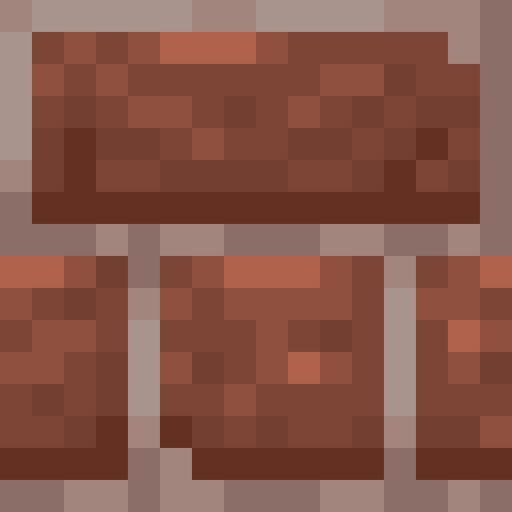
CurseForge · Minecraft mod
Glacial's Construction
Construction done right! A mod focusing on building blocks!
Choose a version Pick your version below, then grab the matching file.
Quick answer
Which Glacial's Construction release should I use?
Latest stable file Glacial's Construction v1.0.1-1.19.2
Game version 1.19.2
Loader Forge
Glacial's Construction v1.0.1-1.19.2 targets 1.19.2 with Forge. The project page does not say whether this file belongs on the client, dedicated server, or both. No extra mods listed for this file.
Where it goes
Is Glacial's Construction required on the client, server, or both?
The project page does not say whether this file belongs on the client, dedicated server, or both.
Client Source doesn’t say
Dedicated server Source doesn’t say
Loader for this release Forge
Required install it here Optional supported, not mandatory Not supported do not install here Source doesn’t say do not assume
The source does not explicitly classify this release as client-only or server-only.
What else does Glacial's Construction v1.0.1-1.19.2 need?
Glacial's Construction v1.0.1-1.19.2. Change the file and its required mods may change too.
This file does not list any required mods. Do not add a library just because a different file uses it.
This file does not list any required or optional mods.
Before you install it
Add Glacial's Construction without breaking your instance.
Built for Glacial's Construction v1.0.1-1.19.2. Pick another file and the loader, install side or required mods may change.
- 01
Stick to this file
Use Glacial's Construction v1.0.1-1.19.2. It targets 1.19.2 with Forge; another release may have different loader, side or dependency requirements.
- 02
Bring the mods it needs
This file does not list any required mods. Do not add a library just because a different file uses it.
- 03
Put it on the correct side
The project page does not say whether this file belongs on the client, dedicated server, or both.
- 04
Pick the file you checked
Use the “Get this file” button beside Glacial's Construction v1.0.1-1.19.2. It opens that exact file at the source.
About this project
What does Glacial's Construction add?
Glacial's Construction!
Building done right!
Have you noticed the lack of beautiful, unique building blocks in Minecraft? Well I can't provide too much in the unique category, but I do have a bunch of beautiful new building blocks! These range from Adobe, Bamboo, and Thatch, to Mossy Deepslate, Large Bricks, and even Magma and Soul Bricks! As of the first release, there are 232 new building blocks, most of which based on Vanilla sets, but some - such as Adobe and the two new Nether Brick-esque sets (Magma Bricks and Soul Bricks) - are made from completely new materials! A full list of block sets, items, and tools can be found below!
Adobe
- Adobe + stairs, slab, wall, plate & button
- Adobe Bricks + stairs, slab, wall, plate & button
- Smooth Adobe + stairs, slab, wall, plate & button
- Soaked Adobe
Stone
- Stone Tiles + stairs, slab, wall, plate & button
- Mossy Stone Tiles + stairs, slab, wall, plate & button
- Cracked Stone Tiles + stairs, slab, wall, plate & button
- Calcite Bricks + stairs, slab, wall, plate & button
- Tuff Bricks + stairs, slab, wall, plate & button
- Andesite Bricks + stairs, slab, wall, plate & button
- Diorite Bricks + stairs, slab, wall, plate & button
- Granite Bricks + stairs, slab, wall, plate & button
Deepslate
- Mossy Cobbled Deepslate + stairs, slab, wall, plate & button
- Mossy Deepslate Bricks + stairs, slab, wall, plate & button
- Mossy Deepslate Tiles + stairs, slab, wall, plate & button
- Smooth Deepslate + stairs, slab, wall, plate & buttonBrick
- Large Bricks + stairs, slab, wall, plate & button
- Bricks + plate & button
- Cracked Large Bricks + stairs, slab, wall, plate & button
- Cracked Bricks + stairs, slab, wall, plate & button
- Brick Foundation
Asphalt
- Construction Grout
- Asphalt + stairs, slab,
- Asphalt Bricks+ stairs, slab, plate & button
- Smooth Asphalt + stairs, slab, plate & button
Nether
- Chiseled Soul Bricks
- Chiseled Magma Bricks
- Soul Bricks + stairs, slab, wall, plate & button
- Magma Bricks + stairs, slab, wall, plate & button
- Cracked Soul Bricks + stairs, slab, wall, plate & button
- Cracked Magma Bricks + stairs, slab, wall, plate & button
- Basalt Bricks + stairs, slab, wall, plate & button
- Obsidian Bricks + stairs, slab, wall, bars, plate & button
Miscellaneous
- Amethyst Tiles + stairs, slab, wall, plate & button
- Prismarine Tiles + stairs, slab, wall, plate & button
- End Stone Tiles + stairs, slab, wall, plate & button
- Sculk Tiles + stairs, slab, wall, plate & button
- Smooth Blackstone + stairs, slab, wall, plate & button
- Bamboo + stairs, slab, wall, fence, fence gate, door, trapdoor, plate & button
- Stripped Bamboo + stairs, slab, wall, fence, fence gate, door, trapdoor, plate & button
- Nether Rod, Earthen Rod, Prismatic Rod (similar to the End Rod)
- Thatch + stairs, slab & wall
- Rocky Soil
- Aloe Vera
- Dwarven Thorns
Items
- Dirt Ball
- Gravel Pile
- Sand Pile
- Red Sand Pile
- Mud Clump
- Snow Brick
- Soul Brick
- Magma Brick
- Obsidian Brick
- Aloe Vera Stalks
- Aloe Soup
- Stripped Bamboo
- Thatch
Tools
- Copper Shaving Knife (basically used to strip things like Logs, Bamboo, and Copper. Can only strip Bamboo in the inventory, and cannot mine any blocks.)
Project description from CurseForge.
Pick your setup
Glacial's Construction by Minecraft version and loader
Choose the version and loader you play, then open the matching release.
Check the dependencies, then try the file in a copied instance before changing a world you care about.
Recent files
Glacial's Construction versions and loaders
Glacial's Construction v1.0.1-1.19.2
glacials-construction-1.0.1-1.19.2.jar
30 Dec 2022
Client Source doesn’t say Server Source doesn’t say Dependencies No extras listed Listed on Release listing
Check the 1.19.2 · Forge setup 1.19.2Forge release
Looking for an older file? The official CurseForge project page is in Resources.
 mod
CurseForge + Modrinth · Minecraft
PlayerRevive
Revive your friends.
 mod
CurseForge · Minecraft
My Base
This mod adds the option for colonies, overhauls and modifies the entire Minecraft world, and introduces features such as recruiting soldiers, having colonists, and more.
 mod
CurseForge · Minecraft
CollectionMaster
Turn gathered resources into rewards through configurable item collections and milestones.