Collective Needed by Player Tracking [Fabric/Forge/Neo] 26.1.2-3.7 | Player Tracking
requiredMatching file found Matched file: [Fabric/Forge/Neo] 26.1.2-8.84 | Collective
CurseForge · Minecraft mod
🔎 A PvP mod that encourages raiding. Allows the tracking of players via special trackers.
Quick answer
Player Tracking [Fabric/Forge/Neo] 26.1.2-3.7 | Player Tracking targets 26.1.2 with Fabric, Forge, NeoForge. The project page does not say whether this file belongs on the client, dedicated server, or both. All 1 required mods have matching files.
Where it goes
The project page does not say whether this file belongs on the client, dedicated server, or both.
The source does not explicitly classify this release as client-only or server-only.
[Fabric/Forge/Neo] 26.1.2-3.7 | Player Tracking. Change the file and its required mods may change too.
Install Collective first. We found matching files for this game-version and loader setup.
We only count dependency files that match this setup. A file for another loader does not fill the gap.
Before you install it
Built for Player Tracking [Fabric/Forge/Neo] 26.1.2-3.7 | Player Tracking. Pick another file and the loader, install side or required mods may change.
Use [Fabric/Forge/Neo] 26.1.2-3.7 | Player Tracking. It targets 26.1.2 with Fabric, Forge, NeoForge; another release may have different loader, side or dependency requirements.
Install Collective first. We found matching files for this game-version and loader setup.
The project page does not say whether this file belongs on the client, dedicated server, or both.
Use the “Get this file” button beside [Fabric/Forge/Neo] 26.1.2-3.7 | Player Tracking. It opens that exact file at the source.
About this project


Player Tracking is a PvP mod which allows tracking players via trackers in the world, via the /track command. These have been originally used by the Minecraft PvP server (mcpvp) and later on many raiding servers following their example. It encourages raiding on a hardcore/no-rule server.


The '/track help' content:
Tracking Help Page (1/5)
For an introduction to tracking read page 2.
For information on building a tracker read page 3
For explanation on '/track all' read page 4.
For explanation on '/track [playerName]' read page 5.
To select a page: '/track help [page]'.
Tracking Help Page (2/5) - Introduction:
Tracking is a feature to encourage raiding on a server. Without this it would be near-impossible to find enemy bases legit, and would give hackers an unfair advantage. Tracking is the art of finding a player before he or she finds you. It is not cheap, you will need many valuable materials to start off. Read the next few pages for more information.
Tracking Help Page (3/5) - Building:
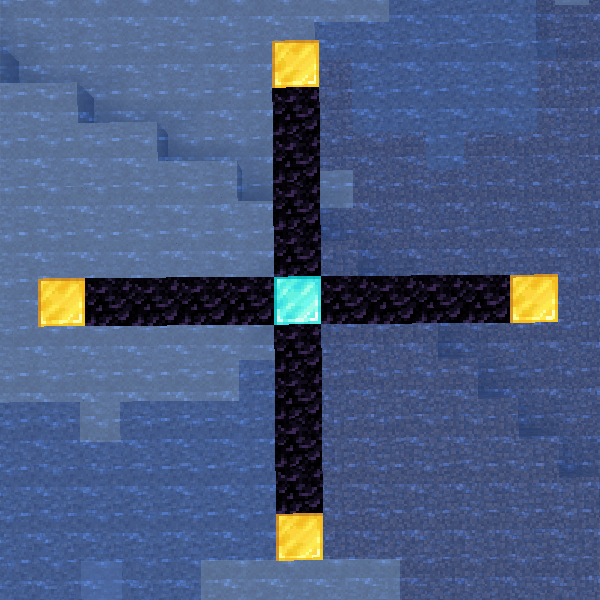
To start building a solid tracker you will need a 'Diamond Block' for the middle, 4 'Gold Blocks' for the end of each 'arm', and as much 'Obsidian' as you can find for the length of the arms. Every obsidian block equals 25 blocks in the real world. Build your tracker at a smart position. Not too close to spawn, and not at coords that are easy to guess. You are not the only one that will try to make one.
To see a 'layout' of a tracker do '/track help 3 layout'.
Tracking Help Page (3/5) - Building LAYOUT:
In the picture below you can see multiple letters and dashes. The dashes are Obsidian blocks, D is a Diamond block, and G are Gold blocks.
G
|
G ---- D ---- G
|
G
Tracking Help Page (4/5) - /track all:
Once you have made your own solid tracker, it's time to find those bases! Stand on the Diamond block in the middle of your tracker and do /track all. If there are players within the range of your tracker they will show up. You will need a player on atleast 2 of your arms to continue to page 5. If not, try to increase the length of your arms or wait until there are more/different players online.
To proceed to page 5 do '/track help 5'.
Tracking Help Page (5/5) - /track [playerName]:
If you are lucky enough to find a player on 2 different arms, it's time to lower the size of your arms. Keep moving the Gold block down/up your arm to pinpoint the location of the player you want to track. If he doesn't show up anymore after you moved the Gold block, place the block higher up until you are at a 1 block difference. Now all that is left is to add the length of the arm from the respective coordinate on your Diamond block and you've found the location of an enemy within 25 blocks!
Basic tracking explained by the original creator, hclewk, on youtube:

A permanent tracker with a range of 150 blocks on all arms, works with '/track all' and '/track playerName':
A single-use tracker which allows '/track playerName':
Stand on the middle block and enter the command:

You may freely use this mod in any modpack, as long as the download remains hosted within the CurseForge or Modrinth ecosystem.
Serilum.com contains an overview and more information on all mods available.
Comments are disabled as I'm unable to keep track of them across so many separate mod pages.
For issues, ideas, suggestions or anything else there is the Github repo. Thanks!
Project description from CurseForge.
Pick your setup
Choose the version and loader you play, then open the matching release.
Showing the newest 12 of 29 game versions. Older files are in the list below.
Check the dependencies, then try the file in a copied instance before changing a world you care about.
Recent files
playertracking-26.1.2-3.7.jar
28 Oct 2026
playertracking-26.3.0-3.7.jar
2 Oct 2026
playertracking-26.2.0-3.7.jar
2 Oct 2026
playertracking-1.21.1-3.7.jar
2 Oct 2026
playertracking-1.20.1-3.7.jar
2 Oct 2026
playertracking-26.3.0-3.6.jar
19 Sept 2026
playertracking-26.2.0-3.6.jar
18 Jun 2026
playertracking-26.1.2-3.6.jar
7 Jun 2026
playertracking-1.21.11-3.6.jar
7 Jun 2026
playertracking-1.21.1-3.6.jar
7 Jun 2026
playertracking-1.20.1-3.6.jar
7 Jun 2026
playertracking-26.1.2-3.5.jar
9 Apr 2026
Looking for an older file? The official CurseForge project page is in Resources.
 mod
SereneSeason Plus (formerly Extended Fix) enhances seasonal immersion with sub season based day/night speed and improved snow piling/melting logic, delivering smoother and more natural seasonal block behavior.
 mod
A world map that draws itself as you explore. 2D and 3D views with real block textures, a minimap, cave mode, waypoints, death points
 mod
A semi-magical mod focused around power, called Force