Minecraft version
Back to mods 
Modrinth · Minecraft mod
GanKura
A Hypixel Skyblock Mod focused on Area Mini-bosses.
Choose a version Pick your version below, then grab the matching file.
Quick answer
Which GanKura release should I use?
Latest stable file 7.6.1+26.3
Game version 26.3
Loader Fabric
GanKura 7.6.1+26.3 targets 26.3 with Fabric. It must be installed on the client. Do not install it on the dedicated server. No extra mods listed for this file.
Where it goes
Is GanKura required on the client, server, or both?
It must be installed on the client. Do not install it on the dedicated server.
Client Required
Dedicated server Not supported
Loader for this release Fabric
Required install it here Optional supported, not mandatory Not supported do not install here Source doesn’t say do not assume
This file is marked client-only.
What else does GanKura 7.6.1+26.3 need?
7.6.1+26.3. Change the file and its required mods may change too.
This file does not list any required mods. Do not add a library just because a different file uses it.
This file does not list any required or optional mods.
Before you install it
Add GanKura without breaking your instance.
Built for GanKura 7.6.1+26.3. Pick another file and the loader, install side or required mods may change.
- 01
Stick to this file
Use 7.6.1+26.3. It targets 26.3 with Fabric; another release may have different loader, side or dependency requirements.
- 02
Bring the mods it needs
This file does not list any required mods. Do not add a library just because a different file uses it.
- 03
Put it on the correct side
It must be installed on the client. Do not install it on the dedicated server.
- 04
Pick the file you checked
Use the “Get this file” button beside 7.6.1+26.3. It opens that exact file at the source.
About this project
What does GanKura add?
GanKura
GanKura is a Hypixel Skyblock Mod focused on Area Mini-bosses.
Features
Open the settings screen with /gankura. The sections below follow its order and names.
Edit HUD Locations
- Move and scale every HUD this mod draws. Also opens with
/gankura hud.
Combat
- Hide Damage Splash
- Hide Fire Overlay
- Cocoon Catch Title
- Ragnarock - Cast Title, Strength in Chat, Cancel Title, Countdown HUD
- Arrow Poison Indicator
- Armor Stack HUD
- Ferocity HUD
- Quiver HUD
- Low Quiver Alert - Enable, Threshold
- Soulflow HUD
- Low Soulflow Alert - Enable, Threshold
- The End
- End Stone Protector
- Status HUD
- Rare Drop Settings - Loot Tracker HUD, Notification, Tracked Drops
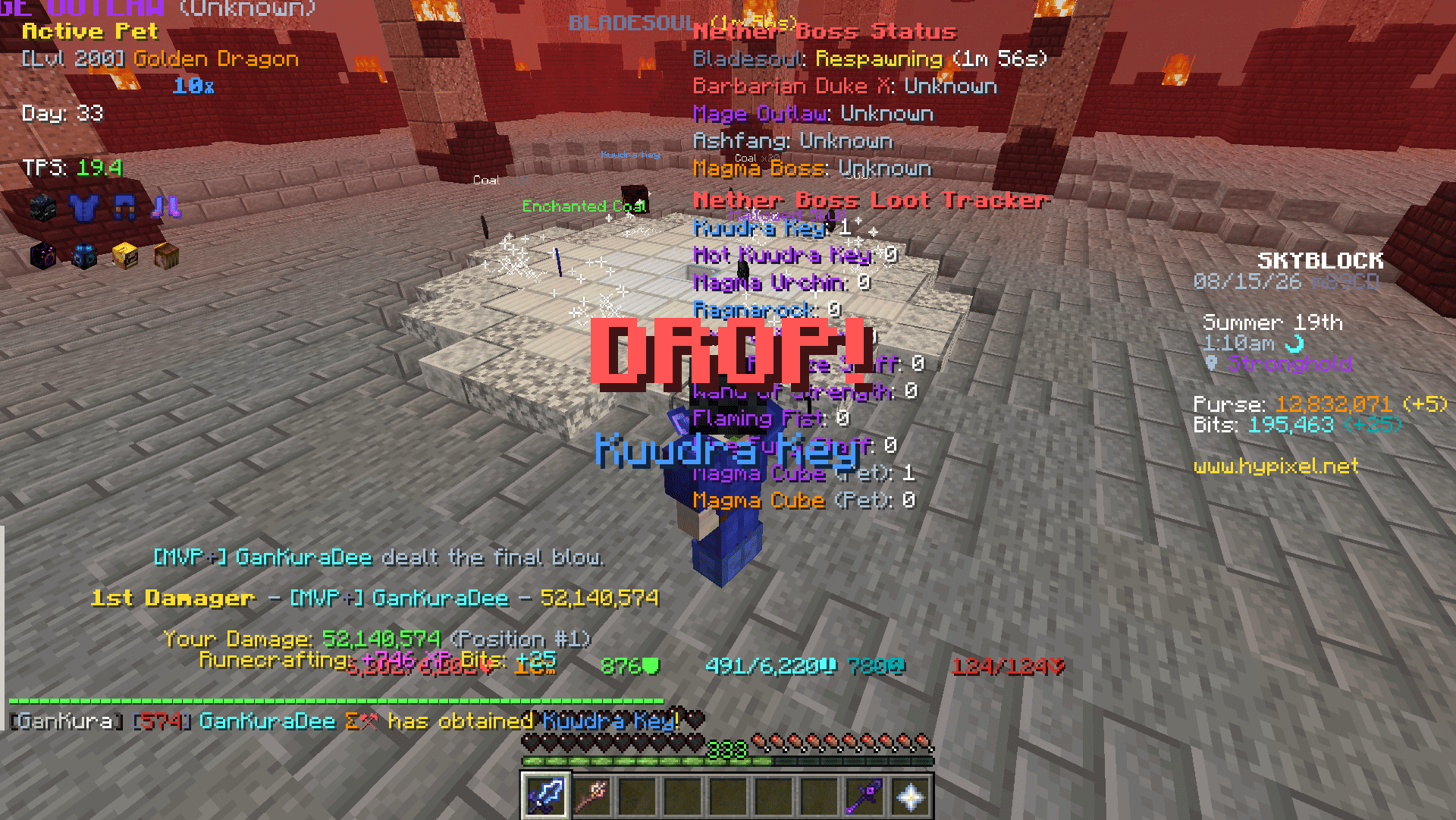
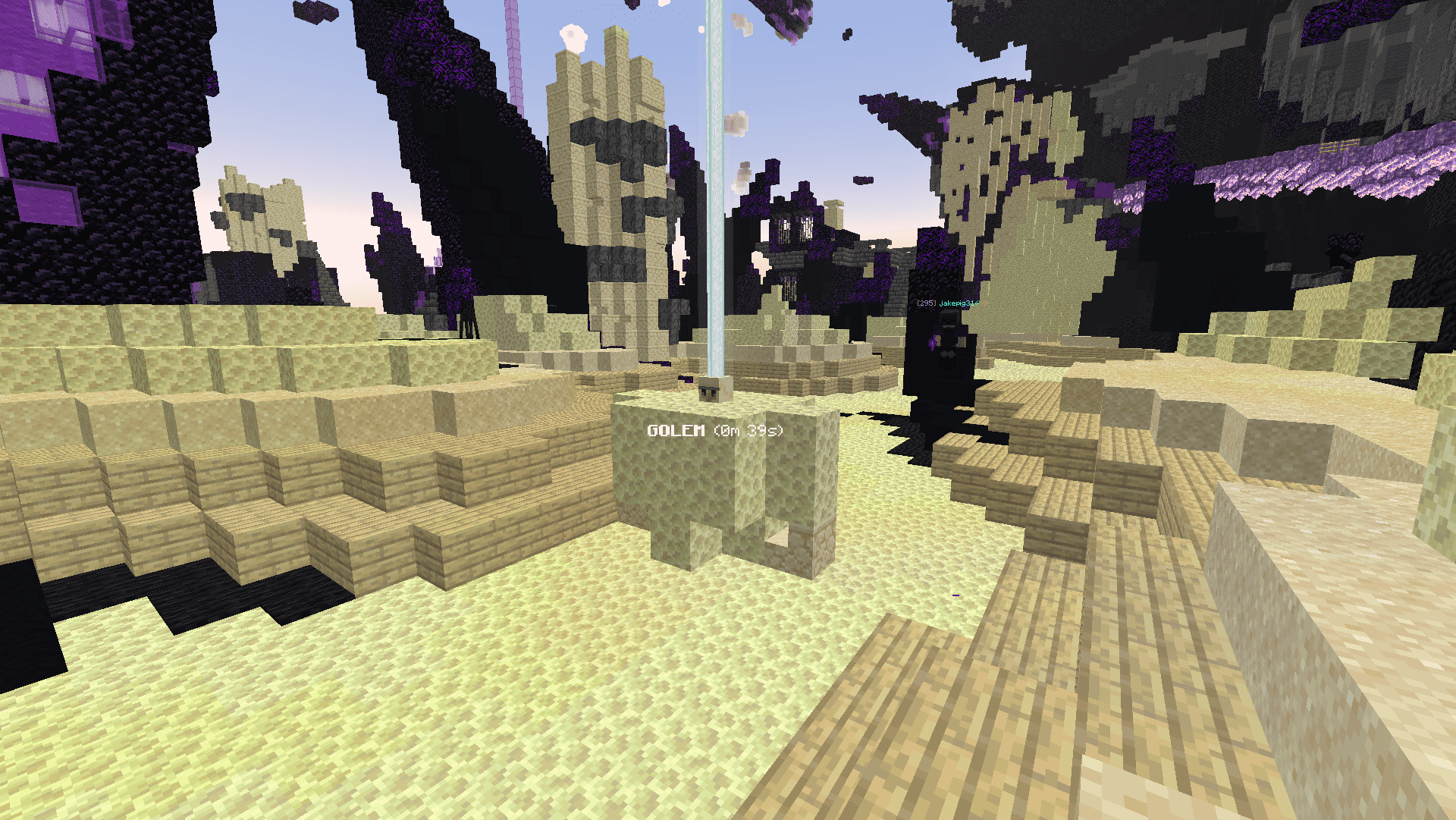
- World Location Display - Show Text, Show Beacon Beam, Show Tracer
- Stage 4 Alert / Stage 5 Alert - Show Title, Play Sound
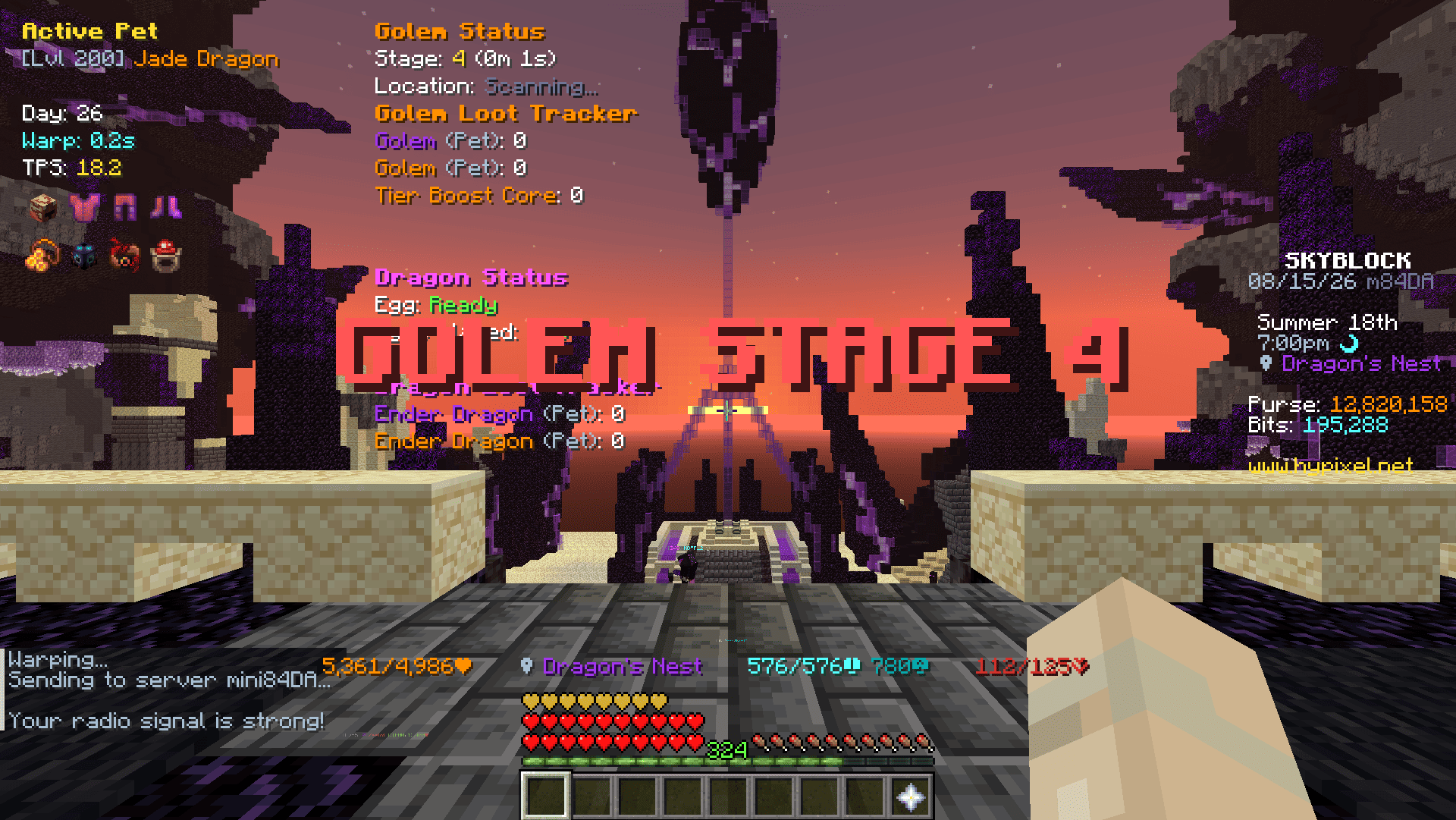
- Chat Settings - Stage 4 Duration Message, DPS Message, Loot Quality Message, Day 30+ Alert Message
- Dragon
- Status HUD
- Rare Drop Settings - Loot Tracker HUD, Notification, Tracked Drops
- Spawn Alert Title - Enable, Alert Dragons
- Chat Settings - DPS Message, Loot Quality Message
- End Stone Protector
- Spider's Den
- Broodmother
- Status HUD
- Stage 4 Alert / Stage 5 Alert - Show Title, Play Sound
- Chat Settings - Stage 4 Duration Message
- Arachne
- Status HUD
- World Location Display - Show Text
- Broodmother
- Crimson Isle
- Status HUD
- Rare Drop Settings - Loot Tracker HUD, Notification, Tracked Drops
- World Location Display - Show Text
- Magma Boss - Stage Status Title
Farming
- DNA Analyzer - Solver, Middle Click, Block Close Button, Hide Tooltips
- Garden
- Visitor - Status HUD, Required Items Panel, Highlight Accept Offer, Arrival Title, Queue Full Title
- Jacob's Contest - Highlight Rewards
- Pest - Status HUD, Spawn Title, Max Pests Title, Spawn Soon Title
- Vacuum - Waypoint, Tracer, Hide Particles
- Squeaky Mousemat - Lock View, Release on Teleport, Release Key
Foraging
- Title Settings - Tree Felled Title, Mob From Tree Title
- Torrhus Canyon - Tiki Spawn Waypoints, Beeheemoth Spawn Title
- Critter Safari
- Captured Critters HUD
- Floor Drops
- Honeybug - Bee Nest Waypoints
- Scrappy - Fish Highlight
- Rockmite - Mound Highlight
- Wumpa - Spawn Title, Capsule Usage Message, Re-enter Waypoint
- Doomspiral - Capsule Usage Message
- Macaw - Spawn Title
Fishing
- HUD Settings - Bite Countdown HUD, Bait HUD
- Chat Settings - Shorten Catch Message
- Low Bait Alert - Enable, Threshold
- Cast Timer - Enable, Start on Liquid Touch
- Hotspot
- Radar Guess - Reads the Hotspot Radar trail and marks where the hotspot should be.
- Gone Title
- Circle - Draws the hotspot edge as a circle, coloured by its perk.
- Found Alert - Title, sound, temporary waypoint and tracer when a hotspot with the perks
you picked shows up, plus a button to share its coordinates.
- Lava as Water - Draws lava with the water texture and clears the orange view inside it,
on Crimson Isle or everywhere. - Golden Fish - Highlight, Tracer, Throw Rod Warning, spawn window timer
Mining
- Commissions - Highlight Completed, Gemstone Waypoints
- Mineshaft
- Corpse - Waypoints, Tracer, Vanguard Title, Profit Message
- Wishing Compass - Solver, Waypoint
General HUD
- Armor HUD
- Equipment HUD
- Yaw and Pitch HUD
- Pet HUD
- TPS HUD
- Day HUD
Mob Visuals
- Highlight, Tracer and Nameplate on the mobs picked for each area.
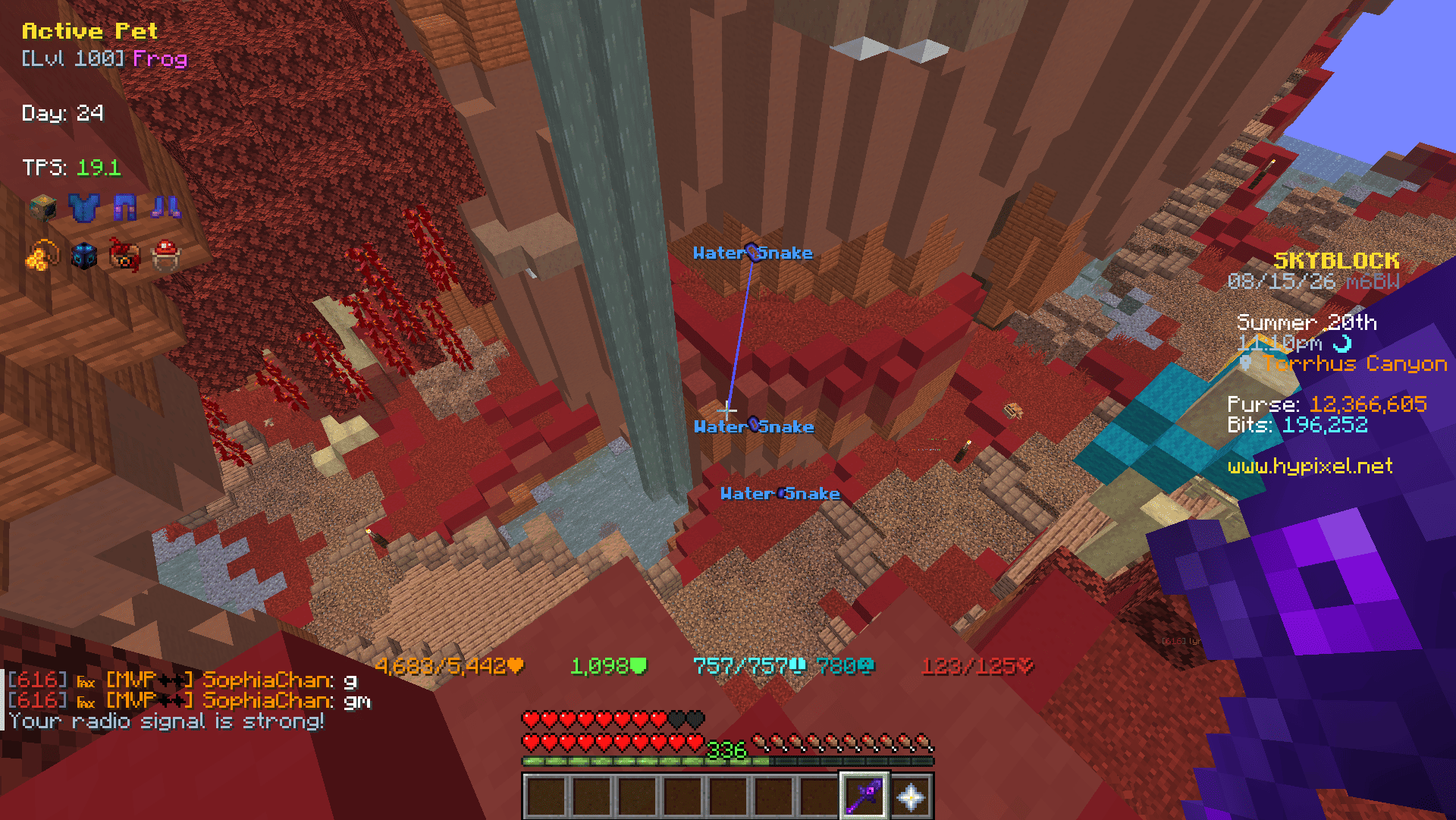
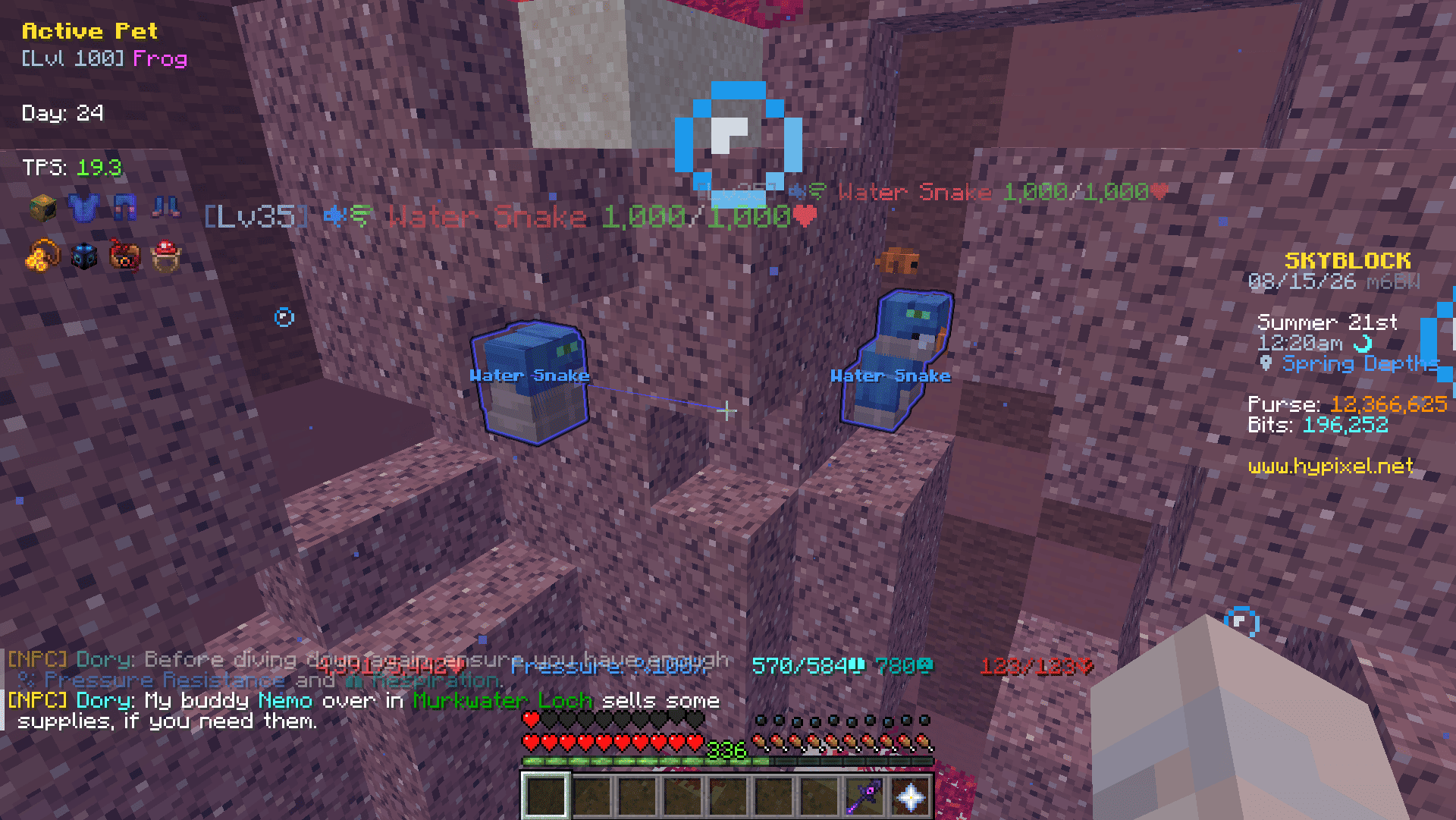
Supported Mobs
- The End
- End Stone Protector
- Dragon
- Spider's Den
- Broodmother
- Arachne
- Arachne's Brood
- Crimson Isle
- Bladesoul
- Barbarian Duke X
- Mage Outlaw
- Magma Boss
- Magma Glare
- Matcho
- Ashfang
- Ashfang Follower
- Ashfang Acolyte
- Ashfang Underling
- Crystal Hollows
- Boss Corleone
- Glacite Mineshaft
- Littlefoot
- Garden
- All Pests
- Foraging
- All Moonglade Marsh Mobs (Excluding Sea Creatures)
- All Torrhus Canyon Mobs (Excluding Sea Creatures)
- All Critter Safari Mobs
- Fishing
- All Rare Sea Creatures
- All Lotus Atoll Critters
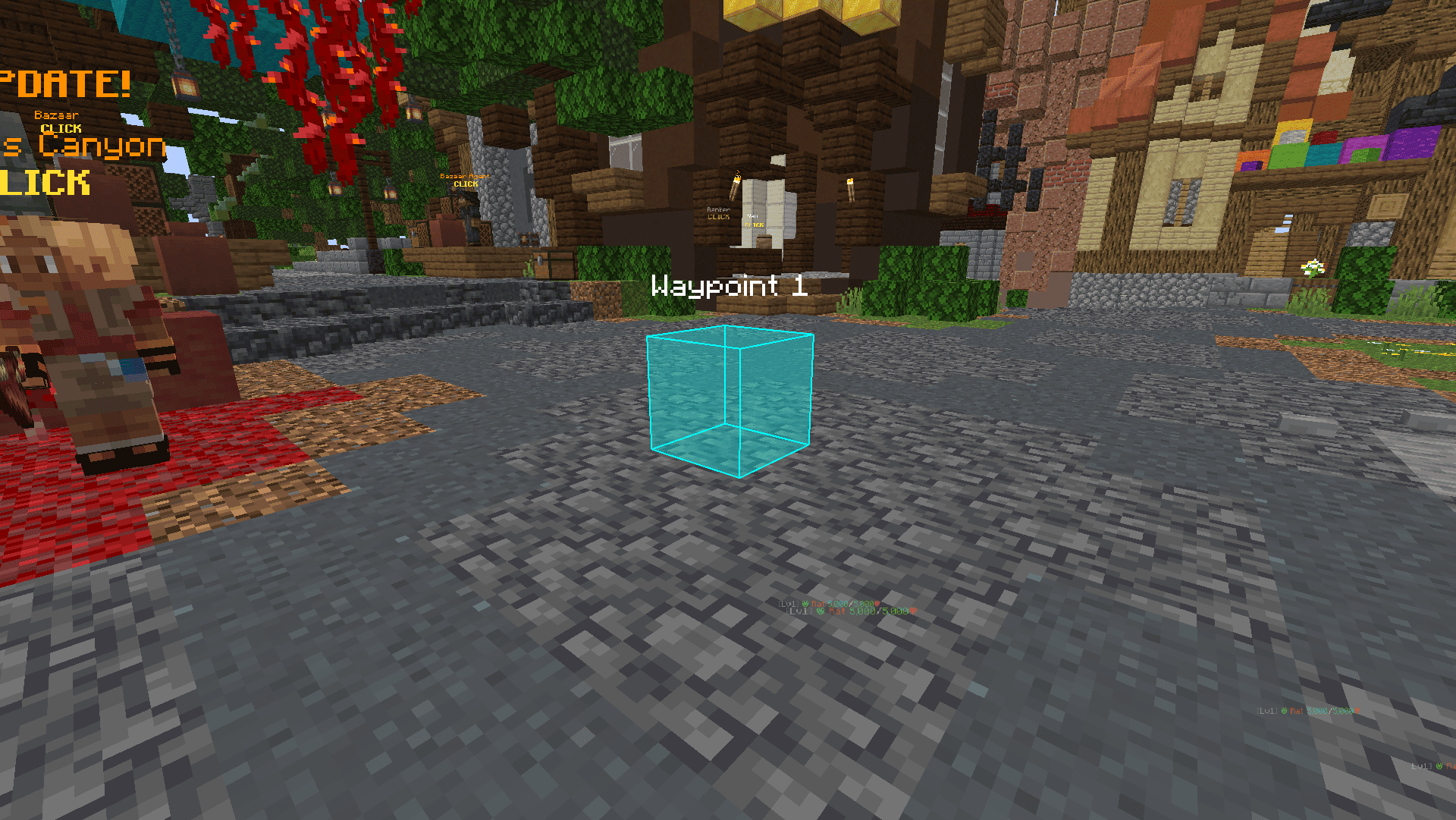
Custom Waypoints
- Commands:
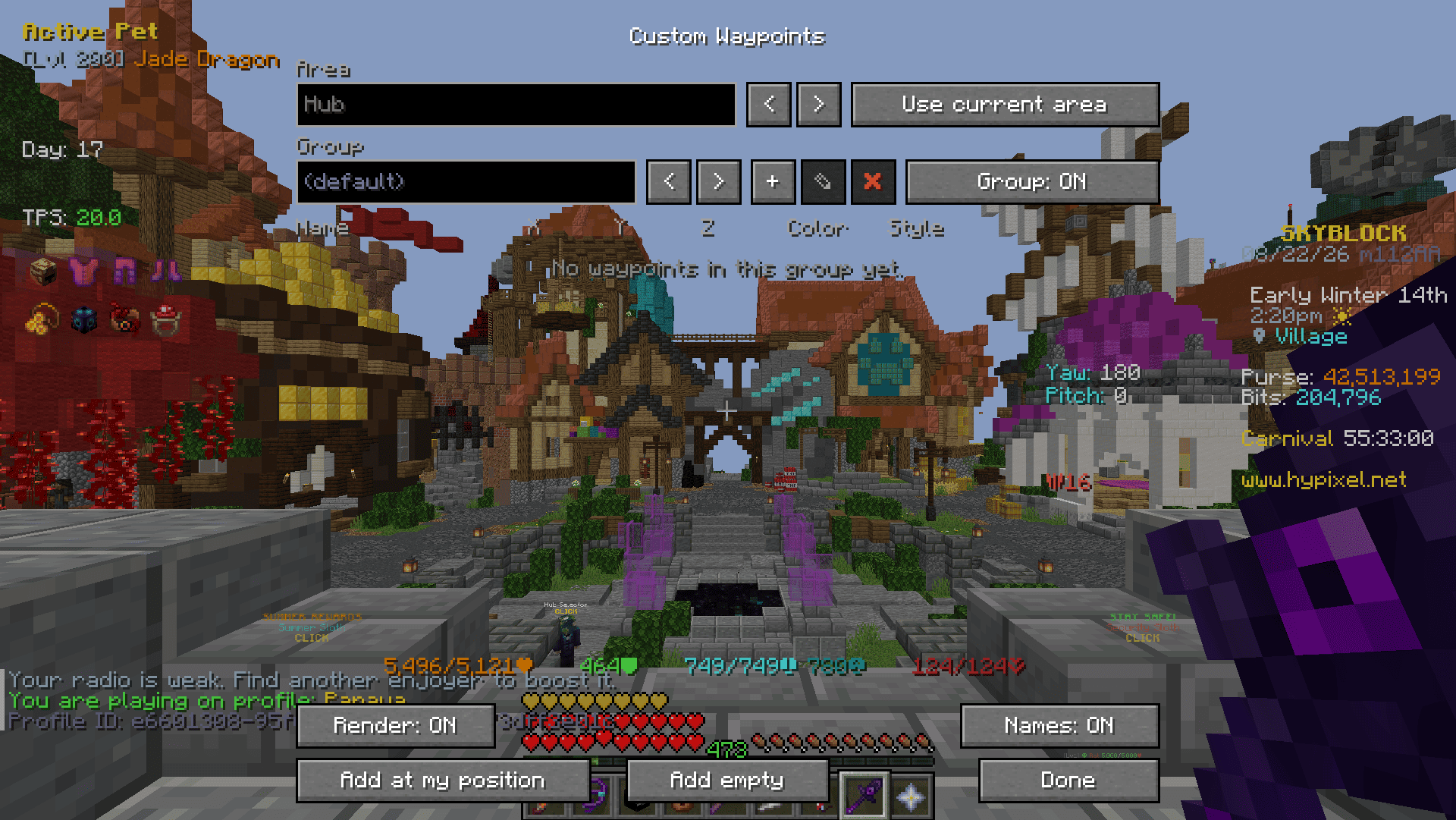
/gankura waypoint, or/gkwfor short/gkw-> Open the Custom Waypoints screen./gkw add-> Add a Waypoint at your current location./gkw add <name>-> Add a named Waypoint at your current location./gkw list-> List the Waypoints in the current area./gkw toggle-> Show or hide the Waypoints.
- Add at my position / Add empty:
- Add Waypoint to your current location / coordinates x:0,y:0,z:0
- Area:
- '<, >' -> Switch between areas where you have created Waypoints.
- Group:
- '+' -> Add a Group
- '<, >' -> Switch between the groups you have created
- '✎' -> Rename current group
- '✖' -> Remove current group
- Waypoint:
- Name -> Name of Waypoint to display in the world
- X, Y, Z -> Coordinates of Waypoint
- Color -> Settings the color and fill opacity of the Waypoint
- Style:
- Both -> Outline and Fill
- Outline -> Displays only Outline
- Fill -> Displays only Fill
- '⇄' -> Move selected Waypoint to another group
- '✖' -> Remove selected Waypoint
Inventory Buttons
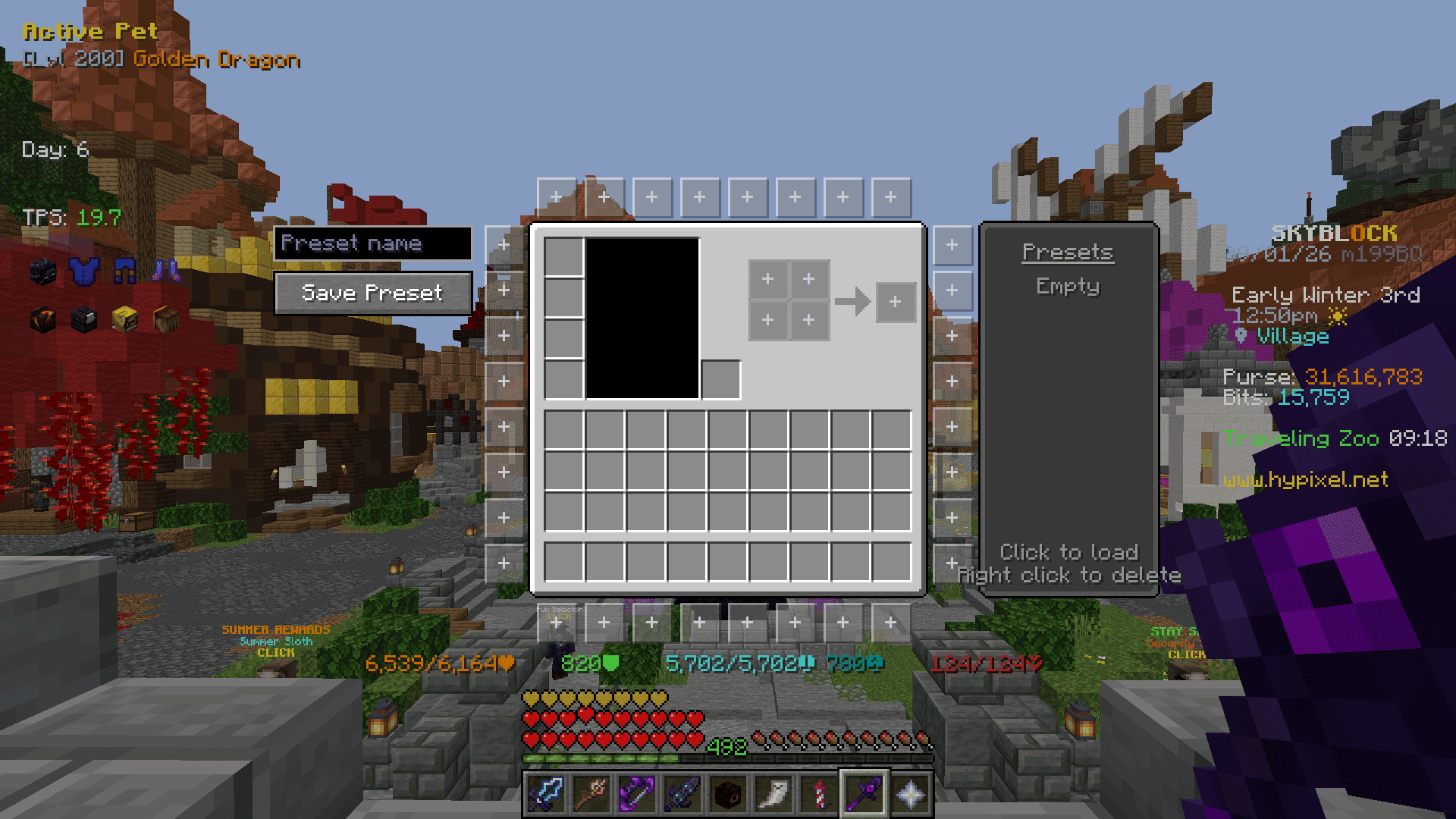
Buttons placed around inventory menus that run a command when clicked. Ported from NotEnoughUpdates.
- Button Editor (
/gankura buttons, or the button in the settings screen)- Click a slot around the inventory to edit it, click it again to close the panel.
- Command -> The command the button runs. A slot with no command stays hidden in game.
- Background -> One of five frame styles.
- Icon Type -> Item, head or built-in icon.
- Icon Selector -> Type to filter, then click an icon.
- Presets -> The list on the right. Click a name to load it, right click to delete it.
Emptyis built in and restores the default layout. - Save Preset -> Saves the current buttons to the preset list under the name typed above the button (up to 12).
- Options
- Hide in Dungeon Menus -> Keeps the buttons out of dungeon puzzle menus.
- Click Type -> Run the command on press or on release.
- Tooltip Delay -> How long the cursor rests on a button before its command is shown.
Viewmodel
- Size, X, Y - The size and position of the item in your hand.
Interface
- Highlight Opacity
- Search Input Screen - Replaces the Bazaar and Auction House sign editor with a text box.
- Inventory - Hide Potion Effects, Hide Background Dim, Hide Recipe Book
- Tab List - Hide Ads, Hide Ping Icons, Hide Extra Heads, Compact Columns, Fit Column Width, Shrink To Fit
- Tooltips - Scrollable Tooltips, Invert Tooltip Scroll, Tooltip From Top
- Enchant - Replace Roman Numerals, Max Enchant Chroma, Book Enchant Gold, Skip Ultimate Enchants
- Item Price - Lowest BIN, Bazaar, Craft Cost, Stack Price, Short Numbers
- Auction/Bazaar - Order Helper, Manage Auctions, Undercut Highlight
- Attribute Menu - Replace Roman Numerals, Highlight Progress, Show Tier, Hide Maxed Tier, Shard Cost Panel
- Bestiary Menu - Replace Roman Numerals, Highlight Progress, Show Tier, Hide Maxed Tier
- Hunting Box - Show Owned, Value Panel
- Heart of the Forest / Mountain - Highlight Status, Show Level
- Enchanted Book - Show Name, Show Tier
- Pets - Highlight Active Pet, Show Level, Hide Maxed Level
- Personal Compactor - Show Status
- NPC Sell Protection - Minimum Rarity, Protect Recombobulated, Triple-Click to Sell
- Keep Cursor Position
Chat Filter
- Hide Profile Name
- Hide Profile ID
- Hide Stash Reminder
- Hide Blank Lines
Keybinds
- Open Menu Keybind - Loadouts, Wardrobe, Equipment
- Loadouts Keybind - Slot 1 to 12
- Armor Set Keybind - Slot 1 to 9
- Equipment Set Keybind - Slot 1 to 9
Misc
- Etherwarp - Highlight Target, Only While Sneaking, Show Reason
- Server Reboot Alert
- Warp Cooldown Queue
- Ability Menu Fix
- Hide Block Break Particles
- Ignore Armor Stand Clicks
Credits
- NotEnoughUpdates (LGPL-3.0-or-later) - the Inventory Buttons feature, its button textures, icons and presets.
- SkyHanni-REPO (MIT, Copyright (c) 2022 hannibal2) - the enchantment level limits used by Max Enchant Chroma and Book Enchant Gold.
Project description from Modrinth.
Pick your setup
GanKura by Minecraft version and loader
Choose the version and loader you play, then open the matching release.
Minecraft version
26.2
1 loader buildMinecraft version
26.1.2
1 loader buildMinecraft version
26.1.1
1 loader buildMinecraft version
26.1
1 loader buildMinecraft version
1.21.11
1 loader buildCheck the dependencies, then try the file in a copied instance before changing a world you care about.
Recent files
GanKura versions and loaders
7.6.1+26.3
gankura-7.6.1+26.3.jar
15 Oct 2026
Client Required Server Not supported Dependencies No extras listed Listed on Release listing
Check the 26.3 · Fabric setup 26.3Fabric release
7.6.1+26.2
gankura-7.6.1+26.2.jar
15 Oct 2026
Client Required Server Not supported Dependencies No extras listed Listed on Release listing
Check the 26.2 · Fabric setup 26.2Fabric release
7.6.1+26.1.x
gankura-7.6.1+26.1.x.jar
15 Oct 2026
Client Required Server Not supported Dependencies No extras listed Listed on Release listing
Check the 26.1.2 · Fabric setup 26.126.1.126.1.2Fabric release
7.6.0+26.3
gankura-7.6.0+26.3.jar
24 Sept 2026
Client Required Server Not supported Dependencies No extras listed Listed on Release listing
Check the 26.3 · Fabric setup 26.3Fabric release
7.6.0+26.2
gankura-7.6.0+26.2.jar
24 Sept 2026
Client Required Server Not supported Dependencies No extras listed Listed on Release listing
Check the 26.2 · Fabric setup 26.2Fabric release
7.6.0+26.1.x
gankura-7.6.0+26.1.x.jar
24 Sept 2026
Client Required Server Not supported Dependencies No extras listed Listed on Release listing
Check the 26.1.2 · Fabric setup 26.126.1.126.1.2Fabric release
7.5.5+26.2
gankura-7.5.5+26.2.jar
16 Sept 2026
Client Required Server Not supported Dependencies No extras listed Listed on Release listing
Check the 26.2 · Fabric setup 26.2Fabric release
7.5.5+26.1.x
gankura-7.5.5+26.1.x.jar
16 Sept 2026
Client Required Server Not supported Dependencies No extras listed Listed on Release listing
Check the 26.1.2 · Fabric setup 26.126.1.126.1.2Fabric release
7.5.4+26.2
gankura-7.5.4+26.2.jar
12 Sept 2026
Client Required Server Not supported Dependencies No extras listed Listed on Release listing
Check the 26.2 · Fabric setup 26.2Fabric release
7.5.4+26.1.x
gankura-7.5.4+26.1.x.jar
12 Sept 2026
Client Required Server Not supported Dependencies No extras listed Listed on Release listing
Check the 26.1.2 · Fabric setup 26.126.1.126.1.2Fabric release
7.5.3+26.2
gankura-7.5.3+26.2.jar
10 Sept 2026
Client Required Server Not supported Dependencies No extras listed Listed on Release listing
Check the 26.2 · Fabric setup 26.2Fabric release
7.5.3+26.1.x
gankura-7.5.3+26.1.x.jar
10 Sept 2026
Client Required Server Not supported Dependencies No extras listed Listed on Release listing
Check the 26.1.2 · Fabric setup 26.126.1.126.1.2Fabric release
Looking for an older file? The official Modrinth project page is in Resources.
 mod
mod Modrinth · Minecraft
Matthiesen Core
A library mod for NeoForge and Fabric that enables developers to create mods with a shared common codebase.
 mod
mod Modrinth · Minecraft
Cobblemon Picnic
A Picnic Table for Cobblemon that re-rolls nearby wild spawns on demand — hunt shinies or specific Pokemon without roaming, plus a shiny aura, care and trainer battles.
 mod
mod Modrinth · Minecraft
Villager Reroller
Breaks and replaces jobsite blocks to find any book/item you desire!