Fabric API Needed by Philter Mod 1.3.5 for Minecraft 26.1
requiredMatching file found Matched file: [26.1.2] Fabric API 0.155.3+26.1.2

CurseForge · Minecraft mod
An item-filtering hopper
Quick answer
Philter Mod 1.3.5 for Minecraft 26.1 targets 26.1 with Fabric. The project page does not say whether this file belongs on the client, dedicated server, or both. All 1 required mods have matching files.
Where it goes
The project page does not say whether this file belongs on the client, dedicated server, or both.
The source does not explicitly classify this release as client-only or server-only.
Philter Mod 1.3.5 for Minecraft 26.1. Change the file and its required mods may change too.
Install Fabric API first. We found matching files for this game-version and loader setup.
We only count dependency files that match this setup. A file for another loader does not fill the gap.
Before you install it
Built for Philter Mod 1.3.5 for Minecraft 26.1. Pick another file and the loader, install side or required mods may change.
Use Philter Mod 1.3.5 for Minecraft 26.1. It targets 26.1 with Fabric; another release may have different loader, side or dependency requirements.
Install Fabric API first. We found matching files for this game-version and loader setup.
The project page does not say whether this file belongs on the client, dedicated server, or both.
Use the “Get this file” button beside Philter Mod 1.3.5 for Minecraft 26.1. It opens that exact file at the source.
About this project
The Philter mod gives you a filter super-hopper that works with vanilla Minecraft or any mod. Any kind of items can be diverted into a different output container. Otherwise, it just passes them along like any other hopper.
Here's what it looks like in action:
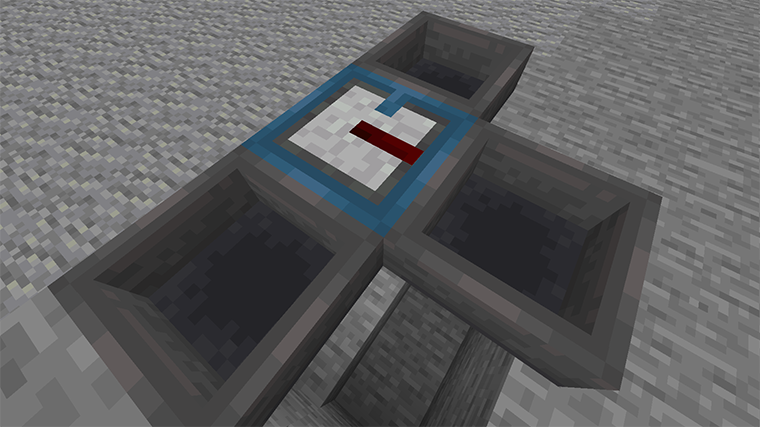
Overall the filter is a steel-blue hopper, and it has a redstone insert that does the filtering. The blue tab on the filter's top shows where normal items are directed. The redstone stripe flashes when an item is instead filtered to the hopper on the right.
The filter does not "pull" from the block above. This means you can run filters horizontally or vertically as you please without worrying about the filter pulling items down from the philter (or hopper or chest) above it. Which makes it very simple to create a sorter without using redstone to block that pulling.
Here's an image of how you can use it to build an item sorter:
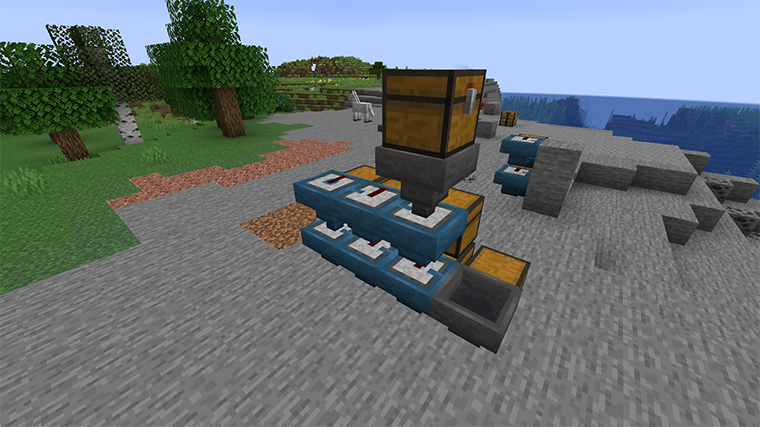
The input is the topmost chest. The filters all point into the chests, and they face to the next filter (that is, the hopper part of the filter points to the next filter). The last filter faces down to put items into the row of filters below. There is an overflow for unfiltered items into the chest on the lower right.
So items from the chest will get sorted into the six chests, with unsorted items ending in the seventh chest. Note that lack of extra redstone mechanism, it is all done with the filter.
You can set up the filter using its UI:
 "Filter in "Same As" mode")
The area in the upper left is the basic hopper UI, and works just the same. On the right is the filter configuration. Here it is in "Same As" mode, which means it will only put items into the filter that match examples. These examples can be set by putting objects in the filter itself. Or the items already in the object container can be used as the examples instead. So if the filter has planks of every type, or if it has nothing and the target container has them, then planks will be diverted, and other items will continue onward.
The "Exact" button is off, so modifications will be ignored. If the examples included iron chestplate, this would allow damaged or enchanted iron chestplates to also be put in the target. If "Exact" were on, only chestplate that had the same damage and enchantment would be diverted.
The other primary mode is "Match", where you specify tags and regular expressions to tell the filter what to do:
 "Filter in "Matches" mode") filter UI in 'Only Same' mode
Here we've told the filter to match blocks that are covered by the tag #wool (all kinds of wool) plus anything that has dirt in the name. "Any of" can be switched to "All of", which would mean the item would have to both match #wool and have dirt in the name (which nothing does, so ...).
In "Match" mode, "Exact" means that NBT value will be included when string matching. So you could match any item that was enchanted with the pattern Enchantments because that string appears in the NBT of enchanted items.
The list of standard tags will probably be helpful. As for regular expressions, there are many tutorials on the web. Generally, text matches the same text except for special symbols. The most important are:
. matches any single character, so d.rt matches both dirt and dart.
* means "zero or more repetitions", so .* means "zero or more of any characters".
^ matches the start of the text, so you could say "anything whose name starts with blue" with the pattern ^blue.*, which would not match light blue things.
$ matches the end of the text.
The filter finds a match anywhere in the string unless you anchor it to the start and/or end of the text. It also ignores the case of the text, so "enchantments" would match both "enchantments" and "Enchantments".
Finally, the mode "None" just turns off the filtering entirely.
The third part of the UI, the part below your inventory, allows you to change the direction of the filter. Like a hopper, a filter can point in any direction but up, but also it cannot point in the same direction as the regular hopper output. When you place a filter, the filtered output is defined by how you're facing, but you can change it afterwards using this part of the UI.
Project description from CurseForge.
Pick your setup
Choose the version and loader you play, then open the matching release.
Check the dependencies, then try the file in a copied instance before changing a world you care about.
Recent files
philter-1.3.5+26.1.jar
26 May 2026
philter-1.3.5+1.21.jar
15 Oct 2024
philter-1.3.4+1.21.jar
15 Oct 2024
philter-1.3.4+1.21.jar
9 Aug 2024
philter-1.3.3+1.21.jar
9 Aug 2024
philter-1.3.3+1.21.jar
21 Jun 2024
philter-1.3.1+1.21.jar
21 Jun 2024
philter-1.3.1+1.20.6.jar
29 May 2024
philter-1.3.1+1.20.6.jar
25 May 2024
philter-1.3.1+1.20.6.jar
6 May 2024
philter-1.3.1+1.20.1.jar
25 Jun 2023
philter-1.3.1+1.20.1.jar
25 Jun 2023
Looking for an older file? The official CurseForge project page is in Resources.
 mod
It adds a large number of potion effects based on RPG mechanics.
 mod
Factorio style deferred crafting within your inventory
 mod
Lose hearts when dying, gain a heart when eating enchanted golden apples (similar to LifeDrain LifeSteal)