CurseForge · Minecraft mod
WhyMap
High performance in-browser world map. Detailed texture view on zoom. Open Source.
Quick answer
Which WhyMap release should I use?
WhyMap 1.7.8 targets 1.21.1, 1.21 with Fabric. The project page does not say whether this file belongs on the client, dedicated server, or both. All 2 required mods have matching files.
Where it goes
Is WhyMap required on the client, server, or both?
The project page does not say whether this file belongs on the client, dedicated server, or both.
The source does not explicitly classify this release as client-only or server-only.
What else does WhyMap 1.7.8 need?
WhyMap 1.7.8. Change the file and its required mods may change too.
Install Fabric Language Kotlin, Fabric API first. We found matching files for this game-version and loader setup. 2 come through another mod in the chain.
2 extra mods were pulled in by other dependencies. Indented rows show who needs each one. We only count dependency files that match this setup. A file for another loader does not fill the gap.
Before you install it
Add WhyMap without breaking your instance.
Built for WhyMap 1.7.8. Pick another file and the loader, install side or required mods may change.
- 01
Stick to this file
Use WhyMap 1.7.8. It targets 1.21.1, 1.21 with Fabric; another release may have different loader, side or dependency requirements.
- 02
Bring the mods it needs
Install Fabric Language Kotlin, Fabric API first. We found matching files for this game-version and loader setup. 2 come through another mod in the chain.
- 03
Put it on the correct side
The project page does not say whether this file belongs on the client, dedicated server, or both.
- 04
Pick the file you checked
Use the “Get this file” button beside WhyMap 1.7.8. It opens that exact file at the source.
About this project
What does WhyMap add?
WhyMap
See interactive web demo on: https://wefhy.github.io/whymap-demo/map.html
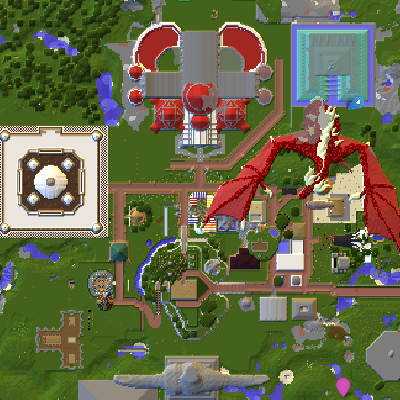
You can zoom in close enough to see the textures of blocks. It's old 0.8 version from September 2022 but should give you hint of what it feels like to browse the map in the browser.
High performance minecraft world map with web-based interface and infinite zoom. Your map will be presented at http://localhost:7542
Download the mod from:
Join discord for support:
How to use it?
- Install the mod and required dependencies (Fabric Language Kotlin and Fabric API)
- All keyboard shortcuts can be configured in minecraft keybind settings
Y- toggle minimapM- configuration (requires Cloth Config)B- create new waypoint- Open your browser at http://localhost:7542 to browse the map
- Zoom in to see block textures
- Click right mouse button on the map to see more options
- Click on the waypoint to center the map on it (after you add waypoints)
- You can search waypoints or coordinates
Actively supported versions:
- 1.19.3, 1.19.4
Other supported versions:
- 1.19, 1.19.1, 1.19.2
- 1.16.5
FAQ
How to use it?
- Browse your map on http://localhost:7542
How to add waypoints?
- You can import xaero's waypoints from file though browser
- Press
Bin game to create new waypoint - Right-click on the map to create new waypoint
Is the mod uploading my world to the internet?
- No, the mod is not uploading your world to the internet. It's running a local web server on your computer.
Who can access my map?
- The map can only be accessed from your computer.
- If you change it in the settings, the map can also be available to other computers and phones on your local network.
So how does it work?
- The mod is using your browser to display files that are stored on your computer.
- The mod creates a local web server that shows the tiles to your computer.
- The mod is using Leaflet to display the map.
- Nothing goes online. All data is stored in WhyMap folder in your minecraft directory. You can freely delete it or move it to another computer.
Can I browse the map on my phone?
- In order to browse the map on your phone, you need to change the settings of web server from
LOCALHOST_ONLYtoEVERYWHERE - Then you can browse the map on your phone by going to
http://[YourComputerLocalIp]:7542(assuming you're connected to the same wifi)
How is WhyMap better than other map mods?
- Incredibly detailed map that shows block textures when zoomed in.
- High performance and doesn't lag when zoomed out.
- Access your maps even when minecraft is not launched (coming soon).
- It's fully open source.
- You can browse the map on your phone.
Can I use it with Quilt?
- I only actively support Fabric, however it should work with Quilt.
- In order to run it with Quilt, you need to install Quilted Fabric API and Quilt Kotlin Libraries instead of Fabric API and Fabric Language Kotlin.
How big is the project?
Project description from CurseForge.
Pick your setup
WhyMap by Minecraft version and loader
Choose the version and loader you play, then open the matching release.
1.21.1
1 loader build1.21
1 loader build1.20.6
1 loader build1.20.5
1 loader build1.20.4
1 loader build1.20.3
1 loader build1.20.2
1 loader build1.20.1
1 loader build1.19.4
1 loader build1.19.3
1 loader build1.19.2
1 loader build1.19.1
1 loader buildShowing the newest 12 of 13 game versions. Older files are in the list below.
Check the dependencies, then try the file in a copied instance before changing a world you care about.
Recent files
WhyMap versions and loaders
WhyMap 1.7.8
whymap-1.7.8.jar
2 Jan 2025
WhyMap 1.7.7
whymap-1.7.7.jar
17 Jun 2024
WhyMap 1.7.6
whymap-1.7.6.jar
17 Jun 2024
WhyMap 1.7.5
whymap-1.7.5.jar
31 May 2024
WhyMap 1.7.4
whymap-1.7.4.jar
6 Mar 2024
WhyMap 1.7.3
whymap-1.7.3.jar
4 Nov 2023
WhyMap 1.7.2
whymap-1.7.2.jar
23 Aug 2023
WhyMap 1.7.0
whymap-1.7.0.jar
23 Aug 2023
WhyMap 1.6.6
whymap-1.6.6.jar
22 Jul 2023
WhyMap 1.6.4
whymap-1.6.4.jar
27 Apr 2023
WhyMap 1.6.3
whymap-1.6.3.jar
26 Apr 2023
WhyMap 1.6.2
whymap-1.6.2.jar
24 Apr 2023
Looking for an older file? The official CurseForge project page is in Resources.