GottschCore Needed by Mage Flame [fabric] mageflame-fabric-1.21.1-2.0.1.jar
requiredMatching file found Matched file: [fabric] gottschcore-fabric-1.21.1-2.3.0.jar

CurseForge · Minecraft mod
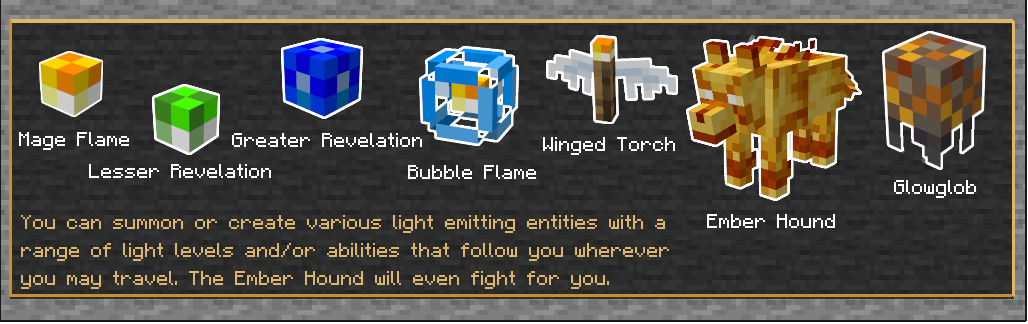
Mage Flame is a small mod that adds the ability to create dynamic light sources that follow you wherever you go.
Quick answer
Mage Flame [fabric] mageflame-fabric-1.21.1-2.0.1.jar targets 1.21.1 with Fabric. The project page does not say whether this file belongs on the client, dedicated server, or both. All 1 required mods have matching files.
Where it goes
The project page does not say whether this file belongs on the client, dedicated server, or both.
The source does not explicitly classify this release as client-only or server-only.
[fabric] mageflame-fabric-1.21.1-2.0.1.jar on Fabric. Every mod below is checked against that same setup.
Install GottschCore first. We found matching files for this game-version and loader setup.
We only count dependency files that match this setup. A file for another loader does not fill the gap.
Before you install it
Built for Mage Flame [fabric] mageflame-fabric-1.21.1-2.0.1.jar on Fabric. Pick another file and the loader, install side or required mods may change.
Use [fabric] mageflame-fabric-1.21.1-2.0.1.jar. It targets 1.21.1 with Fabric; another release may have different loader, side or dependency requirements.
Install GottschCore first. We found matching files for this game-version and loader setup.
The project page does not say whether this file belongs on the client, dedicated server, or both.
Use the “Get this file” button beside [fabric] mageflame-fabric-1.21.1-2.0.1.jar. It opens that exact file at the source.
About this project





Mage Flame is a small mod that adds the ability to create dynamic light sources that follow you wherever you go.
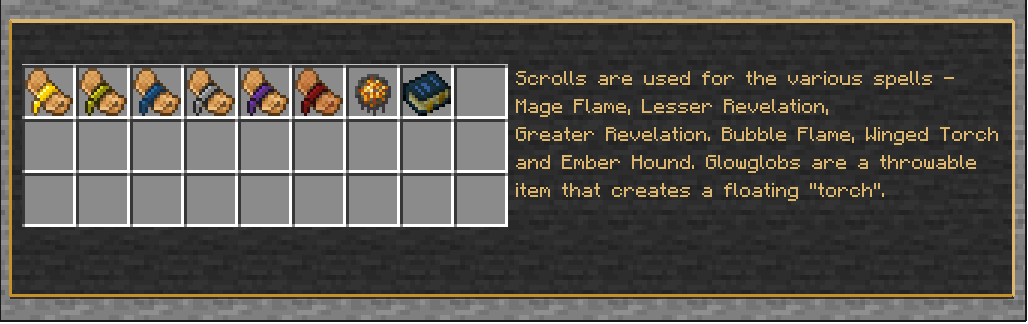
This is executed by using scrolls crafted from vanilla ingredients. No mana, no spell points, no mage classes, no levels. Just craft and use.
VERSION 2
Mage Flame now uses LambdAurora's amazing LambDynamicLights mod to power the dynamic lighting for Fabric versions, and Sodium/Embeddium DynamicLights for Forge versions.
This upgrade greatly improves performance providing higher frame-rates and a smoother experience.
Other notable new features & changes:
* Bubble Flame entity
* Ember Hound entity
* Glowglob entity
* HUD for lifespan of summoned entities
* Multiple summoned entities per player (configurable)
* Improved summoned entity registration
* In-game documentation via tooltips and optional Patchouli mod


DungeonBlocks (not to be confused with Minecraft Dungeon Blocks)

Project description from CurseForge.
Pick your setup
Choose the version and loader you play, then open the matching release.
Check the dependencies, then try the file in a copied instance before changing a world you care about.
Recent files
mageflame-fabric-1.21.1-2.0.1.jar
10 Apr 2026
mageflame-fabric-1.21.1-2.0.0.jar
26 Jan 2025
mageflame-fabric-1.21.2-1.5.0.jar
8 Jan 2025
mageflame-fabric-1.21.1-1.5.0.jar
7 Jan 2025
mageflame-fabric-1.20.6-1.5.0.jar
6 Jan 2025
mageflame-fabric-1.20.4-v1.5.0.jar
6 Jan 2025
mageflame-fabric-1.20.2-v1.5.0.jar
6 Jan 2025
MageFlame-fabric-mc1.20.1-v1.5.0.jar
21 Jan 2024
MageFlame-fabric-mc1.19.4-v1.5.0.jar
8 May 2023
MageFlame-fabric-mc1.19.3-v1.5.0.jar
8 May 2023
MageFlame-fabric-mc1.19.2-v1.5.0.jar
8 May 2023
MageFlame-fabric-mc1.18.2-v1.5.0.jar
8 May 2023
Looking for an older file? The official CurseForge project page is in Resources.
 mod
A Jujutsu Kaisen RPG for Fabric: 30 techniques with real domains, 95 curses to exorcise or raise, calamity-scale destruction and seven bosses.
 mod
A Remake of Poly Ores adding new features.
 mod
Little Mod that allows to steal Pokemon from Trainers.