Minecraft version
Back to mods 
CurseForge · Minecraft mod
Easy Hopper
Speed up Hoppers and add classification function to it!
Choose a version Pick your version below, then grab the matching file.
Quick answer
Which Easy Hopper release matches 26.2?
Best match for your filters easyhopper-3.1+mc26.2-neoforge.jar
Game version 26.2
Loader NeoForge
Easy Hopper easyhopper-3.1+mc26.2-neoforge.jar targets 26.2 with NeoForge. The project page does not say whether this file belongs on the client, dedicated server, or both. No extra mods listed for this file.
Where it goes
Is Easy Hopper required on the client, server, or both?
The project page does not say whether this file belongs on the client, dedicated server, or both.
Client Source doesn’t say
Dedicated server Source doesn’t say
Loader for this release NeoForge
Required install it here Optional supported, not mandatory Not supported do not install here Source doesn’t say do not assume
The source does not explicitly classify this release as client-only or server-only.
What else does Easy Hopper easyhopper-3.1+mc26.2-neoforge.jar need?
easyhopper-3.1+mc26.2-neoforge.jar on 26.2. Every mod below is checked against that same setup.
This file does not list any required mods. Do not add a library just because a different file uses it.
This file does not list any required or optional mods.
Before you install it
Add Easy Hopper without breaking your instance.
Built for Easy Hopper easyhopper-3.1+mc26.2-neoforge.jar on 26.2. Pick another file and the loader, install side or required mods may change.
- 01
Stick to this file
Use easyhopper-3.1+mc26.2-neoforge.jar. It targets 26.2 with NeoForge; another release may have different loader, side or dependency requirements.
- 02
Bring the mods it needs
This file does not list any required mods. Do not add a library just because a different file uses it.
- 03
Put it on the correct side
The project page does not say whether this file belongs on the client, dedicated server, or both.
- 04
Pick the file you checked
Use the “Get this file” button beside easyhopper-3.1+mc26.2-neoforge.jar. It opens that exact file at the source.
About this project
What does Easy Hopper add?
EasyHopper
 English |
  简体中文 |
  繁體中文 |
  Deutsch
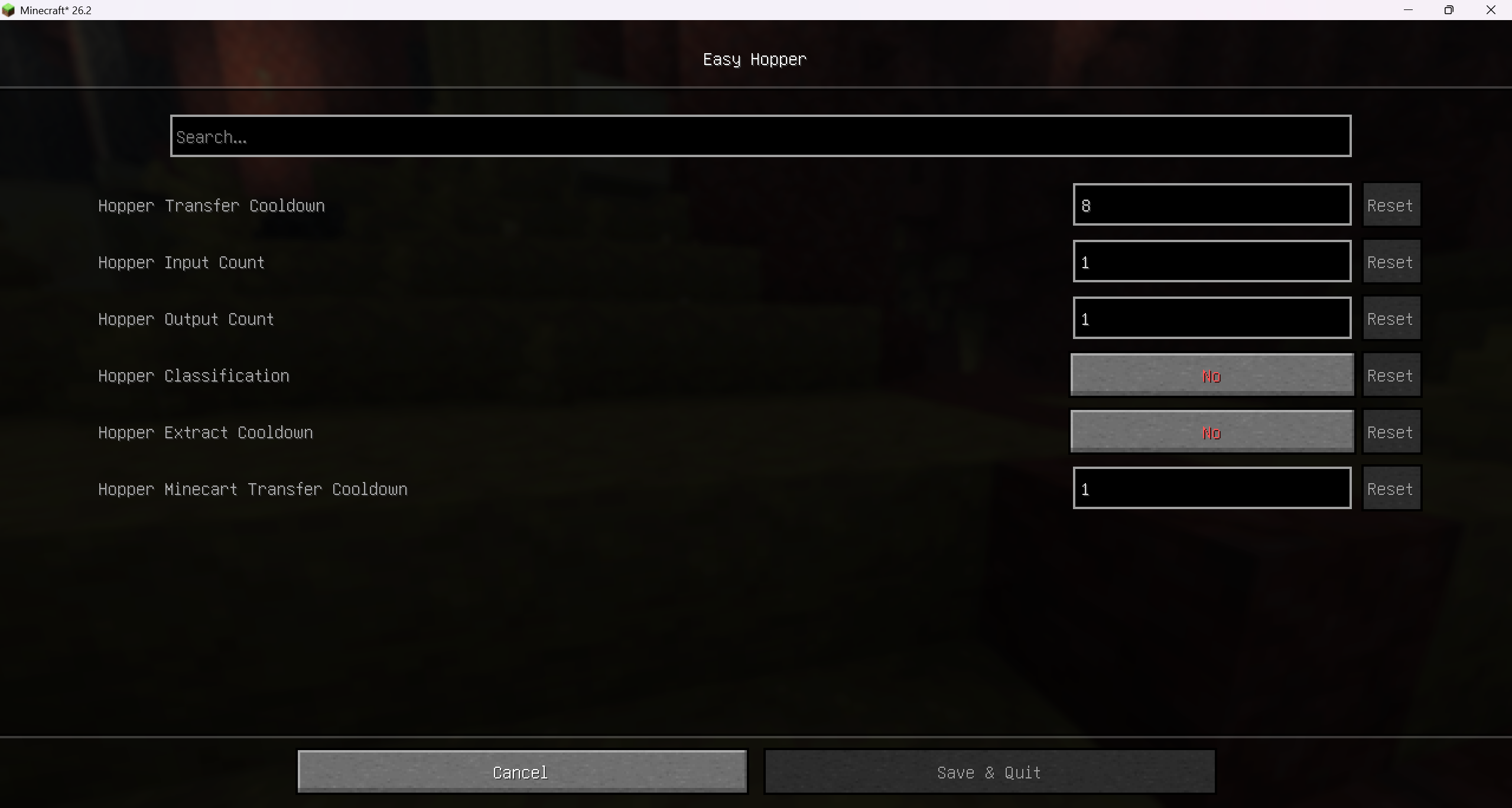
EasyHopper adds item filtering capabilities to vanilla hoppers without introducing any new blocks. Because no custom blocks are added, you can safely uninstall this mod at any time without affecting your save world.
Reporting Issues
Due to work commitments, thorough testing for every scenario can be difficult. If you encounter any issues or bugs, please report them on GitHub Issues.
When submitting an issue, please include:
- Mod version and Minecraft version.
- Steps to reproduce the issue and a description of what went wrong.
Configuration & Feature Setup
Configuration Access
- Any Scenario: You can directly edit
./config/easyhopper.yamlin your game directory. Changes will take effect after re-entering the world. - Singleplayer: You can adjust configurations via the in-game GUI (requires graphical UI dependencies; see below).
- LAN Host: The host can freely modify configurations in-game.
- Dedicated Servers: Players on a server (including non-host LAN players) can only modify configurations in-game if Operator Modification (
ALLOW_OP_MODIFY) is enabled in the server config file AND the player has **Operator (OP) ** permissions.
Graphical UI Dependencies
For Fabric
To enable the config GUI, you must install the following:
- Mod Menu: Adds a configuration button in the mod list.
- Either Cloth Config API (Recommended) **or ** YACL: Provides the graphical interface. If both are installed, Cloth Config API will be used by default.
For NeoForge
To enable the config GUI, install either:
- Cloth Config API (Recommended) **or ** YACL. If both are installed, Cloth Config API will be used by default.
Features
Transfer Speed Adjustment
Modify hopper transfer cooldowns and the number of items transferred per tick/batch to speed up or slow down item movement.
Search / Extract Cooldown
Adds a cooldown whenever a hopper attempts to search for or extract nearby dropped items. This significantly reduces lag when large numbers of hoppers are placed. Note: This may affect timing-sensitive redstone contraptions, such as high-speed super smelters.
Hopper Item Filtering
Uses the 5th (last) slot of a hopper as a filter slot. Only items matching the item type in the 5th slot will be pulled in or outputted. If an invalid item is manually placed into the hopper, it remains in place, but other hoppers below can still pull valid items out.
Performance Optimization (<= 1.20.4)
Disables dropped item entity checks when a hopper is positioned directly below a full solid block or container, reducing server tick lag.
Note: Starting from version
1.20.5, Mojang natively integrated this optimization into vanilla Minecraft code, making this option no longer necessary for newer versions.
Project description from CurseForge.
Pick your setup
Easy Hopper by Minecraft version and loader
Choose the version and loader you play, then open the matching release.
Minecraft version
26.1.2
2 loader buildsMinecraft version
26.1.1
2 loader buildsMinecraft version
26.1
2 loader buildsMinecraft version
1.21.11
2 loader buildsMinecraft version
1.21.10
1 loader buildMinecraft version
1.21.9
1 loader buildMinecraft version
1.21.8
1 loader buildMinecraft version
1.21.7
1 loader buildMinecraft version
1.21.6
1 loader buildMinecraft version
1.21.5
1 loader buildMinecraft version
1.21.4
1 loader buildShowing the newest 12 of 25 game versions. Older files are in the list below.
Check the dependencies, then try the file in a copied instance before changing a world you care about.
Recent files
Easy Hopper versions and loaders
easyhopper-3.1+mc26.2-neoforge.jar
26 Jul 2026
Client Source doesn’t say Server Source doesn’t say Dependencies No extras listed Listed on Release listing
Check the 26.2 · NeoForge setup NeoForge26.2 release
easyhopper-3.1+mc26.2-fabric.jar
26 Jul 2026
Client Source doesn’t say Server Source doesn’t say Dependencies No extras listed Listed on Release listing
Check the 26.2 · Fabric setup Fabric26.2 release
easyhopper-3.0+mc26.2-neoforge.jar
23 Jul 2026
Client Source doesn’t say Server Source doesn’t say Dependencies No extras listed Listed on Release listing
Check the 26.2 · NeoForge setup NeoForge26.2 release
easyhopper-3.0+mc26.2-fabric.jar
23 Jul 2026
Client Source doesn’t say Server Source doesn’t say Dependencies No extras listed Listed on Release listing
Check the 26.2 · Fabric setup Fabric26.2 release
Looking for an older file? The official CurseForge project page is in Resources.
 mod
mod Modrinth · Minecraft
Integrated Dynamics
A mod to take full and automated control of your appliances
 mod
mod CurseForge · Minecraft
Blank DG-LAB
把 DG-LAB 郊狼连入 Minecraft,每一次受伤、坠落和死亡都会化为真实触觉反馈。Connect your DG-LAB Coyote to Minecraft and feel every hit, fall, and death as real haptic pulses — a serious immersion tool, nothing else.
 mod
mod CurseForge · Minecraft
Logistics: Automation
A modern logistics and pipe mod with authentic in-pipe item motion, mod interoperability, and request/autocrafting systems.