Minecraft version
Back to mods 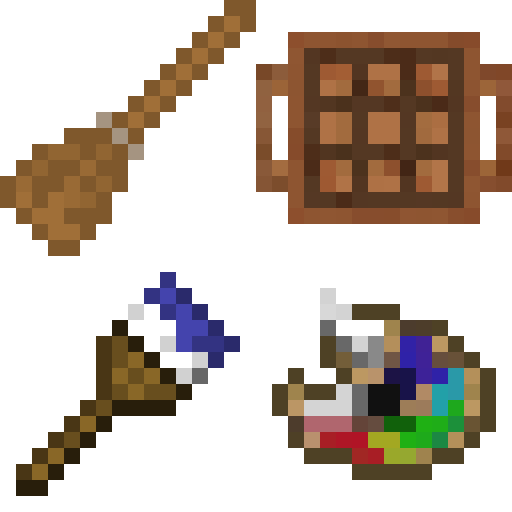
CurseForge · Minecraft mod
PanicleCraft
Paint brushes, drawable paintings, graffiti, chess, broom and more…
Choose a version Pick your version below, then grab the matching file.
Quick answer
Which PanicleCraft release should I use?
beta file PanicleCraft 2.7.2.1
Game version 1.7.10
Loader Forge
PanicleCraft 2.7.2.1 targets 1.7.10 with Forge. The project page does not say whether this file belongs on the client, dedicated server, or both. No extra mods listed for this file.
Where it goes
Is PanicleCraft required on the client, server, or both?
The project page does not say whether this file belongs on the client, dedicated server, or both.
Client Source doesn’t say
Dedicated server Source doesn’t say
Loader for this release Forge
Required install it here Optional supported, not mandatory Not supported do not install here Source doesn’t say do not assume
The source does not explicitly classify this release as client-only or server-only.
What else does PanicleCraft 2.7.2.1 need?
PanicleCraft 2.7.2.1. Change the file and its required mods may change too.
This file does not list any required mods. Do not add a library just because a different file uses it.
This file does not list any required or optional mods.
Before you install it
Add PanicleCraft without breaking your instance.
Built for PanicleCraft 2.7.2.1. Pick another file and the loader, install side or required mods may change.
- 01
Stick to this file
Use PanicleCraft 2.7.2.1. It targets 1.7.10 with Forge; another release may have different loader, side or dependency requirements.
- 02
Bring the mods it needs
This file does not list any required mods. Do not add a library just because a different file uses it.
- 03
Put it on the correct side
The project page does not say whether this file belongs on the client, dedicated server, or both.
- 04
Pick the file you checked
Use the “Get this file” button beside PanicleCraft 2.7.2.1. It opens that exact file at the source.
About this project
What does PanicleCraft add?
PanicleCraft
PanicleCraft is a mod with a miscellaneous components. Open images tab to see how they looks like.
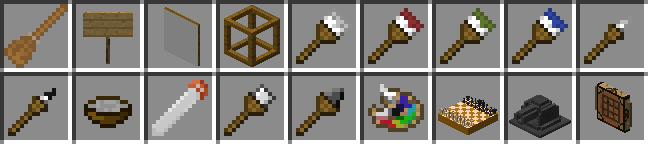
Components
Paint brushes, paintings, graffiti
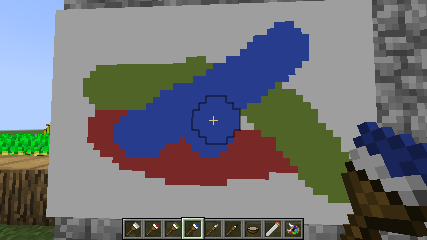
Place a canvas and paint on it using brushes. Brushes can also paint on blocks, make graffiti, but this feature is disabled by default.
Use dyes to change brushes color in a crafting table. Palette can set any color to brush.
Canvas can be placed inside the frame on all sides. Thus, you can place a block with different pictures on the sides. To remove a painting from a frame, right-click with an empty hand while sneaking.
Painted picture can be exported in painting view. Also having permission you can import images into painting.
Paintings can be combined in a crafting table and copied on an anvil.
Chess
Chess board can be placed in world. It saves the state of the game on a break. The game history can be copied.
Broom
Broom can collect items around by right click.
Advanced sign
Advanced sign can be placed in many shapes with various colors and number of lines.
Cannon
Cannon can shoot items in a given direction.
Portable Workbench
Portable Workbench allows you to craft things on the go, but consumes durability.
Configuration
Here is only highlight of some config parameters, see all of them in paniclecraft.cfg
Palette
Palette is not craftable by default and available only in creative. To enable crafting recipe change the config parameter painting → craftingRecipePalette to true.
Graffiti
Graffiti, PaintOnBlock feature is disabled by default. To enable it change the config parameter painting → allowPaintOnBlock to true. Also you should enable crafting recipes of paint removers by changing the config parameters painting → craftingRecipePaintRemoverFromStick, craftingRecipeSmallPaintRemoverFromStick to true.
Editview
Op players can open painting editview gui with import feature by /paniclecraft painting editview command. To allow this for any player change the config parameter painting → allowPaintingEditView to true.
Disable components
You can disable any unwanted component by changing enable parameter in their config block to false.
Versions
Now supported versions are 1.7.10 and 1.12.2. Upgrades to newer versions planned to be someday, if you want help me with that, welcome to github.
Project description from CurseForge.
Pick your setup
PanicleCraft by Minecraft version and loader
Choose the version and loader you play, then open the matching release.
Minecraft version
1.7.10
1 loader buildCheck the dependencies, then try the file in a copied instance before changing a world you care about.
Recent files
PanicleCraft versions and loaders
PanicleCraft 2.7.2.1
paniclecraft-1.7.10-2.7.2.1.jar
31 Aug 2025
Client Source doesn’t say Server Source doesn’t say Dependencies No extras listed Listed on Release listing
Check the 1.7.10 · Forge setup Forge1.7.10 beta
PanicleCraft 2.12.2.0
paniclecraft-1.12.2-2.12.2.0.jar
10 Oct 2023
Client Source doesn’t say Server Source doesn’t say Dependencies No extras listed Listed on Release listing
Check the 1.12.2 · Forge setup Forge1.12.2 beta
PanicleCraft 2.7.2.0
paniclecraft-1.7.10-2.7.2.0.jar
10 Oct 2023
Client Source doesn’t say Server Source doesn’t say Dependencies No extras listed Listed on Release listing
Check the 1.7.10 · Forge setup Forge1.7.10 beta
PanicleCraft 2.12.0.0
paniclecraft-1.12.2-2.12.0.0.jar
6 Jun 2023
Client Source doesn’t say Server Source doesn’t say Dependencies No extras listed Listed on Release listing
Check the 1.12.2 · Forge setup Forge1.12.2 beta
PanicleCraft 2.7.0.0
paniclecraft-1.7.10-2.7.0.0.jar
6 Jun 2023
Client Source doesn’t say Server Source doesn’t say Dependencies No extras listed Listed on Release listing
Check the 1.7.10 · Forge setup Forge1.7.10 beta
Looking for an older file? The official CurseForge project page is in Resources.
 mod
CurseForge · Minecraft
Extra Bows: Restrung
Extra bows datapack in mod form! (A datapack that adds tiered bows and crossbows)
 mod
CurseForge · Minecraft
Create Shining Stage
Adds stage machinery to Minecraft! Built upon Create and Aeronautics. (WIP — lots of new content coming soon!)
 mod
CurseForge · Minecraft
Monumental Recipes
This mod is the Core Mod used for all the Custom Recipes used in ModernGamingWorld's modpacks