MineColonies Optional for JadeColonies-1.19.4-1.2.1.jar
optionalMatching file found Matched file: minecolonies-1.19.4-1.0.1516-ALPHA.jar
CurseForge · Minecraft mod
A Jade addon for MineColonies and Domum Ornamentum
Quick answer
JadeColonies-1.19.4-1.2.1.jar targets 1.19.4 with Forge. The project page does not say whether this file belongs on the client, dedicated server, or both. No extra mods listed for this file.
Where it goes
The project page does not say whether this file belongs on the client, dedicated server, or both.
The source does not explicitly classify this release as client-only or server-only.
JadeColonies-1.19.4-1.2.1.jar on 1.19.4. Every mod below is checked against that same setup.
This file does not list any required mods. Do not add a library just because a different file uses it.
4 extra mods were pulled in by other dependencies. Indented rows show who needs each one. We only count dependency files that match this setup. A file for another loader does not fill the gap.
Before you install it
Built for JadeColonies-1.19.4-1.2.1.jar on 1.19.4. Pick another file and the loader, install side or required mods may change.
Use JadeColonies-1.19.4-1.2.1.jar. It targets 1.19.4 with Forge; another release may have different loader, side or dependency requirements.
This file does not list any required mods. Do not add a library just because a different file uses it.
The project page does not say whether this file belongs on the client, dedicated server, or both.
Use the “Get this file” button beside JadeColonies-1.19.4-1.2.1.jar. It opens that exact file at the source.
About this project

This is an addon for Jade that adds support for MineColonies and Domum Ornamentum. Note that you don't need both of these; it will adapt to whichever you have installed.
Even when installed, you can use Jade's plugin config menu to turn on or off each of these features as needed.
For multiplayer, most of these will work when JadeColonies is only installed on the client, but there are a few features that will only work if also installed on the server.
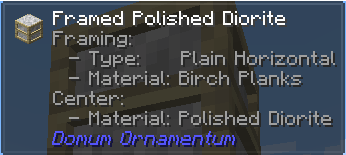
When enabled, this will display the variant type and materials used by DO blocks when looking at them in-world, as they would appear on the item tooltip -- this helps you make more of something that you like (or alter part of it as you go), especially if you don't have access to "pick block" in creative mode.
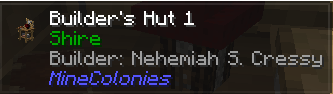
The building name and level are shown instead of the regular block name, when looking at the hut block. If you've given the building a custom name, that will appear first, with the default name just below.
When looking at a Decoration Controller block, it will display the blueprint path.
The style pack that the building belongs to will be shown when you're looking at the hut block.
The citizens assigned to a building are listed when looking at the hut block. This includes both residents and workers.
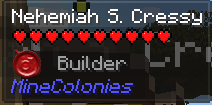
When looking at a colonist, their gender and job are shown.
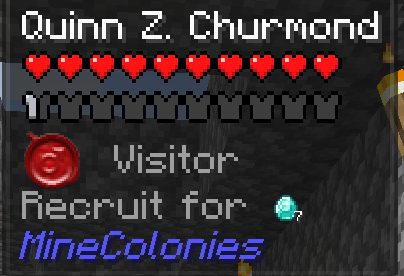
When looking at a visitor, it will show the items they will demand if you try to recruit them.
Project description from CurseForge.
Pick your setup
Choose the version and loader you play, then open the matching release.
Check the dependencies, then try the file in a copied instance before changing a world you care about.
Recent files
10 Jul 2023
30 Jun 2023
Looking for an older file? The official CurseForge project page is in Resources.
 mod
BankSystem is a Minecraft mod that brings money in to the game. Players can have a bankacount that can not only hold money but items too.
 mod
Automatically load your favorite data packs and resource packs globally across all your Minecraft worlds. A must have utility for players and modpack creators!
 mod
Enforces keepInventory gamerule to always be true. Never lose your items on death!