Minecraft version
Back to mods 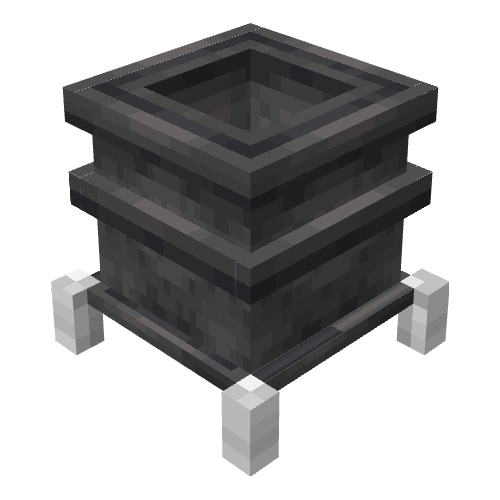
CurseForge · Minecraft mod
Melter Block
Turns blocks into fluids! Create mod compatibility! A fork of the mod 'melter'.
Choose a version Pick your version below, then grab the matching file.
Quick answer
Which Melter Block release should I use?
Latest stable file melterblock-1.20.1-1.3.5-all.jar
Game version 1.20.1
Loader NeoForge, Forge
Melter Block melterblock-1.20.1-1.3.5-all.jar targets 1.20.1 with NeoForge, Forge. The project page does not say whether this file belongs on the client, dedicated server, or both. No extra mods listed for this file.
Where it goes
Is Melter Block required on the client, server, or both?
The project page does not say whether this file belongs on the client, dedicated server, or both.
Client Source doesn’t say
Dedicated server Source doesn’t say
Loader for this release NeoForge, Forge
Required install it here Optional supported, not mandatory Not supported do not install here Source doesn’t say do not assume
The source does not explicitly classify this release as client-only or server-only.
What else does Melter Block melterblock-1.20.1-1.3.5-all.jar need?
melterblock-1.20.1-1.3.5-all.jar. Change the file and its required mods may change too.
This file does not list any required mods. Do not add a library just because a different file uses it.
This file does not list any required or optional mods.
Before you install it
Add Melter Block without breaking your instance.
Built for Melter Block melterblock-1.20.1-1.3.5-all.jar. Pick another file and the loader, install side or required mods may change.
- 01
Stick to this file
Use melterblock-1.20.1-1.3.5-all.jar. It targets 1.20.1 with NeoForge, Forge; another release may have different loader, side or dependency requirements.
- 02
Bring the mods it needs
This file does not list any required mods. Do not add a library just because a different file uses it.
- 03
Put it on the correct side
The project page does not say whether this file belongs on the client, dedicated server, or both.
- 04
Pick the file you checked
Use the “Get this file” button beside melterblock-1.20.1-1.3.5-all.jar. It opens that exact file at the source.
About this project
What does Melter Block add?
Melter Block
A simple melter block that turn blocks into liquid.
Wish there was an easier way to get your lava rather than scooping buckets and trudging through the snow for 5 miles before breakfast? Are you an older MC user who misses the cobble to lava cauldrons of old days of yore? The Melter may be your favorite new machine block!
Default recipes
- Cobblestone >>> Lava
- Snow >>> Water
- Ice >>> Water
- Honey Block >>> Honey (If mod 'Productive Bees' is loaded)
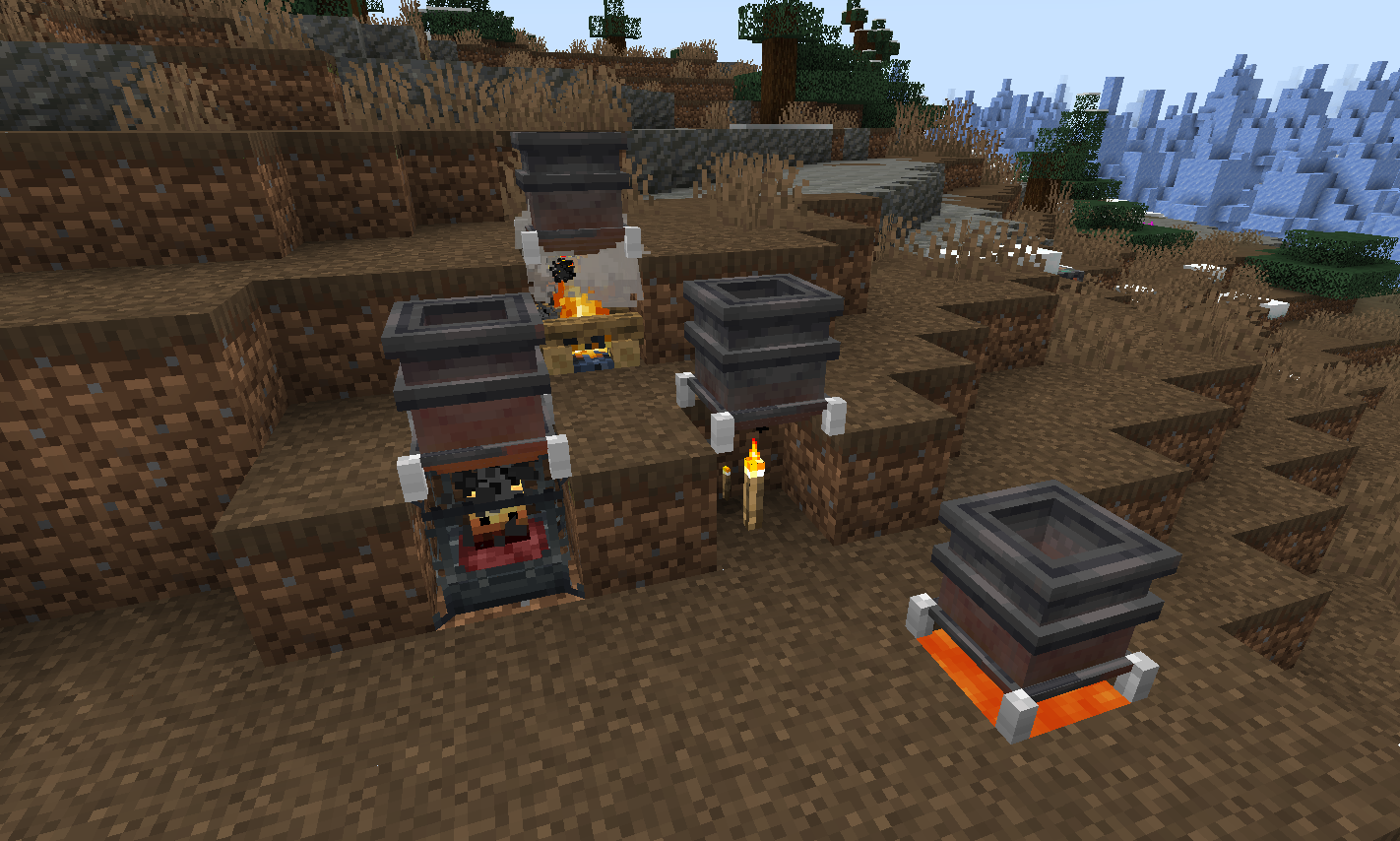
To place blocks into the Melter drop them in, or push them in using pipes from a storage location. Holding blocks in hand to right-click-mouse insert will not work. Only blocks with recipes can be dropped-in / inserted.
If the mod 'Create' is included then blaze burners will be available as a possible heat source.
Heat sources + Heat level
- Torch -1
- Soul Torch - 1
- Campfire - 2
- Soul Campfire - 2
- Lava - 3
- Blaze burner - 5 (active), 1 (fading), 0 (inactive), 8 (superheated)
Adding additional recipes
Datapack JSON example for adding melting recipes:
example - creating a JSON file with the same name as the default cobble recipe and placing it in the data location of it to overwrite the default -
data\melter\recipes\melting\cobble_melting.json
-- Example recipe basic
{
"type": "melter:melting",
"ingredient": {
"item": "minecraft:cobblestone",
"count": 1
},
"result": {
"fluid": "minecraft:lava",
"amount": 250
},
"processingTime": 500
}
-- Example recipe with optional minimum heat level required to melt
{
"type": "melter:melting",
"ingredient": {
"tag": "forge:stone",
"count": 1
},
"result": {
"fluid": "minecraft:lava",
"amount": 250
},
"processingTime": 2000,
"minimumHeat": 4
}
To introduce new recipes you can add your own JSON files to datapacks with different filenames and recipe values.
KubeJS Integration
The KubeJS mod can be used to add recipes in a simple 1 line format.
Place lines like example below (in the recipes event) of any *.js script file located in the profile\kubejs\server_scripts\ folder location - that's it!
- See below for how to construct recipe adding script lines.
- Note that some of the examples have an optional minimum heat level needed. The .minimumHeat is optional. Without it any heat source will work with the recipe. With it, recipe items placed will only melt if the heat level on the block is high enough.
ServerEvents.recipes((event) => {

// event.recipes.melterMelting(OUTPUT,INPUT).processingTime(INT);
// event.recipes.melterMelting(OUTPUT,INPUT).processingTime(INT).minimumHeat(INT);

event.recipes.melterMelting(Fluid.of('minecraft:water', 1000),"minecraft:ice").processingTime(200);

event.recipes.melterMelting(Fluid.of('minecraft:lava', 250),"#forge:stone").processingTime(1000).minimumHeat(4);

  });
Keep in mind that the above KubeJS examples add new recipes, not replace existing recipes.
- If you'd like to replace an existing recipe such as the default cobble_melting.json recipe found in the melter:recipes/melting/ folder - use the following KubeJS line first to remove the original recipe, and then add your new recipe using the examples above:
event.remove({id: 'melter:melting/cobble_melting'});
(This mod is a fork of the mod 'melter' - the impetus for it's initial creation was to introduce compatibility with the newest versions of the 'create' mod 0.5.1.+)
Project description from CurseForge.
Pick your setup
Melter Block by Minecraft version and loader
Choose the version and loader you play, then open the matching release.
Minecraft version
1.20
2 loader buildsMinecraft version
1.19.2
1 loader buildMinecraft version
1.18.2
1 loader buildCheck the dependencies, then try the file in a copied instance before changing a world you care about.
Recent files
Melter Block versions and loaders
melterblock-1.20.1-1.3.5-all.jar
16 Mar 2024
Client Source doesn’t say Server Source doesn’t say Dependencies No extras listed Listed on Release listing
Check the 1.20.1 · NeoForge setup NeoForge1.20.1Forge release
melterblock-1.18.2-1.3.4-all.jar
11 Mar 2024
Client Source doesn’t say Server Source doesn’t say Dependencies No extras listed Listed on Release listing
Check the 1.18.2 · Forge setup 1.18.2Forge release
melterblock-1.19.2-1.3.4-all.jar
11 Mar 2024
Client Source doesn’t say Server Source doesn’t say Dependencies No extras listed Listed on Release listing
Check the 1.19.2 · Forge setup 1.19.2Forge release
melterblock-1.20.1-1.3.4-all.jar
10 Mar 2024
Client Source doesn’t say Server Source doesn’t say Dependencies No extras listed Listed on Release listing
Check the 1.20.1 · NeoForge setup NeoForge1.20.1Forge release
melterblock-1.20.1-1.3.3-all.jar
27 Jul 2023
Client Source doesn’t say Server Source doesn’t say Dependencies No extras listed Listed on Release listing
Check the 1.20.1 · NeoForge setup NeoForge1.20.1Forge1.20 release
melterblock-1.19.2-1.3.3-all.jar
27 Jul 2023
Client Source doesn’t say Server Source doesn’t say Dependencies No extras listed Listed on Release listing
Check the 1.19.2 · Forge setup 1.19.2Forge release
melterblock-1.18.2-1.3.2-all.jar
27 Jul 2023
Client Source doesn’t say Server Source doesn’t say Dependencies No extras listed Listed on Release listing
Check the 1.18.2 · Forge setup 1.18.2Forge release
melterblock-1.19.2-1.3.2-all.jar
24 Jul 2023
Client Source doesn’t say Server Source doesn’t say Dependencies No extras listed Listed on Release listing
Check the 1.19.2 · Forge setup 1.19.2Forge release
melterblock-1.20.1-1.3.2-all.jar
19 Jul 2023
Client Source doesn’t say Server Source doesn’t say Dependencies No extras listed Listed on Release listing
Check the 1.20.1 · NeoForge setup NeoForge1.20.1Forge1.20 release
melterblock-1.18.2-1.3.1-all.jar
7 Jul 2023
Client Source doesn’t say Server Source doesn’t say Dependencies No extras listed Listed on Release listing
Check the 1.18.2 · Forge setup 1.18.2Forge release
melterblock-1.19.2-1.3.0-all.jar
6 Jul 2023
Client Source doesn’t say Server Source doesn’t say Dependencies No extras listed Listed on Release listing
Check the 1.19.2 · Forge setup 1.19.2Forge release
melterblock-1.18.2-1.3.0-all.jar
5 Jul 2023
Client Source doesn’t say Server Source doesn’t say Dependencies No extras listed Listed on Release listing
Check the 1.18.2 · Forge setup 1.18.2Forge release
Looking for an older file? The official CurseForge project page is in Resources.
 mod
mod CurseForge · Minecraft
Day and Death Counter
This mod displays an in-game overlay that tracks days, deaths, and in-game time.
 mod
mod CurseForge · Minecraft
铁砧工艺:额外电力 | Anvilcraft:Extra Power
Anvilcraft's subsidiary mod,added more installs to produce electricity.
 mod
mod CurseForge · Minecraft
Kombucha!
Ferment, drink, fight and tame the kombucha!