Minecraft version
Back to mods 
CurseForge · Minecraft mod
AutoTag
Automatically populates some item, block and other tags (for mod compatibility)
Choose a version Pick your version below, then grab the matching file.
Quick answer
Which AutoTag release should I use?
Latest stable file 1.20: AutoTag 2.0.2
Game version 1.20.1, 1.20
Loader Fabric
AutoTag 1.20: AutoTag 2.0.2 targets 1.20.1, 1.20 with Fabric. The project page does not say whether it belongs on the client. The project page does not say whether it belongs on the dedicated server. No extra mods listed for this file.
Where it goes
Is AutoTag required on the client, server, or both?
The project page does not say whether it belongs on the client. The project page does not say whether it belongs on the dedicated server.
Client Source doesn’t say
Dedicated server Source doesn’t say
Loader for this release Fabric
Required install it here Optional supported, not mandatory Not supported do not install here Source doesn’t say do not assume
The source does not explicitly classify this release as client-only or server-only.
What else does AutoTag 1.20: AutoTag 2.0.2 need?
1.20: AutoTag 2.0.2. Change the file and its required mods may change too.
This file does not list any required mods. Do not add a library just because a different file uses it.
This file does not list any required or optional mods.
Before you install it
Add AutoTag without breaking your instance.
Built for AutoTag 1.20: AutoTag 2.0.2. Pick another file and the loader, install side or required mods may change.
- 01
Stick to this file
Use 1.20: AutoTag 2.0.2. It targets 1.20.1, 1.20 with Fabric; another release may have different loader, side or dependency requirements.
- 02
Bring the mods it needs
This file does not list any required mods. Do not add a library just because a different file uses it.
- 03
Put it on the correct side
The project page does not say whether it belongs on the client. The project page does not say whether it belongs on the dedicated server.
- 04
Pick the file you checked
Use the “Get this file” button beside 1.20: AutoTag 2.0.2. It opens that exact file at the source.
About this project
What does AutoTag add?
This is a purely technical mod with the aim to increase inter-mod compatibility. By "purely technical" I mean that it won't add any content to your game.
The problem:
Mod creators are encouraged to use tags where possible, e.g. when creating a recipe. If mods are supposed to work together though, they should all share a same base of common "conventional" tags, which group certain items together. Not all developers add their items to common tags though, which means that a person playing with many mods or a mod pack creator might need to create long lists of all items which fulfill certain criteria to add them to specific tags.
The solution:
Upon loading a world, this mod will automatically populate some tags based on code conditions, covering all modded content as well.
It's mostly relevant for mod pack creators who need / want to configure mods by adding to specific tags - this allows them to e.g. easily add all armor items to a tag, because they'll all be bundled in *c:armor*.
As another example, all items which are equippable in the head slot will land in a tag called *c:head\_equippables*:
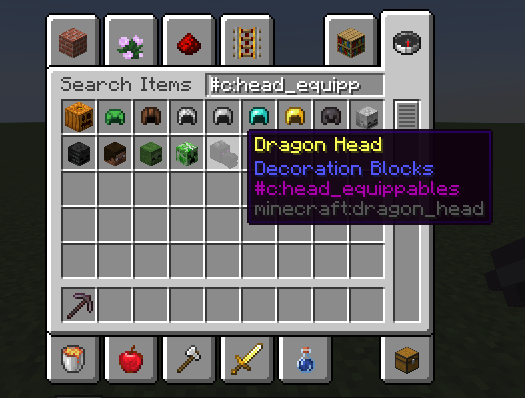
Additional Information:
For an overview of the tags the mod currently adds, as well as the blacklist option via datapacks, view the README on GitHub.
If you have any suggestions for new tags, feel free to post them in the comments or open an issue on GitHub!
I hope this mod helps someone and makes their life a bit easier. :)
The mod icon is a composition of modified icons created by Lorc and Delapouite, found on game-icons.net.
Project description from CurseForge.
Pick your setup
AutoTag by Minecraft version and loader
Choose the version and loader you play, then open the matching release.
Minecraft version
1.20
1 loader buildMinecraft version
1.19.4
1 loader buildMinecraft version
1.19.3
1 loader buildMinecraft version
1.19.2
1 loader buildMinecraft version
1.19.1
1 loader buildMinecraft version
1.19
1 loader buildMinecraft version
1.18.2
1 loader buildCheck the dependencies, then try the file in a copied instance before changing a world you care about.
Recent files
AutoTag versions and loaders
1.20: AutoTag 2.0.2
autotag-2.0.2+1.20.jar
7 Jul 2023
Client Source doesn’t say Server Source doesn’t say Dependencies No extras listed Listed on Release listing
Check the 1.20.1 · Fabric setup Fabric1.20.11.20 release
1.19.4: AutoTag 2.0.2
autotag-2.0.2+1.19.4.jar
2 Jul 2023
Client Source doesn’t say Server Source doesn’t say Dependencies No extras listed Listed on Release listing
Check the 1.19.4 · Fabric setup 1.19.4Fabric release
1.19.3: AutoTag 2.0.2
autotag-2.0.2+1.19.3.jar
16 Feb 2023
Client Source doesn’t say Server Source doesn’t say Dependencies No extras listed Listed on Release listing
Check the 1.19.3 · Fabric setup 1.19.3Fabric release
1.19.x: AutoTag 2.0.0
autotag-2.0.0+1.19.jar
14 Sept 2022
Client Source doesn’t say Server Source doesn’t say Dependencies No extras listed Listed on Release listing
Check the 1.19.2 · Fabric setup Fabric1.19.21.19.11.19 release
1.18.2: AutoTag 1.1.0
AutoTag-1.18.2-1.1.0.jar
29 Apr 2022
Client Source doesn’t say Server Source doesn’t say Dependencies No extras listed Listed on Release listing
Check the 1.18.2 · Fabric setup Fabric1.18.2 release
1.18.2: AutoTag 1.0.1
AutoTag-1.18.2-1.0.1.jar
28 Apr 2022
Client Source doesn’t say Server Source doesn’t say Dependencies No extras listed Listed on Release listing
Check the 1.18.2 · Fabric setup Fabric1.18.2 release
1.18.2: AutoTag 1.0.0
AutoTag-1.18.2-1.0.0.jar
27 Apr 2022
Client Source doesn’t say Server Source doesn’t say Dependencies No extras listed Listed on Release listing
Check the 1.18.2 · Fabric setup Fabric1.18.2 release
Looking for an older file? The official CurseForge project page is in Resources.
 mod
mod CurseForge · Minecraft
VTT MineRPG
D&D Sheets is a utility and QoL mod intended for tabletop players. It gives the player the ability to manage and roll from a character sheet accessible with the press of a key.
 mod
mod CurseForge · Minecraft
Coil Comfort
A tough as nails addon that brings back heating and cooling coils
 mod
mod CurseForge · Minecraft
Player Animation Core
A NeoForge library for non-conflicting player animations. Layered animation stack, Molang support, first-person model rendering, and simple API for mod integration. Multiple mods can animate the player simultaneously.