WTHIT Optional for Weird Wares 0.3.0+1.21.11
optionalMatching file found Matched file: fabric-18.2.3

Modrinth · Minecraft mod
Weird wares for your wacky world! This mod adds various unobtainable and forgotten items, blocks, and features plus a few extras.
Quick answer
Weird Wares 0.3.0+1.21.11 targets 1.21.11 with Fabric. Installation on the client is optional. Installation on the dedicated server is optional. All 1 required mods have matching files.
Where it goes
Installation on the client is optional. Installation on the dedicated server is optional.
The source marks this as usable on both the client and server.
0.3.0+1.21.11. Change the file and its required mods may change too.
Install Fabric API first. We found matching files for this game-version and loader setup. 11 come through another mod in the chain.
11 extra mods were pulled in by other dependencies. Indented rows show who needs each one. We only count dependency files that match this setup. A file for another loader does not fill the gap.
Before you install it
Built for Weird Wares 0.3.0+1.21.11. Pick another file and the loader, install side or required mods may change.
Use 0.3.0+1.21.11. It targets 1.21.11 with Fabric; another release may have different loader, side or dependency requirements.
Install Fabric API first. We found matching files for this game-version and loader setup. 11 come through another mod in the chain.
Installation on the client is optional. Installation on the dedicated server is optional.
Use the “Get this file” button beside 0.3.0+1.21.11. It opens that exact file at the source.
About this project
Weird wares for your wacky world! This mod adds various unobtainable and forgotten items, blocks, and features plus a few extras.
Fair warning: Excessive use of glitter may result in frame drops.
Glitter can be used to add enchantment glint to items and blocks in your world. In the inventory, select a stack of glitter, then apply (left click) the glitter on another item stack. Enchanted blocks that are placed down will appear enchanted in the world.

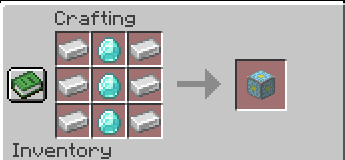
You can craft a Nether Reactor Core with by placing a vertical line of 3 iron ingots on the left, 3 diamonds in the middle, and 3 iron ingots on the right.
There are a few unobtainable blocks that Weird Wares adds to the Creative menu. For example, there is now an "info update" block and an Unknown block.
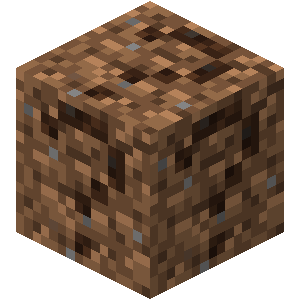
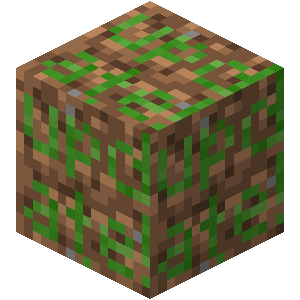
Credit to the Minecraft Wiki for renders of unknown.png and info_update.png.
When used, the Sculk Remote can remotely interact with a block. When sneaking and used, the Sculk Remote sets its target position and dimension to the target block. When dispensed in a dispenser block, the Sculk Remote remotely interacts with its target block, effectively enabling remote redstone. Additionally, Sculk Remotes can shift right-click in a dispenser if the player holds shift and left-clicks a block.


This mod is in its early stages. New features will be released periodically as they are requested. There is no guarantee that any one idea will make it into the mod, but you may create an issue on the issue tracker.
You may use this mod in your Modpack provided you give adequate and direct credit, via a link to the mod's page as well as a copy of the source code. You may not redistribute binary builds of the Software if you do not also provide the Source Code.
By contributing, you agree to the license terms found in LICENSE. You may create forks for the purpose of contributing code upstream.
Project description from Modrinth.
Pick your setup
Choose the version and loader you play, then open the matching release.
Check the dependencies, then try the file in a copied instance before changing a world you care about.
Recent files
weird-wares-0.3.0+1.21.11.jar
22 Dec 2025
weird-wares-0.3.0+1.21.jar
20 Mar 2025
weird-wares-0.2.2+1.21.jar
16 Mar 2025
weird-wares-0.2.1+1.21.jar
15 Mar 2025
weird-wares-0.2.0+1.21.jar
13 Mar 2025
weird-wares-0.1.3+1.21.jar
12 Mar 2025
weird-wares-0.1.2+1.21.jar
13 Aug 2024
weird-wares-0.1.1+1.21.jar
11 Aug 2024
Looking for an older file? The official Modrinth project page is in Resources.
 mod
Saves despawned items so players can fish them up or brush them out of suspicious sand/gravel. With admin tools and optional filters and limits.
 mod
Disposable public fixture for testing the Modpacks.ch GitHub catalogue flow
 mod
Displays a list of materials and the chests in which they are located