Minecraft version
Back to mods 
CurseForge · Minecraft mod
Threads
Performance tweaking mod that allows to change priority of running game threads.
Choose a version Pick your version below, then grab the matching file.
Quick answer
Which Threads release should I use?
Latest stable file Threads-1.4-26.3.jar
Game version 26.3
Loader Fabric
Threads-1.4-26.3.jar targets 26.3 with Fabric. The project page does not say whether this file belongs on the client, dedicated server, or both. No extra mods listed for this file.
Where it goes
Is Threads required on the client, server, or both?
The project page does not say whether this file belongs on the client, dedicated server, or both.
Client Source doesn’t say
Dedicated server Source doesn’t say
Loader for this release Fabric
Required install it here Optional supported, not mandatory Not supported do not install here Source doesn’t say do not assume
The source does not explicitly classify this release as client-only or server-only.
What else does Threads-1.4-26.3.jar need?
Threads-1.4-26.3.jar. Change the file and its required mods may change too.
This file does not list any required mods. Do not add a library just because a different file uses it.
This file does not list any required or optional mods.
Before you install it
Add Threads without breaking your instance.
Built for Threads-1.4-26.3.jar. Pick another file and the loader, install side or required mods may change.
- 01
Stick to this file
Use Threads-1.4-26.3.jar. It targets 26.3 with Fabric; another release may have different loader, side or dependency requirements.
- 02
Bring the mods it needs
This file does not list any required mods. Do not add a library just because a different file uses it.
- 03
Put it on the correct side
The project page does not say whether this file belongs on the client, dedicated server, or both.
- 04
Pick the file you checked
Use the “Get this file” button beside Threads-1.4-26.3.jar. It opens that exact file at the source.
About this project
What does Threads add?
Default priority values for Render and Server threads depends on the amount of CPU threads you have, specifically more than 4 by Mojang rules. If CPU have more than 4 threads then Render Thread have priority of 10 and Server Thread of 8. Otherwise, thread priority is 5, which is default value for every thread by Java rules. This is a bad thing to have, because Java Virtual Machine does not prioritize game tasks, which is most expensive part of Minecraft process. For example, this may cause lag spikes during world generation on bad CPU. This mod allows to take control of those values by editing config file.
Higher priority for Render Thread - higher FPS and frame stability. Higher priority for Server Thread - more stable tick rate with less delays. But that doesn't mean that you can just set everything at 10. It depends on the problem: if you have low TPS you need to lower render and sound engine threads and increase server thread priority. If you have low frames and spikes you need to lower server and sound engine threads and increase render thread. Additionally there some other threads is running in background with unnecessary priority that can interrupt main game. You can use 'Every other thread' config option to set priority for those. If set to 1 is a good test if performance issues is in thread priorities and usually greatly increases performance on weak PC.
Config menu that can be accessed through main menu, pause screen or pressing F6 (by default) while in-game.
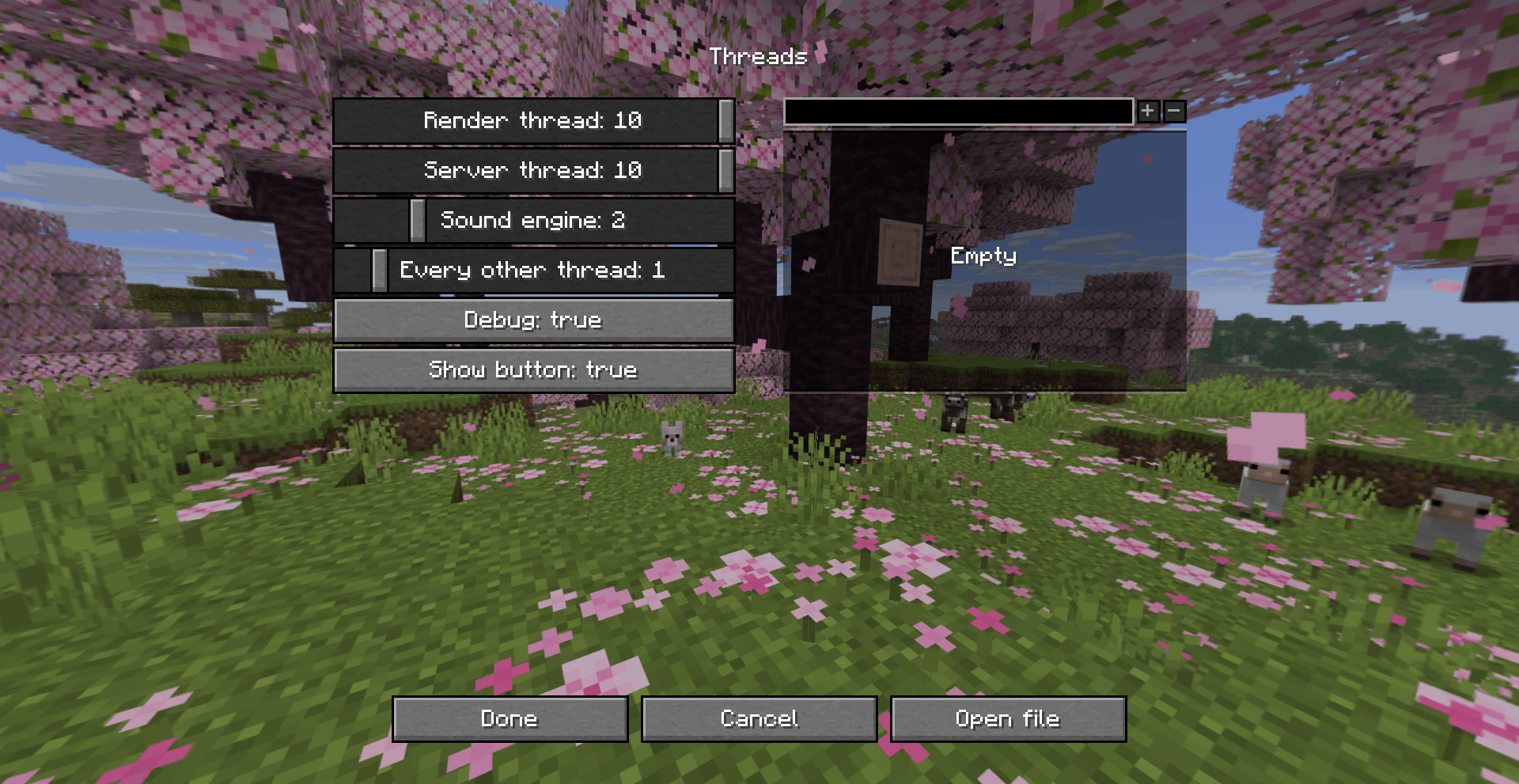
Sliders and buttons have tooltips with useful info. You can see current priority of three main threads in the F3 menu by enabling 'threads' debug entry.
For versions before 1.2
To open config file, run /threads openconfig command.
To apply the changes run /threads reload command or rejoin the world.
threads.json
{
    "renderThreadPriority": 1-10, // Default 5 or 10 if CPU thread count > 4
    "serverThreadPriority": 1-10, // Default 5 or 8 if CPU thread count > 4
    "soundEngineThreadPriority": 1-10, // Default 5
    "everyOtherThreadPriority": 0-10, // Default 0
    "threadBlacklist": [],
    "debug": false // If true logs info about actions with each thread.
}
Legacy config for 1.20.1 Forge version.
Configuration will be applied after world is loaded or config file is changed while world is open.
threads-client.toml
render_thread = Range 1-10. Default is 5 or 10 if cpu thread count > 4.
server_thread = Range 1-10. Default is 5 or 8 if cpu thread count > 4.
sound_engine_thread = Range 1-10. Default is 5.

Default is 0, which means do nothing.
every_other_thread = Range 0-10.
thread_name_blacklist = ["Thread-3"]
Project description from CurseForge.
Pick your setup
Threads by Minecraft version and loader
Choose the version and loader you play, then open the matching release.
Minecraft version
26.2
1 loader buildMinecraft version
26.1.2
1 loader buildMinecraft version
26.1.1
1 loader buildMinecraft version
1.21.11
1 loader buildMinecraft version
1.21.10
1 loader buildMinecraft version
1.21.5
1 loader buildMinecraft version
1.21.4
1 loader buildMinecraft version
1.21.3
1 loader buildMinecraft version
1.21.2
1 loader buildMinecraft version
1.21.1
1 loader buildMinecraft version
1.20.4
1 loader buildShowing the newest 12 of 15 game versions. Older files are in the list below.
Check the dependencies, then try the file in a copied instance before changing a world you care about.
Recent files
Threads versions and loaders
Threads-1.4-26.3.jar
19 Sept 2026
Client Source doesn’t say Server Source doesn’t say Dependencies No extras listed Listed on Release listing
Check the 26.3 · Fabric setup Fabric26.3 release
Threads-1.3.1-26.2.jar
24 Jun 2026
Client Source doesn’t say Server Source doesn’t say Dependencies No extras listed Listed on Release listing
Check the 26.2 · Fabric setup Fabric26.2 release
Threads-1.3-26.2.jar
17 Jun 2026
Client Source doesn’t say Server Source doesn’t say Dependencies No extras listed Listed on Release listing
Check the 26.2 · Fabric setup Fabric26.2 release
Threads-1.2.1-26.1.1.jar
2 Apr 2026
Client Source doesn’t say Server Source doesn’t say Dependencies No extras listed Listed on Release listing
Check the 26.1.2 · Fabric setup Fabric26.1.126.1.2 release
Threads-1.2-1.21.11.jar
2 Apr 2026
Client Source doesn’t say Server Source doesn’t say Dependencies No extras listed Listed on Release listing
Check the 1.21.11 · Fabric setup Fabric1.21.11 release
Threads-1.1-1.21.10.jar
21 Oct 2025
Client Source doesn’t say Server Source doesn’t say Dependencies No extras listed Listed on Release listing
Check the 1.21.11 · Fabric setup Fabric1.21.101.21.11 release
Threads-1.0.5-1.21.4.jar
15 Dec 2024
Client Source doesn’t say Server Source doesn’t say Dependencies No extras listed Listed on Release listing
Check the 1.21.5 · Fabric setup 1.21.5Fabric1.21.4 release
Threads-1.0.4-1.21.1.jar
23 Oct 2024
Client Source doesn’t say Server Source doesn’t say Dependencies No extras listed Listed on Release listing
Check the 1.21.4 · Fabric setup Fabric1.21.41.21.31.21.1 release
Threads-1.0.3-1.21.1.jar
1 Oct 2024
Client Source doesn’t say Server Source doesn’t say Dependencies No extras listed Listed on Release listing
Check the 1.21.1 · Fabric setup Fabric1.21.1 release
Threads-1.0.2-1.20.1.jar
19 Dec 2023
Client Source doesn’t say Server Source doesn’t say Dependencies No extras listed Listed on Release listing
Check the 1.20.4 · Forge setup 1.20.21.20.31.20.1Forge release
Threads-1.0.1-1.20.1.jar
19 Dec 2023
Client Source doesn’t say Server Source doesn’t say Dependencies No extras listed Listed on Release listing
Check the 1.20.4 · Forge setup 1.20.21.20.31.20.1Forge release
Looking for an older file? The official CurseForge project page is in Resources.
 mod
mod CurseForge + Modrinth · Minecraft
Epic Fight: Tinkers Integration
Fixes compatibility issues and integrates Tinkers' Construct weapons/modifiers with Epic Fight weapon types and movesets.
 mod
mod GitHub · Minecraft
modpacks-ch-github-test
Disposable public fixture for testing the Modpacks.ch GitHub catalogue flow
 mod
mod CurseForge · Minecraft
Art Update
A mod that adds a new dimension, new biomes, new adventures and new boss.