Minecraft version
Back to mods 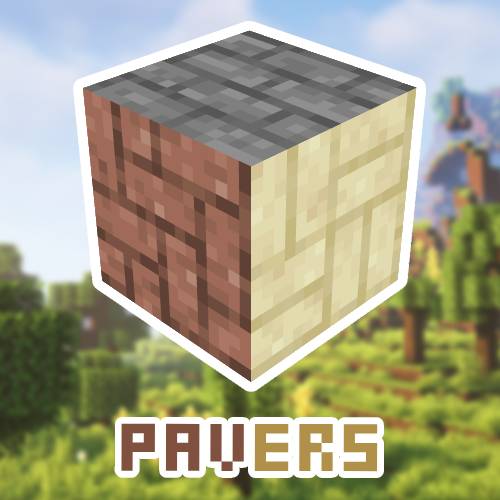
CurseForge · Minecraft mod
Decorative Pavers
Paving stones to decorate streets, parks, recreational spaces, etc.
Choose a version Pick your version below, then grab the matching file.
Quick answer
Which Decorative Pavers release should I use?
Latest stable file Decorative Pavers 26.2 - v1.0 NeoForge
Game version 26.2
Loader NeoForge
Decorative Pavers 26.2 - v1.0 NeoForge targets 26.2 with NeoForge. The project page does not say whether this file belongs on the client, dedicated server, or both. No extra mods listed for this file.
Where it goes
Is Decorative Pavers required on the client, server, or both?
The project page does not say whether this file belongs on the client, dedicated server, or both.
Client Source doesn’t say
Dedicated server Source doesn’t say
Loader for this release NeoForge
Required install it here Optional supported, not mandatory Not supported do not install here Source doesn’t say do not assume
The source does not explicitly classify this release as client-only or server-only.
What else does Decorative Pavers 26.2 - v1.0 NeoForge need?
Decorative Pavers 26.2 - v1.0 NeoForge. Change the file and its required mods may change too.
This file does not list any required mods. Do not add a library just because a different file uses it.
This file does not list any required or optional mods.
Before you install it
Add Decorative Pavers without breaking your instance.
Built for Decorative Pavers 26.2 - v1.0 NeoForge. Pick another file and the loader, install side or required mods may change.
- 01
Stick to this file
Use Decorative Pavers 26.2 - v1.0 NeoForge. It targets 26.2 with NeoForge; another release may have different loader, side or dependency requirements.
- 02
Bring the mods it needs
This file does not list any required mods. Do not add a library just because a different file uses it.
- 03
Put it on the correct side
The project page does not say whether this file belongs on the client, dedicated server, or both.
- 04
Pick the file you checked
Use the “Get this file” button beside Decorative Pavers 26.2 - v1.0 NeoForge. It opens that exact file at the source.
About this project
What does Decorative Pavers add?

Decorative cobblestones is a minecraft mod that adds a wide variety of cobblestones to decorate your streets, houses etc.
With this mod you will be able to use different types of stone and wood pavers composed of stone, granite, andesite, diorite, deepslate, calcite, tuff, dripstone, cobblestone, red sandstone, sandstone and oak wood blocks, spruce, birch, jungle, acacia, dark oak, crimson, warped and mangrove to create intricate and elegant designs on your builds.

2 new blocks are added

new colored blocks added, the blocks are diorite rock 26/04/24

The colored granite blocks are only for creating the colored granite cobblestones, they do not have functionality to be used as a construction block.The colored granite blocks are crafted on the crafting table, using a granite block and a colored dye, the dyes to use are white, gray, black, brown, red, yellow, green, blue, magenta, the crafting will give you 5 blocks
To obtain the colored paving stones you have to use the stone cutter

To be able to create the cobblestones you only need the stone cutter

To create any of the colored blocks, you only need to put a block from which that colored block is made into the stone cutter.

Project description from CurseForge.
Pick your setup
Decorative Pavers by Minecraft version and loader
Choose the version and loader you play, then open the matching release.
Minecraft version
26.1.2
2 loader buildsMinecraft version
1.21.10
2 loader buildsMinecraft version
1.21.8
2 loader buildsMinecraft version
1.21.7
2 loader buildsMinecraft version
1.21.6
2 loader buildsMinecraft version
1.21.5
2 loader buildsMinecraft version
1.21.4
2 loader buildsMinecraft version
1.21.3
2 loader buildsMinecraft version
1.21.1
2 loader buildsMinecraft version
1.21
2 loader buildsMinecraft version
1.20.6
2 loader buildsShowing the newest 12 of 22 game versions. Older files are in the list below.
Check the dependencies, then try the file in a copied instance before changing a world you care about.
Recent files
Decorative Pavers versions and loaders
Decorative Pavers 26.2 - v1.0 NeoForge
Decorative Pavers 26.2 - v1.0 NeoForge.jar
29 Jul 2026
Client Source doesn’t say Server Source doesn’t say Dependencies No extras listed Listed on Release listing
Check the 26.2 · NeoForge setup NeoForge26.2 release
Decorativepavers 26.2 -1.0-Forge
Decorativepavers 26.2 -1.0-Forge.jar
29 Jul 2026
Client Source doesn’t say Server Source doesn’t say Dependencies No extras listed Listed on Release listing
Check the 26.2 · Forge setup Forge26.2 release
Decorative Pavers 26.1.2 - v1.0 NeoForge
Decorative Pavers 26.1.2 - v1.0 NeoForge.jar
22 Jun 2026
Client Source doesn’t say Server Source doesn’t say Dependencies No extras listed Listed on Release listing
Check the 26.1.2 · NeoForge setup NeoForge26.1.2 release
Decorativepavers 26.1.2 -1.0-Forge
Decorativepavers 26.1.2 -1.0-Forge.jar
22 Jun 2026
Client Source doesn’t say Server Source doesn’t say Dependencies No extras listed Listed on Release listing
Check the 26.1.2 · Forge setup Forge26.1.2 release
Decorative Pavers 1.21.10 - v1.0 NeoForge
Decorative Pavers 1.21.10 - v1.0 NeoForge.jar
21 Jan 2026
Client Source doesn’t say Server Source doesn’t say Dependencies No extras listed Listed on Release listing
Check the 1.21.10 · NeoForge setup NeoForge1.21.10 release
Decorativepavers 1.21.10 -1.0-Forge
Decorativepavers 1.21.10 -1.0-Forge.jar
21 Jan 2026
Client Source doesn’t say Server Source doesn’t say Dependencies No extras listed Listed on Release listing
Check the 1.21.10 · Forge setup Forge1.21.10 release
Decorative Pavers 1.21.8 - v1.0 NeoForge
Decorative Pavers 1.21.8 - v1.0 NeoForge.jar
25 Oct 2025
Client Source doesn’t say Server Source doesn’t say Dependencies No extras listed Listed on Release listing
Check the 1.21.8 · NeoForge setup 1.21.8NeoForge release
Decorative Pavers 1.21.7 - v1.0 NeoForge
Decorative Pavers 1.21.7 - v1.0 NeoForge.jar
25 Oct 2025
Client Source doesn’t say Server Source doesn’t say Dependencies No extras listed Listed on Release listing
Check the 1.21.7 · NeoForge setup NeoForge1.21.7 release
Decorative Pavers 1.21.6 - v1.0 NeoForge
Decorative Pavers 1.21.6 - v1.0 NeoForge.jar
25 Oct 2025
Client Source doesn’t say Server Source doesn’t say Dependencies No extras listed Listed on Release listing
Check the 1.21.6 · NeoForge setup NeoForge1.21.6 release
Decorative Pavers 1.21.5 - v1.0 NeoForge
Decorative Pavers 1.21.5 - v1.0 NeoForge.jar
25 Oct 2025
Client Source doesn’t say Server Source doesn’t say Dependencies No extras listed Listed on Release listing
Check the 1.21.5 · NeoForge setup 1.21.5NeoForge release
Decorative Pavers 1.21.4 - v1.0 NeoForge
Decorative Pavers 1.21.4 - v1.0 NeoForge.jar
25 Oct 2025
Client Source doesn’t say Server Source doesn’t say Dependencies No extras listed Listed on Release listing
Check the 1.21.4 · NeoForge setup 1.21.4NeoForge release
Decorative Pavers 1.21.3 - v1.0 NeoForge
Decorative Pavers 1.21.3 - v1.0 NeoForge.jar
25 Oct 2025
Client Source doesn’t say Server Source doesn’t say Dependencies No extras listed Listed on Release listing
Check the 1.21.3 · NeoForge setup NeoForge1.21.3 release
Looking for an older file? The official CurseForge project page is in Resources.
 mod
CurseForge · Minecraft
Guhs
Chubby pink plush mice to tame, dress up and cuddle, and a whole pink Guhmension!
 mod
CurseForge · Minecraft
Elsewood
Redwoods, firs, Japanese maples, two cypresses, rainbow eucalyptus, and the elsewood, grown in the biomes you already have.
 mod
CurseForge + Modrinth · Minecraft
Dungeon Train: A Lore-Rich Roguelite RPG Adventure
Adventure time inspired dungeon crawler on a train. Procedurally generated carriages on a infinite sable physics train. Rich narrative, with custom made mods for a completely unique experience.