Minecraft version
Back to mods 
Modrinth · Minecraft mod
Server Eye
Prevent Players from joining your Server if they have certian Mods
Choose a version Pick your version below, then grab the matching file.
Quick answer
Which Server Eye release should I use?
Latest stable file 1.4-forge
Game version 1.20.1
Loader Forge, NeoForge
Server Eye 1.4-forge targets 1.20.1 with Forge, NeoForge. Installation on the client is optional. Installation on the dedicated server is optional. No extra mods listed for this file.
Where it goes
Is Server Eye required on the client, server, or both?
Installation on the client is optional. Installation on the dedicated server is optional.
Client Optional
Dedicated server Optional
Loader for this release Forge, NeoForge
Required install it here Optional supported, not mandatory Not supported do not install here Source doesn’t say do not assume
The source marks this as usable on both the client and server.
What else does Server Eye 1.4-forge need?
1.4-forge. Change the file and its required mods may change too.
This file does not list any required mods. Do not add a library just because a different file uses it.
This file does not list any required or optional mods.
Before you install it
Add Server Eye without breaking your instance.
Built for Server Eye 1.4-forge. Pick another file and the loader, install side or required mods may change.
- 01
Stick to this file
Use 1.4-forge. It targets 1.20.1 with Forge, NeoForge; another release may have different loader, side or dependency requirements.
- 02
Bring the mods it needs
This file does not list any required mods. Do not add a library just because a different file uses it.
- 03
Put it on the correct side
Installation on the client is optional. Installation on the dedicated server is optional.
- 04
Pick the file you checked
Use the “Get this file” button beside 1.4-forge. It opens that exact file at the source.
About this project
What does Server Eye add?
Overview
Server Eye is a Mod designed for Forge and NeoForge, giving Server Owners the ability to Blacklist certian modIds to prevent Players with these Mods from joining the Server.
How does this work?
Once a Player connects to your Server, the Client of Server Eye will send all Mod Data to the Server, which will the be compared to the Blacklist set in server_eye-common.toml. If a modId matches, the Player will be kicked from the Server, asking them to remove the Mod.
Best use-case
I personally recommend doing this, as it is an ideal outcome.
The best use case by far is if your Server is Modded and has a Modpack! You can just add Server Eye to the Modpack, so Players do not have to install it manually.
Then, simply put Server Eye on the Server's end, configure it to match your needs, Blacklist some Mods via there modId and you should be good to go.
Heads up!
I made this Mod for my Server, and only published it in the hoppes that people may find it useful. Server Eye is not perfect, but I will try to maintain the Project as best as I can.
Configuration
You can find Server Eye's Config under Files > Config > server_eye-common.toml
Blacklisting Mods
blacklistedMods
blacklistedMods is a list of modIds that you do not want your Players to use on your Server.
# This is how you add modIds
blacklistedMods = ["freecam", "xray"]
Where can I find a modId?
On Forge and NeoForge, you have an inbuild Mod Menu, just click on "Mods", and it will show a list of all Mods you currently have installed. You can click on any Mod listed within the Menu.
Right below the Mod'ss Version, you should be able to find something that says "ModID". A Mod's ID is always lowercase, so it should not be hard to find. You can see an example below.
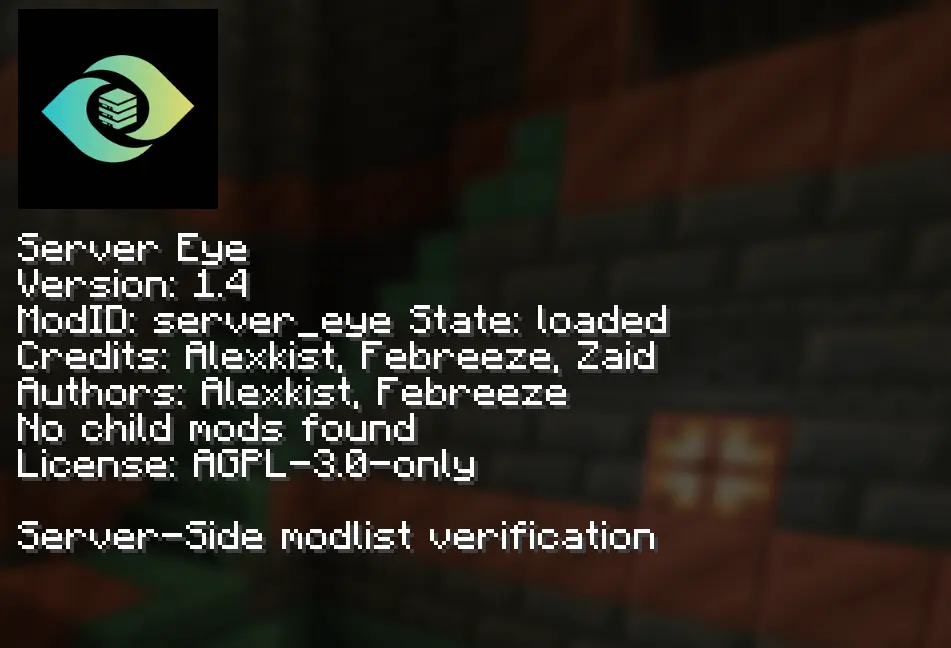
This Screenshot was taken on NeoForge 1.21.1
Whitelisting Players
whitelistedPlayers
whitelistedPlayers is a list of Players which will skip the Mod checks that Server Eye does. This currently only Supports Usernames.
# This is how you add Players
whitelistedPlayers = ["Player1", "Player2"]
timeoutSeconds
timeoutSeconds
timeoutSeconds is the Duration where Server Eye waits for the Client to send its Modlist. If the Modlist is not send in the specified duration, the Player will be kicked for timing out.
This feature can be disabled by setting timeoutSeconds to 0
"logOnly" Mode
logOnly
logOnly will disable Players being kicked from the Server. If a Player joins with a Blacklisted Mod, it will be logged in the Console.
Commands
Server Eye has a few simple Commands, which can be accessed via /server_eye
viewMods
/server_eye viewMods
The /server_eye viewMods Command allows you to see all the Mods a Player currently has installed, once the Player has sent there Modlist.
reload
/server_eye reload
This Command is Forge exclusive! NeoForge checks for Config changes and applies them automatically.
The /server_eye reload Command will reload Server Eye's Config File, so you do not have to restart the Server when changing the Config.
Q&A
Fabric Support?
I have no plans to port this Project to Fabric. ClientID is an allot better alternative then what I created here. So if you want something simular for Fabric, use ClientID!
Is this Server-Side only?
No. there is no known methood to do so for Forge and NeoForge. You can get more detail below.
Can you make this a Plugin?
Yes, I could. I can make the Server-side of Server Eye a Plugin. But, it would still need its Client-side to work correctly. Players would still need to Download the Mod, even if it is a Plugin.
Even if there are methoods to do so without the Mod, they are not as reliable as a Plugin Mod pair, I do not have plans for any kind of Plugin Support.
Is Server Eye reliable?
Yes, it should be in most cases, but ofcourse, nothing is perfect. So, you cannot just add this and expect that if you Blacklist Freecam that your Players cannot use it anymore, there are ways to bypass Mods like Server Eye.
Project description from Modrinth.
Pick your setup
Server Eye by Minecraft version and loader
Choose the version and loader you play, then open the matching release.
Minecraft version
1.20.1
2 loader buildsCheck the dependencies, then try the file in a copied instance before changing a world you care about.
Recent files
Server Eye versions and loaders
1.4-forge
server_eye-1.4-forge.jar
29 Aug 2026
Client Optional Server Optional Dependencies No extras listed Listed on Release listing
Check the 1.20.1 · Forge setup 1.20.1ForgeNeoForge release
1.4-neoforge
server_eye-1.4-neoforge.jar
29 Aug 2026
Client Optional Server Optional Dependencies No extras listed Listed on Release listing
Check the 1.21.1 · NeoForge setup 1.21.1NeoForge release
1.3-forge
server_eye-1.3-forge.jar
4 Aug 2026
Client Optional Server Optional Dependencies No extras listed Listed on Release listing
Check the 1.20.1 · Forge setup 1.20.1ForgeNeoForge release
1.3-neoforge
server_eye-1.3-neoforge.jar
4 Aug 2026
Client Optional Server Optional Dependencies No extras listed Listed on Release listing
Check the 1.21.1 · NeoForge setup 1.21.1NeoForge release
1.2-neoforge
server_eye-1.2-neoforge.jar
2 Aug 2026
Client Optional Server Optional Dependencies No extras listed Listed on Release listing
Check the 1.21.1 · NeoForge setup 1.21.1NeoForge beta
1.2-forge
server_eye-1.2-forge.jar
2 Aug 2026
Client Optional Server Optional Dependencies No extras listed Listed on Release listing
Check the 1.20.1 · Forge setup 1.20.1Forge release
1.1-forge
server_eye-1.1.jar
25 Jul 2026
Client Optional Server Optional Dependencies No extras listed Listed on Release listing
Check the 1.20.1 · Forge setup 1.20.1Forge release
1.0-forge
server_eye-1.0.jar
20 Jul 2026
Client Optional Server Optional Dependencies No extras listed Listed on Release listing
Check the 1.20.1 · Forge setup 1.20.1Forge release
Looking for an older file? The official Modrinth project page is in Resources.
 mod
mod CurseForge + Modrinth · Minecraft
Create: Sulfuric Resonance
Build an entire thermochemical industry with Create — generate and transmit heat, harness sulfur chemistry and sulfuric acid, process advanced resonant materials, and automate increasingly complex industrial systems.
 mod
mod CurseForge + Modrinth · Minecraft
FirmaLife
Cooking and farming addon for TerraFirmaCraft
 mod
mod Modrinth · Minecraft
Create Waystones Recipes
This mod changes the recipes of Waystones to fit with and use the Create mod. It also balances things a bit more.