Minecraft version
Back to mods 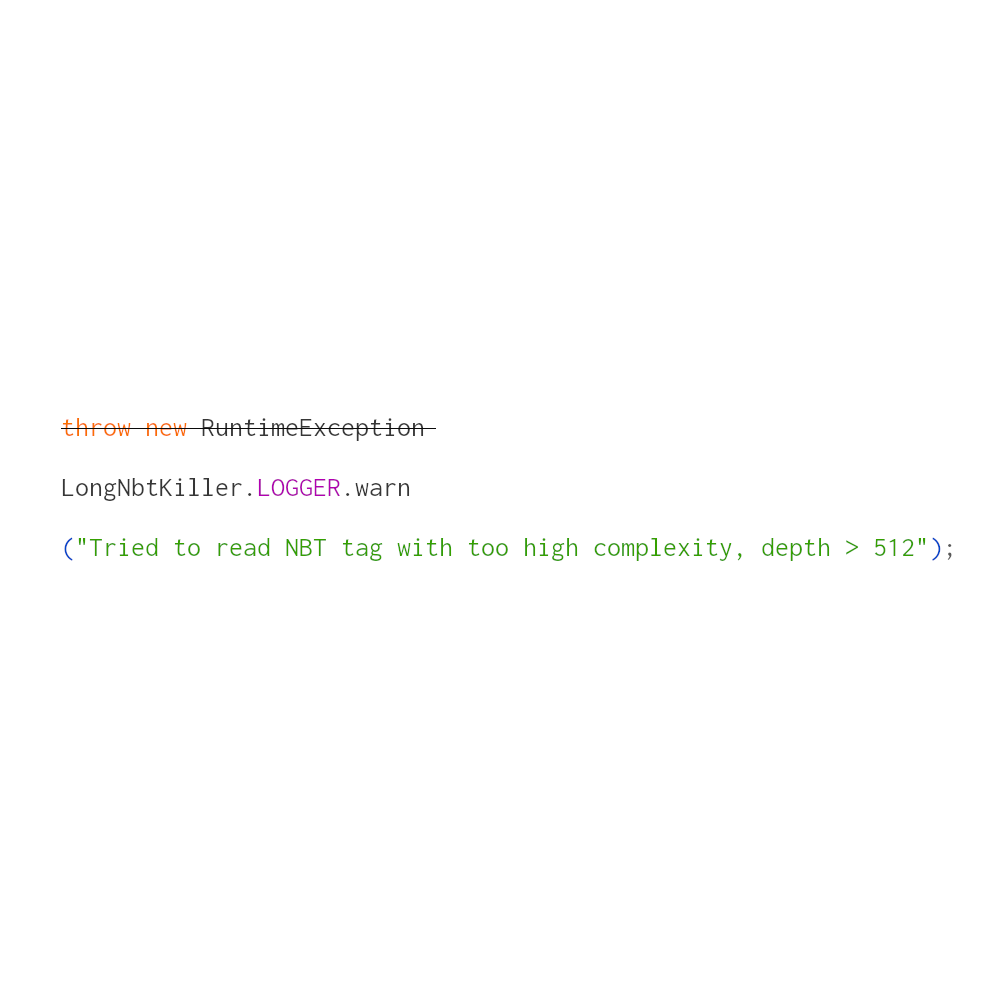
CurseForge · Minecraft mod
Long NBT Killer
Prevent minecraft from crashing while encountering deep nbt tags
Choose a version Pick your version below, then grab the matching file.
Quick answer
Which Long NBT Killer release should I use?
Latest stable file LongNBTKiller-NeoForge-1.21.8-1.0.0.jar
Game version 1.21.8
Loader NeoForge
Long NBT Killer LongNBTKiller-NeoForge-1.21.8-1.0.0.jar targets 1.21.8 with NeoForge. The project page does not say whether this file belongs on the client, dedicated server, or both. No extra mods listed for this file.
Where it goes
Is Long NBT Killer required on the client, server, or both?
The project page does not say whether this file belongs on the client, dedicated server, or both.
Client Source doesn’t say
Dedicated server Source doesn’t say
Loader for this release NeoForge
Required install it here Optional supported, not mandatory Not supported do not install here Source doesn’t say do not assume
The source does not explicitly classify this release as client-only or server-only.
What else does Long NBT Killer LongNBTKiller-NeoForge-1.21.8-1.0.0.jar need?
LongNBTKiller-NeoForge-1.21.8-1.0.0.jar. Change the file and its required mods may change too.
This file does not list any required mods. Do not add a library just because a different file uses it.
This file does not list any required or optional mods.
Before you install it
Add Long NBT Killer without breaking your instance.
Built for Long NBT Killer LongNBTKiller-NeoForge-1.21.8-1.0.0.jar. Pick another file and the loader, install side or required mods may change.
- 01
Stick to this file
Use LongNBTKiller-NeoForge-1.21.8-1.0.0.jar. It targets 1.21.8 with NeoForge; another release may have different loader, side or dependency requirements.
- 02
Bring the mods it needs
This file does not list any required mods. Do not add a library just because a different file uses it.
- 03
Put it on the correct side
The project page does not say whether this file belongs on the client, dedicated server, or both.
- 04
Pick the file you checked
Use the “Get this file” button beside LongNBTKiller-NeoForge-1.21.8-1.0.0.jar. It opens that exact file at the source.
About this project
What does Long NBT Killer add?
When Minecraft is encountering any compound / list nbt tag with a depth greater than 512, it throws an exception and refuses to load the save.
This mod replaced the annoying mechanism with a harmless log warning, and let the game go ahead.
Unfortunately, the erroneous behavior of certain mods can cause the NBT depth to increase continuously, eventually leading to a StackOverflowError. Consequently, users may need to identify the specific mods responsible and take appropriate action. According to a report by the user "ABadHaiku," such issues are relatively common in some MCreator mods. He has already contacted the developers of MCreator, who have since fixed this problem in the latest version. If users can determine the source of the glitch, they should report it to the mod's author. Additionally, "ABadHaiku" has provided a method for repairing affected save files here.
ATTENTION:
A compound / list nbt tag with a depth greater than 512 itself is abnormal, and you may check your save via NBT editor after receiving the warning in the log;
You DEFINITELY CAN add the mod to your modpack.
Project description from CurseForge.
Pick your setup
Long NBT Killer by Minecraft version and loader
Choose the version and loader you play, then open the matching release.
Minecraft version
1.21.3
2 loader buildsMinecraft version
1.21.2
1 loader buildMinecraft version
1.21.1
1 loader buildMinecraft version
1.20.4
2 loader buildsMinecraft version
1.20.2
1 loader buildMinecraft version
1.20.1
2 loader buildsMinecraft version
1.20
2 loader buildsMinecraft version
1.19.2
1 loader buildMinecraft version
1.18.2
1 loader buildMinecraft version
1.16.5
1 loader buildCheck the dependencies, then try the file in a copied instance before changing a world you care about.
Recent files
Long NBT Killer versions and loaders
LongNBTKiller-NeoForge-1.21.8-1.0.0.jar
28 Sept 2025
Client Source doesn’t say Server Source doesn’t say Dependencies No extras listed Listed on Release listing
Check the 1.21.8 · NeoForge setup 1.21.8NeoForge release
LongNbtKiller-Fabric-1.21.8-1.0.0.jar
28 Sept 2025
Client Source doesn’t say Server Source doesn’t say Dependencies No extras listed Listed on Release listing
Check the 1.21.8 · Fabric setup Fabric1.21.8 release
LongNBTKiller-Forge-1.21.3-1.0.0.jar
9 Nov 2024
Client Source doesn’t say Server Source doesn’t say Dependencies No extras listed Listed on Release listing
Check the 1.21.3 · Forge setup Forge1.21.3 release
LongNBTKiller-NeoForge-1.21.3-1.0.0.jar
9 Nov 2024
Client Source doesn’t say Server Source doesn’t say Dependencies No extras listed Listed on Release listing
Check the 1.21.3 · NeoForge setup 1.21.11.21.3NeoForge1.21.2 release
LongNbtKiller-Forge-1.20.2-1.0.0.jar
4 Jan 2024
Client Source doesn’t say Server Source doesn’t say Dependencies No extras listed Listed on Release listing
Check the 1.20.2 · Forge setup 1.20.2Forge release
LongNbtKiller-Forge-1.20.4-1.0.0.jar
14 Dec 2023
Client Source doesn’t say Server Source doesn’t say Dependencies No extras listed Listed on Release listing
Check the 1.20.4 · Forge setup Forge1.20.4 release
LongNbtKiller-Fabric-1.20.4-1.0.0.jar
14 Dec 2023
Client Source doesn’t say Server Source doesn’t say Dependencies No extras listed Listed on Release listing
Check the 1.20.4 · Fabric setup Fabric1.20.4 release
LongNbtKiller-Forge-1.20.1-1.0.0.jar
14 Dec 2023
Client Source doesn’t say Server Source doesn’t say Dependencies No extras listed Listed on Release listing
Check the 1.20.1 · Forge setup 1.20.1Forge1.20 release
LongNbtKiller-Fabric-1.20.1-1.0.0.jar
14 Dec 2023
Client Source doesn’t say Server Source doesn’t say Dependencies No extras listed Listed on Release listing
Check the 1.20.1 · Fabric setup Fabric1.20.11.20 release
LongNbtKiller-Forge-1.19.2-1.0.0.jar
14 Dec 2023
Client Source doesn’t say Server Source doesn’t say Dependencies No extras listed Listed on Release listing
Check the 1.19.2 · Forge setup 1.19.2Forge release
LongNbtKiller-Forge-1.18.2-1.0.0.jar
14 Dec 2023
Client Source doesn’t say Server Source doesn’t say Dependencies No extras listed Listed on Release listing
Check the 1.18.2 · Forge setup 1.18.2Forge release
LongNbtKiller-Forge-1.16.5-1.0.0.jar
14 Dec 2023
Client Source doesn’t say Server Source doesn’t say Dependencies No extras listed Listed on Release listing
Check the 1.16.5 · Forge setup 1.16.5Forge release
Looking for an older file? The official CurseForge project page is in Resources.
 mod
mod CurseForge + Modrinth · Minecraft
Falldrop Backport
Backporting minecraft features from 26.3 to the latest versions
 mod
mod CurseForge · Minecraft
Coinverse Gearcoins
Coins in industrial designs. A mod for Server currency in the style of Create
 mod
mod CurseForge · Minecraft
Iron's Spells: Incantation
Voice-cast Iron's Spells 'n Spellbooks through Simple Voice Chat. Offline speech recognition, only the spells you have equipped can cast, no voice training.